





nik82
Members
-
Joined
-
Last visited
Everything posted by nik82
-
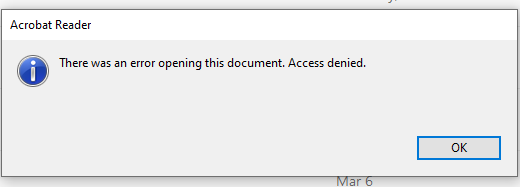
Same problem has been working since it was first setup but after unraid update and community app update today we noticed that version is no longer viable in the docker section, also processed files can no longer accessed and comes back with an access denied when trying to open them.
-
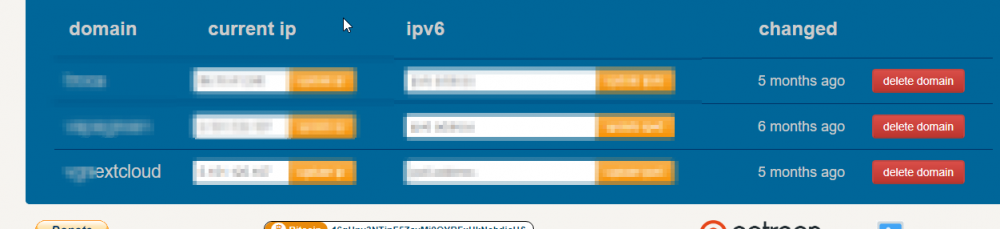
Thank you, there shouldn't be a problem there as it looks correct in the duckdns docker and it is updating the IP correctly. I have also confirmed it in on the Duckdns.org website. I can also connect to my wekan docker if i just add a :5555 at the end of that subdomain as well I will take a little break tonight and start with a fresh mind tomorrow morning, thanks for your help and time spent trying to figure this our with me
-
Hi, Thank again Yes I did, have had it setup for ages, just not got around to do the rest of the work LOL
-
No, I am using sumdomain1.duckdns.org and subdomain2.duckdns.org The strange this is that I have duckdns setup and working as I am using subdomain1.duckdns.org:5555 to access a Wekan Docker from home and that works perfect. On that occasion I assigned the docker port 5555 port forwarded 5555 on the office router (Zyxel VMG8825-B50B) and I have full access to it from home and it works great. With the risk of sounding stupid, I "understand" basic port forwarding and "basic" networking as I have set everything up at work, Ip cameras, blue iris servers (with port forwarding), unraid and all office computers, switches, routers etc. However I am by NO MEANS an expert and most things I have setup has been quiet basic. This SSL is however driving me Insane! Why I am doing is is because I want an SSL certificated so I can get nextcloud working, I have even removed subdomain1 now only use Subdomain2 in the docker container. Subdomain2 is basically the one I will use for nextcloud and it has a name like nextcloudsubdomain. nextcloudsubdomain is set as the subdomain in the subdomain field in the docker config and duckdns.org is set as the domain. I have redirected port 80 to 181 on the router and port 443 to port 1443, I also tested just opening 180 and 1443 without redirects (neither works) I have set the 2 ports in the docker config to 180 and 1443 Now for the 4th time today lets encypt has "banned" me for trying any more for 1h so I will have to wait.
-
Hi I have 2 sub domains setup as he recommended it as the "best" solution. 1 will only be used to access unraid, the other Nextcloud, Nexcloud is the main reason for this as this is an office server i want to access some files from home. domain1.duckdns.org and domain.duckdns.org In the config i put subdomain1,subdomain2 as subdomain and duckdns.org as the domain name
-
Thank you for trying to help, I am using Duckdns so, hopefully without sounding like a complete idiot, is it them I should contact?
-
Sorry I mean to say that 443 (not 447) and it was changed to 1443 in the docker and port 1443 was opene on the router. I followed space invaders tutorial as per what he did and he recommended changing it as unraid uses port 443 This Tutorial - https://youtu.be/I0lhZc25Sro?t=720
-
Hi Guys, I have been tearing my hair out trying to get this to work. I am 90% sure I have configured everything correctly but it is still not working for me. When running the docker i get the following errors in the docker log ( I have stared out some sensitive information). If there an issue with the docker or is it me? Opened ports on my router, tried several different. Most Basic is giving port 80 - 180 and port 447 - 1447, I think configure the docker to use these ports and open them up on my router but still getting the same errors Any help would be greatly appreciated. IMPORTANT NOTES: - The following errors were reported by the server: Domain: **********.duckdns.org Type: unauthorized Detail: Invalid response from http://**********.duckdns.org/.well-known/acme-challenge/cHRR6FCd-bgEKS-0VpQ2JNv7npGaHXT6gWX6mB***** [5.151.***.***]: "<html>\r\n<head><title>404 Not Found</title></head>\r\n<body>\r\n<center><h1>404 Not Found</h1></center>\r\n<hr><center>nginx</center>\r\n" Domain: **********.duckdns.org Type: unauthorized Detail: Invalid response from http://**********.duckdns.org/.well-known/acme-challenge/t5lBAsWP_H4iYZhdOpS5LAU5VWmKmaRIiCAlh***** [5.151.***.***]: "<html>\r\n<head><title>404 Not Found</title></head>\r\n<body>\r\n<center><h1>404 Not Found</h1></center>\r\n<hr><center>nginx</center>\r\n" To fix these errors, please make sure that your domain name was entered correctly and the DNS A/AAAA record(s) for that domain contain(s) the right IP address. ERROR: Cert does not exist! Please see the validation error above. The issue may be due to incorrect dns or port forwarding settings. Please fix your settings and recreate the container
-
I updated unraid to V6.8.1 today. I then also decided to update all our dockers, unfortunately this resulted in Wekan just disapering from the dockers list. I figured annoying but I will just re-install it. This was unfortunately impossible for me as no matter what i do I just get The Command Failed error: Any suggestions as to what has happened and if It can be resolved? all the other dockers updated nicely except for wekan.

-
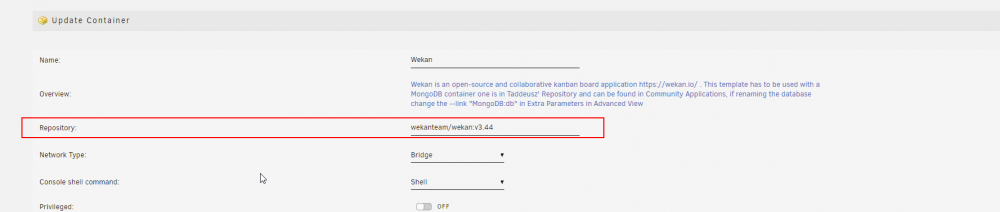
Thanks for the reply Unfortunately I am to dumb to figure out how to do this, not a problem though we will just have to wait a couple of days until this has been resolved. EDIT: Spoke to soon, found it and it works Thank you! If anyone else is as dumb as me here is the setting that Kru-x so nicely provided just click edit on the docker and change this field.
-
After updating today 30.09.19 we can no longer move cards by dragging them. Big issue for us, I was hoping to request that the docker version tot change to the "old" 3.44 as this new version has drag handle changes. Lesson learned if nothing else, if it is working do not update. more about this new "bug" can be read here - https://github.com/wekan/wekan/issues/2739
-
I just came here to say THANK YOU! Installed this in our small office on our unraid server! this board is AMAZING for planning small and big projects. We love it, again thank you for this docker!


