





tehtide
Members
-
Joined
-
Last visited
-
I've got both networks in there. I'm able to ping the deluge docker VPN from both networks, but radarr/sonarr won't connect to the json feed if they are on the same network. Unknown exception: The operation has timed out.: 'http://10.10.50.22:8112/json'
-
OK I'm having another strange issue. I'm moving my setup over to vlans and I currently have a vlan that is for all my dockers on my server. When I put this docker on the vlan br.50, no other dockers on that vlan can communicate with it. IE radarr or sonarr. However if I move radarr or sonarr back to br0 then they will communicate. I'd really like to get these all on the same vlan to keep things simple. Any idea why this is happening?
-
I've got a Dell R530 that seems to be locking/crashing. The server is not pingable and the console is unresponsive. Attached is a screen shot from the server.... not sure if it is useful or not. Only way to get it back is a hard boot. Are there any logs I can send after this that will help? I'm going to run Dells hardware diagnostics to make sure I don't have a memory issue etc... Anything else I can try?
-
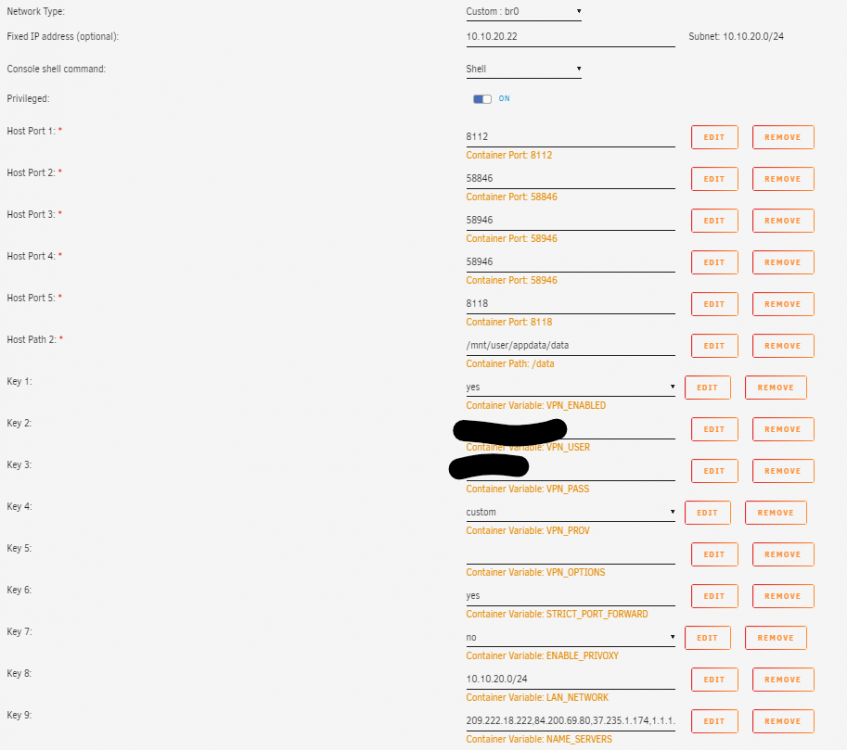
I'm having an issue with radarr and sonarr connecting to this container. It had been working, but now I cannot get radarr and sonarr to connect to deluge. In both sonarr and radarr I'm getting the following error: Unknown exception: The operation has timed out.: 'http://10.10.20.22:8112/json' If I look into the logs for radarr and sonarr this is what I'm seeing: [Error] Deluge: The operation has timed out.: 'http://10.10.20.22:8112/json' [v0.2.0.1450] System.Net.WebException: The operation has timed out.: 'http://10.10.20.22:8112/json' ---> System.Net.WebException: The operation has timed out. at System.Net.HttpWebRequest.GetRequestStream () [0x00016] in <91935ad653254a93b9d73a9f8f2f7a2d>:0 at NzbDrone.Common.Http.Dispatchers.ManagedHttpDispatcher.GetResponse (NzbDrone.Common.Http.HttpRequest request, System.Net.CookieContainer cookies) [0x000ef] in C:\projects\radarr-usby1\src\NzbDrone.Common\Http\Dispatchers\ManagedHttpDispatcher.cs:76 --- End of inner exception stack trace --- at NzbDrone.Common.Http.Dispatchers.ManagedHttpDispatcher.GetResponse (NzbDrone.Common.Http.HttpRequest request, System.Net.CookieContainer cookies) [0x001cf] in C:\projects\radarr-usby1\src\NzbDrone.Common\Http\Dispatchers\ManagedHttpDispatcher.cs:113 at NzbDrone.Common.Http.Dispatchers.FallbackHttpDispatcher.GetResponse (NzbDrone.Common.Http.HttpRequest request, System.Net.CookieContainer cookies) [0x000cc] in C:\projects\radarr-usby1\src\NzbDrone.Common\Http\Dispatchers\FallbackHttpDispatcher.cs:60 at NzbDrone.Common.Http.HttpClient.ExecuteRequest (NzbDrone.Common.Http.HttpRequest request, System.Net.CookieContainer cookieContainer) [0x0007e] in C:\projects\radarr-usby1\src\NzbDrone.Common\Http\HttpClient.cs:121 at NzbDrone.Common.Http.HttpClient.Execute (NzbDrone.Common.Http.HttpRequest request) [0x00008] in C:\projects\radarr-usby1\src\NzbDrone.Common\Http\HttpClient.cs:57 at NzbDrone.Core.Download.Clients.Deluge.DelugeProxy.AuthenticateClient (NzbDrone.Common.Http.JsonRpcRequestBuilder requestBuilder, NzbDrone.Core.Download.Clients.Deluge.DelugeSettings settings, System.Boolean reauthenticate) [0x0005b] in C:\projects\radarr-usby1\src\NzbDrone.Core\Download\Clients\Deluge\DelugeProxy.cs:284 at NzbDrone.Core.Download.Clients.Deluge.DelugeProxy.BuildRequest (NzbDrone.Core.Download.Clients.Deluge.DelugeSettings settings) [0x0006b] in C:\projects\radarr-usby1\src\NzbDrone.Core\Download\Clients\Deluge\DelugeProxy.cs:197 at NzbDrone.Core.Download.Clients.Deluge.DelugeProxy.ProcessRequest[TResult] (NzbDrone.Core.Download.Clients.Deluge.DelugeSettings settings, System.String method, System.Object[] arguments) [0x00000] in C:\projects\radarr-usby1\src\NzbDrone.Core\Download\Clients\Deluge\DelugeProxy.cs:204 at NzbDrone.Core.Download.Clients.Deluge.DelugeProxy.GetVersion (NzbDrone.Core.Download.Clients.Deluge.DelugeSettings settings) [0x00000] in C:\projects\radarr-usby1\src\NzbDrone.Core\Download\Clients\Deluge\DelugeProxy.cs:53 at NzbDrone.Core.Download.Clients.Deluge.Deluge.TestConnection () [0x00000] in C:\projects\radarr-usby1\src\NzbDrone.Core\Download\Clients\Deluge\Deluge.cs:188 Attached is the screenshot of the deluge settings. I'm using NORDVpn. If I turn off STRICT_PORT_FORWARD it doesn't change, however if I turn off the VPN in the deluge container then I can connect. Any ideas?
-
OK... so I'm sure that it is somewhere I just can't find it. How can I use the letsencrypt docker to provide a certificate for this docker so when I connect via my private side chrome on a Mac will allow me to connect? It is setup for a self signed right now I'd rather use a good certificate so that things are proper. Thanks!
-
Thanks for the help. I added a cache drive and cross my fingers I've not had an issue in almost 24 hours.
-
That's what I was afraid of... OK I'll work on that. I don't have a cache drive setup yet as I'm migrating over from an old homebrew ubuntu system and don't have a drive available for a cache yet. Are there any other possible work arounds?
-
I'm just switching over to Unraid and have deployed this docker as well as the Sonarr docker and I'm having similar issues in both. After running the docker image for a while, I start to get errors in the log: [Error] TaskExtensions: Task Error [v2.0.0.5322] System.Data.SQLite.SQLiteException (0x80004005): database disk image is malformed database disk image is malformed Sometimes if I restart the docker the issues disappears, but other times it persists and I have to restore a backup. Needless to say this is quite annoying as this will blow up the queue, movie database etc... Is there a fix for this? Anything I need to tweak/change?
