





Ancan
Members
-
Joined
-
Last visited
Everything posted by Ancan
-
After some spellunking in my deeper memories, I believe this was probably me implementing backup of the USB, and the folder I choose for destination was automatically shared as @itimpi wrote.
-
Renaming share that is exported also seems to trigger it.
-
So it's safe to remove? I have no idea where it came from. Edit: Chatgpt with uttermost confidence says it's a link to the actual USB drive, but examining it seems it's not.
-
Hi, I have migrated to an all-flash zfs-pool and no longer really need a cache-pool so I intend to remove it. But there is this share "unraid-usb" lingering on it, that I've read really is virtual mount point to the USB boot-drive. Is it safe to just remove the cache-pool or should I in some way "move" this "unraid-usb" to the zfs pool?
-
Quoting myself so I can reply: The identification of a removed drive does not persist through a reboot. It's impossible to start the array as long as a pool is missing an assigned drived to you have to remove it from the pool. You end up with "Not installed" on that slot, and no way to see the serial of the drive that used to be on that location. I guess you could locate all the good drives by their serial, but that could be some work.
-
I don't think the scripts show the serial of the drive, so you're still left with pairing /dev/sdX to the physical drive. I guess keeping the output of "lsblk -o NAME,SERIAL" somewhere safe could be a workaround. EDIT: I don't know if there's a reason unRAID doesn't create zpools using /dev/disk/by-id instead of /dev/sdX. Would have made the identification part so much easier.
-
Hi, I'm planning on migrating to a zfs pool instead of the unRAID array, but am a bit hesistant due to some lacking features in the unRAID-interface. First, I was flabbergasted to see that unRAID does NOT in any way warn or even indicate when there's a drive failure in the pool, which in my eyes is a absolute requirement. It can't be that hard for the system to do a "zpool status" now and then and act on that!? But lets assume you are aware of a failed drive, how do you know which drive it is? As long as unRAID keeps showing the pool and all its drives as online as it is now, it's possible to map the /dev/sdX to the drive identification, but I'm not 100% sure this can be trusted to stay. So how do you that do use ZFS do to be sure of which drive to replace when you get a failure? Do you have document mapping sdX->serial for all drives?
-
Hi all, Has anyone succeeded in getting gocryptfs to run in a container to provide encryption of individual folders on the host? I've come so far as I can spin upp the container, and encryption is working as long as I access the file system directly on the host. If I access them via shares I get permission denied and I can't chown/chmod as root on the host ("Operation not permitted"). I assume it's because it goes via the container and the Second problem is that after I stop the container, the subdirectories on the decoded directory becomes inaccessible, with "transport endpoint is not connected". This also affects the container which can't restart until I've manually done "umount" on all subdirectories. I'm using https://github.com/OJFord/docker-gocryptfs, and have added some extra parameters: --cap-add SYS_ADMIN --device /dev/fuse Encrypted volume mapped /mnt/user/crypt/test -> /crypt/test, access mode Read/Write. Decrypted volume mapped /mnt/user/test /mnt, access mode Read/Write - Shared. Thanks, A
-
Right, I checked around a bit myself, and one showstopper is that if a disk fails, there's a chance that the entire SATA-channel stops responding and makes the multiplexed drives fail as well. Seems like risk of data loss, so I'll be returning this card.
-
After ordering a new controller I think I might have made too littile research first. I'm currently using a LSI 8-port HBA, which have started to give errors on my partity drive (even after replacing both cable and drive) so I thought I'd replace it and go for a plain SATA-card instead since they are supposed to have much lower power consumption. However, looking at the order now, I see that the 10-port card is using a JMB575 port multiplier and just read that those are not recommended for unRAID. So now I ask, what may go wrong with this card? Am I loosing performance or are there more serious downsides?
-
Hi all, After swapping my cache-drive for a larger one, I did reinstall of the Deconz container from "old apps" and restored appdata-folder from my backup. After this I've lost control over all my zigbee devices. Checking the logs there's lots of "error ASSPDE-DATA.confirm: 0xE1 on task". I've also noted that in the container, "DECONZ_DEVICE" is set to "0", but in the config screen it says "set same as device", which for me is /dev/ttyACM0. Is this expected? It seems to find the USB-device, because it confirms that the firmware is up to date.
-
The first Mac just joined the household, and I've been trying to connect to shares on the unRAID server from it. All works fine except hidden shares (i.e. share name ends with "$"). I have no problem mounting hidden shares that are on a Windows machine from the Mac, nor mounting the hidden unRAID shares from a Windows machine, which leads me to suspect there's something with the samba setup on unRAID. I've monitored the traffic while connecting and it seems I get STATUS_BAD_NETWORK_NAME. 24 1.892387 192.168.y.y 192.168.x.x SMB2 414 Create Request File: ;GetInfo Request FILE_INFO/SMB2_FILE_ALL_INFO;Close Request 25 1.894348 192.168.x.x 192.168.y.y SMB2 566 Create Response File: ;GetInfo Response;Close Response 27 1.894602 192.168.y.y 192.168.x.x SMB2 414 Create Request File: ;GetInfo Request FILE_INFO/SMB2_FILE_ALL_INFO;Close Request 28 1.896113 192.168.x.x 192.168.y.y SMB2 566 Create Response File: ;GetInfo Response;Close Response 30 2.083146 192.168.y.y 192.168.x.x SMB2 208 Tree Connect Request Tree: \\<myNAS>._smb._tcp.local\<sharename>$ 31 2.085822 192.168.x.x 192.168.y.y SMB2 151 Tree Connect Response, Error: STATUS_BAD_NETWORK_NAME 33 2.085957 192.168.y.y 192.168.x.x SMB2 190 Tree Connect Request Tree: \\192.168.x.x\<SHARENAME>$ 34 2.088408 192.168.x.x 192.168.y.y SMB2 151 Tree Connect Response, Error: STATUS_BAD_NETWORK_NAME 36 2.089989 192.168.y.y 192.168.x.x SMB2 198 Tree Connect Request Tree: \\<myNAS>._smb._tcp.local\IPC$ 37 2.091087 192.168.x.x 192.168.y.y SMB2 158 Tree Connect Response 39 2.091278 192.168.y.y 192.168.x.x SMB2 240 Ioctl Request FSCTL_DFS_GET_REFERRALS, File: \192.168.x.x\<sharename>$ 40 2.093056 192.168.x.x 192.168.y.y SMB2 151 Ioctl Response, Error: STATUS_NOT_FOUND 42 2.093249 192.168.y.y 192.168.x.x SMB2 138 Tree Disconnect Request 43 2.094102 192.168.x.x 192.168.y.y SMB2 146 Tree Disconnect Response 45 2.095655 192.168.y.y 192.168.x.x SMB2 198 Tree Connect Request Tree: \\<myNAS>._smb._tcp.local\IPC$ 46 2.097853 192.168.x.x 192.168.y.y SMB2 158 Tree Connect Response 48 2.098042 192.168.y.y 192.168.x.x SMB2 240 Ioctl Request FSCTL_DFS_GET_REFERRALS, File: \192.168.x.x\<sharename>$ 49 2.100083 192.168.x.x 192.168.y.y SMB2 151 Ioctl Response, Error: STATUS_NOT_FOUND 51 2.100296 192.168.y.y 192.168.x.x SMB2 138 Tree Disconnect Request 52 2.100979 192.168.x.x 192.168.y.y SMB2 146 Tree Disconnect Response 54 2.102956 192.168.y.y 192.168.x.x SMB2 198 Tree Connect Request Tree: \\<myNAS>._smb._tcp.local\IPC$ 55 2.104394 192.168.x.x 192.168.y.y SMB2 158 Tree Connect Response 57 2.104578 192.168.y.y 192.168.x.x SMB2 220 Ioctl Request FSCTL_DFS_GET_REFERRALS, File: \192.168.x.x 58 2.105260 192.168.x.x 192.168.y.y SMB2 151 Ioctl Response, Error: STATUS_NOT_FOUND 60 2.105402 192.168.y.y 192.168.x.x SMB2 138 Tree Disconnect Request 61 2.106209 192.168.x.x 192.168.y.y SMB2 146 Tree Disconnect Response 63 2.258212 192.168.y.y 192.168.x.x SMB2 446 Create Request File: :AFP_AfpInfo;Read Request Len:60 Off:0;Close Request 64 2.260541 192.168.x.x 192.168.y.y SMB2 318 Create Response, Error: STATUS_OBJECT_NAME_NOT_FOUND;Read Response, Error: STATUS_FILE_CLOSED;Close Response, Error: STATUS_FILE_CLOSED 66 2.260991 192.168.y.y 192.168.x.x SMB2 446 Create Request File: :AFP_AfpInfo;Read Request Len:60 Off:0;Close Request 67 2.262606 192.168.x.x 192.168.y.y SMB2 318 Create Response, Error: STATUS_OBJECT_NAME_NOT_FOUND;Read Response, Error: STATUS_FILE_CLOSED;Close Response, Error: STATUS_FILE_CLOSED 69 2.263692 192.168.y.y 192.168.x.x SMB2 414 Create Request File: ;GetInfo Request FS_INFO/FileFsSizeInformation;Close Request 70 2.264944 192.168.x.x 192.168.y.y SMB2 486 Create Response File: ;GetInfo Response;Close Response 72 2.265747 192.168.y.y 192.168.x.x SMB2 414 Create Request File: ;GetInfo Request FS_INFO/FileFsSizeInformation;Close Request 73 2.267337 192.168.x.x 192.168.y.y SMB2 486 Create Response File: ;GetInfo Response;Close Response
-
No, I've been running it as it is since my last post. No issues.
-
Appreciate your support. I'll post in the flax "farming support"
-
Late reply, but I still can't get flax to work. I've copied the mnemonic.txt to the correct placement, and also deleted the database file for good measure, but there's still zero plots. Running "flax plots check" from the console finds them all though, and "flax keys show --show-mnemonic-seed" shows the correct mnemonic. In the GUI under "workers" the proper plots directories are shown with correct disk space usage reported, but still the summary shows "0 Total Plots", and lots of alerts about "Your harvester appears to be offline". init.log just shows this: Flax directory /root/.chia/flax/mainnet /root/.chia/flax/mainnet already exists, no migration action taken debug.log is attached. debug.log
-
Can't seem to get Flax to find my plots after moving it to the separate docker. All /plots1, /plots2 and so on are mapped, listed under plots_dir, and I can see all plots from the docker console. Farming is "active" but still zero plots. Nothing obvious in the logs. Not sure if it's relevant, but the harvester process is shown as "defunct" in ps: [flax_harvester] <defunct> I believe I followed the guide properly, but must have missed something.
-
I just realized I've been running "latest" all the time since it's the default, but I'd rather be on LTS. What's the best way to move to the LTS branch, keeping your configuration? I tried reinstalling and restoring from backup, but that wasn't possible since the backup was done with a newer version of the controller.
-
If it's till 4.1GB with only Chia, then I assume my usage is normal. It's been around 5.8-5.9GB since yesterday now.
-
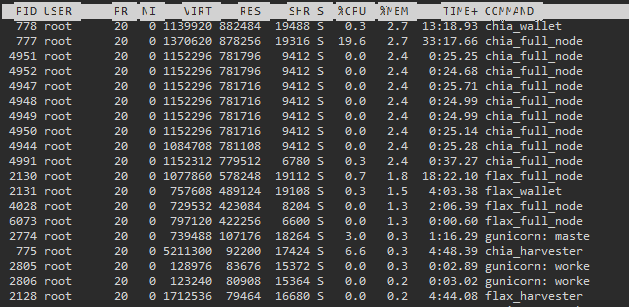
Anyone knows how much RAM is needed for this, if you're just running it as a farm? I've done all my plotting on other hardware, and am farming 930 plots. I thought 4GB would be well enough for this, since ppl are farming on Raspberry Pi's, but it got unstable and now with 8GB RAM, it's on 5.8 and rising. Is there a memory leak or is it normal?
-
Thanks for the fast reply! Still doesn't work though. Now I've got two "TZ" in the docker startup parameters, and while "Europe/Stockholm" is what I entered "Europe/Berlin" is the same zone, so it should work. Can it be some daylight savings thing? I usually like troubleshooting things myself but this is a bit urgent. root@localhost:# /usr/local/emhttp/plugins/dynamix.docker.manager/scripts/docker run -d --name='motioneye' --net='bridge' -e TZ="Europe/Berlin" -e HOST_OS="Unraid" -e 'UID'='1000' -e 'GID'='100' -e 'TZ'='Europe/Stockholm' -p '8765:8765/tcp' -v '/mnt/user/cam':'/var/lib/motioneye':'rw' -v '/mnt/cache/appdata/motioneye':'/etc/motioneye':'rw' 'djaydev/motioneye'
-
Hi, I've installed the motionEye docker but the timezone is wrong. Anyone know how to change it?
-
...and here's an example on how I'm using it. This is my "daily-backup.sh", that is scheduled daily at 01:00. It snapshots and backs up all VM's and all directories under appdata. #!/bin/sh # VMs KEEP_SRC=48h KEEP_DST=14d SRC_ROOT=/mnt/cache/domains DST_ROOT=/mnt/disk6/backup/domains cd /mnt/disk6/backup virsh list --all --name | sed '/^$/d' | while read VM; do /mnt/disk6/backup/snapback.sh -c -s $SRC_ROOT/$VM -d $DST_ROOT -ps $KEEP_SRC -pd $KEEP_DST -t daily done # AppData KEEP_SRC=48h KEEP_DST=14d SRC_ROOT=/mnt/cache/appdata DST_ROOT=/mnt/disk6/backup/appdata for APP in $SRC_ROOT/*/; do /mnt/disk6/backup/snapback.sh -c -s $APP -d $DST_ROOT -ps $KEEP_SRC -pd $KEEP_DST -t daily done
-
Hi all, Just spent the day creating a somewhat simple script for creating snaphots and transferring them to another location, and thought I'd throw it in here as well if someone can use it or improve on it. Note that it's user-at-your-own risk. Could probably need more fail-checks and certainly more error checking, but it's a good start I think. I'm new to btrfs as well, so I hope I've not missed anything fundamental about how these snapshots works. The background is that I wanted something that performs hot backups on my VM's that lives on the cache disk, and then moves the snapshots to the safety of the array, so that's more or less what this does, with a few more bells and whistles. - It optionally handles retention on both the primary and secondary storage, deleting expired snapshots. - Snapshots can be "tagged" with a label, and the purging of expired snapshots only affects the snapshots with this tag, so you can have different retention for daily, weekly and so on. - The default location for the snapshots created on the primary storage is a ".snapshots" directory alongside the subvolume you are protecting. This can however be changed, but no check is currenlty performed that it's on the same volume as the source subvolume. To use it there's some prerequisites: - Naturally both the source and destination volumes must be brtfs. - Also, all things you want to protect must be converted to a brtfs subvolume if they are not. - Since there's way to manage btrfs subvolumes that span multiple disks in unRAID, the source and destinations must be specified by disk path (/mnt/cache/..., /mnt/diskN/...). Note that this is a very abrubt way to protect VM's, with no VSS integration or other means of flushing guest OS file system. It's however not worse than what I've been doing at work with NetApp/vmware for years, and I've yet to see a rollback that didn't work out just fine there. Below is the usage header quoted, and the actual script is attached. Example of usage: ./snapback.sh --source /mnt/cache/domains/pengu --destination /mnt/disk6/backup/domains --purge-source 48h --purge-destination 2w -tag daily This will create a snapshot of the virtual machine "pengu" under /mnt/cache/domains/.snapshots, named something like [email protected]. It will then transfer this snapshot to /mnt/disk6/backup/domains/[email protected]. The transfer will be incremental or full depending on if a symbolic link called "pengu.last" exists in the snapshot-directory. This link always points to the latest snapshot created for this subvolume. Any "daily" snapshots on the source will be deleted if they are older than 48 hours, and any older than two weeks will be deleted from the destination. # snapback.sh # # A.Candell 2019 # # Mandatory arguments # --source | -s # Subvolume that should be backed up # # --destination | -d # Where the snapshots should be backed up to. # # Optional arguments: # # --snapshot-location | -s # Override primary storage snapshot location. Default is a directory called ".snapshots" that is located beside the source subvolume. # # --tag | -t # Add a "tag" on the snapshot names (for example for separating daily, weekly). # This string is appended to the end of the snapshot name (after the timestamp), so make it easy to parse and reduce the risk of # mixing it up with the subvolume name. # # --create-destination | -c # Create destination directory if missing # # --force-full | -f # Force a full transfer even if a ".last" snapshot is found # # --purge-source <maxage> | -ps <maxage> # Remove all snapshots older than maxage (see below) from snapshot directory. Only snapshots with specified tag is affected. # # --purge-destination <maxage> | -pd <maxage> # Remove all snapshots older than maxage (see below) from destination directory. Only snapshots with specified tag is affected. # # --verbose | -v # Verbose mode # # --whatif | -w # Only echoes commands, not executing them. # # Age format: # A single letter suffix can be added to the <maxage> arguments to specify the unit used. # NOTE: If no suffix is specified, hours are assumed. # s = seconds (5s = 5 seconds) # m = minutes (5m = 5 minutes) # h = hours (5m = 5 hours) # d = days (5d = 5 days) # w = weeks (5w = 5 weeks) snapback.sh

