





Glonch
Members
-
Joined
-
Last visited
Everything posted by Glonch
-
SOLVED! Had to clear cache for that site.. Go to the site -> F12 (Dev Mode) -> Right Click Reload (top left) -> select Hard Refresh

-
Greetings all... On 7.3.0 and the latest version of Krusader - any ideas?:
-
Greetings All, Anyone have luck with the RTL8127 working at 10Gb?
-
Reboot worked* *I was able to get to the Dashboard, but the API was down. I restarted the API and it took a bit. Once it went online, the On-Boarding screen came up again. Clicked Go To Dashboard and it worked. API getting hit alot today???
-
That's the problem... I cannot close it, it just pops back up. Cannot get to the Dashboard at all to attempt a reboot. I can get to the command line - so could reboot from there.
-
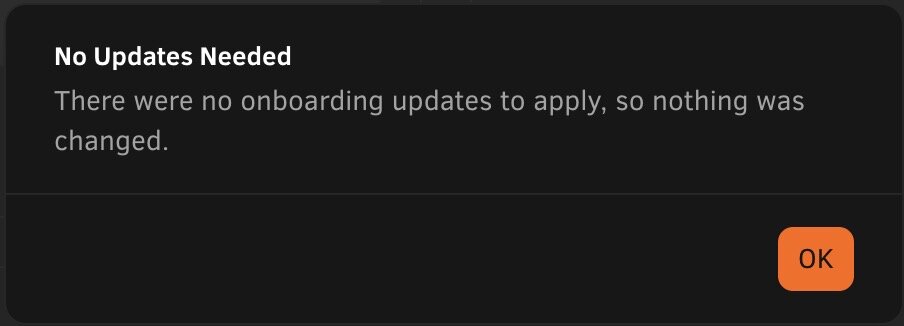
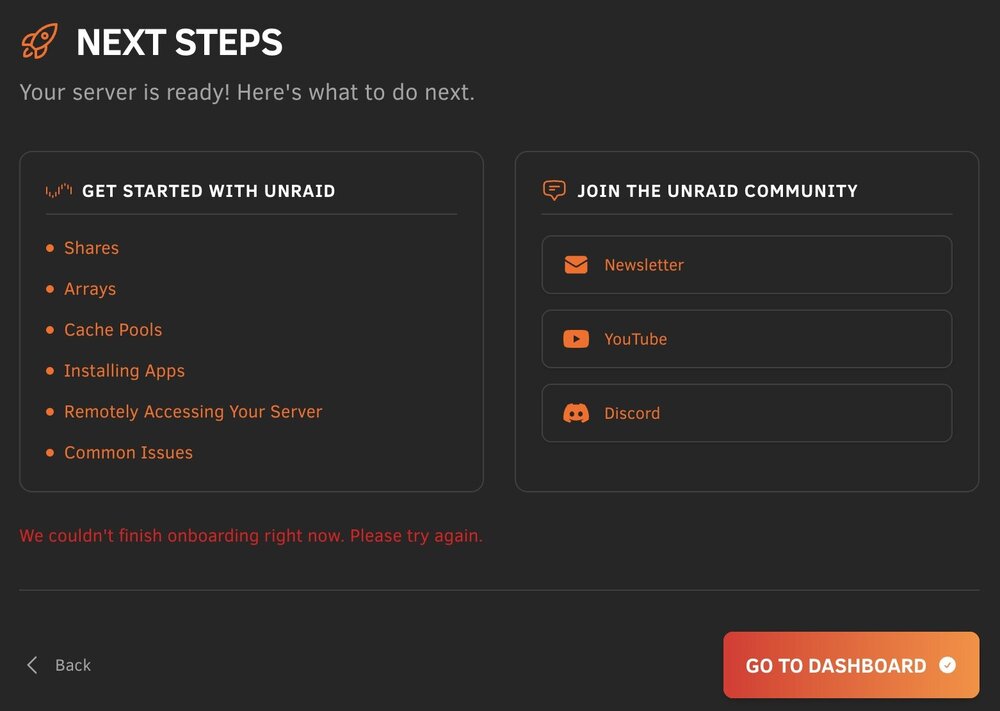
Just upgraded to 7.3.0 and the Onboarding process will never finish or exit. "We couldn't finish onboarding right now. Please try again." Any ideas? I left all my on-boarding questions to default.
-
Thanks - It might be a week or so until I get the diags...
-
Thanks - Understood. We removed the 'hack' and setup the Root Share via UD and came up with the same error. For testing, we mounted one of the (non-root) shares as a mapped drive on the windows laptop. Moving one of the files from one directory to another (in the same share) failed with the same error as above. So, it appears it has nothing to do with the Root Share. Any ideas?
-
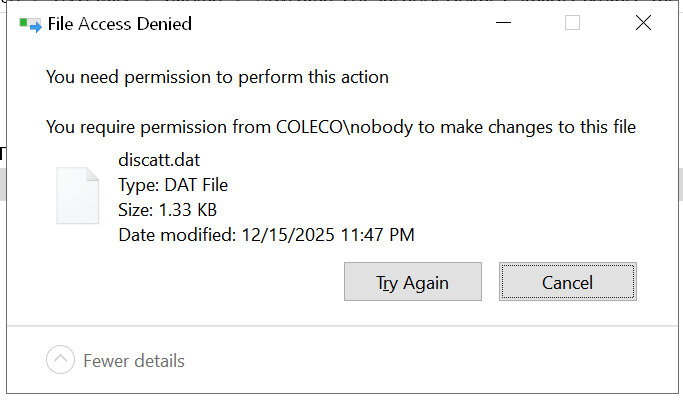
Greetings all, I have been using the 'god share' that SpaceInvader One talked about in his video for about 5 years without issue. It continues to work with 7.2.2. https://www.youtube.com/watch?v=TM9pPz732Gc I built an unRaid server for a friend of mine and setup the same god share for him too. Environment: unRaid 7.2.2 Windows 10 (latest updates with extended support, he'll be going to Win11 in 2026 when he gets a new laptop) What works: God share mounts (Win10 network is set to private) Windows -> unRaid copies Windows <- unRaid copies What doesn't work: Windows moving files between shares within the unRaid God share: Fails with an error - attached The odd thing - I checked my unRaid setup and did the same functions without any issues. Win11/unRaid 7.2.2, same god share settings After looking around the forums, I see that some suggest to not use God/Root shares due to security concerns, etc. I have also since learned that Unassigned Devices has a Mount Root Share function. ChatGPT suggested creating an 'admin' share and adding simlinks to the shares you want and then mount that 'admin' share Not sure what the best plan of action is. Any ideas? Thanks
-
Well... look at that... folders are back and I just reinstalled the two dockers. Amazing. Thanks so much!
-
Thanks. What do you mean by “rebake”? Restart?
-
I'm an idiot.... In the process of swapping my cache drive, I have lost appdata/domains/system. I cannot locate the folders on the array (I forgot to execute the mover when I changed the folders to move to the array). The original cache has been formatted. Domains is not important as I didn't have VMs. Since this is a backup server, I only had two dockers (Krusader/resilio-sync). Any suggestions on how to recover? Thanks! Diags attached. gooseisland-diagnostics-20251128-1905.zip
-
I forgot where mine landed but it was over a million - all super small files...
-
Awesome! I just curious, it appears you had the same issue as me. The number of files was extremely high. I wonder what Krusader is saving/caching?
-
Looks like from the Krusader instructions all of the settings are in: appdata\binhex-krusader\home\.config\krusaderrc I suspect if that was backed up, you should be fine... BUT... your mileage might vary, no warranty implied, etc, etc.
-
As a test, I changed the appdata path... in this case I went from /mnt/user/appdata/binhex-krusader to /mnt/user/appdata/binhex-krusader/test Which basically gave it a clean slate to rebuild the appdata for the app. (as this might imply, it removes any Krusader custom settings - saved window settings, etc - it's like having a fresh install of the app) This worked! Since then, I have cleaned this up: Shutdown Krusader Delete everything inside of /mnt/user/appdata/binhex-krusader (thus removing the original and test appdata in my case) - I used MC for this but can be done via command line of course. Start Krusader Initial load will take about a min or so to recreate the default appdata Subsequent loading has been almost instantaneous Side note - Over 1,300,000 (very small) files were removed from the original folder! Not sure where they came from - they appeared to be cache files of some sort. Hope this helps

-
Ok, thanks... Set networking to default - Was already set to bridge New config - that did it! It now loads in about 3 secs and I'm able to access remote shares... I have stopped and restarted the docker a few times and all is working! Thanks again!
-
FWIW - The link to the remote share was somewhat new and the delay to get into Krusader was already happening. As a test, I removed the share, stopped Krusader, started Krusader - took ~8 mins for noVNC to display Krusader (stopwatch timing while refreshing). Logs (I started the docker at 18:52) text error warn system array login 2025-07-27 19:00:38,991 DEBG 'start' stderr output: error 3: BadWindow (invalid Window parameter) request 15 minor 0 serial 503 2025-07-27 19:00:38,991 DEBG 'start' stderr output: error 3: BadWindow (invalid Window parameter) request 20 minor 0 serial 504 error 3: BadWindow (invalid Window parameter) request 15 minor 0 serial 505 error 3: BadWindow (invalid Window parameter) request 20 minor 0 serial 506 error 3: BadWindow (invalid Window parameter) request 15 minor 0 serial 507 error 3: BadWindow (invalid Window parameter) request 20 minor 0 serial 508 error 3: BadWindow (invalid Window parameter) request 15 minor 0 serial 509 error 3: BadWindow (invalid Window parameter) request 20 minor 0 serial 510 2025-07-27 19:00:38,991 DEBG 'start' stderr output: error 3: BadWindow (invalid Window parameter) request 15 minor 0 serial 511 error 3: BadWindow (invalid Window parameter) request 20 minor 0 serial 512 error 3: BadWindow (invalid Window parameter) request 15 minor 0 serial 513 2025-07-27 19:00:38,991 DEBG 'start' stderr output: error 3: BadWindow (invalid Window parameter) request 20 minor 0 serial 514 error 3: BadWindow (invalid Window parameter) request 15 minor 0 serial 515 error 3: BadWindow (invalid Window parameter) request 20 minor 0 serial 516 2025-07-27 19:00:38,991 DEBG 'start' stderr output: error 3: BadWindow (invalid Window parameter) request 15 minor 0 serial 517 error 3: BadWindow (invalid Window parameter) request 20 minor 0 serial 518 error 3: BadWindow (invalid Window parameter) request 15 minor 0 serial 519 2025-07-27 19:00:38,991 DEBG 'start' stderr output: error 3: BadWindow (invalid Window parameter) request 20 minor 0 serial 520 error 3: BadWindow (invalid Window parameter) request 15 minor 0 serial 521 error 3: BadWindow (invalid Window parameter) request 20 minor 0 serial 522 error 3: BadWindow (invalid Window parameter) request 15 minor 0 serial 523 error 3: BadWindow (invalid Window parameter) request 20 minor 0 serial 524 2025-07-27 19:00:38,992 DEBG 'start' stderr output: error 3: BadWindow (invalid Window parameter) request 15 minor 0 serial 525 error 3: BadWindow (invalid Window parameter) request 20 minor 0 serial 526 error 3: BadWindow (invalid Window parameter) request 15 minor 0 serial 527 2025-07-27 19:00:38,992 DEBG 'start' stderr output: error 3: BadWindow (invalid Window parameter) request 2 minor 0 serial 547 error 3: BadWindow (invalid Window parameter) request 20 minor 0 serial 548 2025-07-27 19:00:39,255 DEBG 'start' stderr output: Sun Jul 27 19:00:39 2025 VNCSConnST: closing 127.0.0.1::44980: Clean disconnection EncodeManager: Framebuffer updates: 6 EncodeManager: Tight: EncodeManager: Solid: 13 rects, 2.31446 Mpixels EncodeManager: 208 B (1:44509.7 ratio) EncodeManager: Bitmap RLE: 1 rects, 1.875 kpixels EncodeManager: 2025-07-27 19:00:39,255 DEBG 'start' stderr output: 95 B (1:79.0737 ratio) EncodeManager: Indexed RLE: 4 rects, 3.076 kpixels EncodeManager: 1.43945 KiB (1:8.37992 ratio) EncodeManager: Tight (JPEG): EncodeManager: Full Colour: 2 rects, 3.889 kpixels EncodeManager: 2.16895 KiB (1:7.01486 ratio) EncodeManager: Total: 20 rects, 2.3233 Mpixels EncodeManager: 3.9043 KiB (1:2324.53 ratio) Connections: closed: 127.0.0.1::44980 ComparingUpdateTracker: 7.14 Mpixels in / 108.504 kpixels out ComparingUpdateTracker: (1:65.804 ratio) 2025-07-27 19:00:39,269 DEBG 'start' stderr output: 192.168.0.232 - - [27/Jul/2025 19:00:39] 192.168.0.232: Plain non-SSL (ws://) WebSocket connection 192.168.0.232 - - [27/Jul/2025 19:00:39] 192.168.0.232: Path: '/websockify' 2025-07-27 19:00:39,269 DEBG 'start' stderr output: 192.168.0.232 - - [27/Jul/2025 19:00:39] connecting to: localhost:5900 2025-07-27 19:00:39,273 DEBG 'start' stderr output: Connections: accepted: 127.0.0.1::33266 2025-07-27 19:00:39,278 DEBG 'start' stderr output: SConnection: Client needs protocol version 3.8 2025-07-27 19:00:39,282 DEBG 'start' stderr output: SConnection: Client requests security type None(1) 2025-07-27 19:00:39,282 DEBG 'start' stderr output: VNCSConnST: Server default pixel format depth 24 (32bpp) little-endian rgb888 2025-07-27 19:00:39,291 DEBG 'start' stderr output: VNCSConnST: Client pixel format depth 24 2025-07-27 19:00:39,291 DEBG 'start' stderr output: (32bpp) little-endian bgr888
-
Greetings everyone, Any ideas/comments? Thanks
-
I'm having the same problem - and Docker is set to Native too. Not only it will take forever for the GUI to come up, there are many times remote atttached directories will not populate either. I'll have to use MC via command line to move things around.
-
Thanks for the link! That worked!
-
Greetings all, I have an ASUS ProArt X670E-CREATOR WIFI motherboard and haven't been able to get unRaid to recognize its temp sensors. From Googling, it appears this was added to the 6.3 Kernel - https://www.phoronix.com/news/Linux-6.3-HWMON I was hoping for 7.0.0 to fix this (just upgraded from 6.12.14), but when I click Detect Drivers, it does not recognize any. Any ideas? Diag file attached. Thanks! coleco-diagnostics-20250112-2044.zip
-
Greetings everyone... I have searched around and I cannot find a solution for this. When starting/restarting Krusader, the UI (noVNC) takes about 5mins to come up. Also, when I connect/mount an external drive or network share, Krusader will not work with those items until it is restarted. Any ideas on why that is happening? Thanks!
-
6.12.3 - but now it is working fine... hmmmm
-
Same thing for me - Incognito, Safari, Chome - nothing is working.



