





Glonch
Members
-
Joined
-
Last visited
Everything posted by Glonch
-
Thanks for the info. I have backed up my flash drive in 3 locations Along with a screenshot of the drive setup. I will not be caught again!
-
Thanks - but I had done that process a while back but it appears it didn't take. So, I had no way of downloading a backup. As I mentioned above, I was able to manually recover via a new stick and coping over from the old stick. Not an official way of doing it, but it worked.
-
I was able to recover everything… My Hail Mary: Took a new flash drive that worked, copied all of the files to another new flash drive (Kensington)… Then took my original drive that wouldn’t boot and copied all of the files from it to the Kensington drive, overwriting duplicates. Booted the Kensington drive and it loaded correctly. Just had to update the GUID, logout/in of My Servers. All dockers and drives are running perfectly. Was able to download a zip of flash drive via My Servers and took a screenshot of the drive layout for extra protection… I’ll never not do a backup of the flash drive again… lesson learned.
-
Greetings everyone, In a bit of a bind... I attempted to upgrade to 6.10.3 this evening and upon boot, this error came up: Loading /bzimage.. failed: No such file or directory I have no backup of the flashdrive locally. (I know, totally my fault) I logged into My Servers via my pc and I cannot locate any of the backup files for my server. I know that I did enable it. All I see is the download key option. Any ideas? Thanks
-
I have the same problem.. any ideas? Tried Edge and Chrome - no dice
-
Understood with Krusader... But still doesn't explain Mover not moving the files unless they are coming from the same cache drive.
-
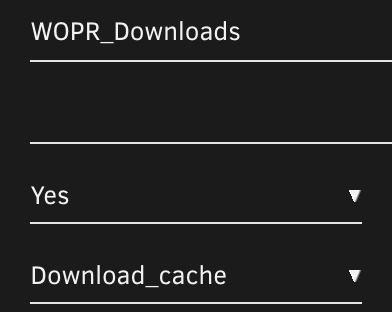
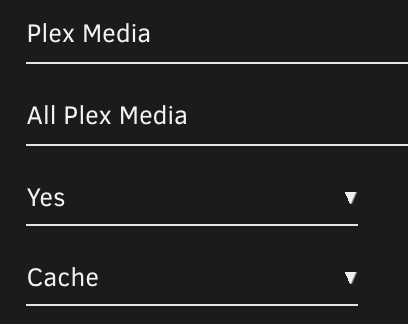
Greetings, Original troubleshooting thread: https://forums.unraid.net/topic/114377-mover-not-moving/?tab=comments#comment-1040527 Solution (last comment on that thread): My download share settings: My (original) Plex Media share settings: So... you can't have one share (WORP_Downloads) on one cache pool (Download_Cache) and another share (Plex Media) that you will copy to on another cache pool (Cache). Changed Plex Media share to use Download_Cache and Mover now moves without issue. In my opinion, if I moved files (under 'user' via Krusader) from WORP_Download [Download_cache] to Plex Media [Cache] - unRaid should have moved the files to the cache drive named Cache. Then, at 3am, Mover would have moved to the array. This would be inefficient of course. Having an error stating that 'file exists' doesn't point to having different cache settings between shares, thus was super hard to figure out. So, I see three options: This is bug with cache pools or This setup should not be done, thus noted in the wiki (I haven't looked) or This is normal behavior but the error should be updated to reflect the two cache pools are 'competing' Opinions/Comments? PS - I had recently setup two cache pools. Previously all cache data was saved to a cache named "Cache". After changing the setup to have two cache pools, I never thought to change the Plex Media share cache pool setting until my friend mentioned it until today. (I have not uploaded my diag zip file due to privacy concerns (even with 'Anonymize diagnostics' turned on) - I can send the file if needed via email)
-
Finally! Figured it out (thanks to a friend of mine looking over my shoulder): My download share settings: My (original) Plex Media share settings: So... you can't have one share (WORP_Downloads) on one cache pool (Download_Cache) and another share (Plex Media) that you will copy to on another cache pool (Cache). Changed Plex Media share to use Download_Cache and Mover now moves without issue. In my opinion, if I moved files (under 'user' via Krusader) from WORP_Download [Download_cache] to Plex Media [Cache] - unRaid should have moved the files to the cache drive named Cache. Then, at 3am, Mover would have moved to the array. This would be inefficient of course. Having an error stating that 'file exists' doesn't point to having different cache settings between shares, thus was super hard to figure out. So, I see three options: This is bug with cache pools or This setup should not be done, thus noted in the wiki (I haven't looked) or This is normal behavior but the error should be updated to reflect the two cache pools are 'competing' Opinions/Comments? PS - I had recently setup two cache pools. Previously all cache data was saved to a cache named "Cache". After changing the setup to have two cache pools, I never thought to change the Plex Media share cache pool setting until my friend mentioned it until today.
-
hmmm... Removed about 10 duplicates and invoked the mover... still not moving. None of the files in Download_cache\Plex Media exists in user0\Plex Media via Krusader or MC but the mover thinks so. Attached the latest diag file.
-
Thanks so much... Off to search and destroy.
-
Ok... I can use MC and go to user0... Two questions: 1. Am I just deleting the files noted in the logs as already existing or all in a particular directory within user0? 2. I reviewed all of my docker mappings and none of them have user0 - how they could have landed there? Thanks for lobbying Limetech for a better solution and for the assistance.
-
Thanks! I little confused on the mapping.... I don't see UNRAID/user0 anywhere on my system
-
Greetings Everyone, I have searched all over the forums for a solution to my problem but none of the suggestions worked in my case. It appears my mover cannot move files to the array any more and it is continuously filling up. All the directories are set to Cache=Yes. In looking at the logs, I'm seeing "File exists" entries. I have searched all the disks and the referenced file names do not exist on the array, only on the cache drive. I have also read somewhere that there was bug introduced recently in unRaid where if a share name has a space in it, Mover will fail - I cannot locate that info again though. Many of my shares and subfolders have spaces in them. Attached is my diag file Any help would be greatly appreciated.
-
With all the changes to cache/pools... Question: I have a cache with 3 drives in RAID 0... I'd like to replace it with a slightly smaller single drive (1.5 TB to 1TB... only using 12% of the cache at the moment). After looking around, there are so many dated and conflicting articles/videos on how to accomplish this. Any help would be greatly appreciated. Thanks
-
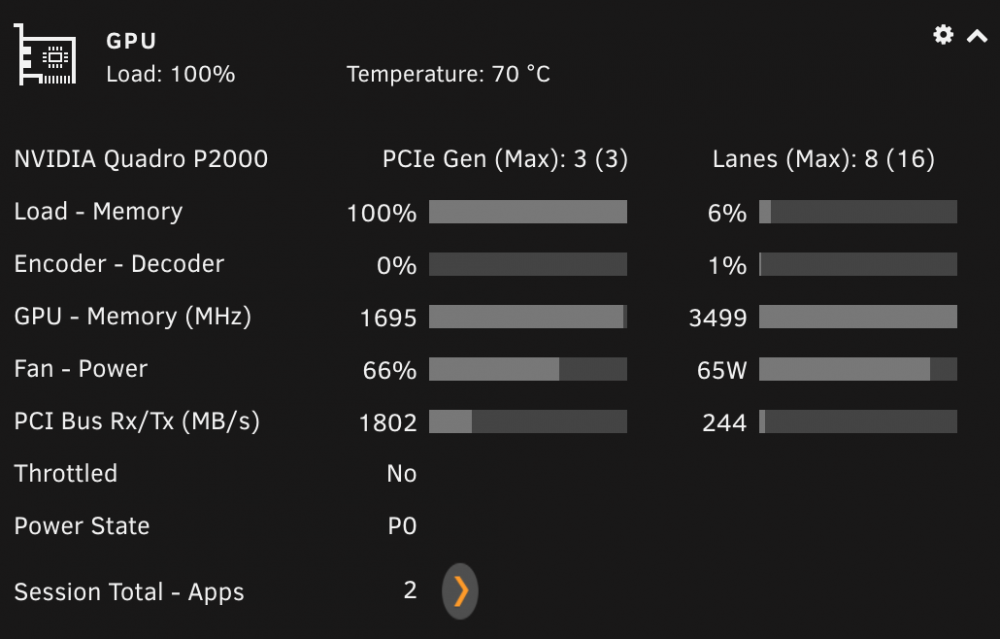
I checked Plex and there was only 1 transcode when this screenshot was taken. When I have no transcodes from Plex, the only other docker that is GPU aware is Folding@Home and it is using the GPU for modeling.
-
I've noticed the App Icon too but it is not correctly reporting the apps. In my case, it show 2 apps, both Plex. But I only had one thread for Plex and another for Folding@Home (which runs all the time).
-
Greetings, Comment on the Recordings-autoconverter docker. I'm really liking the functionality of it; saving a ton of space vs the .ts files. Is it possible to adjust the docker to convert MakeMKV ripped DVDs (TV Shows averaging 1-2gb/episode) to H265 encoded files (and delete the ripped copy)? Thanks
-
Greetings everyone, Just installed binkex - MakeMKV and it's great. Curious, I'm trying to use VNC Viewer from RealVNC from a Mac to attach to the docker and it is not working. VNC Viewer works great for Krusader. I did have to change the port to 7080 while keeping the docker setting to 6080 (Krusader used 6080). Any ideas? Thanks
-
Greetings everyone, I just built an unraid system with the TUF Gaming X570-Plus mother board and a Ryzen 5 3600. I've looked all over in the forums on getting the motherboard/CPU temps to be recognized but cannot figure it out. When I detect drivers in Dynamix System Temperature plug-in, nothing comes up. Thanks.

