





Marc_G2
Members
-
Joined
-
Last visited
Everything posted by Marc_G2
-
This should not affect the spin down, is the USB device capable of spin down and also does it report that correctly, eventually this is the problem. I think half the issue is the UD plugin since I confirmed it didn't spin down the drive after 15 minutes. But apparently upgrading to 6.9.X (from 6.8.3) may fix the problem. So I will try that a little later
-
Maybe it's my configuration? If my appdata folder is on the array, would a running docker keep it always active? For the USB drive, I have it enabled as a share. I'm wondering if that affects the UD plugin spin down behavior. My one other UD share is a SSD and it was active this morning as well. But I previously haven't payed any attention to whether it's label ever changes to spun down or not
-
I recently used luckybackup for the first time where I'm backing up to a USB drive with the UD plugin. And I ran into a couple issues. 1) It appears luckybackup was keeping my array active (drives not spinning down) when not syncing anything. 2) The external USB drive never spins down even when not in use. Does someone know how I can address this?
-
Diagnostics attached nas-ng-diagnostics-20210416-2054.zip
-
So I have a USB DAC I want to use in my VM. Initially I tried passing just the device to the VM. But when playing audio I would periodically (like every 8 seconds) get these pop/crack sounds. I'm not sure if that's a good way describe it. If the audio playing is busy enough, the pop is subtle enough to be missed. After that, I tried using the USB PCIe card passed through to the VM. The result there was much better. But I'm stilling getting pops every 30 to 90 seconds. Updating the drivers didn't help. Changing USB cables didn't help. Ideally I'd use the optical output on my motherboard. But I was unable to pass though the audio even when using ACS override. I also tried doing the MSI audio fix. But that doesn't seem to do anything for my USB audio. Edits: CPU core and it's hyper thread are also left out of the VM like is suggested on other threads. I disabled the MSI fix for my USB devices, and I think I saw an improvement. But I'm not 100% sure I also tried messing around with the different bit depth and sampling rate settings. That may have had some influence. But nothing fixed the issue. Does anyone have an idea of a fix?
-
You aren't using a VM are you? That wouldn't work with putting the whole system to sleep.
-
It would be nice if we could have different excluded for each day of the week on the Sleep Plugin. Is there maybe a workaround to achieve this? Is there a command (after wakeup) I could execute where it would check the current day of the week and tell unraid to not sleep for the next X hours?
-
Up until now, I've been using a modified of the S3 sleep plugin which was recommenced to me in the above post. The problem was the plugin wasn't reliably detecting when all drives were spun down. Does anyone know if the current version of the plugin, or unRAID 6.8+ resolved this issue?
-
Thanks, I will give your version a try. I wish there was dedicated forum threads for each these plugins.
-
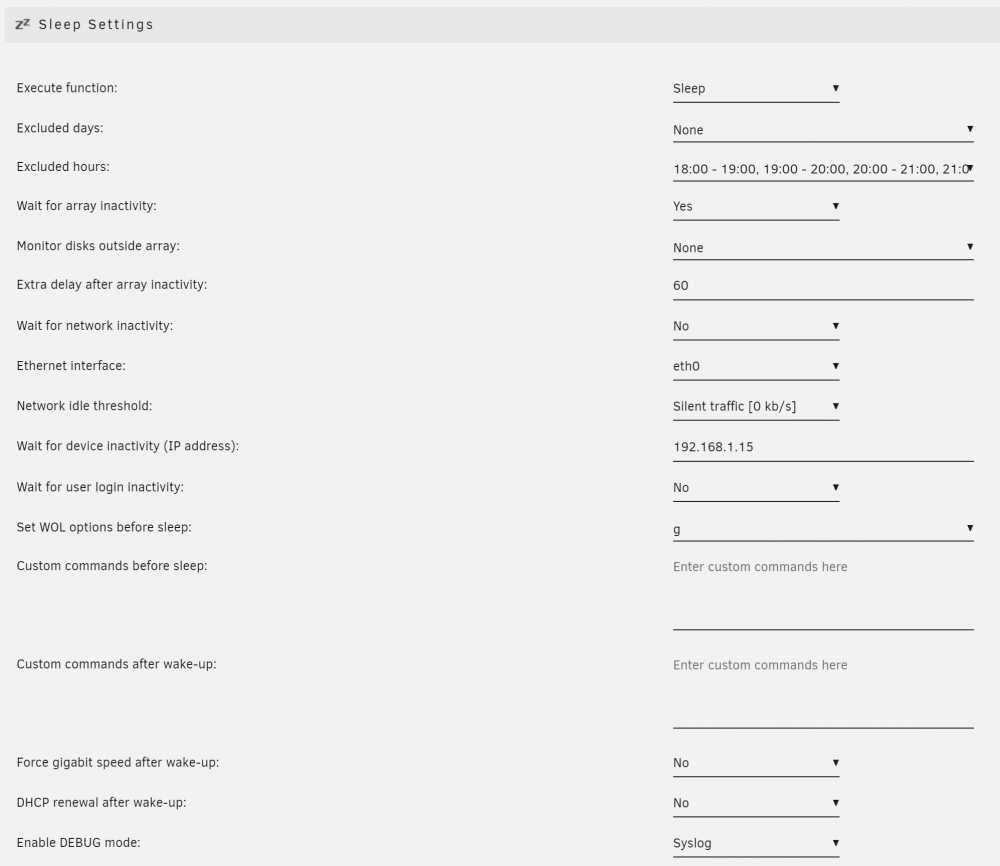
So I'm still having a problem where S3 Sleep is erroneously detecting drive activity (and then not going to sleep). What is criteria for hard drive activity occurring? I assumed it was checking if the drives were spun up. But that doesn't appear to be the case. At the moment, my best guess of the root cause is one of my windows PCs (that remain on most of the time) is somehow causing the issue. Anyone have an idea? I've attached a screenshot of plugin config. EDIT. I wanted to have this image as just a clickable item you could expand. Is that not possible?
-
No any CPU activity spikes I've seen have always been temporary (and I assume are due to normal activity). So I don't believe I've had that particular issue. Based on the debug logs, it's always because of detected array activity. But I still haven't confirmed what's been pinging my server so much.
-
Thanks, I forgot about that option. The system ran throughout the night again and according to the syslog, it was detecting drive activity. I'll try disabling Cache Directories to see if that fixes the issue. Usually when I've encountered this issue, unRAID would show all drives being spun down when I checked in the morning. So I didn't think it was the plugin misbehaving.
-
S3 Sleep, Unreliable activation. I have my unRAID server setup to go to sleep after a period of inactivity. Most of the time it works as expected. But frequently I would leave the server untouched over night and find out the next morning it never automatically went to sleep. Whether it works correctly seems random. Do you have an idea on what could be causing the issue? The only other plugins that run automatically daily are Dynamix SSD TRIM and Cache Directories. I don't imagine those being the issue.
-
I'm running a MSI X470 Gaming Plus with a 3600X. Is this fix necessary to get GPU pass through working in any capacity? I've tried ROM edit method for passing a Nvidia GPU, but had no luck. Tomorrow when my second GPU arrives, I will give that a try. *****EDIT****** I was able to get GPU pass though working on board without this fix. So anyone else using MSI, probably won't need them.

