





Scott Harkless
Members
-
Joined
-
Last visited
-
Ok I did get some errors but just moved the memory to new slots and everything tested perfect. I have been running on the old slots for a while not sure why they are getting errors now. So now that memory is fixed how do I fix the errors on the nvme pool ?
-
OK I am running the memory test now. I will post what it finds once it is done.
-
Here are the diags requested. tower-diagnostics-20260514-1617.zip
-
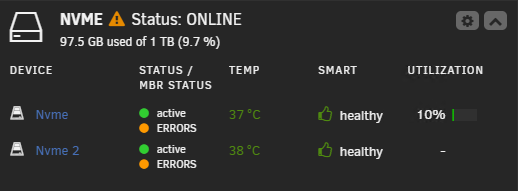
After updating my server today I noticed these errors and was wondering how to try and fix it. I already tried to do a scrub and that found no errors. I think the only thing on this is some data that has not moved to the array and appdata.

-
Is there a way to make the parity rebuild that drive? I dont have a backup of all the files from that drive. Should I just do an extended smart test on the drive to make sure its not failing or is there a better way to test ?
-
One of my disks today went to unsuppoted file system. I brought up the array in maintenance mode and did xfs_repair to fix the issue and the drive is back in the array. The issue I have now is all my files are in lost+found folder. Is there a way to recover these files without having to manually copy all the files back to the correct directory? Attaching my Diag file. tower-diagnostics-20220519-1035.zip
-
both sabnzbd and sonarr have /media in their host path. So I know that Sonarr can see where the downloaded files are.
-
Anyone else having issues with post processing? I have it searching and downloading with sabzbnd no issues there. The problem is once its done downloading it will move the files to the completed/tv directory but sonarr never picks it up from there and moves it to the tvshows folder. Any help would be great on this issue. I know it used to work just not sure when it broke for me.
-
All my tests were from the WAN. If I goto the IP:8082 like I have setup in the configuration from the LAN it works just fine. Maybe I just need to have people come in via port 8082 and not try to redirect port 80 outside to port 8082 inside.
-
I searched but could not find anything but im not 100% sure its the dockers issue or not. I have a simple php page that will list out files and directories onto a page with links. I set the port on the docker to be 8082 and i have my sophos firewall forwarding all port 80 traffic to the unraid server ip port 8082. The issue is the links on my page look like they would be going to website/directory but it is for some reason trying to goto website:8082/directory. If i let it break and clear out the port it works. Any ideas why i would be seeing this? Sorry this is my first time dealing with nginx in a docker usually we just install this direct on a server for something like this.
-
Ok so i have the issue yet again with my plex not being reachable. I really dont want to go through redoing my entire library again. It is going to be too much trouble to pull out a HD from my raid is there a way to maybe put this on the usb boot drive? Is there any way for me to recover my plex without redoing it? I am on UnRaid Version: 6.8.0-rc3 now. sh-5.0# cat Plex\ Media\ Server.log Oct 21, 2019 21:24:13.612 [0x14f33e1e2700] INFO - Plex Media Server v1.18.1.1973-0f4abfbcc - unknown PC unknown - build: linux-x86_64 redhat - GMT -04:00 Oct 21, 2019 21:24:13.612 [0x14f33e1e2700] INFO - Linux version: 5.3.6-Unraid (#2 SMP Wed Oct 16 14:28:06 PDT 2019), language: en-GB Oct 21, 2019 21:24:13.612 [0x14f33e1e2700] INFO - Processor Intel(R) Xeon(R) CPU E3-1230 V2 @ 3.30GHz Oct 21, 2019 21:24:13.612 [0x14f33e1e2700] INFO - /usr/lib/plexmediaserver/Plex Media Server Oct 21, 2019 21:24:13.610 [0x14f33e6cbb80] DEBUG - BPQ: [Idle] -> [Starting] Oct 21, 2019 21:24:13.611 [0x14f33e6cbb80] DEBUG - FeatureManager: Using cached data for features list Oct 21, 2019 21:24:13.611 [0x14f33e6cbb80] DEBUG - Opening 20 database sessions to library (com.plexapp.plugins.library), SQLite 3.26.0, threadsafe=1 sh-5.0# cat Plex\ Media\ Server.1.log Oct 21, 2019 21:24:10.580 [0x14769fe40700] INFO - Plex Media Server v1.18.1.1973-0f4abfbcc - unknown PC unknown - build: linux-x86_64 redhat - GMT -04:00 Oct 21, 2019 21:24:10.580 [0x14769fe40700] INFO - Linux version: 5.3.6-Unraid (#2 SMP Wed Oct 16 14:28:06 PDT 2019), language: en-GB Oct 21, 2019 21:24:10.580 [0x14769fe40700] INFO - Processor Intel(R) Xeon(R) CPU E3-1230 V2 @ 3.30GHz Oct 21, 2019 21:24:10.580 [0x14769fe40700] INFO - /usr/lib/plexmediaserver/Plex Media Server Oct 21, 2019 21:24:10.578 [0x1476a0329b80] DEBUG - BPQ: [Idle] -> [Starting] Oct 21, 2019 21:24:10.579 [0x1476a0329b80] DEBUG - FeatureManager: Using cached data for features list Oct 21, 2019 21:24:10.580 [0x1476a0329b80] DEBUG - Opening 20 database sessions to library (com.plexapp.plugins.library), SQLite 3.26.0, threadsafe=1 Oct 21, 2019 21:24:10.581 [0x1476a0329b80] ERROR - SQLITE3:(nil), 26, file is not a database in "PRAGMA cache_size=2000" Oct 21, 2019 21:24:10.581 [0x1476a0329b80] ERROR - Database corruption: sqlite3_statement_backend::prepare: file is not a database for SQL: PRAGMA cache_size=2000
-
Will a downgrade work if 6.7.2 was a fresh install for me?
-
Gotcha...im going to have to wait and hope because I am maxed out right now with 6 drives no room to add a cache disk.
-
Yes I am on 6.7.2 and it is on the array. Where else would i put it ?
-
I ran through the database with a check and found nothing. I got tired of waiting and just blew away the docker and started fresh. Just hope this is not going to happen every few weeks because its sucks starting over.
