





S1dney
Members
-
Joined
-
Last visited
Everything posted by S1dney
-
Good to hear! You're welcome You would indeed map a volume to the container pointing to a location on the host. This is were it crashes according to multiple sources though, so I would be curious how that goes for you. You would add a PATH from the DockerMan page and map /var/opt/mssql/ or /var/opt/mssql/data to a path on your host to make the data persistent. Cheers!
-
I think you're right on this one. I only picked that container as an example. According to the Community Apps GitHub, the Apps page does a lookup to the Docker Hub with this command: shell_exec("curl -s -X GET 'https://registry.hub.docker.com/v1/search?q=$filter&page=$pageNumber'"); I first noticed that the Apps searchbar filters special character so I thought I try to hack the URL itself: Somthing like: - 'https://registry.hub.docker.com/v1/search?q=mcr.microsoft.com' - 'https://registry.hub.docker.com/v1/search?q=mssql/server' Tried all kinds of variations but nothing works. The problem appears to be not with the community apps however, but with Microsoft moving it's container to their own repo. See here: https://dbafromthecold.com/2019/02/22/displaying-the-tags-within-the-sql-server-docker-repository/ I think that to get this to work you need to have some PHP skills as it probably requires building/modifying the community apps search_dockerhub function. See lines 318 till 372 here: https://github.com/Squidly271/community.applications/blob/master/source/community.applications/usr/local/emhttp/plugins/community.applications/include/exec.php ............Now there might be another way Download an official image you CAN download, I've downloaded pihole/pihole for example. This gives you a template to work with: cat /boot/config/plugins/dockerMan/templates-user/my-pihole.xml You can copy it and modify the values you need. After all settings are changed you can deploy the template from the docker tab -> Add Container -> User-Templates. I've created a short MSSQL image briefly using this template below and it pulls the image just fine: root@Tower:/# cat /boot/config/plugins/dockerMan/templates-user/my-mssql.xml <?xml version="1.0"?> <Container version="2"> <Name>mssql</Name> <Repository>mcr.microsoft.com/mssql/server</Repository> <Registry>https://hub.docker.com/_/microsoft-mssql-server</Registry> <Network>bridge</Network> <MyIP/> <Shell>sh</Shell> <Privileged>false</Privileged> <Support>https://hub.docker.com/_/microsoft-mssql-server</Support> <Project/> <Overview>The official MSSQL container from the new mcr.microsoft.com repository. Converted By Community Applications Always verify this template (and values) against the dockerhub support page for the container</Overview> <Category/> <WebUI/> <TemplateURL/> <Icon>/plugins/dynamix.docker.manager/images/question.png</Icon> <ExtraParams/> <PostArgs/> <CPUset/> <DateInstalled>1575321381</DateInstalled> <DonateText/> <DonateLink/> <Description>The official MSSQL container from the new mcr.microsoft.com repository. Converted By Community Applications Always verify this template (and values) against the dockerhub support page for the container</Description> <Networking> <Mode>bridge</Mode> <Publish> <Port> <HostPort>1433</HostPort> <ContainerPort>1433</ContainerPort> <Protocol>tcp</Protocol> </Port> </Publish> </Networking> <Data/> <Environment/> <Labels/> <Config Name="TCP_1433" Target="1433" Default="" Mode="tcp" Description="TCP port for SQL Communication" Type="Port" Display="always" Required="false" Mask="false">1433</Config> </Container> When you deploy your container from this image you can modify all other settings (such a paths and ports) from the DockerMan GUI, which is a lot easier. Note that this will also save the changes to the template so this appears to be a one time action Be aware though that you need to feed additional stuff (like accepting EULA) to the container to get it to work, but this should give you a starting point. Also another thing to be aware of: https://github.com/Microsoft/mssql-docker/issues/407. Mentioned in the thread: "Unfortunately, we've had quite a few issues reported with Unraid and it's not something we've tested or supported so far. You can see a list of the issues with Unraid in this query: https://github.com/Microsoft/mssql-docker/issues?utf8=✓&q=is%3Aissue+is%3Aopen+unRAID" MAC OSX has a known bug (listed on the MS Docs also) which appears similar. Maybe unRAID on slackware is hitting the same? Strangely though for me is that my MSSQL bitwarden container just works... So it should be possible right. I don't use the MSSQL docker container other then for Bitwarden at the moment. I'm just curious.
-
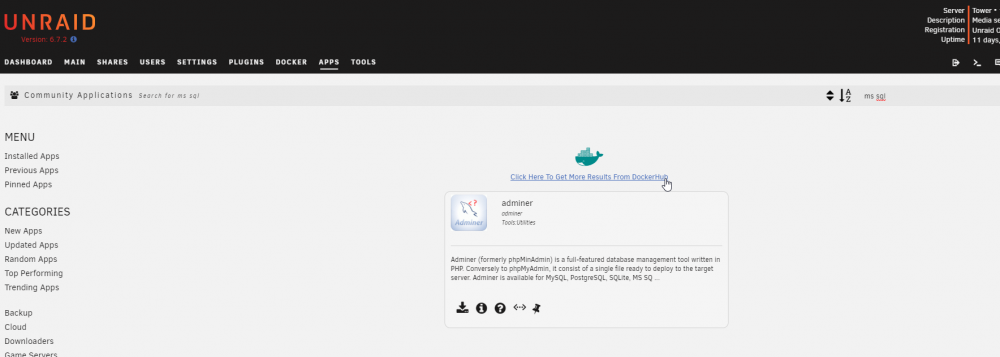
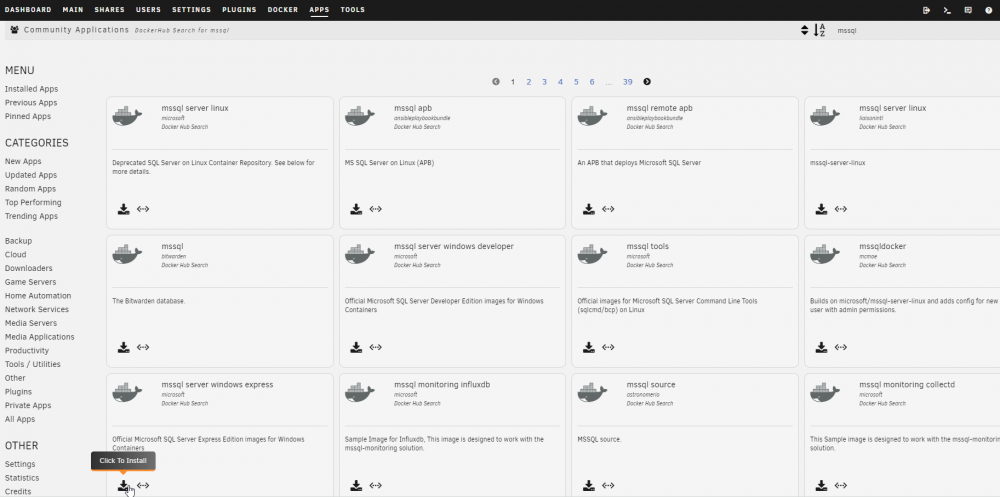
The one in the screenshot is actually the docker from Microsoft's official docker hub: (Expand the search to DockerHub) (Search Microsoft's official image, I guess you should be able to view on Publisher to get a better listing) Now it will be converted into a DockerMan template that @trurl is referring about. You just need to figure out which specific image name you're pulling and and which repo it came from. If you use docker pull, DockerMan has no template to work with. Hope this clears is up.
-
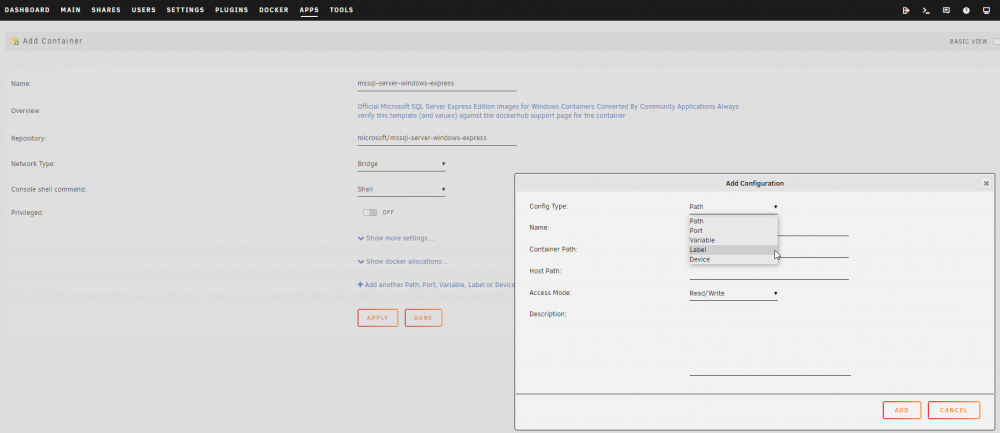
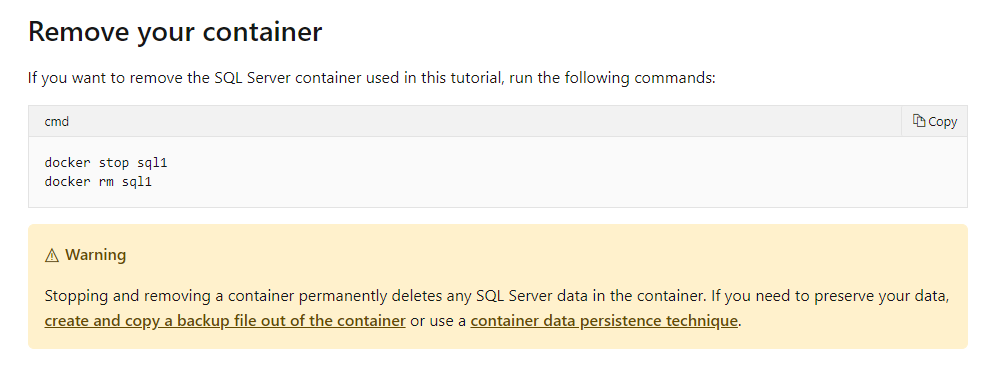
Who not? If searched via the docker hub you can just insert your own paths and variables? You would add Paths to make it write data to your hosts appdata.. Not really sure what else you're searching for The Microsoft article actually describes this behavior: The link describing data persistence point you to the -v options, which is what adding a path lets DockerMan feed docker under the hood. Running docker pull bypasses DockerMan so it'll show up as an orphaned container when it's off.
-
Ah, that’s great to hear. Thanks for completing that statement. I might be browsing that part of the forums one of these days 😃
-
The docker container is downloaded to a subdirectory in /var/lib/docker, which is actually a loop device. The loop device is the docker.img image being mounted to that location. The docker image itself is located in /mnt/user/system/docker, which is most likely on your cache (if present). Any changes will therefore be stored inside docker.img (on the array/cache) but will be probably be lost upon upgrading the container (cause it get's overwritten) or rebuilding the docker.img file. That's why you would normally mount local folders to folder in the container, to have data persist. If you want to make it an actual docker, you'd download it from the community applications (https://synaptiklabs.com/posts/setup-unraid-to-pull-from-docker-hub/) You can download every container from the docker hub directly (takes on extra click in the apps section), but certain ones that are more easily found there have been made into a template (if I'm not mistaking) by fellow unraid enthusiasts. This would ask you to create certain paths instead of you having to look up the docker hub for options to specifiy. I usually prefer using the one directly from the developer's docker repository, but that's personal. Cheers!
-
Ok man, good luck! For now I start things up manually, but when my scripts for backups etc are done I’ll be writing a script that runs when the array is started and that’ll start all necessary docker containers. That will use a mixture of docker start and docker-compose commands or maybe I just out everything in a compose file, haven’t decided yet. Cheers!
-
Well, in my case it runs perfectly fine with just the ulimit changes. I checked my configfile for Bitwarden and it seems to map to appdata also (as this is were my bwdata directory resides, ../mssql maps it to /mnt/appdata/bitwarden/mssql) See attached screenshot. And mounting it to a random other directory on appdata? So create /mnt/appdata/test and mount it in there? Mine seems to be on version 1.32.0, might also be worth checking that specific version. Cheers!
-
EDIT (March 9th 2021): Solved in 6.9 and up. Reformatting the cache to new partition alignment and hosting docker directly on a cache-only directory brought writes down to a bare minimum. ### Hey Guys, First of all, I know that you're all very busy on getting version 6.8 out there, something I'm very much waiting on as well. I'm seeing great progress, so thanks so much for that! Furthermore I won't be expecting this to be on top of the priority list, but I'm hoping someone of the developers team is willing to invest (perhaps after the release). Hardware and software involved: 2 x 1TB Samsung EVO 860, setup with LUKS encryption in BTRFS RAID1 pool. ### TLDR (but I'd suggest to read on anyway 😀) The image file mounted as a loop device is causing massive writes on the cache, potentially wearing out SSD's quite rapidly. This appears to be only happening on encrypted caches formatted with BTRFS (maybe only in RAID1 setup, but not sure). Hosting the Docker files directory on /mnt/cache instead of using the loopdevice seems to fix this problem. Possible idea for implementation proposed on the bottom. Grateful for any help provided! ### I have written a topic in the general support section (see link below), but I have done a lot of research lately and think I have gathered enough evidence pointing to a bug, I also was able to build (kind of) a workaround for my situation. More details below. So to see what was actually hammering on the cache I started doing all the obvious, like using a lot of find commands to trace files that were written to every few minutes and also used the fileactivity plugin. Neither was able trace down any writes that would explain 400 GBs worth of writes a day for just a few containers that aren't even that active. Digging further I moved the docker.img to /mnt/cach/system/docker/docker.img, so directly on the BTRFS RAID1 mountpoint. I wanted to check whether the unRAID FS layer was causing the loop2 device to write this heavy. No luck either. This gave me a situation I was able to reproduce on a virtual machine though, so I started with a recent Debian install (I know, it's not Slackware, but I had to start somewhere ☺️). I create some vDisks, encrypted them with LUKS, bundled them in a BTRFS RAID1 setup, created the loopdevice on the BTRFS mountpoint (same of /dev/cache) en mounted it on /var/lib/docker. I made sure I had to NoCow flags set on the IMG file like unRAID does. Strangely this did not show any excessive writes, iotop shows really healthy values for the same workload (I migrated the docker content over to the VM). After my Debian troubleshooting I went back over to the unRAID server, wondering whether the loopdevice is created weirdly, so I took the exact same steps to create a new image and pointed the settings from the GUI there. Still same write issues. Finally I decided to put the whole image out of the equation and took the following steps: - Stopped docker from the WebGUI so unRAID would properly unmount the loop device. - Modified /etc/rc.d/rc.docker to not check whether /var/lib/docker was a mountpoint - Created a share on the cache for the docker files - Created a softlink from /mnt/cache/docker to /var/lib/docker - Started docker using "/etc/rd.d/rc.docker start" - Started my BItwarden containers. Looking into the stats with "iotstat -ao" I did not see any excessive writing taking place anymore. I had the containers running for like 3 hours and maybe got 1GB of writes total (note that on the loopdevice this gave me 2.5GB every 10 minutes!) Now don't get me wrong, I understand why the loopdevice was implemented. Dockerd is started with options to make it run with the BTRFS driver, and since the image file is formatted with the BTRFS filesystem this works at every setup, it doesn't even matter whether it runs on XFS, EXT4 or BTRFS and it will just work. I my case I had to point the softlink to /mnt/cache because pointing it /mnt/user would not allow me to start using the BTRFS driver (obviously the unRAID filesystem isn't BTRFS). Also the WebGUI has commands to scrub to filesystem inside the container, all is based on the assumption everyone is using docker on BTRFS (which of course they are because of the container 😁) I must say that my approach also broke when I changed something in the shares, certain services get a restart causing docker to be turned off for some reason. No big issue since it wasn't meant to be a long term solution, just to see whether the loopdevice was causing the issue, which I think my tests did point out. Now I'm at the point where I would definitely need some developer help, I'm currently keeping nearly all docker container off all day because 300/400GB worth of writes a day is just a BIG waste of expensive flash storage. Especially since I've pointed out that it's not needed at all. It does defeat the purpose of my NAS and SSD cache though since it's main purpose was hosting docker containers while allowing the HD's to spin down. Again, I'm hoping someone in the dev team acknowledges this problem and is willing to invest. I did got quite a few hits on the forums and reddit without someone actually pointed out the root cause of issue. I missing the technical know-how to troubleshoot the loopdevice issues on a lower level, but have been thinking on possible ways to implement a workaround. Like adjusting the Docker Settings page to switch off the use of a vDisk and if all requirements are met (pointing to /mnt/cache and BTRFS formatted) start docker on a share on the /mnt/cache partition instead of using the vDisk. In this way you would still keep all advantages of the docker.img file (cross filesystem type) and users who don't care about writes could still use it, but you'd be massively helping out others that are concerned over these writes. I'm not attaching diagnostic files since they would probably not point out the needed. Also if this should have been in feature requests, I'm sorry. But I feel that, since the solution is misbehaving in terms of writes, this could also be placed in the bugreport section. Thanks though for this great product, have been using it so far with a lot of joy! I'm just hoping we can solve this one so I can keep all my dockers running without the cache wearing out quick, Cheers!
-
Yeah I know. This seems like a really nasty tradeoff. Security vs SSD's wearing out quick. I was quite happy with the encryption on all disks, but feel that it's a real waste of the SSD's to write TB's of data to them each month.
-
+1 on this. I'm seeing similar issues (high writes on the SSD cache). However since my docker containers are hosting my bitwarden vault, I'm not really keen on unencrypting it. Bug in BTRFS? Or something we can tweak?
-
I see you have it figured out in the meantime. All other parameters are managed by the Compose file in my case so didn't really apply. Great to see you have it up and running. And thanks for sharing back your own findings, might definitely help someone in the future. Cheers man!
-
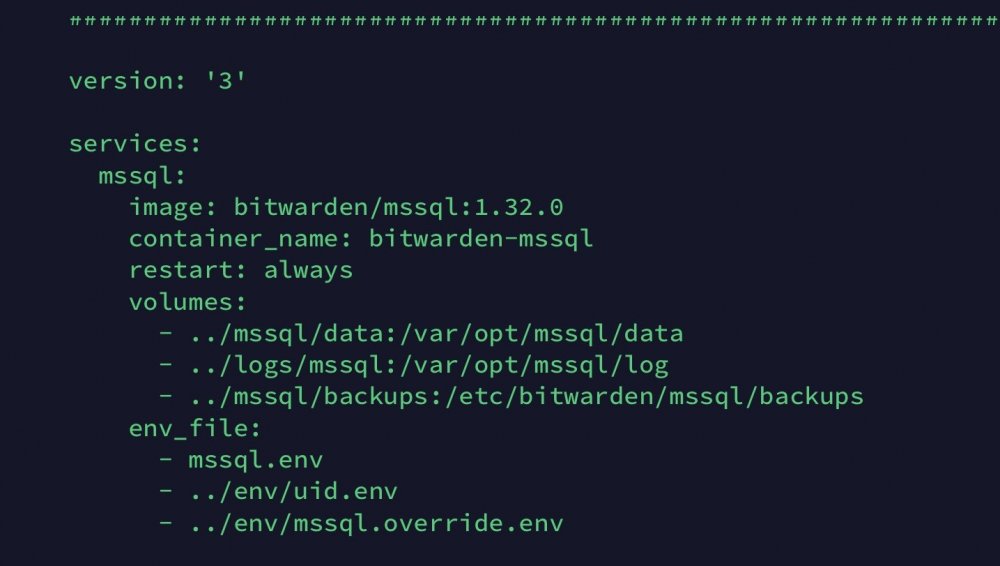
Hey man, Just bumped into the same thing setting up Bitwarden on my unRaid build. I had it running in on a Debian build which I'm looking to phase out now that unRaid will be the Docker host. Seems like we're hitting that exact same thing. Microsoft wrote an article about this: check it out! Comparing the two settings mentioned in the article between my unRaid build and my Debian host: Debian [%%%%%%%%%] :/# sysctl vm.legacy_va_layout vm.legacy_va_layout = 0 [%%%%%%%%%] :/# ulimit -s 8192 unRaid [%%%%%%%%%] # sysctl vm.legacy_va_layout vm.legacy_va_layout = 0 [%%%%%%%%%] # ulimit -s unlimited Apparently the ulimit for the stack size is set differently on my unRaid system. Now I'm not really a fan in modifying these kind of things system wide, since unRaid might have had a good reason to set the to unlimited in the first place, so I was looking for other ways to do it. Fortunately Docker seems to have a switch to modify these on a per container basis: Docker docs Now in my case Bitwarden is using Docker Compose to build the Bitwarden environment, so I had to tweak the yml code. The default docker-compose.yml (located in bwdata/docker) lists the following lines for the mssql container: version: '3' services: mssql: image: bitwarden/mssql:1.32.0 container_name: bitwarden-mssql restart: always volumes: - ../mssql/data:/var/opt/mssql/data - ../logs/mssql:/var/opt/mssql/log - ../mssql/backups:/etc/bitwarden/mssql/backups env_file: - mssql.env - ../env/uid.env - ../env/mssql.override.env Now if we create an override file named docker-compose.override.yml and also place it in the same bwdata/docker directory we only have to put these lines in: # # Override file for the auto-generated docker-compose.yml file provided # by Bitwarden # This file sets ulimits on the mssql container because with the ulimit # stack size set to ulimited systemwide (as is the case on unRaid), # the container refuses to start # ######################################################################### version: '3' services: mssql: ulimits: stack: soft: "8192000" hard: "8192000" After this we can safely start up the container as it merges the settings together with the mssql service, effectively setting the stack size limits for our mssql container environment the same as they were on Debian. Be aware though that the soft and hard limits use bytes instead of kilobytes (that the ulimit -s command takes), so you'd have to convert the values as I did. Hope this helps! Cheers, Sidney



