





S1dney
Members
-
Joined
-
Last visited
Everything posted by S1dney
-
No, you will indeed do a lot of this from the terminal as you can't interact from the unRAID dockerman (GUI). And you can go as deep as you want with unRAID, it doen't really hide anything for you, which is what I love about it.
-
You don't really need to compose a docker neither. Just download/curl the build script, run the commands and when you run ./bitwarden.sh start it will issue the compose commands needed to start anything. And the override setting will allow you to override the default settings.
-
You need to find the nerdpack plugin, it has docker-compose included, cause you are right indeed that bitwarden uses docker-compose to start everything up. Then with that installed just follow the steps mentioned in the Bitwarden docs. You have to complete: - step 1 - step 2 is already done by running unraid (docker onboard) and installing the nerdpack for docker-compose - create a directory in step 3 (I have mine on /mnt/user/appdata/bitwarden since the appdata resides on the cache only). Note that I did not create a bitwarden user at the time, may do that later for additional security, this has been running for 3 years+ lol. - Get your key in step 4 - Install Bitwarden in step 5 by curling the build script into the directory you have created and then invoke some commands. - Add the overrides I gave you in the mentioned post in step 6 so it will actually be able to start on unRAID - Then start it and enjoy Bitwarden. GL!
-
I think I still have Bitwarden running using the override file specified in my comment: I don’t recall touching that since and it had been working very well for me. You cannot choose another SQL version, this is what the template from Bitwarden pulls for you. Good luck!
-
Hmm, did not get a notification on these replies. Guess I wasn’t following my own topic yet lol. Following now. Good suggestions tho! I’ll check those out and report back later on. Cheers!
-
Hey Y'all! I'm using a custom built bash script to update all my self built docker containers every once in a while. It still requires me to login to the GUI and press the "Update All" button from the Docker tab tho.. I'm running these updates from the terminal so would rather have the code trigger this as well. Have been searching through the php files etc to see if I can see how this is done but no luck yet. I also have a script that allows my UPS to shutdown unraid in a clean manner which basically uses the CSRF token to control it. echo 'Stopping unraid array.' CSRF=$(cat /var/local/emhttp/var.ini | grep -oP 'csrf_token="\K[^"]+') # Send this command to the backgroup so we can check the status of the unmount on the array (last step unraid takes) # We send everything to /dev/null cause we're not interested in nohup's output nohup curl -k --data "startState=STARTED&file=&csrf_token=${CSRF}&cmdStop=Stop" https://localhost:5443/update.htm >/dev/null 2>&1 & I assume that something similar must be possible for the Update All button? Anyone able to assist here? Appreciate the efforts! Best regards, Sidney
-
Just add those lines to download docker-compose in the go file and have the user scripts plug-in run a few lines of docker-compose commands after array start? I haven’t set it up tho as I manually unlock my encrypted array anyways. Cheers
-
The GO (and service.d file) modifications are not needed anymore in unraid 9.2 as they basically created a way to do exactly that from the GUI. The GUI should now allow you to host docker files in their own directory directly on the cache (which what the workaround did via scripts instead of the GUI). Haven't moved there myself yet as I still see enough issues with rc2 for now. I believe that reformatting the cache is also advisable cause they have made some changes in the partition alignment there as well (you may or may not get lesser rights because of it, I'm using Samsung EVO's so I consider wiping and reformatting mine after the upgrade). Cheers!
-
I've looked at my go file, I still have the pip3 way in place and it's working nice: # Since the NerdPack does not include this anymore we need to download docker-compose outselves. # pip3, python3 and the setuptools are all provided by the nerdpack # See: https://forums.unraid.net/index.php?/topic/35866-unRAID-6-NerdPack---CLI-tools-(iftop,-iotop,-screen,-kbd,-etc.&do=findComment&comment=838361) pip3 install docker-compose The second way via curl also works well as I equipped my duplicati container with it. You don't have to setup any dependencies that pip3 needs, so for simplicity reasons this may be more perferable. Cheers!
-
Best wishes to you too 👍 Whether to use docker-compose or Unraid’s own DockerMan, depends on what you want and/or need. The DockerMan templates give you an easy option to redeploy containers from the GUI, you’ll also be notified when a docker container has an update available. I like Unraid’s tools so I default to these and create most containers from the GUI, however certain scenarios cannot be setup via DockerMan (at least not when I checked), like linking the network interfaces of containers together (so that all the container’s traffic flows through one of them). Therefore I use docker-compose for those and also have some containers I’ve built myself that I want to setup with some dependencies. I update them via a bash script I wrote and redeploy them afterwards, as the GUI is not able to modify their properties (which answers your second question, containers deployed outside of the DockerMan GUI do not get a template and cannot be managed/updated, you can start and stop them tho). My advise would be: stay with the Unraid default tooling unless you find a limitation which might make you want to deviate from them.
-
It's not anymore. You can now select some prerequisites from the NERDpack and then use pip3 to handle the install. I've edited to my go (/boot/config/go) file: # Since the NerdPack does not include this anymore we need to download docker-compose outselves. # pip3, python3 and the setuptools are all provided by the nerdpack # See: https://forums.unraid.net/index.php?/topic/35866-unRAID-6-NerdPack---CLI-tools-(iftop,-iotop,-screen,-kbd,-etc.&do=findComment&comment=838361) pip3 install docker-compose I must say that you curl solution looks clean and doesn't require setting up additional dependencies via the NERDpack in advance. Bookmarked in case the pip3 solution might fail later on EDIT: The curl solution seems to have been truncated @juan11perez. I wanted to use this in my Duplicati container but noticed that the second line is missing its end. The docker docs noted the full command: COMPOSE_VERSION=$(curl -s https://api.github.com/repos/docker/compose/releases/latest | grep 'tag_name' | cut -d\" -f4) curl -L https://github.com/docker/compose/releases/download/${COMPOSE_VERSION}/docker-compose-`uname -s`-`uname -m` -o /usr/local/bin/docker-compose chmod +x /usr/local/bin/docker-compose You may want to edit your example in case anyone want to use. Thanks!
-
Ok understood, I'll give that a go. Sad that it had to go tho. Thanks for the alternative way! Appreciate it.
-
Hey Guys, I was wondering what happened to the docker-compose command? Rebooted my server after 39 days today and the nerdpack apparently got an update, but this left me without docker-compose. Running on 6.8.0rc7, I did notice some commits on the Github less then 39 days ago. My docker setup greatly depends on docker-compose, so I'd like to have it back 🙂 Appreciate the effort! Best regards. EDIT: Noticed that it was still listed at "https://github.com/dmacias72/unRAID-NerdPack/tree/master/packages/6.6", but not on "https://github.com/dmacias72/unRAID-NerdPack/tree/master/packages/6.7" and above. So I was able to get it for now by putting version 6.6 in the NerdPackHelper script. I imagine this was a mistake? Thanks again!
-
There a bug report for this now: See report.
-
Yeah it should indeed. You can check with: df -hm /dev/loop2 This will probably show you mounted on /var/lib/docker. Now the fact that you're moving the docker image between the user share appdata and the mountpoint directly doesn't really help, since docker is still running inside an image file, mounted via a loop device on your cache. There seems to be a bug with using docker in this kind of setup, although I wasn't able to reproduce this on another linux distro. Might be a Slackware thing. The only way (I could come up with) to get the writes down is to create a symlink between /mnt/cache/docker (or whatever cache only dir you create) and /var/lib/docker and then start docker. The start_docker() function I've modified inside the rc.docker script does that and some other things, like checking whether the docker image is already mounted, and if so, unmount it.
-
You're saying you're moving the mariadb location between the array, the cache location (/mnt/user/appdata) and directly onto the mountpoint (/mnt/cache). The screenshots seem to point out that the loop device your docker image is using is still the source of a lot of writes though (loop2)? One way to avoid this behavior would be to have docker mount on the cache directly, bypassing the loop device approach. I had similar issues and I'm running directly on the BTRFS cache now for quite some time. Still really happy with it. I wrote about my approach in the bug report I did here: Note that in order to have it working on boot automatically I modified the start_docker() function and copied the entire /etc/rc.d/rc.docker file to /boot/config/docker-service-mod/rc.docker. My go file copies that back over the original rc.docker file so that when the docker deamon is started, the script sets up docker to use the cache directly. Haven't got any issues so far 🙂 My /boot/config/go file looks like this now (just the cp command to rc.docker is relevant here, the other lines before are for hardware acceleration on Plex) #!/bin/bash # Load the i915 driver and set the right permissions on the Quick Sync device so Plex can use it modprobe i915 chmod -R 777 /dev/dri # Place the modified docker rc.d script over the original one to make it not use the docker.img cp /boot/config/docker-service-mod/rc.docker /etc/rc.d/rc.docker # Start the Management Utility /usr/local/sbin/emhttp & Cheers.
-
Well, if I read your initial post on 01-11-2010, there is a security vulnerability discovered in the form-based authentication. If all users are strongly encouraged to update/patch this flaw, I'd really also like to deploy it of course. I wasn't able to find any of the releases that included the kernel 5.4 with it, they all seem to revert me back to a kernel version below 5. Thanks again! REF:
-
Hey Guys, Is this patch also available for those holding on 6.8rc7? I want to stay on kernel 5.4, but leaving my host vulnerable is also not that appealing. Appreciate the help! Cheers
-
Hahah thanks, trial and error though this time You're right. It was a long night I will adjust it right away, I meant the mountpoint of the cache indeed instead of a user share. Yeah I was aware of this, I wasn't affected by the bug though so I haven't dug into this too deep. I might try a few versions later to switch back to the /mnt/user shares, but until that time for me this is a perfect workaround.
-
Well isn't that great, of course the Bitwarden version is crashing. I just have to wait until they decide to upgrade the SQL container to a newer version. I did notice the MCR version of SQL doesn't require the ulimits override anymore so that's nice. I've collected my Bitwarden MSSQL logging and rolled back to 6.7.2, everything's fine now (so said cause I liked the new features). Thanks for confirming this. EDIT: Now that were an additional four hours well spend. So apparently the combination of the newer docker build with the MSSQL container trips over mounting volumes relatively to /mnt/user/appdata (so the unRAID filesystem). The docker version shipped with unRAID version 6.7.2 (that was 18.x?) doesn't seem to care but now on 19.x this becomes a problem all of a sudden. The reason why your container worked (I assume) was that you mounted directly onto the btrfs (orwhichever filesystem you're using) mountpoint on /mnt/cache. Docker seems to now like this better. Although this would break if the mover kicks in I don't really mind cause my appdata is cache only anyways. I've updated the docker-compose.override.yml file to map them differently and the container is running fine now. # # Override file for the auto-generated docker-compose.yml file provided # by Bitwarden # This file mounts the volumes inside the MSSQL container directly onto # the btrfs mountpoint instead of a relative path in the unRAID # filesystem as the MSSQL container fails otherwise. # The file also sets ulimits on the same MSSQL container, because with the # ulimit stack size set to ulimited systemwide (as is the case on unRaid), # the container refuses to start. # ######################################################################### version: '3' services: mssql: volumes: - /mnt/cache/appdata/bitwarden/bwdata/mssql/data:/var/opt/mssql/data - /mnt/cache/appdata/bitwarden/bwdata/logs/mssql:/var/opt/mssql/log - /mnt/cache/appdata/bitwarden/bwdata/mssql/backups:/etc/bitwarden/mssql/backups ulimits: stack: soft: "8192000" hard: "8192000" Cheers! 🍻
-
Oh darn, so much irony. I updated to 6.8 rc7 yesterday and this seemed to have killed my bitwarden mssql container. Stuck in a restart loop, and the errors are kind of not getting me anywhere. The ones of you actually using the mssql container already running a 6.8 build?
-
On second thought you're right. I know that DockerMan/GUI is the way to interact with docker on unRAID, but I didn't know (yet) how to pull a docker container that could not be located from the Apps (or DockerHub within Apps) section. Therefore I thought to include it if anyone end up here with the same questions. I've edited my post cause adding a container from scratch using "Add container" might even be better, this is the way it's meant to be used I guess 😅, I always found any container in the Apps or DockerHub section so never had the need to look into this more. Thanks for time taken to elaborate/help though
-
Hahaha saw this after I hit apply. Thanks, I will also check it out! Until the time some developer wants to take ownership of publishing the MSSQL container, my way described above also works I guess
-
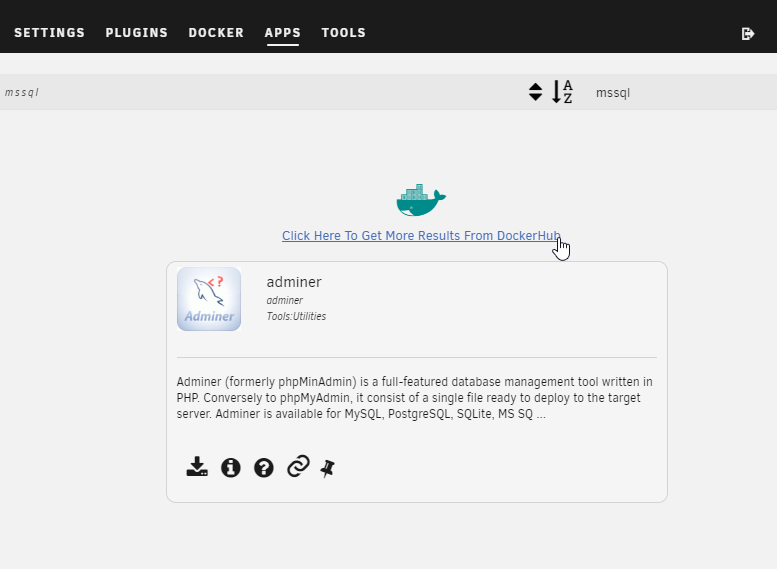
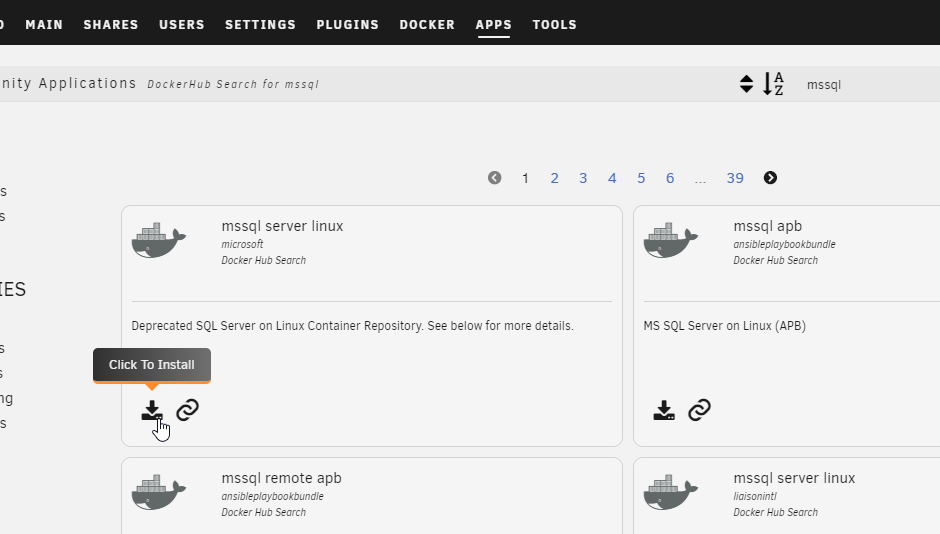
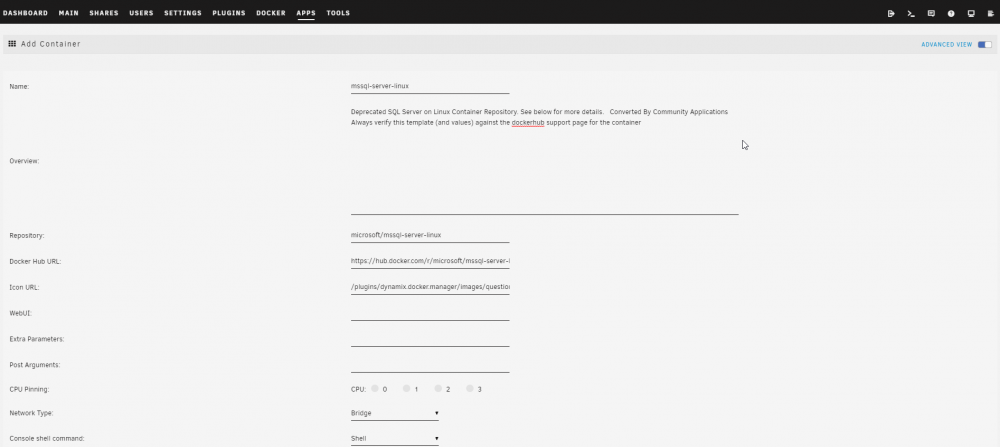
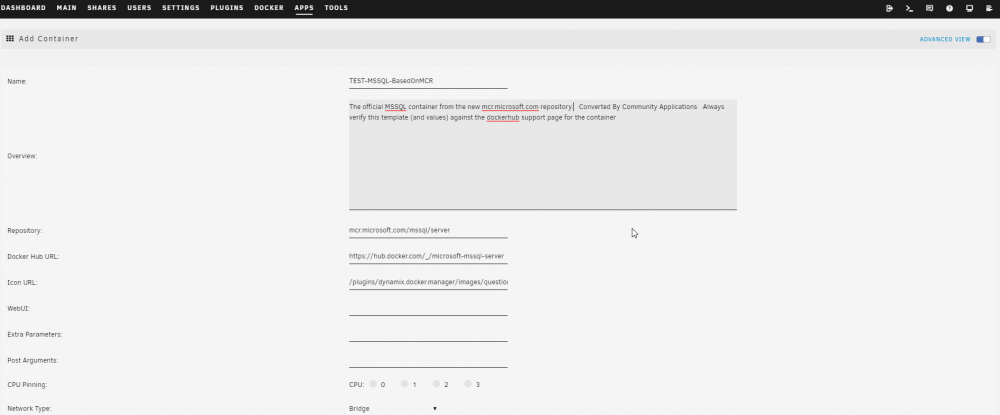
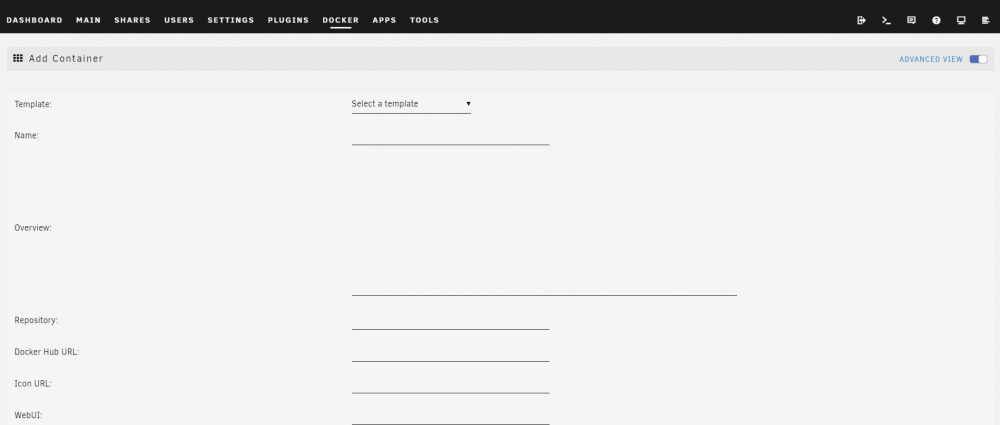
Well, I don't think that's a stupid question at all. I would assume someone has to take ownership on maintaining it, like the ones @binhex is maintaining? (Not sure how it works exactly, but thanks anyway for your work! ) Now @BoxOfSnoo's comment got me thinking. Modifying the user-template can be done more easily then copying the XML files on the flashdrive via the command line. So in case anyone else wants to download the image from the new Microsoft Container Repository I would take these steps: Search for mssql in the Community Apps (make sure that searching the DockerHub is enabled in the settings). And click "Click Here To Get More Results From DockerHub". Install the mssql server linux container (allthough it can be any container of choice, doesn't has to be mssql either) Make sure "Advanced" view is selected, this will show you which Repository and Docker Hub URL you're downloading the image. Change the following values: Name: Name of your container obviously Repository: mcr.microsoft.com/mssql/server Docker Hub URL: https://hub.docker.com/_/microsoft-mssql-server Icon URL: If you want a custom icon. Description: To something descriptive (although not really necessary). Then add the required Ports, Paths and Variables from the GUI. After clicking Apply the docker is created from the new Microsoft Repository and the template is written to Flash, without even using the command line. In my case it wrote (my-TEST-MSSQL-BasedOnMCR.xml to /boot/config/plugins/dockerMan/templates-user/). Easier then messing around with XML's from flash EDIT: Downloading a new container isn't even necessary, as you can just click "Add Container" from the docker tab. Just making sure the "Advanced" button is selected gives you the exact same options.
-
Did you download the MSSQL image from the Apps section? This only gives you the image from the Microsoft Hub that is not being updated anymore and is more then a year old (see post) By manually constructing the user-template xml you download the newest image of the Microsoft Container Repository by pointing it to the repo/image, which the Community Apps isn't able to find (yet). Nice to see this is resolved, good addition to dockerland on unRAID 🙂




