





wesman
Members
-
Joined
-
Last visited
Everything posted by wesman
-
Hi, Is it possible to get up update to EXIFTOOL? I believe its up to ExifTool 12.36 @dmacias Thank! and thanks for all your hard work!
-
Hi, Is it possible to get up update to EXIFTOOL? I believe its up to ExifTool 12.36 @dmacias Thank! and thanks for all your hard work!
-
Thank you for letting me know! that is news to me
-
Well, I created a second user without the special characters, and it worked. THANKS! Although, I am surprised that doesn't work
-
I used root, but it does have "#" in the password
-
Yep, double and triple checked, both with Hostname and IP, its right
-
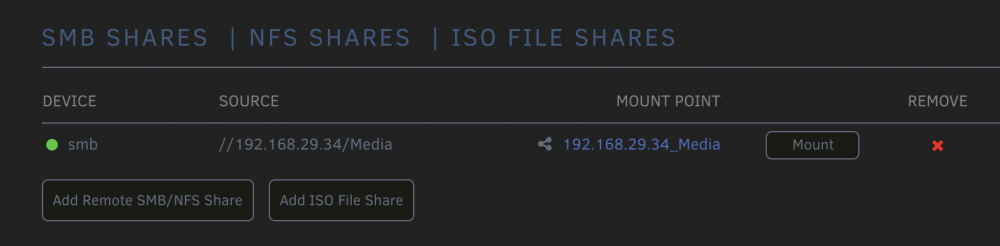
Hi there, I am attempting to mount a share on a different unraid system. I installed the latest (as of 28 Aug 2020) Version on UD, and the UD Addon. Added the Share, Got the Success lcon, but the share will not mount. I tried, Searching for the System (Found and added by name), as well as, deleting it and adding it by IP (Seen above). When I try to mount it, I get Aug 28 06:04:09 Eyrie kernel: CIFS VFS: \\HARDHOME failed to connect to IPC (rc=-13) Aug 28 06:04:09 Eyrie kernel: CIFS VFS: cifs_mount failed w/return code = -13 Aug 28 06:04:09 Eyrie unassigned.devices: Mount of '//HARDHOME/Media' failed. Error message: 'mount error(13): Permission denied Refer to the mount.cifs(8) manual page (e.g. man mount.cifs) and kernel log messages (dmesg) '. Aug 28 06:05:39 Eyrie unassigned.devices: Removing configuration '//HARDHOME/Media'. Aug 28 06:09:38 Eyrie ntpd[4558]: kernel reports TIME_ERROR: 0x2041: Clock Unsynchronized Aug 28 06:13:08 Eyrie unassigned.devices: Mount SMB share '//192.168.29.34/Media' using SMB3 protocol. Aug 28 06:13:08 Eyrie unassigned.devices: Mount SMB command: /sbin/mount -t cifs -o rw,nounix,iocharset=utf8,file_mode=0777,dir_mode=0777,uid=99,gid=100,vers=3.0,credentials='/tmp/unassigned.devices/credentials_Media' '//192.168.29.34/Media' '/mnt/disks/192.168.29.34_Media' Aug 28 06:13:08 Eyrie kernel: CIFS: Attempting to mount //192.168.29.34/Media Aug 28 06:13:08 Eyrie kernel: Status code returned 0xc000006d STATUS_LOGON_FAILURE Aug 28 06:13:08 Eyrie kernel: CIFS VFS: \\192.168.29.34 Send error in SessSetup = -13 Aug 28 06:13:08 Eyrie kernel: CIFS VFS: cifs_mount failed w/return code = -13 Aug 28 06:13:08 Eyrie unassigned.devices: Mount of '//192.168.29.34/Media' failed. Error message: 'mount error(13): Permission denied Refer to the mount.cifs(8) manual page (e.g. man mount.cifs) and kernel log messages (dmesg) '. Again, this is the lasted version of UD, Diagnostics attached, Thanks for the advice/assist! eyrie-diagnostics-20200828-0835.zip
-
Thank for the hard work! @dmacias Is it possible to get an update on exiftool? I think its up to 11.4 now
-
@dmacias given that /usr/bin/borg and /usr/bin/borgfs on both 6.7.2 and 6.8.3 have the same dependancies, which are at the same level, can I just move copy them into the 6.7.2 folder and would it work?
-
Anyone seen this before in the install? you can see it didnt complete the PULL's in the top section. Unable to find image 'linuxserver/tautulli:latest' locally its been sitting at this screen for 5 minute, and not the Docker tab will not load

-
yes, I liked it two posts up. and it has several diagnostics and sys logs posted in it. and the only difference between the two servers are these intel i7-7700 ----> intel i9-9900 ASUS Z170-A Mobo. ----> Asrock z390 Taichi Ultimate Virtually everything else is the same. SOOOOOO Now I am thinking: The only other difference is that the old server started on 6.7.2 then went to 6.8.3 the new server started at 6.8.3 is anything pulled forward in the upgrade path, that is different in fresh install path that might cause this?
-
@trurl I ask these, because in 6.8.x it appears to have issues revolving around dockers hanging and freezing etc. not no real logs errors in syslog
-
@trurl That's a great question, with no answer. As you might remember (or might not, I am sure you see 1000's of these all day), from this post. 6.8.3, continually crashed and ran Parity Checks every 3 days or so. I ran down every possible error log, scrubbed through, 100's of log files, posted several times - No fix. No Fixes. I was really tearing my hear out, especially considering my old server is at 6.8.3 and running like a champ. new server, not so much. tried everything, including completely reinstalling, twice. and the only difference between the two are these intel i7-7700 ----> intel i9-9900 ASUS Z170-A Mobo. ----> Asrock z390 Taichi Ultimate Virtually everything else is the same. SOOOOOO Now I am thinking: The only other difference is that the old server started on 6.7.2 then went to 6.8.3 the new server started at 6.8.3 I reinstalled (fresh) the new server at 6.7.2 and its been running like a champ since 14 March 2020. I am completely installing all my programs, then I am going to upgrade it to 6.8.3 Is there anything pulled up from 6.7.2 to 6.8.x that would not be the same if it was just a 6.8.3 fresh install? maybe the docker image? if it goes back to being on stable at 6.8.X i'll just go back to 6.7.2. just need to figure out how to get my borg updated
-
Thanks, I've been trying to research this, but there does not appear to be much information on this out there. is this the correct procedure? 1.) Install Slackware on a temp box somewhere. (lastest version I assume) 2.) Install Borg and all its dependancies. 3.) move the freshly compiled slackware '/usr/bin/borg' to my unraid '/usr/bin/borg' 4.) reboot unraid? Am I close?
-
Sorry. I only update the current stable for the most part. I just don't have the time to keep up with betas and past version compatibility. I understand, since its an install, will the basic "sudo apt-get install package" get what I need on unraid?
-
I hope this isn't the case, on my old server 6.8 doesn't want to be stable, i've tried several times but I am keeping this one at 6.7.2 until I can get that fixed
-
Hi @dmacias my target unraid server, is still at 6.7.2, and it still shows borg 1.1.10 as the latest? are there two different updates for this? could you update that as well?
-
Thanks, you're the best
-
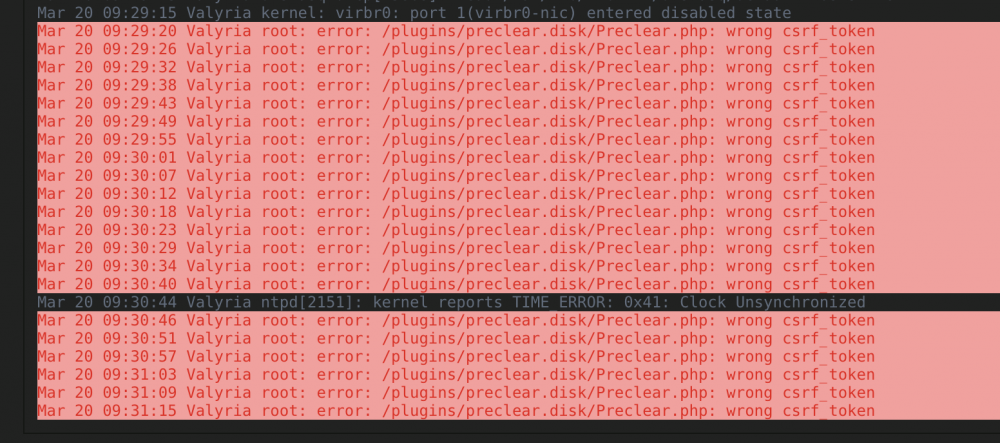
@gfjardim I am currently on the 2020.03.14a version of the plug in. And my log it littered with this error every 6 seconds. I am not actually using the Pre-Clear at the moment.
-
@Hoopster thanks! @dmacias Thanks for the awesome plug in!, is it possible to request an update for BorgBackup? Thank YOU for your awesome work!
-
Does anyone know how to request an update to Nerd Pack? I noticed that Borg Backup was moved to 1.1.11 due to an error in the 1.1.10 that is current in Nerd Pack. I am sure it will get updated eventually but thought I could draw someones attention to it. If you're affected you can follow directions here to fix it, after the update in Nerd Pack, of course.
-
@Djoss Apparently, the Hanging issue was the result of a faulty SATA Cable to one of my Array Disks. Odd that it would affect so much, but it appears to be working correctly now. Will check the speed on the next Bluray that I order
-
Approximately the same speed on all disks
-
That's what it suppose to do, but it hangs the entire system, requiring a Power Button force power down to get anywhere.
-
The other issue I am currently having, is that if I start this container, I can't get i to stop


