





JT24
Members
-
Joined
-
Last visited
Everything posted by JT24
-
Any advice would be very much appreciated.
-
Does anyone have any thoughts on this?
-
I've just began to rip my Blu-Ray collection and everything is going great. I though I'd give a 4K a try, no luck. Did a little research, it seems I need a different player to achieve this. I was thinking the Pioneer BDR-UD04. Has anyone else tried 4K ripping? Any issues?
-
Ok, that's fine. Just wish I could see some sort of log or anything to show that there is progress.
-
Hi, I've got a pesky problem that i'm hoping someone will be able to solve for me. I've been using Krusader to sync an FTP server locally. I then learnt about this container and was hoping to automate the process away from Krusader. I setup the server, tested, connecting fine. I'm syncing the directories to the same location that I was previously using with Krusader, however, i'm not seeing any progress. It says that the task is running and downloading. Progress bar goes along, then back to the start, not indicating progress that well. Any ideas as to why this might be happening?
-
@rsutter, try the above.


-
I meant, how are you connecting to Plex? If you're connecting via the webgui, you'd be using either the "local-ip:32400/web" or "dynamic-dns-address:32400/web". Where I was going with the type of connection.... if the IP of your plex server is 192.168.0.100 and the gateway of you 4G connection (if there's a router) is 192.168.0.1/24 (255.255.255.0), you won't be able to connect to the plex server as it'll be trying to find that IP locally. Hope this kind of makes sense.... Just a thought. It's a common mistake with VPN's. Am I on the right train?
-
How are you trying to connect to it? Via the device name or IP What connection are you using when connecting to your VPN? Cellular or wlan/lan
-
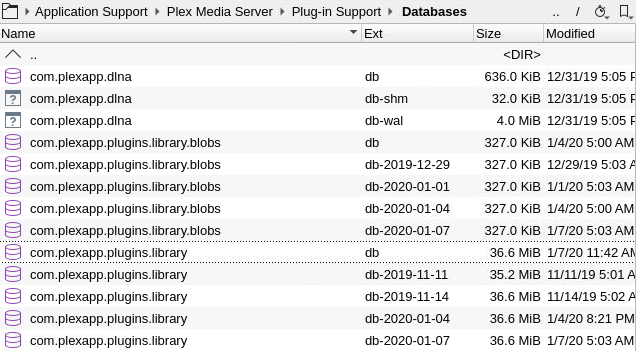
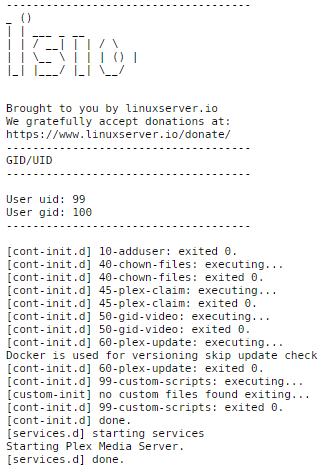
@Mogo, The below may be able to help you. I had quite a few issues setting up Plex initially. At first it was simple to get it going. content added fine. everything was working correctly. The next day, "Server Unavailable".... great. I did quite a lot of research and learnt quite a bit. This is what I learnt. - IPv6 should be disabled, can cause some instability and trouble accesing the service. Settings -> General -> Network - Set the appdata folder specifically to 1 drive. This way, unraid can't move it around in the bachground and destroy links. Edit Docker -> Advanced View -> Show More Settings. - Install the "Krusader" Docker Container. This will allow you to navigate to the appdata folder. - I don't like to wait the full 3 days usually, so I'll stop Plex, open Krusader, navigate to this folder, make a copy of the library.db file, name it library.db-2020-01-07 for example. If i have a corruption issues later, i'll rename the existing library.db to library.ob-old. Find my latest backup, copy it, rename to ......library.db Start Plex, and that fixes the problem every time. if it doesn't I just use the backup before. - If you want to make sure that the DB is corrupt, open the live logs. (Click on the Docker -> Logs) This is what i'd call "Normal" When you see Starting Plex Media Server Starting Plex Media Server Starting Plex Media Server Starting Plex Media Server Starting Plex Media Server Starting Plex Media Server Starting Plex Media Server It's corrupt. I'm explaing all of these in as simple term I know in the hopes that this would help many people out there. I'll be honest, it's not the easiest thing to setup if you're a semi-cleanskin. I've been there. But once you get it all setup and working, my gosh is it fantastic. If you have any more questions, just ask.
-
Perfect. Your incredibly quick thinking and equally timed responses have solved my problem. Many thanks.
-
Hi, I'm just wondering how I can mount an external USB drive to transfer data? I'm seeing it in the System Devices, just not having any luck in mounting. Does anyone have any ideas?
-
I've just copied and pasted the commands into the console. Pretty sure it wasn't going to work, and it didn't. Any ideas as to how I can run them correctly?
-
Is there a way to salvage the database and rebuild it? How can I try this? https://support.plex.tv/articles/201100678-repair-a-corrupt-database/?_ga=2.158357434.1477259291.1572050764-45369178.1571561051 I'm not sure how to execute these commands.
-
Could you please post how to do this?
-
Dammit, it's happened again. Overnight something must've happened. This morning, I woke to this.... Starting Plex Media Server. Starting Plex Media Server. Starting Plex Media Server. Starting Plex Media Server. Last time this occurred, I changed the app data folder to a specific drive. /mnt/disk1/appdata/plex Does anyone have any ideas how to prevent this?
-
The only thing I can see there that doesn't add up is the Extra Parameters. You've got an extra "/dev/dri" and you don't seem to have any mounted directories, but i'm not an expert. Just trying to help.
-
How is the network configured in the Docker container?
-
What's the log showing?
-
Shouldn't the link be http://<IP-or-hostname>:34200/web/index.html Alternatively, click the icon on the docker and select "webGUI".
-
Which one of these were you thinking?
-
Oct 20, 2019 23:38:05.990 [0x14fc6d221700] INFO - Plex Media Server v1.18.0.1944-f2cae8d6b - Docker Docker Container (LinuxServer.io) x86_64 - build: linux-x86_64 debian - GMT 11:00 Oct 20, 2019 23:38:05.990 [0x14fc6d221700] INFO - Linux version: 4.19.56-Unraid, language: en-US Oct 20, 2019 23:38:05.990 [0x14fc6d221700] INFO - Processor Intel(R) Core(TM) i5-9500 CPU @ 3.00GHz Oct 20, 2019 23:38:05.990 [0x14fc6d221700] INFO - /usr/lib/plexmediaserver/Plex Media Server Oct 20, 2019 23:38:05.989 [0x14fc76aebb80] DEBUG - BPQ: [Idle] -> [Starting] Oct 20, 2019 23:38:05.989 [0x14fc76aebb80] DEBUG - FeatureManager: Using cached data for features list Oct 20, 2019 23:38:05.990 [0x14fc76aebb80] DEBUG - Opening 20 database sessions to library (com.plexapp.plugins.library), SQLite 3.26.0, threadsafe=1 Oct 20, 2019 23:38:07.989 [0x14fc6ce1f700] WARN - Crash: Crash reporting disabled Oct 20, 2019 23:38:12.837 [0x14fc76aebb80] DEBUG - Running migrations. (EPG 0) Oct 20, 2019 23:38:12.837 [0x14fc76aebb80] ERROR - SQLITE3:(nil), 11, database corruption at line 64757 of [bf8c1b2b7a] Oct 20, 2019 23:38:12.837 [0x14fc76aebb80] ERROR - SQLITE3:(nil), 11, database corruption at line 64798 of [bf8c1b2b7a] Oct 20, 2019 23:38:12.837 [0x14fc76aebb80] ERROR - SQLITE3:(nil), 11, statement aborts at 3: [select max(play_queue_generators.changed_at) from play_queue_generators] database disk image is malformed Oct 20, 2019 23:38:12.838 [0x14fc76aebb80] ERROR - Database corruption: sqlite3_statement_backend::loadOne: database disk image is malformed Oct 20, 2019 23:38:12.838 [0x14fc76aebb80] ERROR - Error: Unable to set up server: sqlite3_statement_backend::loadOne: database disk image is malformed (N4soci10soci_errorE)
-
Hi, I just installed this docker as I had issues with the other plex one. Had to restart the docker, now I'm getting this in the logs and no webGUI. ErrorWarningSystemArrayLogin ------------------------------------- _ () | | ___ _ __ | | / __| | | / \ | | \__ \ | | | () | |_| |___/ |_| \__/ Brought to you by linuxserver.io We gratefully accept donations at: https://www.linuxserver.io/donate/ ------------------------------------- GID/UID ------------------------------------- User uid: 99 User gid: 100 ------------------------------------- [cont-init.d] 10-adduser: exited 0. [cont-init.d] 40-chown-files: executing... [cont-init.d] 40-chown-files: exited 0. [cont-init.d] 50-gid-video: executing... [cont-init.d] 50-gid-video: exited 0. [cont-init.d] 60-plex-update: executing... Docker is used for verisoning skip update check [cont-init.d] 60-plex-update: exited 0. [cont-init.d] 99-custom-scripts: executing... [custom-init] no custom files found exiting... [cont-init.d] 99-custom-scripts: exited 0. [cont-init.d] done. [services.d] starting services Starting Plex Media Server. [services.d] done. Starting Plex Media Server. Starting Plex Media Server. Starting Plex Media Server. Starting Plex Media Server. Starting Plex Media Server. Starting Plex Media Server. Starting Plex Media Server. Starting Plex Media Server Any ideas as to what this may be?
-
Hi, I seem to be getting this error whenever I try to copy something. Any idea what it might mean? Error 'Posix error - Read-only file system' occurred while creating '/storage/Handbreak/Watch/title_t01.mkv'

