Ver7o
Members
-
Joined
-
Q35, cachy linux, arc pro b50. I never had black screen issues, only audio passthrough not working. And with these edits I'm sad to report, the audio still doesnt initialize correctly (dummy output only). I'm really happy for people who got it working with this. Kudos @dnaKID .
-
Sparkle A310 Omni view Intel B50 both cases Q35 and OVMF. both times dGPU is not set as primary. both times the audio is passed through, lspci detects it withing vm, but driver only lists analogue capabilites hence the no HDMI sound.
-
7.3.2 with A310 and CachyOS. Video works, audio does not. 7.3.2 with B50 and CachyOS. Video works, audio does not.
-
Downgrade was done from within GUI. Tools - Downgrade OS - redirect to unraid account and from there you confirm the downgrade. No manual changes were made to the flash drive. The trial account is now complaining that the GUID belongs to a different account. The issue seems that nothing is stopping you or alerting you that current licence is not matched to the current account before performing a downgrade. I'm speculating here, ofcourse, but this seems like the most likely failure mode that got me locked out. I do not remember relogging from my main account, which I keep logged in, to the trial account or any alert that there is a potential mismatch before downgrading. I opened a ticket with LT because this is just silly.
-
I think the issue is that when I downgraded Unraid from that shiny, unneccessary, 1000 redirects unraid account page I have not noticed that I was logged in with my main account, not the trial account. Upon booting back up the licence was then invalid because it somehow got reassigned to a different email then initially used. Hence the complaining that the GUID is registered to another user. Could this have happened?
-
I have used a quality drive. Its a Kingston DT SE9 2.0 which were recommended on these forums years ago, AFAIR. GUID format is 09XX-XXXX-XXXX-C391B939D633. Surely its flash based. I would like the trial that should still be active back. Buying a licence doesn't seem like a fix when something went very wrong. No matter what I do, I cannot get past it complaining about invalid installation.
-
it cannot be TPM. everything is contained within the flashdrive. And I cannot start a new trial because its throwing "GUID '<snip>-C391B939D633' is already registered to another user"
-
Hi, I activated a trial licence with 7.3.1 and it has about a week left. To test if I'd had more luck with what I'm trying to do I downgraded to 7.2.7 and now the system is complaining of GUID mismatch, even tho the flash drive is the same. What is the correct way to go about this so I can get back to testing?
-
I cannot for the life on me get sound over HDMI on 11th gen HD750. I tried windows and linux, i440fx and q35 as well as seabios. It makes no difference no matter the permutation of with or w/o sound card, combined bios, different igpu bios. In linux sound card shows up, uses correct snd_hda_intel drivers but aplay -l shows it is only detecting analog audio and does not have any knowledge of HDMI. I am out of idea of what else I could try.
-
I could swear I did it the same before but some reason it didn't take. Now it did. 😒 Thanks a bunch!
-
has anyone managed to succesfully remap port 8080 to something else and have webui come up?
-
I will add to this with my experiences. I have A310 and Pro B50. Case 1: 7.2.7 with A310 in VM works flawlessly, winblows and linux. Case 2: 7.2.7 with Pro B50 VM has no sound, correct resolution and scaling do not load + another usb device for some reason isn't properly passed through as its not shown in lspci inside VM. Case 3: 7.3.1 with A310 VM has no sound, correct resolution and scaling do not load + another usb device isn't properly passed through as its not shown in lspci inside VM. Case 4 7.3.1 with Pro B50 VM boots to black screen.
-
went from 7.2.5 to 7.3.1. this update makes my linux VM /w intel arc not work. no errors, no clues in the logs just blank "no input" screen. downgraded as im not in the mood to troubleshoot.
-
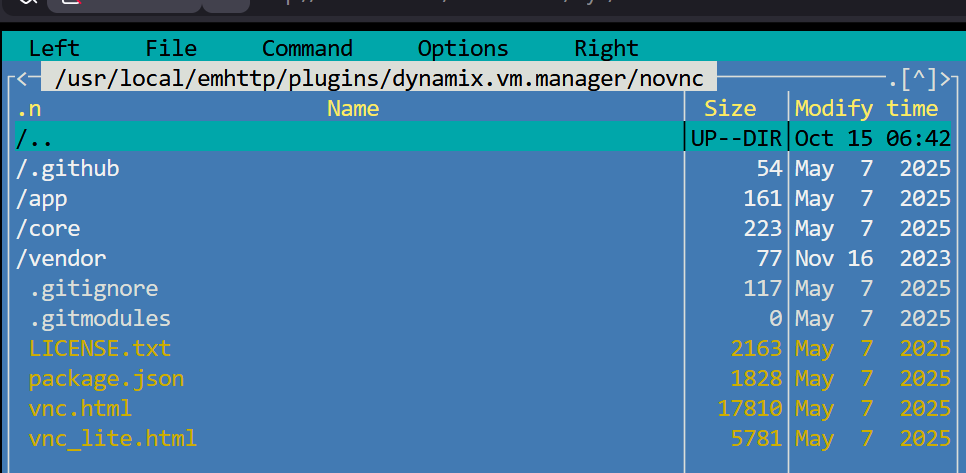
Fixed it. Per https://github.com/novnc/noVNC/blob/master/defaults.json these files are empty so I just used: cd /usr/local/emhttp/plugins/dynamix.vm.manager/novnc/ touch defaults.json touch mandatory.json and it works.
-
I have been trying to create a Linux VM but immediately ran into problems with dynamix.vm.manager trying to remote into the VM using VNC. It seems some files are missing vm manager: /usr/local/emhttp/plugins/dynamix.vm.manager/novnc/defaults.json /usr/local/emhttp/plugins/dynamix.vm.manager/novnc/mandatory.jso Log output: Feb 2 08:38:55 Tower nginx: 2026/02/02 08:38:55 [error] 18625#18625: *4094 open() "/usr/local/emhttp/plugins/dynamix.vm.manager/novnc/defaults.json" failed (2: No such file or directory) while sending to client, client: 192.168.1.102, server: , request: "GET /plugins/dynamix.vm.manager/novnc/defaults.json HTTP/1.1", host: "192.168.1.100", referrer: "http://192.168.1.100/plugins/dynamix.vm.manager/vnc.html?v=1746576860&resize=scale&autoconnect=true&host=192.168.1.100&port=&path=/wsproxy/5700/" Feb 2 08:38:55 Tower nginx: 2026/02/02 08:38:55 [error] 18625#18625: *4094 open() "/usr/local/emhttp/plugins/dynamix.vm.manager/novnc/mandatory.json" failed (2: No such file or directory) while sending to client, client: 192.168.1.102, server: , request: "GET /plugins/dynamix.vm.manager/novnc/mandatory.json HTTP/1.1", host: "192.168.1.100", referrer: "http://192.168.1.100/plugins/dynamix.vm.manager/vnc.html?v=1746576860&resize=scale&autoconnect=true&host=192.168.1.100&port=&path=/wsproxy/5700/" Feb 2 08:38:55 Tower nginx: 2026/02/02 08:38:55 [error] 18625#18625: *4233 recv() failed (104: Connection reset by peer) while reading upstream, client: 192.168.1.102, server: , request: "GET //wsproxy/5700/ HTTP/1.1", upstream: "http://127.0.0.1:5700/", host: "192.168.1.100" How should I go about fixing? tower-diagnostics-20260202-0843.zip