




.png.2fb77bd4acd6c6b8a33209d0ca9b7510.png)

Mirano
Members
-
Joined
-
Last visited
-
Does this mean I can uninstall the plugin and start using it natively? Since i'm able to VF it here.

-
Update, I made a new VM and if i boot it up, first connect to RDP, delete the code 43 driver, wait 5 minutes then connect with Parsec it's got a working driver. Really strange tho.
-
Hey, so i've had this running for quite a while, but i restarted my VM today and it just stops working, it gives Code 43 and the following in the VM Log: char device redirected to /dev/pts/3 (label charserial0) 2025-07-22T15:22:50.062308Z qemu-system-x86_64: VFIO_MAP_DMA failed: Invalid argument 2025-07-22T15:22:50.062353Z qemu-system-x86_64: vfio_container_dma_map(0x5606a2d63de0, 0x382800000000, 0x20000000, 0x154100000000) = -2 (No such file or directory) 2025-07-22T15:22:50.140639Z qemu-system-x86_64: VFIO_MAP_DMA failed: Invalid argument 2025-07-22T15:22:50.140658Z qemu-system-x86_64: vfio_container_dma_map(0x5606a2d63de0, 0x382800000000, 0x20000000, 0x154100000000) = -22 (Invalid argument) 2025-07-22T15:22:54.230866Z qemu-system-x86_64: VFIO_MAP_DMA failed: Invalid argument 2025-07-22T15:22:54.230889Z qemu-system-x86_64: vfio_container_dma_map(0x5606a2d63de0, 0x382800000000, 0x20000000, 0x154100000000) = -22 (Invalid argument) 2025-07-22T15:22:54.293984Z qemu-system-x86_64: VFIO_MAP_DMA failed: Invalid argument 2025-07-22T15:22:54.294013Z qemu-system-x86_64: vfio_container_dma_map(0x5606a2d63de0, 0x382800000000, 0x20000000, 0x154100000000) = -22 (Invalid argument) 2025-07-22T15:22:54.443558Z qemu-system-x86_64: VFIO_MAP_DMA failed: Invalid argument 2025-07-22T15:22:54.443582Z qemu-system-x86_64: vfio_container_dma_map(0x5606a2d63de0, 0x382800000000, 0x20000000, 0x154100000000) = -22 (Invalid argument) 2025-07-22T15:22:54.464231Z qemu-system-x86_64: VFIO_MAP_DMA failed: Invalid argument 2025-07-22T15:22:54.464257Z qemu-system-x86_64: vfio_container_dma_map(0x5606a2d63de0, 0x382800000000, 0x20000000, 0x154100000000) = -22 (Invalid argument) 2025-07-22T15:22:58.141018Z qemu-system-x86_64: VFIO_MAP_DMA failed: Invalid argument 2025-07-22T15:22:58.141040Z qemu-system-x86_64: vfio_container_dma_map(0x5606a2d63de0, 0x382800000000, 0x20000000, 0x154100000000) = -22 (Invalid argument) This issue seem to be common, so i checked all the steps i could find: Reboot of VM Reboot of Server Reassigned VFIO from 3 to 2 Tried VFIO booting, but that wasn't recommended and or working Assigned .bin for BIOS Uninstalled plugin > Reboot > Installed plugin Tried making new VM config Tried different versions of Intel drivers > All of them give code 43 I'm quite out of options, anyone else have ideas?
-
Thank you, this worked perfectly
-
No worries, thank you for responding! :)
-
@ich777 Have you had any chance to take a look into the issue, or require more information from me perhaps?
-
Alright that's clear now, is there a preference based on speed? Or is it similar enough that both will provide the same speed? (10GBe network)
-
Hey! to add to this, it seems like I cannot switch to IPVlan if Bridging is disabled, is that true?
-
Hey Ich777. It seems like, update 7.1.2 has broken the Virtual GPU for my VM. i've tried every step under troubleshooting but it gives code 45 (Not connected). Is the update working for you? Tried the following: Changing Modes within the plugin New VM Reinstalling Plugin (including restarts) Server reboots Unfortunately no luck yet
-
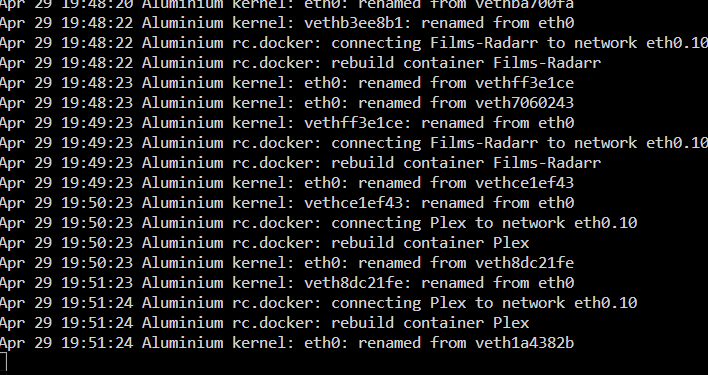
ah perfect, Thank you for the explanation, its currently rebuilding every container:
-
Btw, have you ever used this? Sounds like the only reason to use it you have a VM with a firewall on it to get DHCP working,
-
Yeah I got enough ports to connect it to their own ports, its stated weird in the description of the function then, it sounds like it creates a virtual network to get docker and vms connected to the port. Hence why I always used it. so replicate my test environment to production and that’s totally fine, correct?
-
Hey, That makes alot more sense. So what i could do with bridging is setup: ETH0 receives DHCP from my UDM Pro. ETH0 got bridge enabled and if i include ETH1 into it i can hook my PC to ETH1 so it receives an DHCP through the unraid server to the UDM Pro. Is what i'm saying correct?
-
Hey, Thank you for taking the time to answer to me. I understand the concept or a Bonding, to combine multiple physical adapters to get either more throughput or redundancy. I just don't understand the function of the Bridging function. I'm still confused by that, but that could just be me haha.
-
Hello, I have a question regarding setups With bridging / macvlan and ipvlan I've recently switched backed to macvlan so each docker is shown in the unifi ui, now i came to some questions: My production server is running the following: Network settings: ETH0 Enable bonding no Enable Bridging: yes Bridging members of br0: eth0 Docker: Docker custom network type: macvlan Host access to custom networks: enabled My test server is running: ETH0 Enable bonding no Enable Bridging: no Docker: Docker custom network type: macvlan Host access to custom networks: enabled Both seem to function exactly the same. other than i have for my dockers on production br0.10 and on my test server eth0.10 What is the benefit of running "Enable Bridging: yes"? It seems like it's got no function, or none that i'm seeing. The function description: "Bridging is a feature which creates a virtual bridge and allows VMs and Docker containers to communicate directly with the physical Ethernet port. Both bonding and bridging can be combined to let VMs or containers communicate over a bonded interface." The "strange" thing is that on both setups it seems to work, so it only looks like bridging adds another layer of networking to handle. Can anyone advise me on the differences and best practices?


