





scytherbladez
Members
-
Joined
Everything posted by scytherbladez
-
I have (had) the same setup, except I switched from SyncBackFree to Syncthing awhile back. After sleeping on it... this CrashPlan change doesn't affect my setup, other than costing twice as much. I have about 6 months to decide, so I'll likely run something along side CrashPlan for awhile, though whatever I choose it'll take me weeks to upload using my 2Mbit upload speed.
-
I came here looking for alternatives to CrapPlan bailing on home consumers. SpaceInvader One video on Duplicati is worth watching. In it he discovered that the default /tmp folder could potentially fill up your "docker" image file (and details how to remap it). Since SpaceInvader One video LS have since added the variable to make this mapping easier, you just tell it where you want tmp files stored. For majority of users the cache should suffice, depending on the upload volume size.
-
My word probably means as much as a dog shit on the bottom of your shoe at the moment, but appreciate the effort that went into fixing this. On Friday you mentioned that the three of you had this working fine on both unRaid 6.3.5 and 6.4rc6. Not sure why yours wasn't broken on 6.3.5, but ours was, given what you said was the problem . But any way... as the others have already mentioned, Smokeping is now operational again. Thank you.
-
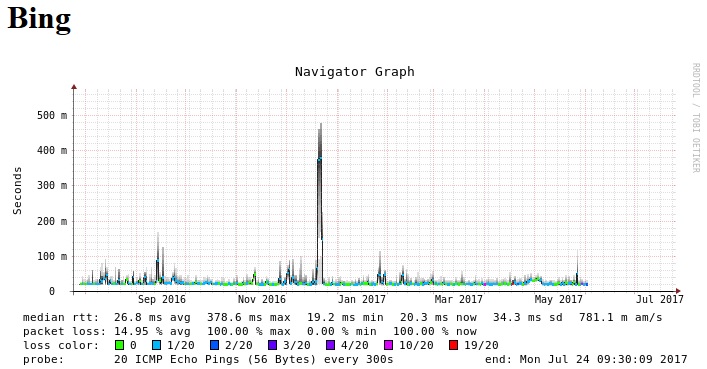
My existing graphs still show data and subsequent blanks since the issue first appeared. I've tried two different W10 machines with Firefox and Edge, and an Android 6 phone with Firefox. IPV6 is disabled on my network. I'm running unRaid 6.3.5. Bonding is disabled. Bridging is enabled (eth0). It's been ~8 weeks since it broke, and from memory the only changes I made to unRaid server at the time was the updating various docker images.
-
Shoot the devil's advocate while you're at it. Sorry for wasting your time trying to get some support & guidance.
-
This support thread can be closed, docker no longer supported.
-
I couldn't follow what you've done here to fix that particular error. Did you have an existing Smokeping install with graphs that had existing data? I ask because changes I make to config do appear in my existing install (Even though this error is reported) e.g. graphing period (1 hour, 3 hours etc).
-
Are you alive @linuxserver.io?
-
@CHBMB @sparklyballs any ideas? Seems a small subset of (known) users are affected thus far.
-
This post is running commentary of my Smokeping investigations. I'm not a Linux person, and don't know how Dockers operate either. I've fixed my Webgui access problem. I noticed between the clean docker template and my existing docker template, the host port in my install was 8086 and linuxserver was 80. I'm about 99.9% sure I didn't change this, because I don't even know how. The overview section shows the default to be 8086 too, so Linuxserver changed this at some point? I can see all my existing data, but nothing new has been recorded since Friday June 2nd. @nallar graphs stopped recording on June 9th, exactly 1 week after mine. And I believe Linuxserver update dockers every Friday? I can see the RRD file timestamps updating every 5 minutes, but nothing new displayed in graphs. For existing data to still be showing, RRD file timestamps updating, but no new data displayed... may suggest that there is an issue with probe and/or new data being stored (at all, or correctly).. ? Running the "smokeping --check" command results in the following error: ERROR: can't open /usr/bin/../etc/smokeping/config: No such file or directory Note: My folder mappings are setup like 'Smokeping -> config' directory and 'Smokeping -> data' directory. Edit: To run that above command (For users such as myself who didn't know) SSH into your unraid and then run this command: docker exec -it smokeping /bin/bash This may be useful, I'm not too tech savvy with Linux: https://lists.oetiker.ch/pipermail/smokeping-users/2014-November/005584.html Exerpt from a reply "In short, you either have a problem with the RRD files getting written, or your web-server/cgi reading the RRD's." And also this post: https://github.com/oetiker/SmokePing/wiki/FAQ FAQ mentions to run Smokeping in debug mode, but I don't know how to do this. Binhex dockers have an option to enable this which is great, perhaps Linuxserver could also implement this? I tried to add --debug in extra parameters, but that's a no go. This works, grabbed from binhex docker: -e "DEBUG"="true", but I can't see any additional log data from it. I added a new website to monitor, it created the RRD file, but no data being recorded and/or displayed. Parts of the Smokeping FAQ I'm unable to play around with are those with references to whatever the webserver runs as (emhttp?), because I don't know how Dockers work or how that's implemented. Hit a road block for this session. Hopefully some gibberish might help lead to a solution... Managed to break WebGUI access. Linuxserver docker to blame. If you change host from bridge to host mode, it doesn't work. And then changing it back to bridge mode, also doesn't work as the container port has been modified (to 8080), but not returned to 80.
-
The latest Plex Media Server update supports my Hauppauge PCIe TV tuner card and is working with this Plex docker. I don't have any Android TV or iOS devices to test Live TV functionality though. Recording LiveTV does not appeal to me, but guess I'll play around with it for the time being.
-
I guess we'll have to wait until one of your systems break. Not sure why I seem to be the only one who also lost GUI access too.
-
Old mate @helpermonkey didn't read any of the posts above their own.
-
This change also broke my Deluge-VPN, which I rarely use and only discovered today. For any one using PIA, you'll have to set the server to one of these locations now: CA Toronto CA Montreal Netherlands Switzerland Sweden France Germany Romania Israel
-
This happened to me too, graphs stopped producing data about ~1-2 days before I posted here. After removing, and reinstalling, not fixed. So I deleted my entire docker file, and reinstalled all my dockers, and then found I couldn't access Smokeping WebGUI at all (Clean install or existing data). I've since stopped dockers automatically updating, because it just breaks things when on an automatic schedule. TLDR: My SmokePing still broken, graphs stopped producing data before I lost WebGUI access too. 3-July-17 Edit: Loss of WebGUI a result of changing "Network type" from "Bridge" to "Host" and back to "Bridge". This docker has issues.
-
Since I updated this docker a few days ago, my install has stopped working. Though the log seems to indicate that it's probably working... I just can't access it? The URL I've always used to access is: [IP]:8086/smokeping/smokeping.cgi Any ideas? Thanks ------------------------------------- GID/UID ------------------------------------- User uid: 99 User gid: 100 ------------------------------------- [cont-init.d] 10-adduser: exited 0. [cont-init.d] 30-config: executing... [cont-init.d] 30-config: exited 0. [cont-init.d] done. [services.d] starting services [services.d] done. AH00558: httpd: Could not reliably determine the server's fully qualified domain name, using 172.17.0.2. Set the 'ServerName' directive globally to suppress this message ### assuming you are using an fping copy reporting in milliseconds Smokeping version 2.006011 successfully launched. Not entering multiprocess mode for just a single probe. FPing: probing 15 targets with step 300 s and offset 177 s.
-
You're close, in Syncthing you use the volume mapping name (Container path) when starting the "Folder Path" within Syncthing. For example if your "Host Path 1" container path is /sync (the default of Syncthing) and you've set it to /mnt/user/ then... In Syncthing when adding a folder, you'd start "Folder path" with /sync and it'll display what is available at /mnt/user/
-
Thanks CHBMB, I'll give that a go when I next get a chance Edit: One of the things I did try was stop the MythTV docker, but I didn't reboot. Can confirm that CHBMB advise did the trick! Thanks again
-
Thanks CHBMB, I'll give that a go when I next get a chance Edit: One of the things I did try was stop the MythTV docker, but I didn't reboot.
-
I've been using MythTV since sparkly made a docker for it, but I'm keen to try Tvheadend again. However I can't seem to get my DVB-T cards to show up (No TV adapters appear). In my current MythTV setup (and prior to that Tvheadend) the extra parameters in the docker are: --device=/dev/dvb/adapter0/demux0:/dev/dvb/adapter0/demux0 --device=/dev/dvb/adapter0/dvr0:/dev/dvb/adapter0/dvr0 --device=/dev/dvb/adapter0/frontend0:/dev/dvb/adapter0/frontend0 --device=/dev/dvb/adapter1/demux0:/dev/dvb/adapter1/demux0 --device=/dev/dvb/adapter1/dvr0:/dev/dvb/adapter1/dvr0 --device=/dev/dvb/adapter1/frontend0:/dev/dvb/adapter1/frontend0 Any ideas? Thanks
-
Sorry, I guess I misinterpreted the ambiguous comment . Can confirm my blackscreen VNC has been fixed, thank you. Highlights the major flaw with having a single user providing dockers. If the docker system allowed a rollback, or ability to choose a previous build, this wouldn't be an issue. (You could rebut this and say build your own, but I'd digress)
-
So you are not updating this container even though numerous users are presented with a black VNC screen?
-
I haven't received any CrashPlan e-mails...
-
It's working in the background, can verify this by visiting crashplan website and seeing last update. We just don't have access to the crashplan (app) itself.
-
For the record my Plex still updated with version=plexpass set.
