





bugsysiegals
Members
-
Joined
-
Last visited
Everything posted by bugsysiegals
-
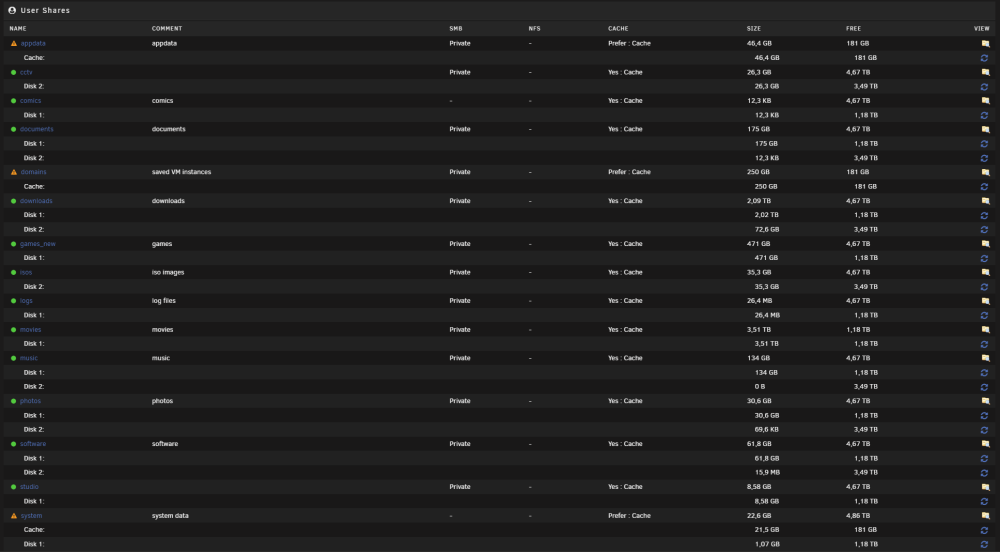
Ok, so shut down Docker, delete the docker.img, set it to /mnt/cache, start Docker, and it will recreate on cache without losing any settings like network type, fixed IP, etc.? About appdata, I only see Compute All on the bottom of Shares but not under appdata. Here's what I see below ... if I'm not mistaken it's recommended to keep the appdata, domains, and system on cache but it's then not backed up to the array so I can lose these critical items?
-
I clicked the folder on Disk 1 and found the latest file updated is docker.img. When I go to settings > Docker I see the v disk and app data is set to /mnt/user. Is it as simple as shutting down Docker service, changing this to /mnt/cache and then starting it back up or do I need to migrate some files from Disk 1 to the cache? Perhaps shutting down Docker service, running Mover, and then starting Docker service?
-
I've Disk 1, Disk 2, and Parity Drives. I noticed they were always running and was able to get Disk 2 to shut down after changing all my dockers from /mnt/user to /mnt/cache. That said, I see Disk 1 and Parity always active with Reads/Writes but cannot tell what is accessing them when using Active Streams/Open Files plugins or "lsof | grep mnt" command. How else do I find out what's accessing these disks and keeping them active?
-
FWIW - if you stop the array before reboot it will not do the parity check. Obviously this should only be done if you're shutting down safely and not because of some failure.
-
Yes, I was setting an IP on my VLANs in unRAID. You should set your VLAN # and None for address.
-
For the longest time I've either had slow to open folders, menu to decide to copy/move files, transfer, and often some files transfer while others fail. I couldn't understand what was wrong and why my Win 10 VM couldn't transfer files to my unRAID shares. Solution: I was setting IPv4 Address Assignments to my VLANs and needed to set them to None. My config ... my unRAID server has a single NIC port which I've enabled bridging, assigned IPv4 Address, and pointed Default Gateway/DNS to my router IP. unRAID is connected to a Cisco 3750G switch (trunk port with specific VLANs allowed) which is then uplinked to a HP Elitedesk G2 Mini PC running pfSense with VLANs (LAN, WAN, Cellphones, Computers, Gaming, Guests, IOT, Multimedia, Security, Docker_VM, etc.) all assigned to it's single interface. Even though this is "router on a stick" with single port shared for all WAN/LAN, I've never saturated the link and needed more. That said, in unRAID, I added a few VLANs for Gaming VM, Security Camera VM, and Dockers. I added their respective VLAN ID's and tried both Static and Automatic IP assignment. While it allowed everything to function, as I mentioned previously, some files would copy to the share while some would fail, it was slow as heck, etc. The reason I was assigning it was because at one point I tried None but lost the bridges to these VLANs and figured I needed to assign IP's in order to see them. Perhaps it was some bug because I tried None again, can see the bridges just fine, and wow, no more failed files, transfer speeds are incredible, copy/move/overwrite menus pop up immediately, etc. I hope this helps somebody who's having similar issues and maybe a help note can be made on the network page to advise against this or when you would want to assign an IP. Thanks for reading!
-
This is the first time the power button hasn't allowed a hard reset ... perhaps because I hit the soft reset button before holding the power button down, not sure. In the past, the power button has worked to hard reset, but unfortunately this means a full scan when powering back up, thus the question, what command to perform a power down without needing a full scan on reboot and if unRAID logs would provide any insight into why the ethernet port and anything else would have stopped working.
-
I went to login to unRAID this morning and couldn't connect. I followed the ethernet wire to my Cisco switch and noticed the port wasn't lit up. I logged into Cisco web portal and see 4 input errors on this port. I tried to move the wire to another port but nothing. I checked the wire at the MB port and no wiggling would cause it to light up. I switched my monitor to DVI in order to see the command line so I could shutdown but nothing would show up. I then held down the power button to hard reboot and it wouldn't shut down until I unplugged the cable!! All that said, is there any logs I can provide which might help somebody understand why the ethernet port and computer itself seemed to freeze up? In the future, if I lost ethernet connection and could access the command line, is there a safe way to shutdown so that I don't have to run the parity check on 20+ TB of data?
-
There was one setting, not sure which, that allowed slightly better than 100 FPS, maybe 125-150 FPS, but at the end of the day none of them came half as close to bare metal performance. As a result, I ended up needing to shut down unRAID and boot my Windows 10 SSD which sucked since my security cams record from an unRAID Windows 10 VM (Blue Iris) and shutting down unRAID resulted in shutting down my security cams.
-
When I tried to copy a file from a Windows VM to my unRAID share, a dialog box pops up with 0% complete, sits there for ~20s thinking about it, pops up 1 Interrupted Action dialog stating, "An unexpected error is keeping you from copying the file, If you continue to receive this error, you can use the error code to search for help with this problem. Error 0x8007003B: An unexpected network error occured". The dialog says Try Again, Skip, or Cancel. After hitting Cancel and refreshing the unRAID share folder I can see the file exists with the same file size as the original except opening it results in this file isn't playable. That might be because the file type is unsupported, the file extension is incorrect, or the file is corrupt. Per recommendations based on this error code, I've done full virus scan, disabled antivirus/windows defender, turned off Windows Search service, and have the same result. My shares (photos, videos, etc.) are set to private and accessible by a SMB user who has read/write. When opening the share in Windows, I was using this userid. Because I thought this might be some permissions issue, I ran Tools > Docker Safe New Permissions which has set all my file ownership to "nobody". I deleted the Windows credential and when trying to access the share it no longer prompted me for a userid. I still cannot copy the file and now I suspect even though my shares are private, they're not really private since the files are owned by "nobody"? I was able to do this the other day in Kali VM without issue but as I just tried again, it transfers immediately, and then interrupts several times with IO errors in the middle of the transfer. That said, I moved the USB stick to my Macbook and it's transferring without any issues whatsoever! I suspect this has to be related to the passed through USB controller I'm using in order to have access to the USB in my VM's...
-
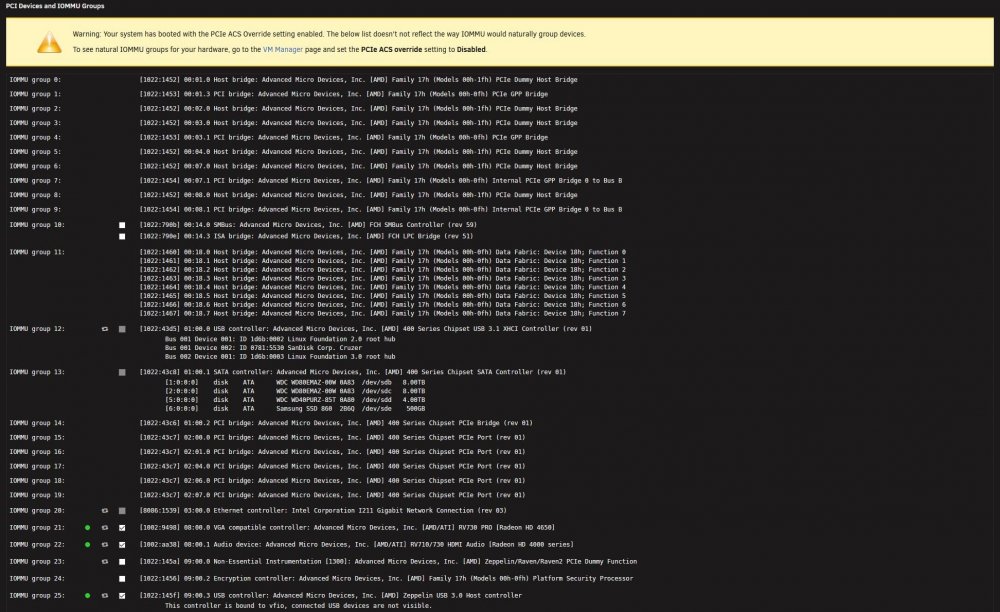
FWIW - when I edit a VM, I see the primary GPU available. If I've understood correctly, the GPU is available for VM's because it's checked on system devices. If I uncheck it, click bind to vfio at boot, it will no longer be available for VM's and unRAID will have exclusive access to it at which point it will continue to show all the boot code until it ends at the command prompt? I must have checked these boxes in order to pass through the primary GPU thinking it would be nice to operate the VM without remoting into it from another PC but never do this and causes full re-scan of the array the few times it's hung and I had to hard reset the PC ... I'll be switching this off, thanks!!
-
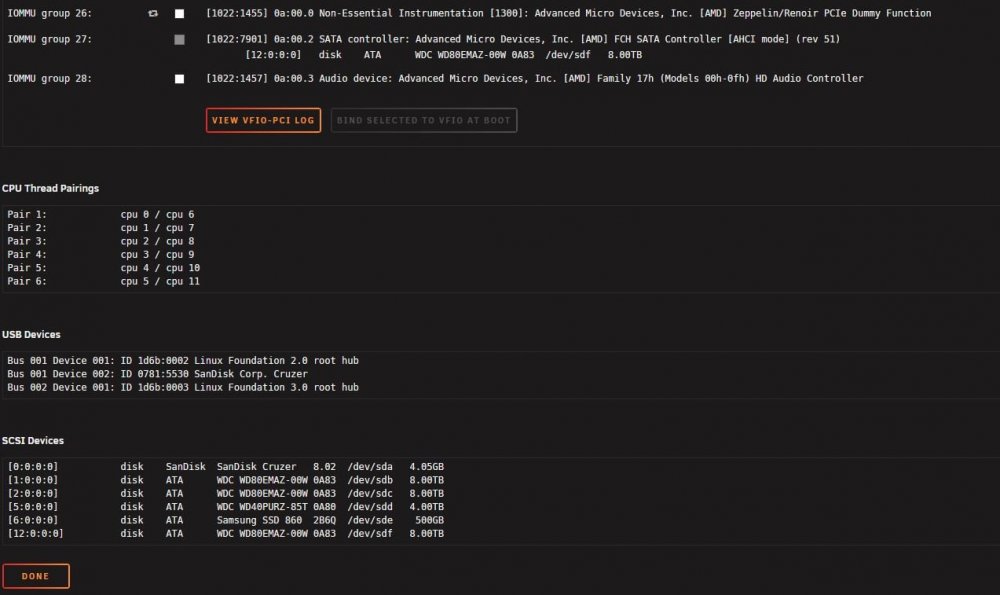
Thanks for the reply. I've only 1 GPU in the server which is attached to a monitor and I can watch it boot UnRAID GUI mode with all the command lines it's just that the code freezes at the vfio-pci line and I desire it to continue until command prompt. In Flash Drive > Syslinux configuration: I'm booting UnRaid OS which has the following code and is booting in UEFI mode. kernel /bzimage append pcie_acs_override=downstream,multifunction isolcpus=1-5,7-11 initrd=/bzroot Under Tools > System Devices I see I've PCIe ACS Override setting enabled to pass through my USB 3.0 controller to a VM. I also see the primary GPU listed as in-use ... images attached. FWIW - I vaguely recall adding some code to a black list file(s) but not sure if it was on this server.
-
I installed an extra Nvidia GPU at one point to do VM gaming. I recall going through some steps, possibly editing some files, to prevent the 2nd GPU from being used during boot, which is now removed, and perhaps to allow the primary to detach and be used for gaming also, etc. When unRAID boots it shows all the command line details and then gets to a point where it says vfio-pci 000:08:00.0: vgaarb: changed VGA decodes: olddecodes=io+mem,decodes=io+mem:owns=io+mem and stops showing anything else but does still boot all the way as I can access it from URL. I cannot use the keyboard to enter any command/console prompts at this point and when the server occasionally becomes unresponsive to URL access I have to hard reset. Any ideas what settings would cause this to happen and what files I need to modify so the GPU doesn’t do this and gets all the way to command prompt?
-
FWIW - I was able to boot the VM after adding this code to the Flash drive Unraid OS Syslinux configuration in between kernel /bzimage and initrd=/bzroot.
-
I see some others solving this by changing some parameters in GRUB but I don't see GRUB on unRAID. is this as simple as adding "video=vesafb:off video=efifb:off" without quotes to the flash drive config where you pass through devices? https://forum.proxmox.com/threads/gpu-passthrough-not-working-bar-3.60996/
-
I setup a W10 gaming VM and am getting ~100 FPS or less on CSGO whereas I get ~325 FPS on bare metal. I'd prefer not to shutdown unRAID and boot up W10 when I want to game so I've tried creating a few VM's pointing to the same vdisk which are i440fx4.2 vs Q35-4.2, Hyper V no/yes, USB 2.0/3.0, and various other combinations but nothing seems to improve. In fact, at one point I was getting between 100-200 FPS but no longer get that amount. I just changed my unRAID to boot UEFI as I read it was the preferred way to boot a VM and might help the FPS but now I receive a Failed to mmap error when it tries to load the GPU and the log quickly fills to 100% causing me to have to reboot the entire server. That said, should I continue to try and figure out how to get the VM working with unRAID in UEFI vs Legacy and what would next steps be?
-
I believe it was this guide I followed when I only had a single GPU (Radeon HD 4650) so I could use the GPU for VM's. It worked fine in that you could see unRAID booting and then during the script it would stop refreshing and be available to the VM's. I've since added another GPU and use it for my VM's and would like to restore the primary GPU in case I need to do some command line to recover unRAID, reset Docker/VM's, etc. That said, I don't have any exclusions in the Flash config for this device so I'm unsure how to re-activate it. I followed this video and went to the directory of the device and found there's a file called enable which had a value of 0 whereas my secondary GPU was set to 1 so I modified this value to 1. There's another file called reset and I entered it hoping it would reset the device without having to restart the server but it didn't seem to work. I've other things running so I cannot reset at the moment but wonder if there's anything else to do besides what i already did, did I do the right thing, and is there a way to initialize the device without restarting the server?
-
While my TV is flickering on/off and I have to figure this piece out, I was finally able to get rid of the Code 43 error!! Tools > System Devices IOMMU group 14: [10de:2187] 06:00.0 VGA compatible controller: NVIDIA Corporation TU116 [GeForce GTX 1650 SUPER] (rev a1) [10de:1aeb] 06:00.1 Audio device: NVIDIA Corporation TU116 High Definition Audio Controller (rev a1) [10de:1aec] 06:00.2 USB controller: NVIDIA Corporation Device 1aec (rev a1) [10de:1aed] 06:00.3 Serial bus controller [0c80]: NVIDIA Corporation TU116 [GeForce GTX 1650 SUPER] (rev a1) IOMMU group 15: [8086:150e] 07:00.0 Ethernet controller: Intel Corporation 82580 Gigabit Network Connection (rev 01) IOMMU group 16: [8086:150e] 07:00.1 Ethernet controller: Intel Corporation 82580 Gigabit Network Connection (rev 01) IOMMU group 17: [8086:150e] 07:00.2 Ethernet controller: Intel Corporation 82580 Gigabit Network Connection (rev 01) IOMMU group 18: [8086:150e] 07:00.3 Ethernet controller: Intel Corporation 82580 Gigabit Network Connection (rev 01) Flash > Syslinux Configuration: kernel /bzimage append vfio-pci.ids=8086:150e,10de:2187,10de:1aeb,10de:1aec,10de:1aed initrd=/bzroot Flash > Server boot mode: Legacy Flash > Permit UEFI boot mode: Unchecked Settings > VM Manager PCIe ACS override: DIsabled VFIO allow unsafe interupts: No Windows VM <features> <acpi/> <apic/> <hyperv> <relaxed state='on'/> <vapic state='on'/> <spinlocks state='on' retries='8191'/> <vendor_id state='on' value='none '/> </hyperv> <kvm> <hidden state='on'/> </kvm> </features> <hostdev mode='subsystem' type='pci' managed='yes'> <driver name='vfio'/> <source> <address domain='0x0000' bus='0x06' slot='0x00' function='0x0'/> </source> <alias name='hostdev0'/> <rom file='/mnt/user/documents/unRAID/TU116.rom'/> <address type='pci' domain='0x0000' bus='0x00' slot='0x08' function='0x0' multifunction='on'/> </hostdev> <hostdev mode='subsystem' type='pci' managed='yes'> <driver name='vfio'/> <source> <address domain='0x0000' bus='0x06' slot='0x00' function='0x1'/> </source> <alias name='hostdev1'/> <address type='pci' domain='0x0000' bus='0x00' slot='0x08' function='0x1'/> </hostdev> <hostdev mode='subsystem' type='pci' managed='yes'> <driver name='vfio'/> <source> <address domain='0x0000' bus='0x06' slot='0x00' function='0x2'/> </source> <alias name='hostdev2'/> <address type='pci' domain='0x0000' bus='0x00' slot='0x08' function='0x2'/> </hostdev> <hostdev mode='subsystem' type='pci' managed='yes'> <driver name='vfio'/> <source> <address domain='0x0000' bus='0x06' slot='0x00' function='0x3'/> </source> <alias name='hostdev3'/> <address type='pci' domain='0x0000' bus='0x00' slot='0x08' function='0x3'/> </hostdev> <memballoon model='none'/> </devices>
-
To confirm, you're booting into UEFI mode and do not have the Code 43 error? I'm also in UEFI mode and cannot reboot as parity check only has 4h left and has already been running 18h
-
I just used console and see the file owner under /mnt/cache/appdata/radarr is nobody/users while it's an SMB share name / users for Sonarr!! I had files I couldn't delete from a HDD I've a SMB share on. I tried to change the owner for this folder/files but it must have changed the entire HDD and my appdata was set to prefer with it's folder on the HDD. I've changed appdata back to only so this will never happen again but have 16 Dockers with this user owning folders/files within them and wouldn't be surprised there's issues I'm not even aware of yet!! Will "chown -R nobody /mnt/cache/appdata" fix the entire appdata folder and sub-folders/files?
-
I'm running 6.8.2 and Sonarr has these errors which say about a month ago when they started. FWIW - I have Radarr running just fine and the file owner/group/permissions are the same for /config, sub-folders, and .db files ... not sure if this is the DB having issues...
-
I recently tried to make an update to Sonarr download clients and it wouldn't save ... wheel spins and nothing. I went into the logs and found it's having a readonly SQL error seen below. My cache drive is not full and I find no errors in the diagnostics ... any ideas what I should be checking to understand the source of the issue? Message Task Error: attempt to write a readonly database attempt to write a readonly database Exception System.Data.SQLite.SQLiteException (0x80004005): attempt to write a readonly database attempt to write a readonly database at System.Data.SQLite.SQLite3.Reset (System.Data.SQLite.SQLiteStatement stmt) [0x00083] in <61a20cde294d4a3eb43b9d9f6284613b>:0 at System.Data.SQLite.SQLite3.Step (System.Data.SQLite.SQLiteStatement stmt) [0x0003c] in <61a20cde294d4a3eb43b9d9f6284613b>:0 at System.Data.SQLite.SQLiteDataReader.NextResult () [0x0016b] in <61a20cde294d4a3eb43b9d9f6284613b>:0 at System.Data.SQLite.SQLiteDataReader..ctor (System.Data.SQLite.SQLiteCommand cmd, System.Data.CommandBehavior behave) [0x00090] in <61a20cde294d4a3eb43b9d9f6284613b>:0 at (wrapper remoting-invoke-with-check) System.Data.SQLite.SQLiteDataReader..ctor(System.Data.SQLite.SQLiteCommand,System.Data.CommandBehavior) at System.Data.SQLite.SQLiteCommand.ExecuteReader (System.Data.CommandBehavior behavior) [0x0000c] in <61a20cde294d4a3eb43b9d9f6284613b>:0 at System.Data.SQLite.SQLiteCommand.ExecuteScalar (System.Dataunraid-diagnostics-20200218-1342.zip.CommandBehavior behavior) [0x00006] in <61a20cde294d4a3eb43b9d9f6284613b>:0 at System.Data.SQLite.SQLiteCommand.ExecuteScalar () [0x00006] in <61a20cde294d4a3eb43b9d9f6284613b>:0 at Marr.Data.QGen.InsertQueryBuilder`1[T].Execute () [0x00046] in M:\BuildAgent\work\5d7581516c0ee5b3\src\Marr.Data\QGen\InsertQueryBuilder.cs:140 at Marr.Data.DataMapper.Insert[T] (T entity) [0x0005d] in M:\BuildAgent\work\5d7581516c0ee5b3\src\Marr.Data\DataMapper.cs:728 at NzbDrone.Core.Datastore.BasicRepository`1[TModel].Insert (TModel model) [0x0002d] in M:\BuildAgent\work\5d7581516c0ee5b3\src\NzbDrone.Core\Datastore\BasicRepository.cs:111 at NzbDrone.Core.Messaging.Commands.CommandQueueManager.Push[TCommand] (TCommand command, NzbDrone.Core.Messaging.Commands.CommandPriority priority, NzbDrone.Core.Messaging.Commands.CommandTrigger trigger) [0x0013d] in M:\BuildAgent\work\5d7581516c0ee5b3\src\NzbDrone.Core\Messaging\Commands\CommandQueueManager.cs:82 at NzbDrone.Core.Messaging.Commands.CommandQueueManager.Push (System.String commandName, System.Nullable`1[T] lastExecutionTime, NzbDrone.Core.Messaging.Commands.CommandPriority priority, NzbDrone.Core.Messaging.Commands.CommandTrigger trigger) [0x000b7] in M:\BuildAgent\work\5d7581516c0ee5b3\src\NzbDrone.Core\Messaging\Commands\CommandQueueManager.cs:95 at NzbDrone.Core.Jobs.Scheduler.ExecuteCommands () [0x00043] in M:\BuildAgent\work\5d7581516c0ee5b3\src\NzbDrone.Core\Jobs\Scheduler.cs:42 at System.Threading.Tasks.Task.InnerInvoke () [0x0000f] in <254335e8c4aa42e3923a8ba0d5ce8650>:0 at System.Threading.Tasks.Task.Execute () [0x00000] in <254335e8c4aa42e3923a8ba0d5ce8650>:0
-
I’ve downloaded beets and am running it with many results in the 50-75% match. I’m selecting apply and am hoping it’s not selecting the wrong albums, etc. That said, I aborted and was going to install chroma to reduce the chances of destroying my library but it seems chroma was already installed; however, there wasn't any mention of it besides at the top of the config file so I added chroma: auto yes. When I run beet import /downloads will it automatically be using chroma and is there a way I would know it is?


