






storybox
Members
-
Joined
-
Last visited
Everything posted by storybox
-
-
That worked! Thanks so much!
-
Happens to me too!
-
Removed :test. Back to normal. Great job!
-
It worked! Next-Gen from Montreal. It required a full 20 minutes of looping through "Retrying in 10 secs..." I have successfully downloaded a file at expected speeds. Will monitor.
-
I made the changes and things are stable for now. The new folder I created with all stopped dockers is not causing any problems at the moment. Fingers crossed! Thanks!
-
@GuildDarts , I have re-installed the plug-in and set up my folders. I can safely re-order the folders and re-order the dockers within the folders. All is stable again. The folders.json is version 4 and I see the settings variable. But at the moment, all folders have at least one running docker inside. I predict that if I create/modify a folder to have no actively running dockers, the plug-in will fail.
-
Sure, I'm rebuilding my folder structure now.
-
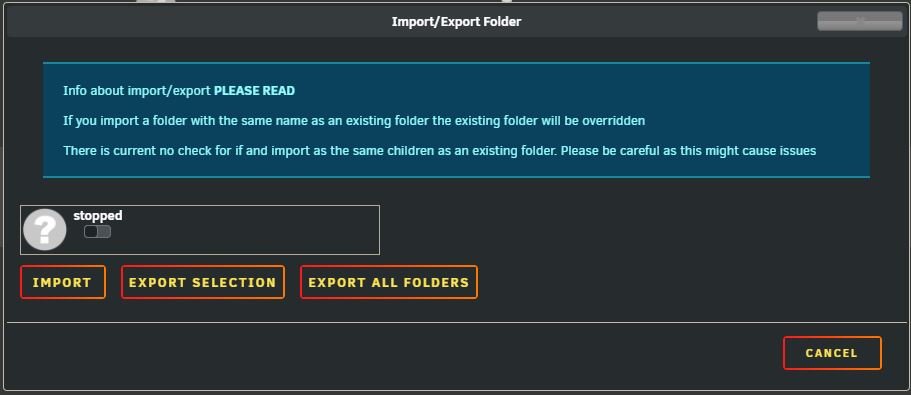
The folder was named "stopped"
-
@GuildDarts, this is exactly what I was describing. So after, reading the post from @darki73 I created a new folder with only stopped dockers. As soon as I clicked SUBMIT, I lost all folders. Now when I click on the IMPORT/EXPORT button, the only folder showing is the one that killed it.
-
GuildDarts, thanks for staying on top of this! I have re-installed your plug-in and set up my folders as I like them. Things are stable for now, and the server passed all of the tests that were just recommended. The one difference this time is that all of my folders have at least one active docker. On previous attempts, I've had a folder(s) that contained all stopped dockers. Is this not allowed?
-
I'm now noticing some missing folders too. Folders seem to come and go for me.
-
I think we have a winner! Thanks for the work, and for a fantastic plug-in!
-
To be more specific, it looks like the order of dockers within a folder are sticking, but the folders order is still not stable.
-
Thanks, I updated the plugin. The behavior is better, but my docker/folder order is still reverting back after every refresh.
-
I'm seeing a problem today. After I drag and drop my dockers and folders in the order I want them, they go back to random order after a page refresh.
-
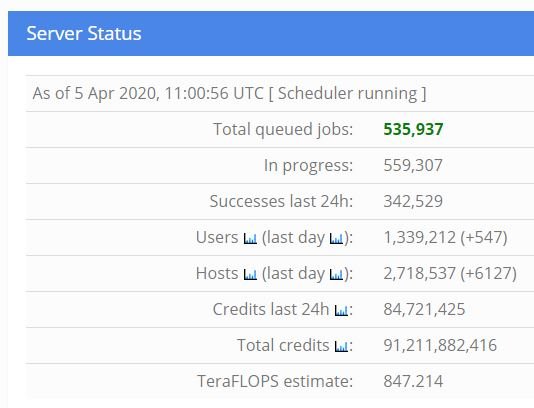
I haven't received any new tasks from Rosetta@Home since April 4th. My other project (World Community Grid) is running just fine. Looks like Rosetta@Home has plenty of tasks available.
-
Firstly, thank you! As a new UNRAID user, I find this plug-in to be invaluable. Whenever my HDDs spin up unexpectedly, this is my go-to utility. My only gripe is that the four control buttons (stop, refresh, clear, done) are at the bottom of the activity list. As more and more activity is reported, the four buttons are forced downward and we have to scroll down (perhaps, several pages) to get to the buttons. Is it possible to anchor the four buttons to the top of the page? And while we're at it, could the activity list be sorted in reverse order? It would be nice to have the option of seeing the latest activity show up at the top of the list, instead of having to scroll to the bottom every time. Any help is appreciated, and thanks again for a great plug-in!


