





Jurykov
Members
-
Joined
-
Last visited
-
Agreed. I was just posting to reply that it did not resolve the issue by staying with the spants container, and just changing the protocol version in HA like kabadisha suggested. Looks like my options are to be patient and hope for an update, or swap over to the official container in order to get protocol version 5 support.
-
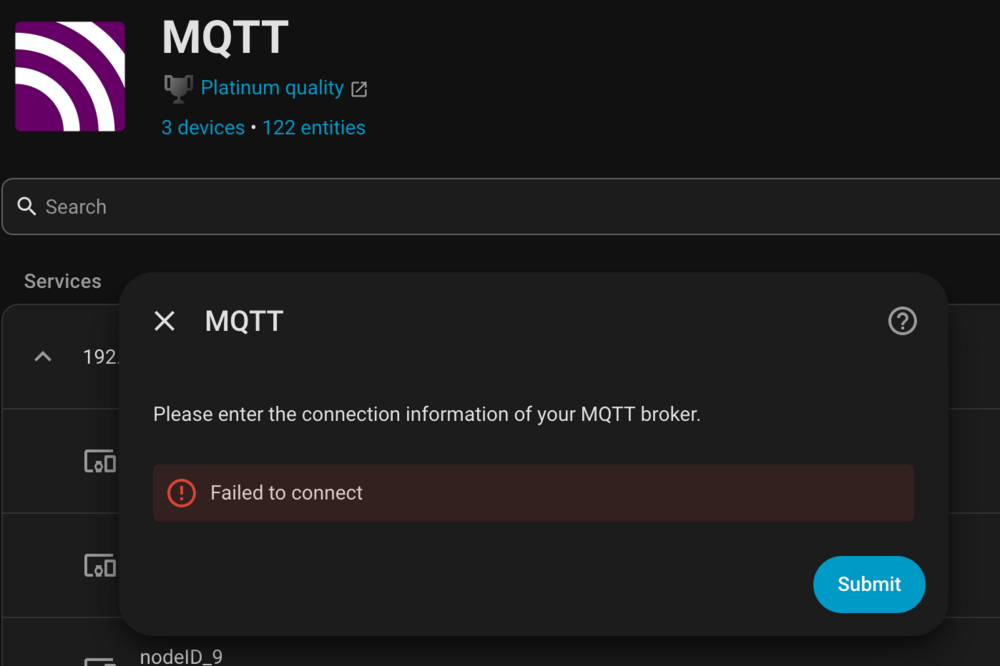
I'm still on the spants MQTT container, but when I set the protocol version to 5 in home assistant it fails to connect. I think both need to be changed in order to make it work. I considered migrating to the official Mosquitto docker, but was working on other stuff today. Looks like I have some time to figure it out though based off the error from home assistant. I see the following when it's set to 5, but nothing in the system logs to tell me exactly what's failing. Works when set to 3.1.1 though.
-
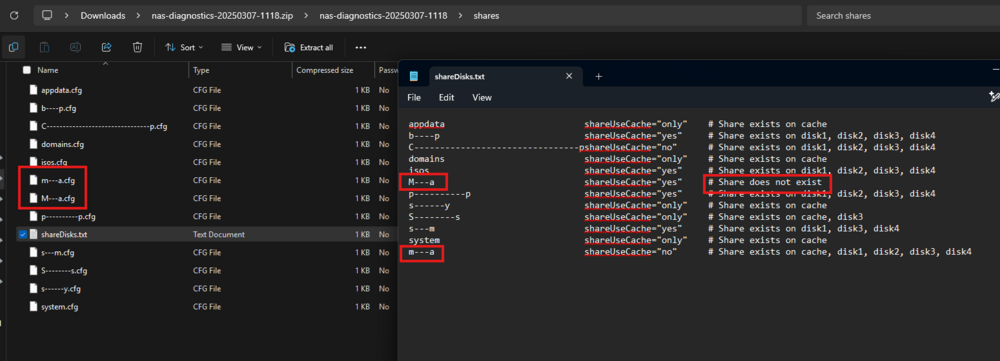
Another user chiming in with the same issue. Didn't notice for a while after my upgrade to 7, but it looks like the mover wasn't working for a week or two. I never had mover tuner installed. I only realized when my cache started filling. Went into my share settings, and many shares that were set to write to cache, then move to array had somehow lost their settings. Adjusted shares back to what I wanted, but the mover wasn't moving some files. Ran a diagnostic, and looked in the zip under shares>shareDisks.txt and looked at the share config. Looked like one of my shares name media, one as 'Media' (which didn't exist on the share), and one called 'media'. Fix for me was to rename my share 'media' to something else, then name it back to 'media'. Not sure what broke my share settings, and no idea where the upper case 'Media' came from. I couldn't see any issues through the UI. I had to start digging into the diagnostics before I realized I had two similar shares. This all worked before upgrading to 7... Working now after I renamed the share though.
-
Thanks for this! Also fixed my 'corrupted' database issues. Saved me setting up again from scratch.
-
Having similar issues. Had hardware acceleration running in 6.8.3 with an i3-8100. Upgraded to an i7-9700k and now Plex, and Viseron (CCTV video object detection) lost hardware acceleration (with no modifications to Unraid). The BIOS did get reset when I changed the CPU, but I have unraid booting on the iGPU again now. But I guess it still could be something set wrong in the BIOS. /dev/dri showing up fine, but non of the dockers can access VAAPI. Upgraded to 6.9.0 Beta 35 this morning thinking that the new kernel would include new enough drivers for the UHD 630 module. Still no luck. /dev/dri/ still showing up fine, and visible to the containers. Not a 10th gen CPU issue like OP, but the delineation seems to be between 8th generation and 9th/10th. There is one successful report above of it working. Anyone have suggestions of what else I could try? Run at root console: lspci -kvnn 00:02.0 VGA compatible controller [0300]: Intel Corporation UHD Graphics 630 (Desktop 9 Series) [8086:3e98] (rev 02) (prog-if 00 [VGA controller]) DeviceName: Onboard - Video Subsystem: Gigabyte Technology Co., Ltd Device [1458:d000] Flags: bus master, fast devsel, latency 0, IRQ 146, IOMMU group 2 Memory at a4000000 (64-bit, non-prefetchable) [size=16M] Memory at 80000000 (64-bit, prefetchable) [size=256M] I/O ports at 4000 [size=64] Expansion ROM at 000c0000 [virtual] [disabled] [size=128K] Capabilities: [40] Vendor Specific Information: Len=0c <?> Capabilities: [70] Express Root Complex Integrated Endpoint, MSI 00 Capabilities: [ac] MSI: Enable+ Count=1/1 Maskable- 64bit- Capabilities: [d0] Power Management version 2 Capabilities: [100] Process Address Space ID (PASID) Capabilities: [200] Address Translation Service (ATS) Capabilities: [300] Page Request Interface (PRI) Kernel driver in use: i915 Kernel modules: i915 Run in docker: # ls -al /dev/dri total 0 drwxr-xr-x 2 root root 80 Nov 17 22:27 . drwxr-xr-x 13 root root 3320 Nov 17 22:27 .. crwxrwxrwx 1 root 18 226, 0 Nov 17 22:27 card0 crwxrwxrwx 1 root 18 226, 128 Nov 17 22:27 renderD128 # vainfo error: XDG_RUNTIME_DIR not set in the environment. error: can't connect to X server! libva info: VA-API version 1.1.0 libva info: va_getDriverName() returns 0 libva info: Trying to open /usr/lib/x86_64-linux-gnu/dri/i965_drv_video.so libva info: Found init function __vaDriverInit_1_1 libva error: /usr/lib/x86_64-linux-gnu/dri/i965_drv_video.so init failed libva info: va_openDriver() returns -1 vaInitialize failed with error code -1 (unknown libva error),exit #

