DBJordan
Members
-
Joined
-
Last visited
Everything posted by DBJordan
-
Yeah, seems to be the case. Since Windows 10 WSL has a 9p built-in for its own use, I started wondering if I could mount a 9p drive on a Windows VM but didn't get very far. Even if I figure it out, Windows would probably see it as a network drive and BB wouldn't back it up.
-
I tried setting this up with a BackBlaze trial and CloudBerry trial. CloudBerry generated a lot of errors indicating I hit some kind of BackBlaze bandwidth/data daily cap. Yet BackBlaze says they offer unlimited space? I've found some stuff in their help pages that seems to indicate their "Personal Backup" cloud vaults are unlimited, but using the "B2 Cloud" has all sorts of data and bandwidth daily caps. Also, I found the B2 data caps information page for my account and I do seem to have hit their daily free limits. Is there a way to use the docker to back up to the unlimited uncapped cloud offering? Or is doing a VM the only way to get that? Apologies if anything I wrote above is incorrect, I'm still a little confused by this!
-
Yes, it will shutdown the VM to do the backup. Not sure about the snapshot feature.
-
Hi @binhex, I was looking for change notes at Sonarr's github, but their releases only go up to build 5322. Do you know where they're storing the 5338 packages? Edit: oh, I think I found them here: https://aur.archlinux.org/packages/sonarr/ Looks like they don't update https://github.com/Sonarr/Sonarr/releases anymore.
-
I agree if it's not hard, but since the VMBackup plugin is beta free software, I'll take whatever is easiest.
-
Sounds like a great idea. Sent from my iPad using Tapatalk
-
Just did a test with a VM that I created using @SpaceInvaderOne Macinabox docker. The docker creates a VM with this structure: root@Truesource:/mnt/user/domains/Stedding# find . . ./icon ./icon/catalina.png ./icon/highsierra.png ./icon/mojave.png ./icon/osx.png ./ovmf ./ovmf/OVMF_CODE.fd ./ovmf/OVMF_VARS.fd ./macos_disk.img ./Clover.qcow2 ./Catalina-install.img VMBackup only backs up the following files: root@Truesource:/mnt/user/Saidar/Backups/Stedding# find . -name '202*' ./20200204_1952_Stedding.xml ./20200204_1952_OVMF_VARS.fd ./20200204_1952_Clover.qcow2 ./20200204_1952_Catalina-install.img ./20200204_1952_macos_disk.img Is there a way to get it to back up the rest of the files? I can probably survive without the icons, but I'm not sure if the VM will work without the others.
-
When I captured that I was using Brave Version 1.1.20 Chromium: 79.0.3945.74 (Official Build) (64-bit).
-
I think this was actually caused by a hardware issue. Unraid does odd things when one of the cache pool drives mysteriously disappears while the array is online... I don't think it had anything to do with the docker container, but thank you for your consideration.
-
Attached. syslog.zip
-
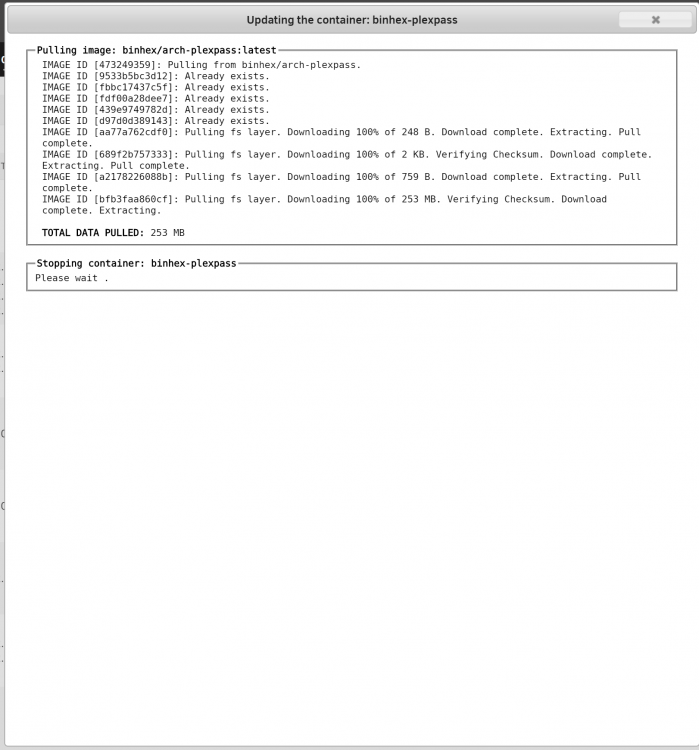
I can't seem to update to the newest docker. It tries to stop the container and can't. Here's what the logs say: Jan 28 01:00:11 Truesource CA Backup/Restore: Stopping binhex-plexpass Jan 28 08:41:25 Truesource nginx: 2020/01/28 08:41:25 [error] 8231#8231: *377259 upstream timed out (110: Connection timed out) while reading upstream, client: 10.10.20.18, server: , request: "GET /plugins/dynamix.docker.manager/include/CreateDocker.php?updateContainer=true&ct[]=binhex-plexpass HTTP/1.1", upstream: "fastcgi://unix:/var/run/php5-fpm.sock:", host: "truesource", referrer: "http://truesource/Docker" Jan 28 09:06:46 Truesource nginx: 2020/01/28 09:06:46 [error] 8231#8231: *382590 upstream timed out (110: Connection timed out) while reading upstream, client: 10.10.20.18, server: , request: "GET /plugins/dynamix.docker.manager/include/CreateDocker.php?updateContainer=true&ct[]=binhex-plexpass HTTP/1.1", upstream: "fastcgi://unix:/var/run/php5-fpm.sock:", host: "truesource", referrer: "http://truesource/Docker" I'd give you the docker command, but at the moment I'm not sure the system is in a state that it's readily available. Diagnostics attached. Please let me know if you have any ideas. truesource-diagnostics-20200128-0913.zip
-
I'm seeing this error in the logs when I try to Run Postprocessing, which sometimes imports the files in the /downloads directory, and often doesn't: 26-Jan-2020 19:53:07 - WARNING :: POSTPROCESS : postprocess.py:processDir:586 : Unexpected download folder Books 26-Jan-2020 19:53:07 - INFO :: POSTPROCESS : postprocess.py:processDir:1107 : 0 downloads processed. 26-Jan-2020 19:53:07 - INFO :: POSTPROCESS : postprocess.py:processDir:1112 : Found 1 unprocessed Any thoughts on how to fix? Diagnostics attached, and Docker run command: root@localhost:# /usr/local/emhttp/plugins/dynamix.docker.manager/scripts/docker run -d --name='lazylibrarian' --net='bridge' --log-opt max-size='50m' --log-opt max-file='1' -e TZ="America/Chicago" -e HOST_OS="Unraid" -e 'PUID'='99' -e 'PGID'='100' -p '5299:5299/tcp' -v '/mnt/user/Saidar/!Downloads/Books/':'/downloads':'rw' -v '/mnt/user/Saidar/Books/':'/books':'rw' -v '/mnt/user/appdata/lazylibrarian':'/config':'rw' 'linuxserver/lazylibrarian' Please let me know if you have any questions or ideas of something to try. truesource-diagnostics-20200126-2039.zip
-
You may need to rework your container parameters, because it looks like you're trying to transfer between two shares. (Although if your host path 2 is /mnt/user you can safely ignore the rest of this paragraph!) This container has a single host path 2 available to configure, which means everything you want to copy from and to needs to be under that host path. So the first step I'd make is assign host path 2 to /mnt/user/media and mkdir /mnt/user/media/downloads/complete as your qbittorrent download directory. Once that's done, the container will have access to both locations it needs. From that point, your bash script can be placed in /mnt/user/media/downloads/myscript.bash or even /mnt/user/media/myscript.bash. It doesn't need to be in the file structure of the container. You can keep it in your shares. Also note that once you change host path 2 to /mnt/user/media, within the container that path becomes /data, so you'll need to tell qbittorrent to execute /data/downloads/myscript.bash or /data/myscript.bash depending on where you put it. Be sure to chmod your script to be executable, then you want an external run-once-download-completes command in qbittorrent that looks like this: /data/myscript.bash %L %F And that script needs to collect the arguments from qbittorrent to run something that looks like this: mkdir -p "/data/%L" && cp -R "%F" $_ Hopefully that gives you enough info to come up with something. 🙂 Good luck! Edit: just one other thought. I provided a command that will create a subdir of that name if it doesn't already exist. If you already have that directory, you probably don't even need a script. Just run this program on completion: cp -R "%F" "/data/%L" This recursively copies the ${full path} of your download into /data/${category}.
-
Canyouseeme is showing not open. (Btw, so cool you included Privoxy in this -- canyouseeme doesn't let me edit the IP address manually, just the port. But using Privoxy gets me there.) I did notice this in the logs: [info] Application does not require port forwarding or VPN provider is != pia, skipping incoming port assignment Do I have a setting wrong or is this normal for custom vpn types? Thanks again.
-
Is there an external way to verify it’s working? The qbittorrent logs claim it is, and I’m peaking at speeds of 320+ mbps. If I connect to one of the servers that doesn’t have port forwarding, the qbittorrent logs indicate it can’t use the port. I’m inclined to trust the logs but am just trying to figure out whether I can externally verify it’s working. Thanks! Sent from my iPhone using Tapatalk
-
I have a VPN (PrivateVPN) that has servers that forwards ports. I've noticed the docker container supports only two VPNs by default. I've set up my container for custom and have gotten it to work, but canyouseeme.org tells me my port isn't forwarded. Is there any way to configure this docker container for port forwarding if I'm using custom VPN type? Thanks.
-
This error is no longer applicable with the latest qbittorrentvpn version. Thanks, @binhex for the new release! 4.2.0 Missing Files Error Just a heads up in case your torrents status is "Missing Files" after restarting qBittorrent: this is caused by a bug introduced in 4.2.0 when using an incomplete torrents folder (Options->Downloads->Keep incomplete torrents in:). I think the options to fix are either 1. to not use an incomplete torrents folder (may work? not sure, haven't tried it) or 2. downgrade to 4.1.9 by editing the docker container and putting this into the repository field: binhex/arch-qbittorrentvpn:4.1.9-1-01 This bug was fixed in qBittorrent 4.2.1, so when @binhex has a moment to update this docker, it should get fixed. For more details, check out https://github.com/qbittorrent/qBittorrent/pull/11642 . Btw, thanks @binhex for a wonderful docker. My DL speeds have capped out at 40 MB/sec (around 320 mbps) with this docker, and that's 3-4x what I was getting by running the VPN client and qBittorrent on a Windows VM. The fact that you've included Privoxy is icing on the cake.
-
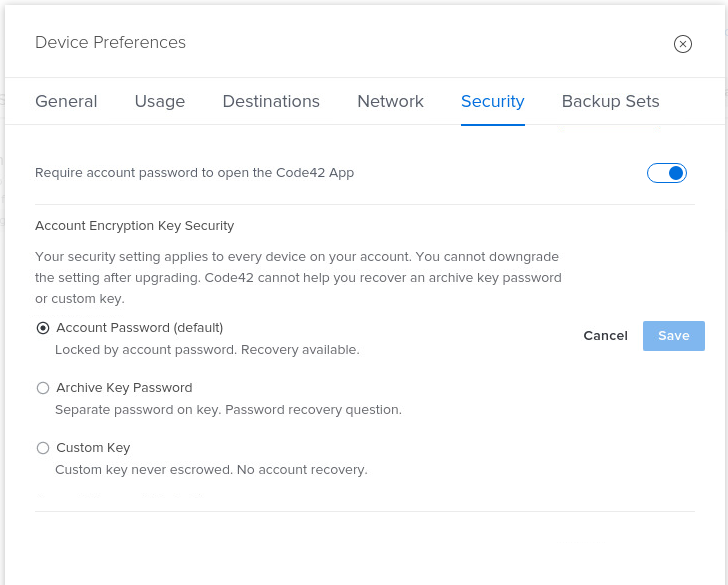
Yeah, that works, but I guess I'm wondering -- is the information encrypted by default and the Account Password can unlock it? Is that why "Save" is disabled for that choice?
-
Hi there, I'm trying to turn on Account Encryption Key Security in the settings, but the Save button is inactive. Is there a way to get this working? Thanks.
-
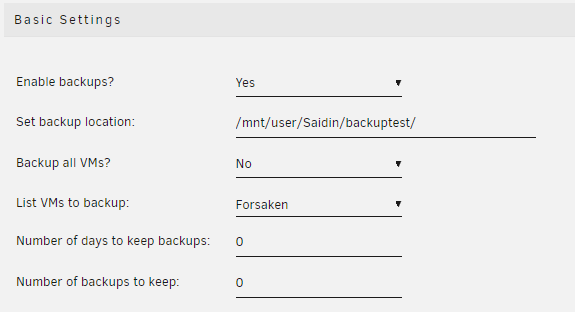
Here's my draft at manual instructions, feel free to use them as a starting point. I just backed up one VM as a test in this case. 1. Stop all VMs. 2. Take a peek at what VMs you're using and where you're backing them up. Here's my config: This means I should be able to find a directory here: /mnt/user/Saidin/backuptest/Forsaken 3. Open a command shell. 4. Now you need to copy your VM vdisk and VM xml to the right location. If you're truly restoring, you'll need to make some directories as well. I'm assuming you're using the default location for domain disks, /domains share. root@Truesource:/# mkdir /mnt/user/domains/Forsaken root@Truesource:/# cp /mnt/user/Saidin/backuptest/Forsaken/20191220_1017_vdisk1.img /mnt/user/domains/Forsaken/vdisk1.img root@Truesource:/# cp /mnt/user/Saidin/backuptest/Forsaken/20191220_1017_Forsaken.xml /etc/libvirt/qemu/Forsaken.xml 5. Start your VM.

-
@SpencerJ Is there a way to see all of the past digests? I've subscribed to the newsletter and have found your June and July links useful, but would like to catch up on other things I missed.
-
Very cool, can't wait to give it a whirl. Quick question: do you plan to add restore capability at some point?
-
Syslogs attached. They compressed quite nicely. syslog.7z
-
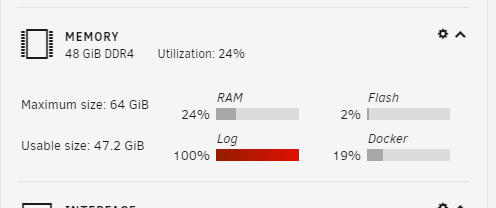
Hi there, I'm running 6.8. I noticed all the live updating to the Dashboard webpage stopped working (no disk utilization bars updating, stuff like that) and under the Memory section the log bar was red+full. Here's are the types of messages in the logs: I did a few searches and found sometimes the wrong web browser can cause this. I'm using Brave Version 1.1.20 Chromium: 79.0.3945.74 (Official Build) (64-bit). I tried completely rebooting the client machine to see if the errors cleaned up. I'm going to leave the browser down overnight and see if any sort of self-healing occurs. I'm attempting to use the gui to generate a diagnostics zip. It's been running for about 5 hours. If I can't get it to complete, what's the most useful information I can hand pull from the command line? Syslogs have seized up at size 70MB of error messages similar to the above with a final message that only partially got written to disk. Haven't had anything new in syslog since 12:31 am this morning. I can hand-execute the diagnostics steps and post something, just let me know if what may be useful. In the meantime, I've attached a snapshot of the memory section on the Dashboard. Thank you for any help you can offer.