





InCaseOf
Members
-
Joined
-
Last visited
Everything posted by InCaseOf
-
The fix is here: " I finally fixed it by going to the SSL/TLS tab in coiudflare and switching from "flexible" to "full" "
-
Hello! So I've had SWAG running great for a few years now and I recently decided to change domains. I thought it would be as simple as editing the template and transferring the DNS records to the new domain but I'm running into a problem. After updaiting SWAG I can still go to server.OLDdomain.com and still see the swag landing page but when I try with my new domain, server.NewDomain.com I get "This page isn't redirecting properly." This happens for any of my existing subdomains I've set up. After getting rid of oldDomian.com from the swag template and replacing it with newDomain.com the old one still shows the sites it should no longer be connected to and the new domain fails to take me to the site. I can ping newdomain.com and get my personal IP, so I think its at least close to being setup right but something isn't working and I'm really not to sure. if I look at the SWAG log it says the following: If anyone has any ideas, I would greatly appreciate the help, thanks!
-
Lol for real! Thanks again Moose!
-
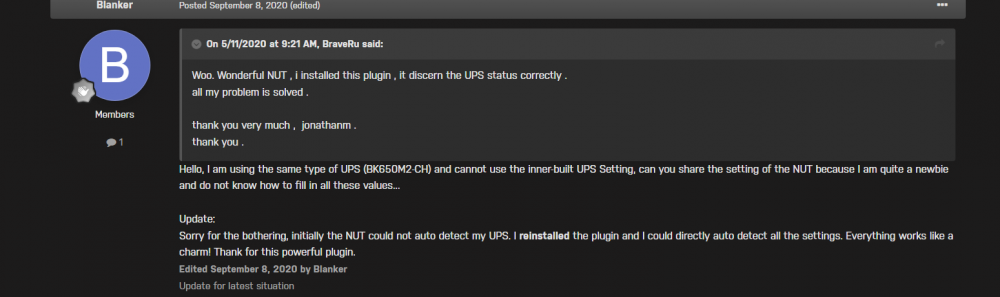
So, I went back to the default UPS daemon and it reported that my ups was OFFLINE which made unraid shut off. I did a bit more digging Found this tread Which led me to this comment I re-installed NUT and everything is working as it should be, maybe a bug with NUT? No clue since my was detecting the UPS Anyway, thanks for the help! Just wanted to add this here in case someone else runs into this problem
-
Very nice! Yeah man UPS-s are awesome when they work lol. Still trying to figure out this thing, I can't imagine it should be this difficult to setup, probobly gonna reach out to APC depending on how tomorrow goes, thanks for the help though!
-
I was able to test the new setup shown in the previous pictures just now and as soon as I flip the breaker off, the ups kicks to battery, Unraid starts a clean shutdown, despite the ups shutdown settings not being met. I do have my modem connected to the UPS and that hasn't power cycled once. I did this with the updated 300 second shutdown timer Maybe tomorrow I can turn off all the Unraid UPS daemons and test the ups, if it still shuts Unraid down then its a UPS problem, I think that makes sense
-
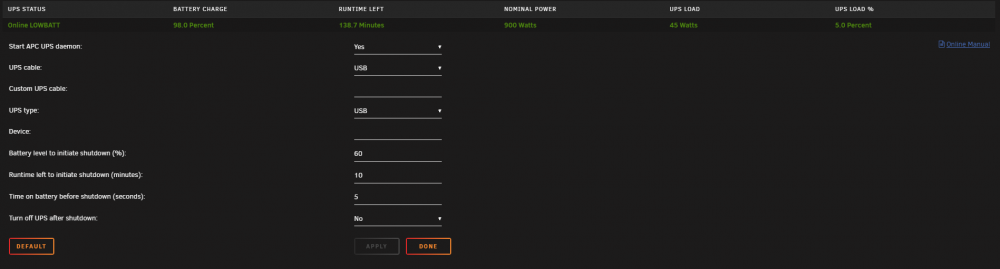
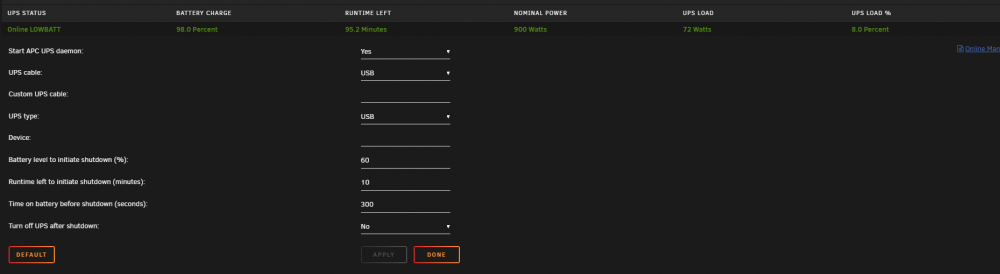
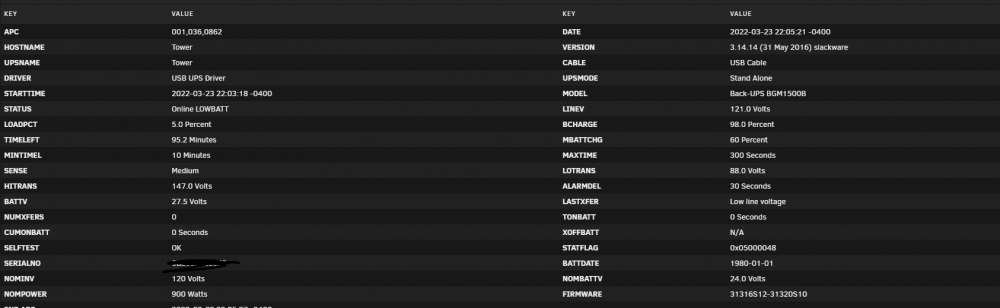
Thanks! Just tried the built in one, and it set it like this: Gonna have to wait till tomorrow to shut the breaker to test it but hopefully it was that , Thanks for the pic Edit: I just saw Time b4 shutdown is in seconds on this one, whoops Here's updated version:
-
I got this one: https://www.apc.com/shop/us/en/products/APC-Back-UPS-Pro-1500VA-for-Gaming-120V-Pure-Sinewave-LCD-Black-3-USB-charging-ports-10-NEMA-outlets-4-surge-/P-BGM1500B I did initially try to use the built it and it didn't seem to recognize it, I can give it another go though, good idea
-
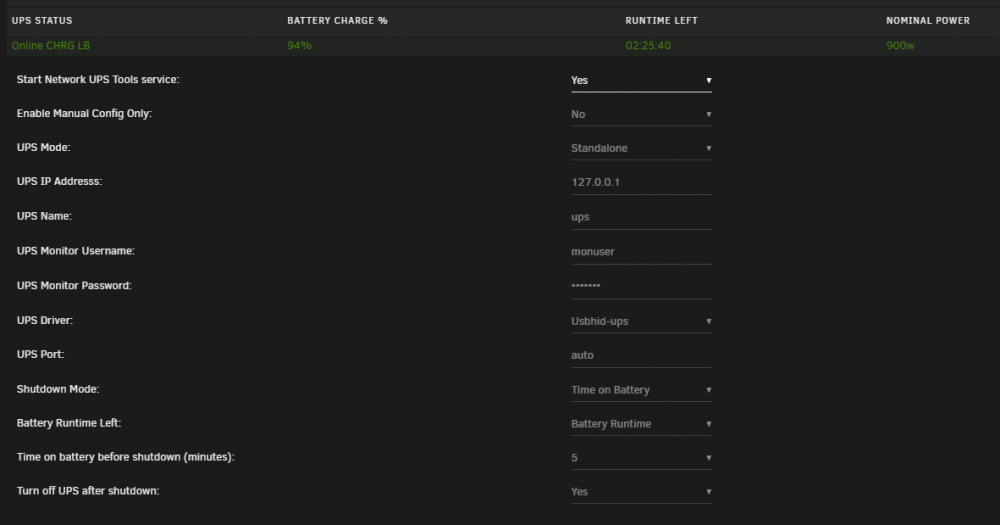
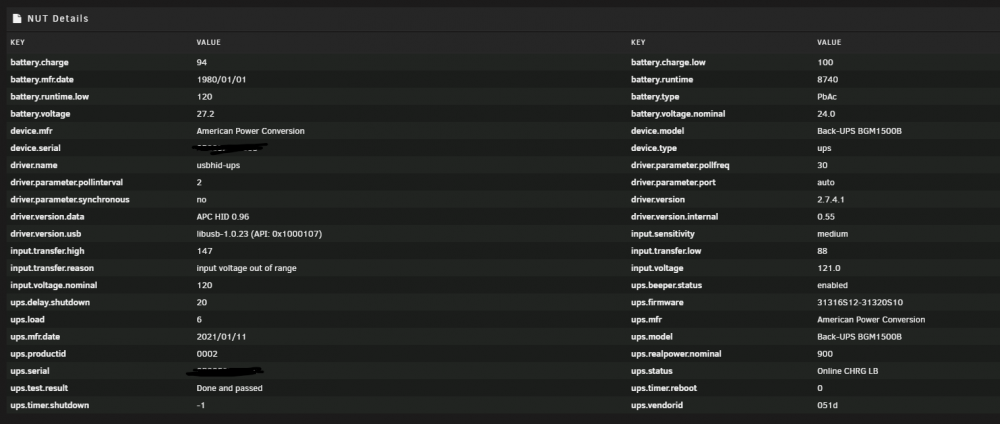
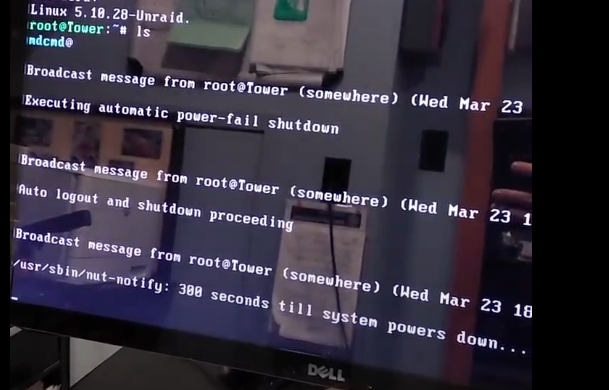
Hello! So a few months back I got a UPS and finally got around to setting it up. My problem is as soon as the UPS switches to battery, the server shuts downs. Here is my NUT settings: I hooked up a monitor so I can watch what gets displayed on the terminal and it is this: After that it displays the normal shut down stuff and shuts down cleanly. From that picture it looks like two things are going one: 1: something is saying there is a power-fail and is forcing a shutdown 2: NUT is working and is attempting to wait for 5 mins before shutting down I jump to the idea that my UPS is not working correctly and the server sees a bad voltage for a second, but it is still on so it cant be that bad, can it? Anyone have a better idea, or see something I missed?
-
I've been running radarr for a while now >1 Year and today I logged onto unraid and saw that the gui for radarr was blank. Radarr's logs give this error. It has to due with the database but I don't know if or how I can fix this, am I better restoring from a backup or is there something else I can try first? Thanks for the help! [Error] EventAggregator: TaskManager failed while processing [ApplicationStartedEvent] 2021-12-20 09:33:45,151 DEBG 'radarr' stdout output: [v3.2.2.5080] System.Data.DataException: Error parsing column 4 (LastStartTime=03/02/2021 00:32:18 - DateTime) ---> System.FormatException: String '2021-02-03 j0:32:18.5365396Z' was not recognized as a valid DateTime. at System.DateTimeParse.ParseExactMultiple(ReadOnlySpan`1 s, String[] formats, DateTimeFormatInfo dtfi, DateTimeStyles style) radarrLogs.txt
-
Hello! So after updating I was able to get the server to start working by replacing my world.db by the world.db.backup. My server was in a boot loop of crashing and restarting. **here is my problem** Now after updating my sever seems to kick off all the players every 20/30 mins The server doesn't crash, it just kicks everyone off and you can rejoin in a few seconds. Here is my log file, to me, a noob, it looks like its restarting something every so often, not sure if good or not, I assume something is wrong, maybe the backup world is corrupt, but I don't have a clue on how to debug this. Any ideas? log.txt
-
hey! so I got a problem, most likely cause im new to unraid lol So I got the upload script to work as expected, files are passed to gdrive with encryption, then removed from local. My problem is with my mount script I assume. In the console running rclone lsd gdrive: or running rclone lsd gdrive_crypt: returns all of my folders as expected. However when I run my mount script the folder is empty. Here is my config stuff: [gdrive] type = drive client_id = ***** client_secret = ***** scope = drive token = {"access_token":*****"} [gdrive_crypt] type = crypt remote = gdrive:crypt filename_encryption = standard directory_name_encryption = true password = **** password2 = ****** and here is my mount script RcloneRemoteName="gdrive_crypt" RcloneMountShare="/mnt/user/the_stuff/gdrive" RcloneMountDirCacheTime="720h" LocalFilesShare="/mnt/user/the_stuff/local" RcloneCacheShare="/mnt/user0/the_stuff/gdrive" RcloneCacheMaxSize="400G" RcloneCacheMaxAge="336h" s MergerfsMountShare="/mnt/user/mount_mergerfs" DockerStart="nzbget plex sonarr radarr ombi" here is the output of it ( Script location: /tmp/user.scripts/tmpScripts/rclone_mount_plugin/script Note that closing this window will abort the execution of this script 12.11.2020 19:00:00 INFO: Creating local folders. 12.11.2020 19:00:00 INFO: Creating MergerFS folders. 12.11.2020 19:00:00 INFO: *** Starting mount of remote gdrive_crypt 12.11.2020 19:00:00 INFO: Checking if this script is already running. 12.11.2020 19:00:00 INFO: Script not running - proceeding. 12.11.2020 19:00:00 INFO: *** Checking if online 12.11.2020 19:00:02 PASSED: *** Internet online 12.11.2020 19:00:02 INFO: Success gdrive_crypt remote is already mounted. 12.11.2020 19:00:02 INFO: Check successful, gdrive_crypt mergerfs mount in place. 12.11.2020 19:00:02 INFO: Starting dockers. Error response from daemon: No such container: nzbget Error response from daemon: No such container: plex Error response from daemon: No such container: sonarr Error response from daemon: No such container: radarr Error response from daemon: No such container: ombi Error: failed to start containers: nzbget, plex, sonarr, radarr, ombi 12.11.2020 19:00:02 INFO: Script complete and here is my upload script # REQUIRED SETTINGS RcloneCommand="move" # choose your rclone command e.g. move, copy, sync RcloneRemoteName="gdrive_crypt" # Name of rclone remote mount WITHOUT ':'. RcloneUploadRemoteName="gdrive_crypt" # If you have a second remote created for uploads put it here. Otherwise use the same remote as RcloneRemoteName. LocalFilesShare="/mnt/user/the_stuff/local" # location of the local files without trailing slash you want to rclone to use RcloneMountShare="/mnt/user/the_stuff/gdrive" # where your rclone mount is located without trailing slash e.g. /mnt/user/mount_rclone MinimumAge="15m" # sync files suffix ms|s|m|h|d|w|M|y ModSort="ascending" # "ascending" oldest files first, "descending" newest files first (it outputs this: 12.11.2020 19:23:06 INFO: *** Rclone move selected. Files will be moved from /mnt/user/the_stuff/local/gdrive_crypt for gdrive_crypt *** 12.11.2020 19:23:06 INFO: *** Starting rclone_upload script for gdrive_crypt *** 12.11.2020 19:23:06 INFO: Script not running - proceeding. 12.11.2020 19:23:06 INFO: Checking if rclone installed successfully. 12.11.2020 19:23:06 INFO: rclone installed successfully - proceeding with upload. 12.11.2020 19:23:06 INFO: Uploading using upload remote gdrive_crypt 12.11.2020 19:23:06 INFO: *** Using rclone move - will add --delete-empty-src-dirs to upload. 2020/11/12 19:23:06 DEBUG : --min-age 15m0s to 2020-11-12 19:08:06.429286925 -0800 PST m=-899.987925388 2020/11/12 19:23:06 DEBUG : rclone: Version "v1.53.2" starting with parameters ["rcloneorig" "--config" "/boot/config/plugins/rclone/.rclone.conf" "move" "/mnt/user/the_stuff/local/gdrive_crypt" "gdrive_crypt:" "--user-agent=gdrive_crypt" "-vv" "--buffer-size" "512M" "--drive-chunk-size" "512M" "--tpslimit" "8" "--checkers" "8" "--transfers" "4" "--order-by" "modtime,ascending" "--min-age" "15m" "--exclude" "downloads/**" "--exclude" "*fuse_hidden*" "--exclude" "*_HIDDEN" "--exclude" ".recycle**" "--exclude" ".Recycle.Bin/**" "--exclude" "*.backup~*" "--exclude" "*.partial~*" "--drive-stop-on-upload-limit" "--bwlimit" "01:00,off 08:00,15M 16:00,12M" "--bind=" "--delete-empty-src-dirs"] 2020/11/12 19:23:06 DEBUG : Creating backend with remote "/mnt/user/the_stuff/local/gdrive_crypt" 2020/11/12 19:23:06 DEBUG : Using config file from "/boot/config/plugins/rclone/.rclone.conf" 2020/11/12 19:23:06 INFO : Starting bandwidth limiter at 12MBytes/s 2020/11/12 19:23:06 INFO : Starting HTTP transaction limiter: max 8 transactions/s with burst 1 2020/11/12 19:23:06 DEBUG : Creating backend with remote "gdrive_crypt:" 2020/11/12 19:23:06 DEBUG : Creating backend with remote "gdrive:crypt" 2020/11/12 19:23:06 DEBUG : Google drive root 'crypt': root_folder_id = "****" - save this in the config to speed up startup 2020/11/12 19:23:06 DEBUG : downloads: Excluded 2020/11/12 19:23:07 DEBUG : Encrypted drive 'gdrive_crypt:': Waiting for checks to finish 2020/11/12 19:23:07 DEBUG : Encrypted drive 'gdrive_crypt:': Waiting for transfers to finish 2020/11/12 19:23:07 DEBUG : tv: Removing directory 2020/11/12 19:23:07 DEBUG : movies: Removing directory 2020/11/12 19:23:07 DEBUG : Local file system at /mnt/user/the_stuff/local/gdrive_crypt: deleted 2 directories 2020/11/12 19:23:07 INFO : There was nothing to transfer 2020/11/12 19:23:07 INFO : Transferred: 0 / 0 Bytes, -, 0 Bytes/s, ETA - Elapsed time: 0.7s 2020/11/12 19:23:07 DEBUG : 7 go routines active 12.11.2020 19:23:07 INFO: Not utilising service accounts. 12.11.2020 19:23:07 INFO: Script complete ) going to this path /mnt/user/the_stuff/gdrive contains /cache and /gdrive_crypt both are empty I know in spaceinvaders tutorial his mount script ran in background but when I try to do that it runs for a second then stops. However if i run it once it says it mounted and then if I try again it says that it already mounted. Please let me know if you need me to provide more info, thanks a lot for the help! and thanks for the scripts!



