





Grohmand
Members
-
Joined
-
Last visited
Everything posted by Grohmand
-
But /config folder could be encrypted and other parts right? I don't think plugin and those configuration needs to be available at that time
-
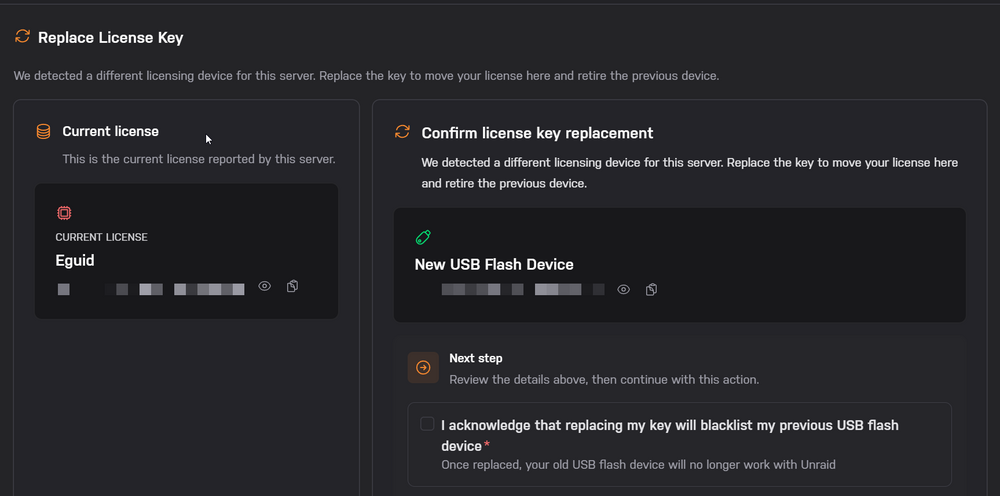
Yes I am using internal boot with TPM currently. Thank you, I am sorry for hijacking the topic but regarding the internal boot as we are on the topic, this won't blacklist my old TPM right? It will just blacklist the USB drive if I had any (I used a new USB drive as I believe the old one to be blacklisted when I originally did the TPM transfer) Original USB (blacklisted) -> TPM -> New USB (TPM fine for blacklist?)
-
I see thank you, how would I move the license to an USB before I transfer it into a VM as I don't get the option anywhere, this is baremetal with Unraid running directly on it.
-
How many times can you transfer TPM licenses?
-
To ask about this, trying to passthrough TPM through proxmox seems to trigger invalid boot device and license even though the TPM is available and can be queried like a normal TPM device. Is there any alternatives for this?
-
Will we be able to encrypt the Internal boot device in future or can we do it now considering tpm 2.0 licensing instead. I want this really to be a feature cause it's a big problem config is unencrypted
-
I seem to have disk 1 disabled yue-diagnostics-20260115-0847.zip
-
yue-diagnostics-20251202-0539.zip The rebuild is done and no read errors ,so I assume it is okay now?
-
Thank you I will do so, and if it doesn't work I will also source new cables, I currently have a LSI SAS card flashed as passthrough with 2x4 cables so it would take some time to arrange new replacements for that. I will update once this is done
-
yue-diagnostics-20251201-0858.zip I restarted and reseated all cables, and I notice now that disk 1 is disabled and content is emulated, but we know disk 1 had read errors, so should I now recreate the array and recreate parity or what should next step be?
-
Parity was disabled though I am not sure if read errors from disk 1 caused it to be disabled, so I unassigned it, started array maintenance and stopped array and added it and parity rebuild, and now it is done. And we have read errors on drive 1 currently. I can physically access the machine next week so I will try do a live memory test to rule out RAM errors also.
-
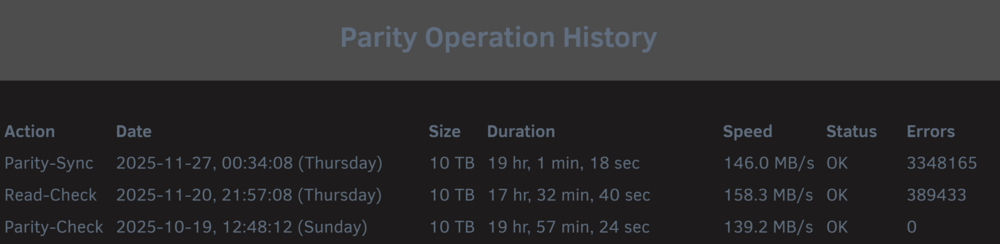
The initial issue as I understand was that the parity drive became disabled, and then I noticed there was read errors, but I did a read sync after parity and same errors. The parity is now done but there was read errors, so can I consider this parity okay? Or is there still a possibility that the issue corrupted the other drives?
-
There is no rebuild, the parity drive failed though, is that cause of the data drive 1? Cause the parity drive was disabled for me, and that's the one I had to recreate so it is rebuilding parity now
-
Will do so when I can, is there any issues with rebuilding parity now or will it try to recover read-errors and still calculate parity? And is there at any time of point that I could have overwritten the data disk with my actions?
-
yue-diagnostics-20251126-1505.zip Here you go! Though I did restart the server once so I am not sure if it contains the original retention, but I believe I have not done any operations to data drive from parity or I hope so at least, is it possibly the parity could have overwritten the data drive or does it only work the other way around?
-
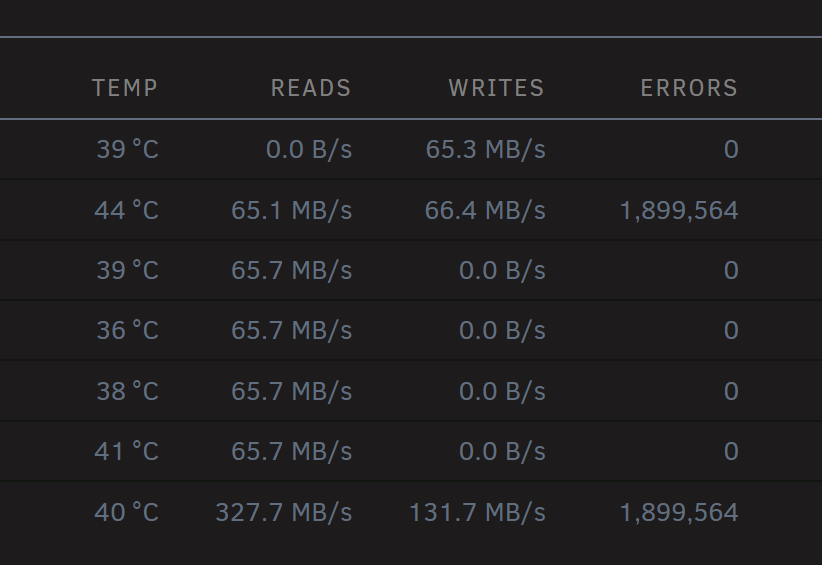
Hello, I do not currently have physical access to my array but I noticed a few issues, I received these emails I think this is the correct order. Event: Unraid array errors Subject: Warning [X] - array has errors Description: Array has 1 disk with read errors Importance: warning Disk 1 - WDC_WD100EZAZ (sdi) (errors 64616) I have Parity and 5 disks, and then I think it died a parity sync but the parity device got disabled so I could only do read check but that succeeded. So I tried to add back the parity by turning off the array and then removing my parity, starting in maintenance and then adding back but now it looks like this. I believe it may be a cabling issue that I touched the cables before as UDMA and reallocated count went up, but at the same time does the read errors mean it failed to read my data drive for the parity? As I killed the parity drive by reassigning it and I no longer have dual parity I am not sure what I can do now to check further the issue. Right now it is currently still rebuilding. This is the drive 1 with read errors smartctl -a /dev/sdi smartctl 7.5 2025-04-30 r5714 [x86_64-linux-6.12.54-Unraid] (local build) Copyright (C) 2002-25, Bruce Allen, Christian Franke, www.smartmontools.org === START OF INFORMATION SECTION === Model Family: Western Digital Ultrastar (He10/12) Device Model: WDC WD100EZAZ-11TDBA0 Serial Number: X LU WWN Device Id: 5 000cca 267dc3d79 Firmware Version: 83.H0A83 User Capacity: 10,000,831,348,736 bytes [10.0 TB] Sector Sizes: 512 bytes logical, 4096 bytes physical Rotation Rate: 5400 rpm Form Factor: 3.5 inches Device is: In smartctl database 7.5/5988 ATA Version is: ACS-2, ATA8-ACS T13/1699-D revision 4 SATA Version is: SATA 3.2, 6.0 Gb/s (current: 6.0 Gb/s) Local Time is: Wed Nov 26 08:41:17 2025 CET SMART support is: Available - device has SMART capability. SMART support is: Enabled === START OF READ SMART DATA SECTION === SMART overall-health self-assessment test result: PASSED General SMART Values: Offline data collection status: (0x80) Offline data collection activity was never started. Auto Offline Data Collection: Enabled. Self-test execution status: ( 0) The previous self-test routine completed without error or no self-test has ever been run. Total time to complete Offline data collection: ( 93) seconds. Offline data collection capabilities: (0x5b) SMART execute Offline immediate. Auto Offline data collection on/off support. Suspend Offline collection upon new command. Offline surface scan supported. Self-test supported. No Conveyance Self-test supported. Selective Self-test supported. SMART capabilities: (0x0003) Saves SMART data before entering power-saving mode. Supports SMART auto save timer. Error logging capability: (0x01) Error logging supported. General Purpose Logging supported. Short self-test routine recommended polling time: ( 2) minutes. Extended self-test routine recommended polling time: ( 996) minutes. SCT capabilities: (0x003d) SCT Status supported. SCT Error Recovery Control supported. SCT Feature Control supported. SCT Data Table supported. SMART Attributes Data Structure revision number: 16 Vendor Specific SMART Attributes with Thresholds: ID# ATTRIBUTE_NAME FLAG VALUE WORST THRESH TYPE UPDATED WHEN_FAILED RAW_VALUE 1 Raw_Read_Error_Rate 0x000b 100 100 016 Pre-fail Always - 0 2 Throughput_Performance 0x0004 131 131 054 Old_age Offline - 104 3 Spin_Up_Time 0x0007 253 253 024 Pre-fail Always - 124 (Average 357) 4 Start_Stop_Count 0x0012 100 100 000 Old_age Always - 204 5 Reallocated_Sector_Ct 0x0033 100 100 005 Pre-fail Always - 0 7 Seek_Error_Rate 0x000a 100 100 067 Old_age Always - 0 8 Seek_Time_Performance 0x0004 128 128 020 Old_age Offline - 18 9 Power_On_Hours 0x0012 092 092 000 Old_age Always - 57099 10 Spin_Retry_Count 0x0012 100 100 060 Old_age Always - 0 12 Power_Cycle_Count 0x0032 100 100 000 Old_age Always - 200 22 Helium_Level 0x0023 100 100 025 Pre-fail Always - 100 192 Power-Off_Retract_Count 0x0032 067 067 000 Old_age Always - 40367 193 Load_Cycle_Count 0x0012 067 067 000 Old_age Always - 40367 194 Temperature_Celsius 0x0002 147 147 000 Old_age Always - 44 (Min/Max 9/56) 196 Reallocated_Event_Count 0x0032 100 100 000 Old_age Always - 0 197 Current_Pending_Sector 0x0022 100 100 000 Old_age Always - 0 198 Offline_Uncorrectable 0x0008 100 100 000 Old_age Offline - 0 199 UDMA_CRC_Error_Count 0x000a 200 200 000 Old_age Always - 0 SMART Error Log Version: 1 No Errors Logged SMART Self-test log structure revision number 1 Num Test_Description Status Remaining LifeTime(hours) LBA_of_first_error # 1 Extended offline Completed without error 00% 54947 - # 2 Short offline Completed without error 00% 54931 - # 3 Short offline Completed without error 00% 54828 - # 4 Short offline Completed without error 00% 53194 - SMART Selective self-test log data structure revision number 1 SPAN MIN_LBA MAX_LBA CURRENT_TEST_STATUS 1 0 0 Not_testing 2 0 0 Not_testing 3 0 0 Not_testing 4 0 0 Not_testing 5 0 0 Not_testing Selective self-test flags (0x0): After scanning selected spans, do NOT read-scan remainder of disk. If Selective self-test is pending on power-up, resume after 0 minute delay. The above only provides legacy SMART information - try 'smartctl -x' for more
-
So to add on to this after rebooting it I can access it through tailscale and I see tailscale1 added in listening interfaces, but I can't access the network interface or atleast web interface locally anymore, is this intended or is there a way for me to do so anyways? I also tried with SSH, through tailscale both works. I will attach diagnostics once I get back home as the server is possibly to be accessed now. If I enable ipv6 it works with ipv6 but not ipv4.
-
I don't currently have a monitor or cable to do the other option, but resetting and then step 4 is just logging in again right did nothing. I can try reboot after the server breaks without removing tailscale device and see if it's same behavior also. Do you have any other ideas I could try? I will try get physical screen access
-
To add on to this, I can only regain access back to the machine by wiping the authentication from Tailscale and rebooting my server losing diagnostics logs in the process, would any additional information help from network settings? I tried to run nmap and all ports seem closed on tailscale IP and the other IP just seems inaccessible to ping or even access after tailscale gets turned on.
-
I installed it on the server and I do not have tailscale subnets on, but I noticed that I can no longer connect to server through it's' normal IP, and I can ping the tailscale IP but no web interface. The only differences compared to before is I have CGNAT here and I am wondering if tailscale is conflicting? Even though it's working fine on another PC here, is there any troubleshooting steps I can take?
-
I see the same issue, I have also tried enabling and disabling subnet and magic DNS in the settings.
-
Is there a way to persist data?



