





Triplerinse
Members
-
Joined
-
Last visited
Everything posted by Triplerinse
-
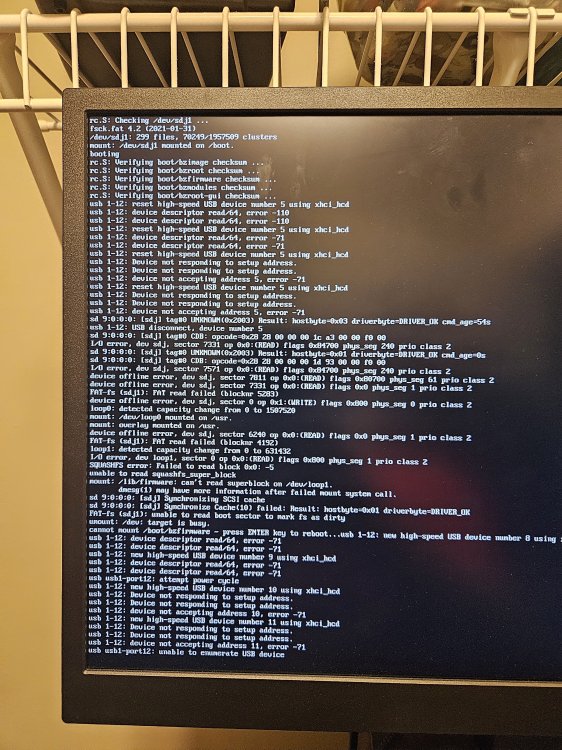
I tried updating updating uraid and ut keeps hanging. I assuming its a flash drive?
-
Yes I got one, it does say if you are running it on docker or nas you can ignore the email.
-
So I upgraded to 7.2.4 from 7.2.0. I had mover tuning working perfectly on 7.2.0. When I upgraded it said it doing things differently. Trying on my test server before going any further. Didn't change anything from the 7.2.0. When mover hit it transferred everything of my primary to my secondary. Anyone running it with 7.2.1 and above? From the looks at the settings looks like it runs off of a cron schedule? So like ever Tuesday at 3 am should it be ,0 3 * * 2? if anyone can explain the new can someone please explain the new settings for me. I assume i disable the built in unraid mover and then put in the new Mover Tuning schedule in cron format ?
-
just notice some warning in my logs in unraid a little over a week ago Dec 5 20:05:14: avahi-daemon[2437]: avahi_normalize_name() failed. Dec 5 20:05:14 avahi-daemon[2437]: avahi_key_new() failed. chatgpt gave this response you’re seeing this on Unraid. This is actually a pretty common Avahi/mDNS issue on Unraid servers, especially after updates. In Unraid, Avahi is used mainly for network discovery (like for SMB/AFP or mDNS host/service announcements). Specifically: avahi_normalize_name() failed → Unraid tried to advertise a service or hostname, but the name had invalid characters. Often this happens if your server name, share name, or Docker/VM hostname contains spaces, underscores, or special characters. avahi_key_new() failed → Avahi can’t create an internal identifier for that invalid name. Typical Unraid triggers: Server/host name issues: Check the main server name in Settings → Identification. Only letters, numbers, and hyphens are safe. Shares with unusual names: If a share has spaces, dots, or special characters, Avahi may try to announce it and fail. Docker or VM hostnames: Some containers or VMs register themselves with Avahi. Invalid names here can trigger this. How to fix: Make sure the server name has only letters, numbers, and hyphens. Check your shares, VMs, and Docker containers for names with invalid characters. Rename them if needed. Restart Avahi to clear the error: i did find a share that had a a space in it. i changed the name to not have spaces but it came back later today. i have not rebooted the server. it did say you could use this in the terminal /etc/rc.d/rc.avahi restart anyone deal with this before?
-
Check your settings and look for claim server. And try in an incognito tab.
-
I was having the same issues. Im Running binhex plex pass. I also had to add a variable plex code and edit my preferences.xml. and it would still not work. Finally changed my network from custom 1 network to host (even though the main pc i was using is allowed to talk to everything on my network) once I did that it allowed me to reclaim it.
-
Let it go for half a day and no change. Had to shut down my pc it was runnung (not the server) Got super busy with kids stuff still haven't got a chance to look at it again. Its fine as long as I just add a couple of files at time. So living with it till I get some more time and things slow down. Sorry for the late response.
-
Just started it Ran the script. Hit 1. Said stopping pms then stopped PMS Ok thanks again
-
I'm really sorry i keep spamming you with this issue. i guess i got confused between 2 different methods (i believe). so binhex has his script he wrote and i believe it is /home/nobody/dbrepair.sh. i saw a screen shot of a guy having an issue and the screen shot was the menus i was looking at. The one that you suggested is form this github? https://github.com/ChuckPa/DBRepair. Its been a long week and im just getting confused from all the previous post. i ran dbrepair.sh but it was sitting at checking pms database for 3 hours and didn't seem like it was running. Im about at the point to nuke the docker and start from scratch. sorry to bug you
-
so i started it looks likes this DBRepair.sh Database Repair Utility for Plex Media Server (BINHEX) Version v1.11.09 Select 1 - 'stop' - Stop PMS. 2 - 'automatic' - Check, Repair/Optimize, and Reindex Database in one step. 3 - 'check' - Perform integrity check of database. 4 - 'vacuum' - Remove empty space from database without optimizing. 5 - 'repair' - Repair/Optimize databases. 6 - 'reindex' - Rebuild database indexes. 7 - 'start' - Start PMS 8 - 'import' - Import watch history from another database independent of Plex. (risky). 9 - 'replace' - Replace current databases with newest usable backup copy (interactive). 10 - 'show' - Show logfile. 11 - 'status' - Report status of PMS (run-state and databases). 12 - 'undo' - Undo last successful command. 21 - 'prune' - Remove old image files (jpeg,jpg,png) from PhotoTranscoder cache & all temp files left by PMS. 42 - 'ignore' - Ignore duplicate/constraint errors. 88 - 'update' - Check for updates. 98 - 'quit' - Quit immediately. Keep all temporary files. 99 - 'exit' - Exit with cleanup options. Enter command # -or- command name (4 char min) : 1 Stopping PMS. Stopped PMS. Select 1 - 'stop' - Stop PMS. 2 - 'automatic' - Check, Repair/Optimize, and Reindex Database in one step. 3 - 'check' - Perform integrity check of database. 4 - 'vacuum' - Remove empty space from database without optimizing. 5 - 'repair' - Repair/Optimize databases. 6 - 'reindex' - Rebuild database indexes. 7 - 'start' - Start PMS 8 - 'import' - Import watch history from another database independent of Plex. (risky). 9 - 'replace' - Replace current databases with newest usable backup copy (interactive). 10 - 'show' - Show logfile. 11 - 'status' - Report status of PMS (run-state and databases). 12 - 'undo' - Undo last successful command. 21 - 'prune' - Remove old image files (jpeg,jpg,png) from PhotoTranscoder cache & all temp files left by PMS. 42 - 'ignore' - Ignore duplicate/constraint errors. 88 - 'update' - Check for updates. 98 - 'quit' - Quit immediately. Keep all temporary files. 99 - 'exit' - Exit with cleanup options. Enter command # -or- command name (4 char min) : 2 Automatic Check,Repair,Index started. Checking the PMS databases you said it will take for ever my db is about 128gb. do i have to keep the window open the whole time. Are we talking over night days lol just curious.
-
Thanks for the help
-
I looked through it and It looks doable lol. In your 2nd post it says it wasn't finishing but then you deleted the perms.txt file. Is that located in the db file? And you manual deleted it.?
-
Is this still working. I think my db got corrupted can u still use this script
-
Yeah it was working fine I was playing with it in my test server too see if it was working before using it on my main server. Mover was working prior to adding it foe test
-
I was playing around with my test server to see if plugin for mover tuning was fixed. Running 7.1.4 and it says 3 files totaling 108 gb moved, but it still shows on the cache. Not the array. Is this still an issue with this plugin?
-
So I had been sitting on 7.0 for a good bit. Hadn't seen to many issues with 7.1.4 so i upgraded over the weekend. Upgraded and didn't seem like i had any issues. Monday night came and went and my mover never initiated. Double checked my mover settings and nothing was off. Changed the time to a time later that day again nothing. Look at my cach drive and there were files in the share that needed to be moved to the array. So I was going to manually move it, but decided to look at the share settings. The share primary was a different cache drive then the one its normally assigned to and no secondary storage. I know this was wrong because I have movies in that share on the original cache not the one in the share settings. I changed share primary and secondary back to what it should have been and rescheduled mover. Everything worked and it moved correctly. Never had this happen anyone else have this happen? Curious if it was an update bug. Double checked all my shares and all of them were correct but that one.
-
thanks and if i read the upgrade changes i would have seen this thanks for your time. sorry 2025.05.29Fixed: Plugins not present within application feed were being misidentified with incorrect messaging if a replacement with identical filename was presentFixed: Typo in some messages Removed Temporarily: Update assistant until the logic for determining next available OS version is completely revamped. Having it remain in place resulted in confusion and false positives
-
as going to upgrade from 7.0.0 today. And I upgrade all docker and plugind because I have ran upgrade assistant before. Went to tools, about. Upgrade assistant is usually there. Upraged os Downgrade os Registration Credits Eula But no upgrade assistant. I know this is part of fix common problems and that plugin is installed and updated. Am I missing something. checked my other server i use for testing purposes its running 7.1.3 and it had upgrade assistant, but I updated all plugging and it disappeared. Can't find anything online about it being removed from fix common problems.
-
So I got a chance to look at it and I logged into the spare email account I use to send notification for. And the email which lead me to this post. https://forums.unraid.net/bug-reports/stable-releases/potentially-dangerous-mode-on-unraid-api-r3625/ Looks like maybe an issue with connect plugin.
-
I'll try to get this installed later seems like it could be helpful. Just remember the only thing I can remember doing with logging was way back on 6.11.5. I was runing it before I jumped to 7.0. Was logging = 0 in the smb extras section. From this post. https://forums.unraid.net/topic/134945-synthetic_pathref-opening-pathtofilefilepdf-failed/ I never removed that prior to upgrading. Curiousif that might be it. I checked its not in smb extra anymore. Either it got deleted or embedded during the upgrade.
-
i must be missing where you see this in the gui i assume this is under schedule all i have is Parity, mover, and trim settings (no advanced tab). i am very gui dependent. i was running this through chat gpt and it was telling me to go through the terminal and look at the logrotate. i was looking at some of the code it was providing and running it through my test server, to see if the code is right. it was giving this as the code to run in terminal logrotate -d /etc/logrotate.conf unriad didn't like -d is there a way to look at the logrotate in the gui?
-
this was my backup server and now my main server. Backup was just the name of the server. Here is the things i checked. smtp settings should be right sent a test email works, get a notification at the right email every night for array status and any time i boot up the server and common problems finds an error. array status, notices, warnings, and alerts all go through to my email fine. All user scripts the schedule is disabled. under schedule nothing runs at that time. I dont have appdata backup plugin installed. Is there any plugin that I have to setup notifications separately?
-
Jun 4 04:40:01 Backupvault logrotate: ALERT - exited abnormally. Jun 4 04:40:01 Backupvault sSMTP[1873508]: Creating SSL connection to host Jun 4 04:40:01 Backupvault sSMTP[1873508]: SSL connection using TLS_AES_256_GCM_SHA384 Jun 4 04:40:03 Backupvault sSMTP[1873508]: Sent mail for [email protected] (221 2.0.0 closing connection 8926c6da1cb9f-4fdd7f00f0dsm2644560173.126 - running 7.0 saw this post from 2011 is this still normal? and why is it saying sent mail for [email protected]. I know i use smtp for email notifications but nothing goes out at that time. Just 1220 for array status.
-
@Decoy01
-
Also I'm not on 7.0.1. I'm still on 7.0 and not running tailscale.



