





Triplerinse
Members
-
Joined
-
Last visited
Everything posted by Triplerinse
-
I could never get it to work in bridge. I was able to use custom br0. Then assign it a static ip that's outside my dhcp lease. Under the docker edit. Switch network to custom bro then a field will come avaliable to assign it a stick ip. Make sure in your network settings it's set to ipvlan not mac lan.
-
Thanks for thor the information.
-
Does this also apply to other containers as well? I appreciate your quick response. When you get some time i would appreciate if you would look at my 2nd and 3 question. I know it's lengthy and I know your very busy and active on this form. You know your stuff so I am all ears.
-
So I setup plex years ago and the default network is set to host. There was some discussion on reddit about a issue running tailscale as host. Just of the topic was that if you have a docker container running as host any person that has access to your tailscale has root access to the host machine. Some people commented that plex is setup to run in host mode by default in the official and a few other docker configurations. 1st. question is runnung plex in host a (bad idea) 2nd if switching to a custom network and adding the port to the config tends to break remote direct streaming. Whats the proper way to run plex in bridge mode. 3rd would it just be better to run plex as ipvlan so that it has its own dedication static ip address and that way the connection is not bridge and creating issues for plex direct streaming. If so how you go about this. I asked chat gpt and stated this To assign a static IP address to your Plex Docker container in Unraid using ipvlan, follow these steps: --- 1. Enable IPvlan Networking in Docker 1. Go to Unraid Web UI → Settings → Docker. 2. Set Enable Docker to No (temporary disable). 3. Find Docker Custom Network Type and select IPvlan (instead of macvlan). 4. Click Apply. --- 2. Configure a Custom Docker Network (br0) 1. Go to Settings → Network Settings. 2. Scroll to Interface eth0 (or your main network interface). 3. Ensure "Enable bridging" is set to Yes. 4. Set the Custom IPv4 subnet (e.g., 192.168.1.0/24). 5. Click Apply. --- 3. Assign a Static IP to Plex 1. Go to Docker → Click Add Container (or edit your existing Plex container). 2. Under Network Type, select Custom: br0. 3. In the Fixed IP Address field, enter the desired static IP (e.g., 192.168.1.150). 4. Click Apply. --- 4. Verify the Setup Open a terminal in Unraid and run: docker network inspect br0 Ensure Plex is assigned the correct IP. Check if Plex is accessible via http://192.168.1.150:32400. --- 5. (Optional) Adjust Router & Firewall Settings If your router supports static IP reservations, bind the Plex IP to avoid conflicts. Ensure no other device is using the same IP. Is this correct? Any help would be appreciated.
-
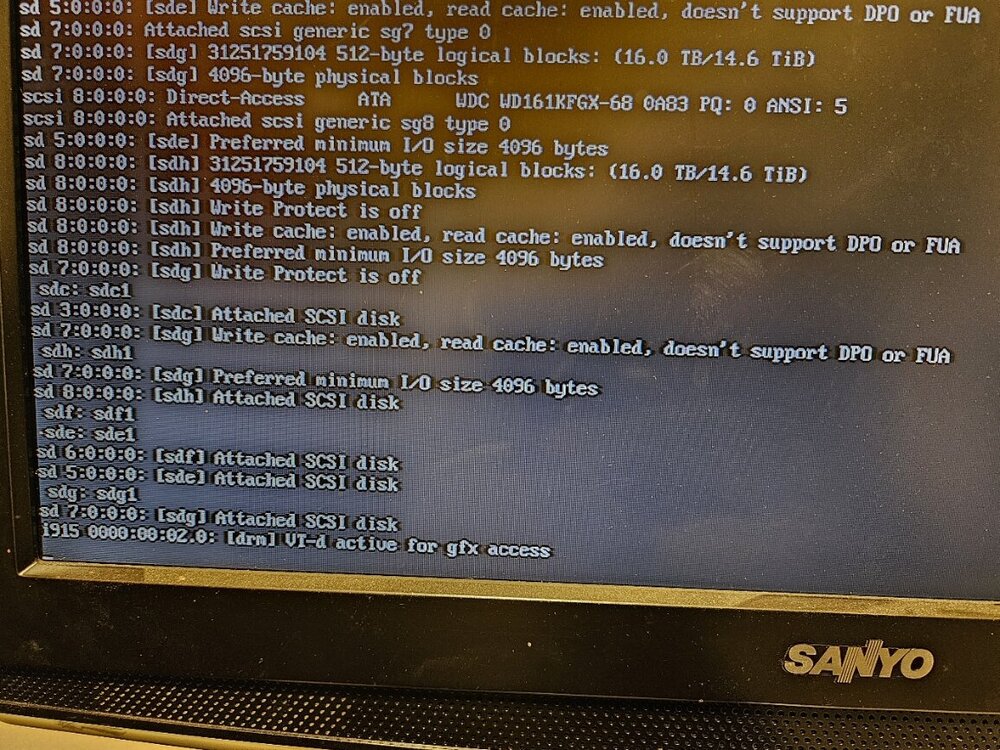
i am curranty running 6.11.5 and never upgraded because of this issue in 6.12 Known issues Crashes related to i915 driver Note: this is no longer an issue as of Unraid 6.12.6. We are aware that some 11th gen Intel Rocket Lake systems are experiencing crashes related to the i915 iGPU. If your Rocket Lake system crashes under Unraid 6.12.0-6.12.5, open a web terminal and type this, then reboot: echo "options i915 enable_dc=0" >> /boot/config/modprobe.d/i915.conf Setting this option may result in higher power use but it may resolve this issue for these GPUs. i see this is fixed in other issues but i was wondering if it was related to another issue i have i can never get to a unraid os version with ip address and unraid login command, but my server is still up and working. the other issue i have is when i start the server, if i just try to let it boot its a black screen but if i go into bios first and then exit it boots just fine. i have disabled fast boot and i have also Rename the folder in the Unraid flash drive “EFI-“ to EF and neither of these worked. So if i upgrade instead of rebooting i shut it down get into bios and then it will boot into unraid. I assume a reboot is the same thing as a shutdown but just faster for people? any help would be appreciated
-
Thank you for your response
-
So i have been running unraid for about 5 years now its great. A few hiccups here and there but its been good. Just before 6.12 dropped (not knowing when it would actually drop) I rebuilt my server and got a new CPU and mother board. intel i5 11600k because it was on sale for a good price. 6.12 drops and all 11th gen intel cpu lock up unraid because of i915 drivers. I know there is a temporary fix by opening up a web terminal and typing some lines of code. they said doing this might result in higher power use. (yes i know its more of a Linux kernel issue than an unraid issue) Fine ill wait till this issue is resolved and then upgrade. then it comes out that community applications will no longer support anything prior to 6.12. 1st question has the i915 issue been resolved? or has unraid implemented a fix for it other then open a web terminal and going that route? 2nd Question. only real dockers I am running is krusader, plex and Tautulli, will these still get updates? For the most part i don't like messing with stuff that's not broke. if its not broke and I try to do something like an upgrade or anything it seems to cause more issues than it was going to fix. this is the fix i was talking about but its still not clear what to do exactly if it wont boot. create a config file in the flash drive and type in "options i915 enable_dc=0". at the risk of sounding dump how do i exactly do this? thanks for any advise.
-
i tried looking in the support thread but nothing has been updated in a while. I don't know if it was just timing or something else. But 2 days ago i shut down my server because of a storm. No error on boot up. but come Sunday morning my ca app data was backing up but did not do to errors. i looked and the network drive that i have mapped and it wasn't mounted so i remounted it and figured that was it. Then i tried to run the backup manually and it started. Logs are as follows Jul 16 21:18:20 ---------l CA Backup/Restore: Stopping tautulli... Jul 16 21:18:21 --------- kernel: docker0: port 1(vethc3b9931) entered disabled state Jul 16 21:18:21 --------- kernel: vethb7e55ef: renamed from eth0 Jul 16 21:18:21 --------- avahi-daemon[15014]: Interface vethc3b9931.IPv6 no longer relevant for mDNS. Jul 16 21:18:21 --------- avahi-daemon[15014]: Leaving mDNS multicast group on interface vethc3b9931.IPv6 with address fe80::a88e:d7ff:fe1c:6bcf. Jul 16 21:18:21 --------- kernel: docker0: port 1(vethc3b9931) entered disabled state Jul 16 21:18:21 --------- kernel: device vethc3b9931 left promiscuous mode Jul 16 21:18:21---------l kernel: docker0: port 1(vethc3b9931) entered disabled state Jul 16 21:18:21 --------- avahi-daemon[15014]: Withdrawing address record for fe80::a88e:d7ff:fe1c:6bcf on vethc3b9931. Jul 16 21:18:21 --------- CA Backup/Restore: done! (took 1 seconds) Jul 16 21:18:21 --------- CA Backup/Restore: Backing Up appData from /mnt/appcache/appdata/ to /mnt/remotes/WDMYCLOUD_nfs/backupcpu/parzival/[email protected] Jul 16 21:18:21 --------- CA Backup/Restore: Separate archives disabled! Saving into one file. Jul 16 21:18:21 --------- CA Backup/Restore: Using command: cd '/mnt/appcache/appdata/' && /usr/bin/tar -caf '/mnt/remotes/WDMYCLOUD_nfs/backupcpu/parzival/[email protected]/CA_backup.tar' --exclude "binhex-plex" . >> /var/lib/docker/unraid/ca.backup2.datastore/appdata_backup.log 2>&1 & echo $! > /tmp/ca.backup2/tempFiles/backupInProgress && wait $! Jul 16 21:18:21 --------- CA Backup/Restore: Backing Up and just sit there. then i about it and then the loggs Jul 16 21:29:40 --------- CA Backup/Restore: CA Backup / Restore tar process running. Killing 20727 Jul 16 21:30:10 --------- kernel: traps: lsof[19097] general protection fault ip:14901a8d84ee sp:9fae83dbb29b697f error:0 in libc-2.36.so[14901a8c0000+16b000] Jul 16 21:30:10 --------- CA Backup/Restore: User aborted backup/restore! Jul 16 21:30:10--------- CA Backup/Restore: done Jul 16 21:30:10 --------- CA Backup/Restore: Starting binhex-plexpass... (try #1) Jul 16 21:30:10 --------- CA Backup/Restore: done! Jul 16 21:30:12 --------- CA Backup/Restore: Starting tautulli... (try #1) Jul 16 21:30:12 ---------kernel: docker0: port 1(vetha9b7d7a) entered blocking state Jul 16 21:30:12 --------- kernel: docker0: port 1(vetha9b7d7a) entered disabled state Jul 16 21:30:12 ---------kernel: device vetha9b7d7a entered promiscuous mode Jul 16 21:30:12 --------- kernel: docker0: port 1(vetha9b7d7a) entered blocking state Jul 16 21:30:12 --------- kernel: docker0: port 1(vetha9b7d7a) entered forwarding state Jul 16 21:30:12 --------- kernel: docker0: port 1(vetha9b7d7a) entered disabled state Jul 16 21:30:12 --------- kernel: eth0: renamed from veth06a4dc9 Jul 16 21:30:12 --------- kernel: IPv6: ADDRCONF(NETDEV_CHANGE): vetha9b7d7a: link becomes ready Jul 16 21:30:12 --------- kernel: docker0: port 1(vetha9b7d7a) entered blocking state Jul 16 21:30:12 --------- kernel: docker0: port 1(vetha9b7d7a) entered forwarding state Jul 16 21:30:12 --------- CA Backup/Restore: done! Jul 16 21:30:14 --------- avahi-daemon[15014]: Joining mDNS multicast group on interface vetha9b7d7a.IPv6 with address fe80::d84a:c3ff:feaa:f128. Jul 16 21:30:14 --------- avahi-daemon[15014]: New relevant interface vetha9b7d7a.IPv6 for mDNS. Jul 16 21:30:14 --------- avahi-daemon[15014]: Registering new address record for fe80::d84a:c3ff:feaa:f128 on vetha9b7d7a.*. Jul 16 21:30:14---------CA Backup/Restore: ####################### Jul 16 21:30:14 ---------l CA Backup/Restore: appData Backup complete Jul 16 21:30:14 ---------CA Backup/Restore: ####################### Jul 16 21:30:14 --------- sSMTP[2853]: Creating SSL connection to host Jul 16 21:30:14 --------- sSMTP[2853]: SSL connection using TLS_AES_256_GCM_SHA384 Only errors i see in all of my sys log. i think i recently updated the application so i have disabled it for the time being. Any help would be appreciated.
-
Can you better explain what this line does and how it will effect server? I use I gpu for plex.
-
It may may ne the 11th gen intel cpu issue. I built my new server 2 months ago because the 11th gen was a great buy.
-
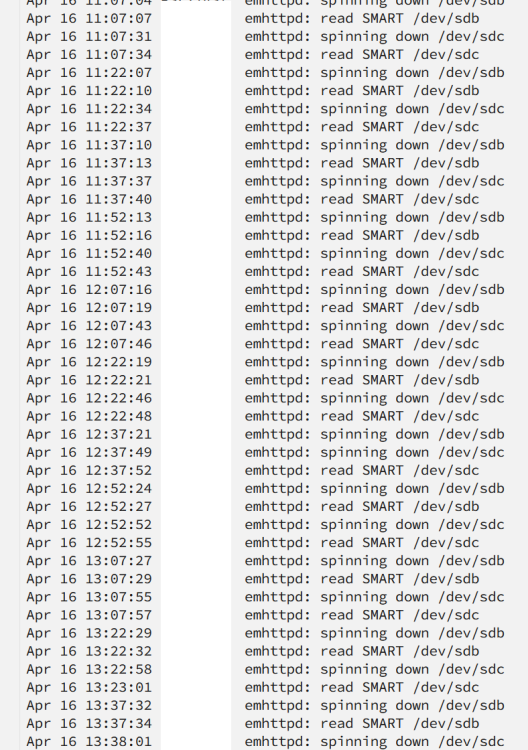
i recently did a fresh install and moved over my old data from my old unraid server. Everything seems to be fine but it seems that occasionally drives will spin up with i access webgui page, or ill access a file on drive 7 and drive 1 and drive 3 will spin up. Is there a different disk setting in 6.11.5 that would causing this? Also i noticed a warning in logs when transferring files to the array. Apr 21 15:11:37 smbd[16202]: [2023/04/21 17:11:37.307830, 0] ../../source3/smbd/files.c:1199(synthetic_pathref) Apr 21 15:11:37 smbd[16202]: synthetic_pathref: opening [4k Movies/Babylon.mkv] failed i found this is this a know issue with 6.11? and i dont need to worry about it. seems like my file transferred fast and moved off my cash. now when i access that file it plays off of my array. Any help would be appreciated.got eveything up and running on 6.11.5 went shares popped up and everything was looking good. Did a parity build and then started to test files transfters. files seem to transfer fine but then i see this in the logs Apr 21 15:11:37 smbd[16202]: [2023/04/21 17:11:37.307830, 0] ../../source3/smbd/files.c:1199(synthetic_pathref) Apr 21 15:11:37 smbd[16202]: synthetic_pathref: opening [4k Movies/Babylon.mkv] failed it seems like any time i transfer a file it has issues. I also have diagnostics if that would help. Also it seems that when i logon to the webgui some times random disk spin up even though no files are being accessed.Thanks for the info. This was my main plan and figured this was how it should go but wanted to double check before proceeding. Printing them out would be a good idea for future incase something happed to the drive I had the jpg stored on my main computer for a backup. Is there any special check box to say keep the data on the drives and not format for the array.i know its odd to do this! But im just wanting to start from brand new install. New flash, new cash drive, new everything but keep data on drives. im fine with redoing dockers since i not going to install all of them again. Maybe its not the best course of action but i was on 6.9.2 before and when i moved to 6.10 weird things started to happen. Drives were renamed (outside of the array) and smart data on one drive 1tb hdd was showing on a 280gb ssd.thank you this workedi have built a new unraid server and wanted to simplify things to just a few dockers and no vms lowering power consumption and down graded cpu. Just wanting to start fresh from the very begging no app data and new flash drive. I have a decent array 68 tb usable and 30 some used. new install of unraid. Can i just take the drives in the old machine move them to the new machine and do a new config matching the config of the old server. Will this keep my data intact or do i have use unassigned drives and move the data one drive at a time?Ill try that. But preclear is actively reading or writing to them so shouldn't that keep them from spinning down in the first placeI am starting a new server for a small amount of drives as a backup. Got new drives was preclearing them before starting the array with them. is this normal to see this in main logs? Temps seem fine and speed seems good. The green dont on the drives while they are precleaning goes gray for about a half second. Done preclearing before but just never looked at logs.
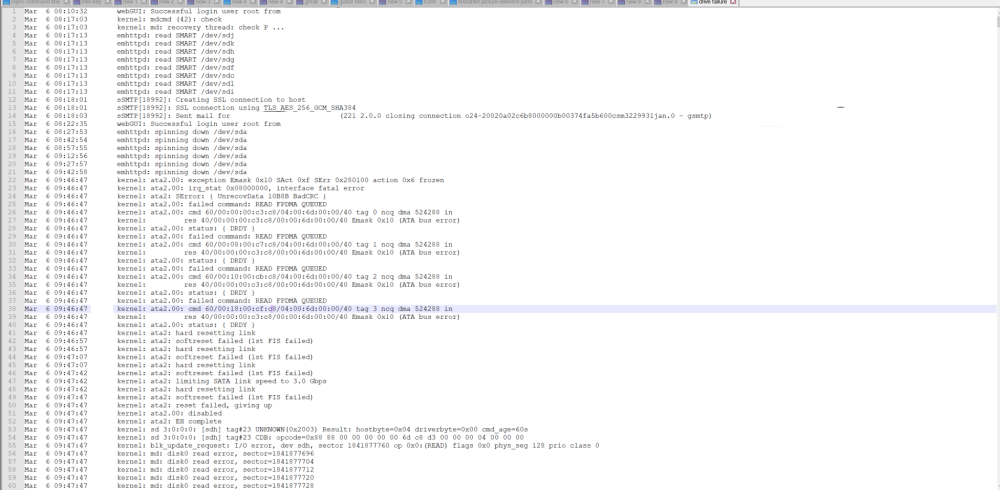
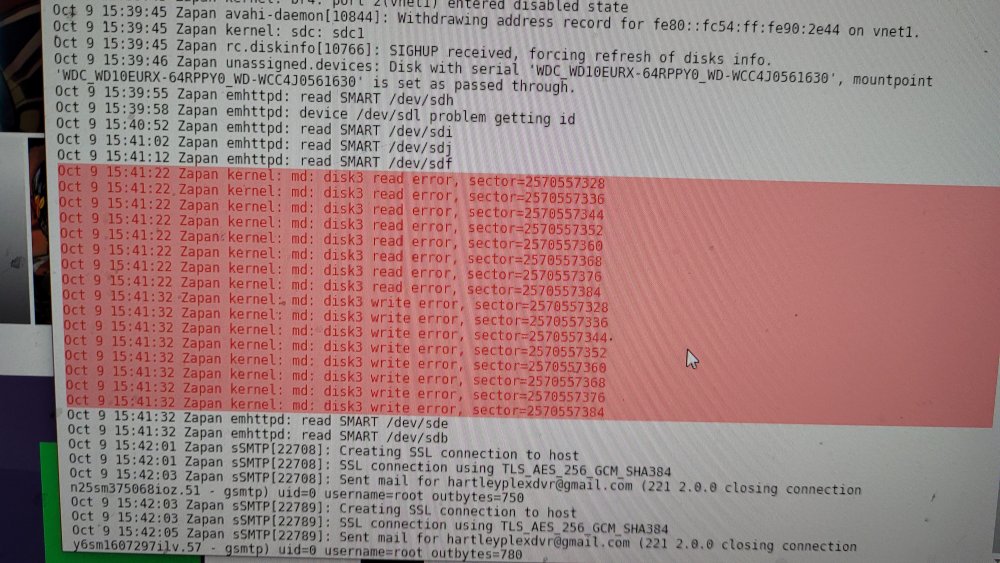
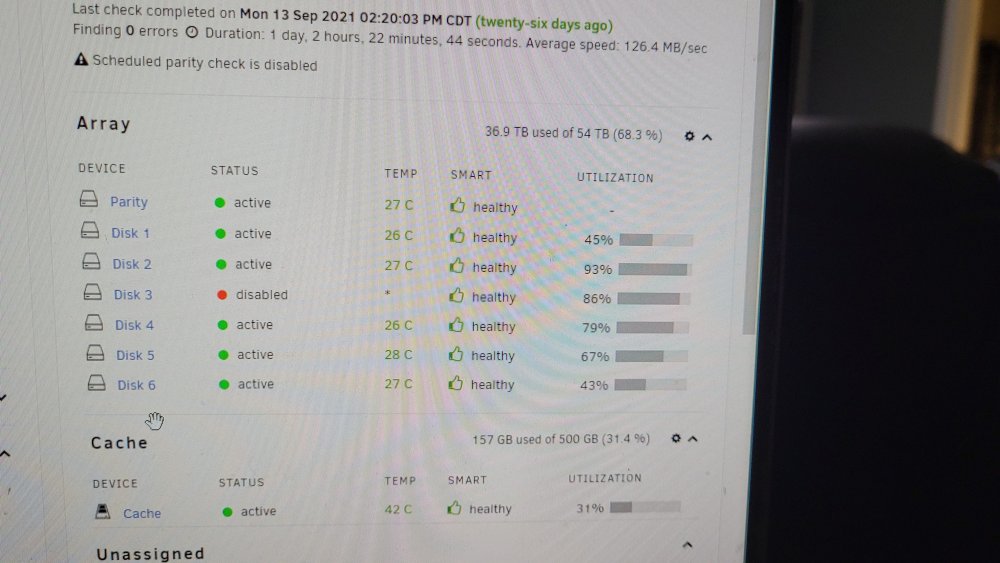
 thanks for the answer, i appreciate the response greatly. i have some new sata cables coming in the mail this week. ill swap sata and power cable and see what happens.I know this community gets a lot of these post, and im sorry just trying to get some opinions. Started a parity check today and shortly after starting, i started getting errors on my parity disk. looks like unraid booted it from the array. Description: Array has 1 disk with read errors Importance: warning Parity disk (sdh) (errors 2048) Logs at the bottom of the post. The attached image is the smart errors. Weird thing was that unraid wouldn't let me run a smart test on disk untill reboot. I have seen countless threads saying that crc issues are cable relate and or cross talk between sata wires. Data going in but not coming out. I added a drive about a month ago but no issues with errors since adding the drive and adding data to said drive with parity being used. I checked cables to drive, both at the drive and motherboard board looked good. swapped cable anyways. No other drives show any other issues 1: does anyone think its the drive. 2 if drive is ok how do i get back the drive into the array after being disabled by unraid?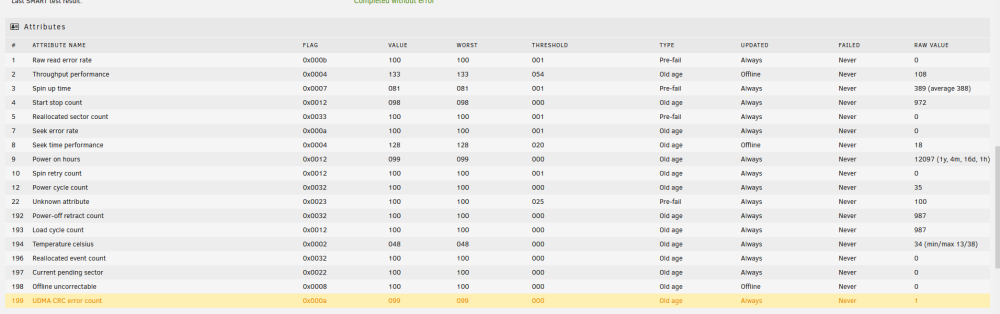
 Shut down server do to server weather. Unplugged power from power supply. This morning I tried butting up. Unraid boot process started. It keep trying to remove my ups (connected by usb) and was doing this in a continuous loop. So I removed usb and restarted. Unraid started process again. This time it ran through everything and got stuck on a wd usb device. Said unit not ready. Removed that and unraid finished boot process. Plugged in both usb device and unriad registered both devices. Then I was going to go check the wd device to make sure I could read files and notice one of my ssd that was being assigned to plex was not in my shares. Checked ssd and it's mounted. Went through unassigned device and it show all folders intact. Then I tried plex plex starts but I can't get to the plex homepage. The only thing I'm really seeing is docker0: port 1 (veth500bc1c) entered disabled mode. Running 6.9.2 so i waited to see if all my drives would power down and they stayed up with no activity for more than 15. so i checked logs kep saying docker 0 port 1. so i killed all docker containers and disk went to sleep within 1 min. any help would be appreciated i am running unraid 6.9.2Question would a bad connection to the drive cause this issue or I this strictly at the drive levelTried adding a ssd as a spare unassigned drive after adding this with sata. Drive next to the sata port went missing. Powered down system checked all connections and powered back up. Drive is there then it started giving me udma crc errors. At that point I moved drive to a sata port on the motherboard and used a new different cord. Powered it up everything looked good. Played a couple of file from the drive it played fine. Left it alone and the drive wouldn't go to sleep. Tried playing a file again. Unriad kicked the drive and parity is emulating it. Pulled the drive and check it with Chrystal disk everything shows fine.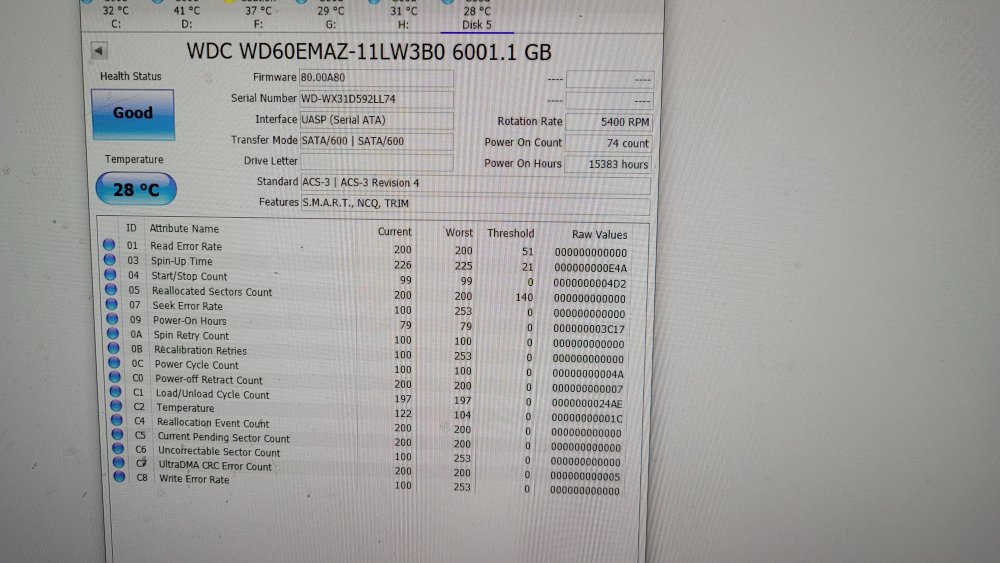
 Model: Custom M/B: Micro-Star International Co., Ltd. MPG X570 GAMING EDGE WIFI (MS-7C37) Version 1.0 - s/n: JA16689981 BIOS: American Megatrends Inc. Version 1.40. Dated: 09/10/2019 CPU: AMD Ryzen 7 3700X 8-Core @ 3600 MHz HVM: Enabled IOMMU: Enabled Cache: 512 KiB, 4096 KiB, 32768 KiB Memory: 32 GiB DDR4 (max. installable capacity 128 GiB) Dynamix System Temperature is seeing this when i scan. k10temp nct6775 but no available sensors at the bottom. nerd pack is installed and peral is active I runing unraid Version: 6.8.1 new to unraid any help would be helpful.




