





Keebler
Members
-
Joined
-
Last visited
-
OK i found the problem. the nic adapter on my daily driver is a 10g nic. I noticed jumbo packets wasn't on the other day and turned it on. Well turns out that having that turned on at the adapter was a no go for unraid. it was killing the connection. set it back to disabled and it started working.
-
OK. I can confirm this is a ME issue. I booted my PC on an older hard dive and i am able to get to the GUI. So something in the last day that i have installed or messed with caused this problem. Im going to work through this and see if i can pinpoint the exact issue so i can post it for future searches
-
Yes. It has always been through the 10g nic. I did however get out my laptop that has never acceesed unraid before and it seems to work without issue. This looks like its something specific to my everyday driver. whats odd is i have cleard everything browser history and cache wise and still same thing. and tried on 3 diferent browsers.
-
OK. i performed a safemode boot no-gui and with gui and got the same result. Thank you for helping with this
-
So until today. things have been working with no issue. I go to log in and the web gui wouldnt load. so I thought maybe the server is down, network, just something for it being out of the blue (im in it daily). I can ping it no problem. I hook a monitor to the server and i can access the terminal. I reboot and i tell it to boot with the gui. GUI comes up on the server itself. no issus, I can access everything without problems. Just no GUI when i try to log in from my normal daily driver PC. I read and I read. it seems to all come down to the usb drive, this will have been the second one i have had to replace. But replacing it didnt help. any insight? I included the diagnostics. I tried to look at some of the logs but not knbowing enough abouot unraid on the back end, im not seeing anything that sticks out as obvious. unraidmedia-diagnostics-20231101-1424.zip
-
OK I have been running now for 10 days without issue. I'm going to mark this resolved. If i crash again I will get a screen shot of the crash screen and open a new thread. Thanks for the help
-
Sorry for the late response on this. I have been laid up in the hospital having surgery. As of right now the server is going on 7 days without a crash. As soon as it does ill grab the screen shot.
-
I think it was around the 6am'ish time frame. when it crashed in the past i had a screen connected to it or connected to it through iDRAC and the last line was something about kernal panic. I dont remember the specifics. I will have to hook a monitor up and get a screen shot of it. this last time it lasted what, 3 and a half days i think from my first post.
-
syslog-192.168.1.39.log here is the sysy log, thanks for the help
-
OK. I need further help. It just crashed this morning. Added the diagnostics file. thanks for the continued help EDIT: After posting this i looked at upgrading the Firmware on my 10g nic. I went from version 2.33 to 2.42 which is the latest firmware since 2017. unraidmedia-diagnostics-20230102-0641.zip
-
Thank you! I have made the changes and will let it run a couple days then report back and mark it solved.
-
so for about a year now i have been dealing with the frequent crashing of unraid. I figured I recently purchased a new faster server and installed unraid and started from scratch but the crashes continue and seem to be getting more frequent. I am running a dell R720 with dual E5-2690 0 @ 2.90GHz CPU's and 129gb of ram. Its running a Mellanox 3 10g card and also have a 1tb nmve cache drive on an adapter in one of the PCI slots and, running version Version 6.11.5 2022-11-20. I look at the log and I'm just lost on what exactly is going on. This crashing was happening on my old server before i moved to a 10g card and before i hade the 1tb cache. I have attached the sys log and any help would be appreciated. this went from a minor inconvenience i could deal with to the point of wanting to move away from Unraid. I have another unraid server set up at my moms house with the exact same configuration with the exception of the Mellanox card and it has not crashed at all which makes me think this is a card/driver issue. syslog-.log diags.zip
-
I noticed this time around that different drives showed up as being capped. Unless im looking at this wrong. I have some really slow drives.
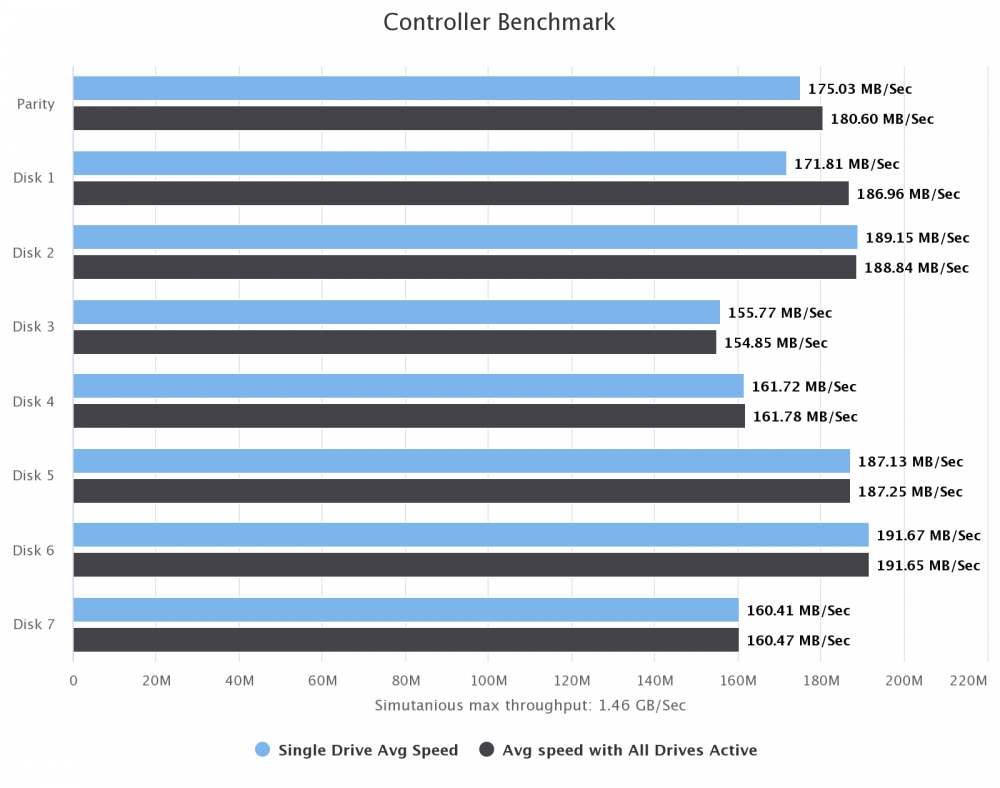
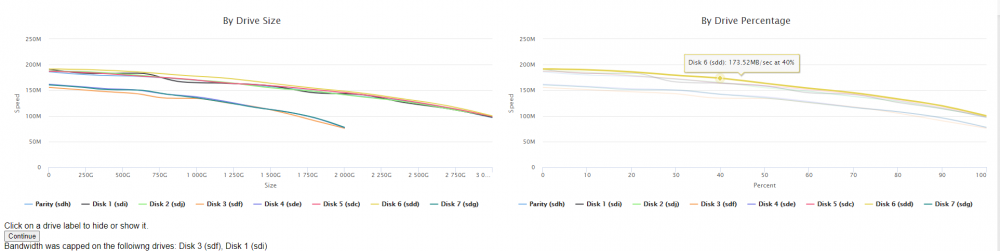
-
I have tried searching but all i get is the beginning of this thread and going through 22 pages is a task lol. I am getting "bandwidth capped on disk" for all of my disks. What should i start looking at? Thanks I am running on a dell R720 with SAS2008 PCI-Express Fusion-MPT SAS-2 [Falcon] Dell (Broadcom / LSI) Serial Attached SCSI controller Type: Onboard Controller Current & Maximum Link Speed: 5GT/s width x8 (4 GB/s max throughput) Capabilities: storage pm pciexpress vpd msi msix bus_master cap_list rom
-
Thanks for the hard work.


