





Dava2k7
Members
-
Joined
-
Last visited
Everything posted by Dava2k7
-
No but Spaceinvaderone has got an updated video on things I think.... I just got another pc to game on rather then mess about with VM's
-
Hi Space Invader I recently Dumped my new Asus Dual OC RTX 3070 8gb bios Rom with GPU-Z I have attached it below I couldn't remove the Nvidia header because it didn't look the same as was stated on your past video if you could have alook for me id appreciate it I'm not looking to put this in my server as of yet!! but may do in the future once I get a much bigger case hopefullly this will help other people with RTX 3070 Asus Dual OC RTX 3070.rom
-
Yeah thank you I’m not sure what’s happened either I’ve looked around different comments everything points to vbios and I got mine from techpowerup but mine was working for months on 6.8.3 using that vbios I lost Vm completely in 6.9.0 beta 25
-
Hey all I’m getting similar problems with my 1050ti my VM seems to work but with no graphics output I don’t even see unraid load up screen now I think my vbios is ok since I’ve been on my VM previously playing games on it when I update to 6.9.0 beta 29 the Vm worked for two days before screen went blank with cpu cores going crazy so I force shutdown VM and haven’t had no hdmi output since pls help.... Vm seem to work in background but can’t see nothing....
-
Hi all I’ve seen that nvidia drivers aren’t in beta 22 so I’ve been trying to passthrough my 1050ti with no success due to the Dredded Kernal Security check failure so as stated on prelease info I was hoping to build vfio In system devices to solve this after selecting both graphics and sound to passthrough I restarted but nothing happens just won’t boot up web interface to unraid what so ever so had to take unraid usb out and delete vfio file any ideas any help be appreciated 👍🏻
-
Hi all If you go on your windows VM and goto Power settings then Advanced Power settings then to Usb settings/Usb selective suspend settings then click disable should stop the usbs from sleeping hence stopping your screen glitching out but that doesn't mean your screen resolution wont go weird time from time cause believe me it does lol Try This Before Spending Money.....
-
No but it didn’t do anything inside vm do I need the vfio config file in place before doing this? Or Somin?
-
Yeah I’m on f11 I believe
-
Yeah That didn’t work either unfortunately
-
Ok so what would advise I do now and thank you again for you persistence 😊
-
IOMMU group 0:[1022:1482] 00:01.0 Host bridge: Advanced Micro Devices, Inc. [AMD] Starship/Matisse PCIe Dummy Host Bridge [1022:1483] 00:01.1 PCI bridge: Advanced Micro Devices, Inc. [AMD] Starship/Matisse GPP Bridge [1022:1483] 00:01.2 PCI bridge: Advanced Micro Devices, Inc. [AMD] Starship/Matisse GPP Bridge [197b:0585] 01:00.0 SATA controller: JMicron Technology Corp. Device 0585 [1022:57ad] 02:00.0 PCI bridge: Advanced Micro Devices, Inc. [AMD] Matisse Switch Upstream [1022:57a3] 03:02.0 PCI bridge: Advanced Micro Devices, Inc. [AMD] Matisse PCIe GPP Bridge [1022:57a3] 03:03.0 PCI bridge: Advanced Micro Devices, Inc. [AMD] Matisse PCIe GPP Bridge [1022:57a4] 03:08.0 PCI bridge: Advanced Micro Devices, Inc. [AMD] Matisse PCIe GPP Bridge [1022:57a4] 03:09.0 PCI bridge: Advanced Micro Devices, Inc. [AMD] Matisse PCIe GPP Bridge [1022:57a4] 03:0a.0 PCI bridge: Advanced Micro Devices, Inc. [AMD] Matisse PCIe GPP Bridge [8086:1539] 04:00.0 Ethernet controller: Intel Corporation I211 Gigabit Network Connection (rev 03) [8086:2723] 05:00.0 Network controller: Intel Corporation Wi-Fi 6 AX200 (rev 1a) [1022:1485] 06:00.0 Non-Essential Instrumentation [1300]: Advanced Micro Devices, Inc. [AMD] Starship/Matisse Reserved SPP [1022:149c] 06:00.1 USB controller: Advanced Micro Devices, Inc. [AMD] Matisse USB 3.0 Host Controller [1022:149c] 06:00.3 USB controller: Advanced Micro Devices, Inc. [AMD] Matisse USB 3.0 Host Controller [1022:7901] 07:00.0 SATA controller: Advanced Micro Devices, Inc. [AMD] FCH SATA Controller [AHCI mode] (rev 51) [1022:7901] 08:00.0 SATA controller: Advanced Micro Devices, Inc. [AMD] FCH SATA Controller [AHCI mode] (rev 51) IOMMU group 1:[1022:1482] 00:02.0 Host bridge: Advanced Micro Devices, Inc. [AMD] Starship/Matisse PCIe Dummy Host Bridge IOMMU group 2:[1022:1482] 00:03.0 Host bridge: Advanced Micro Devices, Inc. [AMD] Starship/Matisse PCIe Dummy Host Bridge [1022:1483] 00:03.1 PCI bridge: Advanced Micro Devices, Inc. [AMD] Starship/Matisse GPP Bridge [10de:1c82] 09:00.0 VGA compatible controller: NVIDIA Corporation GP107 [GeForce GTX 1050 Ti] (rev a1) [10de:0fb9] 09:00.1 Audio device: NVIDIA Corporation GP107GL High Definition Audio Controller (rev a1) IOMMU group 3:[1022:1482] 00:04.0 Host bridge: Advanced Micro Devices, Inc. [AMD] Starship/Matisse PCIe Dummy Host Bridge IOMMU group 4:[1022:1482] 00:05.0 Host bridge: Advanced Micro Devices, Inc. [AMD] Starship/Matisse PCIe Dummy Host Bridge IOMMU group 5:[1022:1482] 00:07.0 Host bridge: Advanced Micro Devices, Inc. [AMD] Starship/Matisse PCIe Dummy Host Bridge IOMMU group 6:[1022:1484] 00:07.1 PCI bridge: Advanced Micro Devices, Inc. [AMD] Starship/Matisse Internal PCIe GPP Bridge 0 to bus[E:B] IOMMU group 7:[1022:1482] 00:08.0 Host bridge: Advanced Micro Devices, Inc. [AMD] Starship/Matisse PCIe Dummy Host Bridge IOMMU group 8:[1022:1484] 00:08.1 PCI bridge: Advanced Micro Devices, Inc. [AMD] Starship/Matisse Internal PCIe GPP Bridge 0 to bus[E:B] IOMMU group 9:[1022:1484] 00:08.2 PCI bridge: Advanced Micro Devices, Inc. [AMD] Starship/Matisse Internal PCIe GPP Bridge 0 to bus[E:B] IOMMU group 10:[1022:1484] 00:08.3 PCI bridge: Advanced Micro Devices, Inc. [AMD] Starship/Matisse Internal PCIe GPP Bridge 0 to bus[E:B] IOMMU group 11:[1022:790b] 00:14.0 SMBus: Advanced Micro Devices, Inc. [AMD] FCH SMBus Controller (rev 61) [1022:790e] 00:14.3 ISA bridge: Advanced Micro Devices, Inc. [AMD] FCH LPC Bridge (rev 51) IOMMU group 12:[1022:1440] 00:18.0 Host bridge: Advanced Micro Devices, Inc. [AMD] Matisse Device 24: Function 0 [1022:1441] 00:18.1 Host bridge: Advanced Micro Devices, Inc. [AMD] Matisse Device 24: Function 1 [1022:1442] 00:18.2 Host bridge: Advanced Micro Devices, Inc. [AMD] Matisse Device 24: Function 2 [1022:1443] 00:18.3 Host bridge: Advanced Micro Devices, Inc. [AMD] Matisse Device 24: Function 3 [1022:1444] 00:18.4 Host bridge: Advanced Micro Devices, Inc. [AMD] Matisse Device 24: Function 4 [1022:1445] 00:18.5 Host bridge: Advanced Micro Devices, Inc. [AMD] Matisse Device 24: Function 5 [1022:1446] 00:18.6 Host bridge: Advanced Micro Devices, Inc. [AMD] Matisse Device 24: Function 6 [1022:1447] 00:18.7 Host bridge: Advanced Micro Devices, Inc. [AMD] Matisse Device 24: Function 7 IOMMU group 13:[1022:148a] 0a:00.0 Non-Essential Instrumentation [1300]: Advanced Micro Devices, Inc. [AMD] Starship/Matisse PCIe Dummy Function IOMMU group 14:[1022:1485] 0b:00.0 Non-Essential Instrumentation [1300]: Advanced Micro Devices, Inc. [AMD] Starship/Matisse Reserved SPP IOMMU group 15:[1022:1486] 0b:00.1 Encryption controller: Advanced Micro Devices, Inc. [AMD] Starship/Matisse Cryptographic Coprocessor PSPCPP IOMMU group 16:[1022:149c] 0b:00.3 USB controller: Advanced Micro Devices, Inc. [AMD] Matisse USB 3.0 Host Controller IOMMU group 17:[1022:1487] 0b:00.4 Audio device: Advanced Micro Devices, Inc. [AMD] Starship/Matisse HD Audio Controller IOMMU group 18:[1022:7901] 0c:00.0 SATA controller: Advanced Micro Devices, Inc. [AMD] FCH SATA Controller [AHCI mode] (rev 51) IOMMU group 19:[1022:7901] 0d:00.0 SATA controller: Advanced Micro Devices, Inc. [AMD] FCH SATA Controller [AHCI mode] (rev 51) <?xml version='1.0' encoding='UTF-8'?> <domain type='kvm'> <name>Windows 10</name> <uuid>a73f1e5e-e058-810b-0873-efdafd2ce5b1</uuid> <metadata> <vmtemplate xmlns="unraid" name="Windows 10" icon="windows.png" os="windows10"/> </metadata> <memory unit='KiB'>16777216</memory> <currentMemory unit='KiB'>16777216</currentMemory> <memoryBacking> <nosharepages/> </memoryBacking> <vcpu placement='static'>12</vcpu> <cputune> <vcpupin vcpu='0' cpuset='6'/> <vcpupin vcpu='1' cpuset='18'/> <vcpupin vcpu='2' cpuset='7'/> <vcpupin vcpu='3' cpuset='19'/> <vcpupin vcpu='4' cpuset='8'/> <vcpupin vcpu='5' cpuset='20'/> <vcpupin vcpu='6' cpuset='9'/> <vcpupin vcpu='7' cpuset='21'/> <vcpupin vcpu='8' cpuset='10'/> <vcpupin vcpu='9' cpuset='22'/> <vcpupin vcpu='10' cpuset='11'/> <vcpupin vcpu='11' cpuset='23'/> </cputune> <os> <type arch='x86_64' machine='pc-i440fx-4.2'>hvm</type> <loader readonly='yes' type='pflash'>/usr/share/qemu/ovmf-x64/OVMF_CODE-pure-efi.fd</loader> <nvram>/etc/libvirt/qemu/nvram/a73f1e5e-e058-810b-0873-efdafd2ce5b1_VARS-pure-efi.fd</nvram> </os> <features> <acpi/> <apic/> <hyperv> <relaxed state='on'/> <vapic state='on'/> <spinlocks state='on' retries='8191'/> <vendor_id state='on' value='none'/> </hyperv> </features> <cpu mode='host-passthrough' check='none'> <topology sockets='1' cores='12' threads='1'/> </cpu> <clock offset='localtime'> <timer name='hypervclock' present='yes'/> <timer name='hpet' present='no'/> </clock> <on_poweroff>destroy</on_poweroff> <on_reboot>restart</on_reboot> <on_crash>restart</on_crash> <devices> <emulator>/usr/local/sbin/qemu</emulator> <disk type='file' device='disk'> <driver name='qemu' type='raw' cache='writeback'/> <source file='/mnt/user/domains/Windows 10/vdisk1.img'/> <target dev='hdc' bus='virtio'/> <boot order='1'/> <address type='pci' domain='0x0000' bus='0x00' slot='0x04' function='0x0'/> </disk> <disk type='file' device='cdrom'> <driver name='qemu' type='raw'/> <source file='/mnt/user/isos/virtio-win-0.1.160-1.iso'/> <target dev='hdb' bus='ide'/> <readonly/> <address type='drive' controller='0' bus='0' target='0' unit='1'/> </disk> <controller type='pci' index='0' model='pci-root'/> <controller type='ide' index='0'> <address type='pci' domain='0x0000' bus='0x00' slot='0x01' function='0x1'/> </controller> <controller type='virtio-serial' index='0'> <address type='pci' domain='0x0000' bus='0x00' slot='0x03' function='0x0'/> </controller> <controller type='usb' index='0' model='ich9-ehci1'> <address type='pci' domain='0x0000' bus='0x00' slot='0x07' function='0x7'/> </controller> <controller type='usb' index='0' model='ich9-uhci1'> <master startport='0'/> <address type='pci' domain='0x0000' bus='0x00' slot='0x07' function='0x0' multifunction='on'/> </controller> <controller type='usb' index='0' model='ich9-uhci2'> <master startport='2'/> <address type='pci' domain='0x0000' bus='0x00' slot='0x07' function='0x1'/> </controller> <controller type='usb' index='0' model='ich9-uhci3'> <master startport='4'/> <address type='pci' domain='0x0000' bus='0x00' slot='0x07' function='0x2'/> </controller> <interface type='bridge'> <mac address='52:54:00:3f:23:bd'/> <source bridge='br0'/> <model type='virtio'/> <address type='pci' domain='0x0000' bus='0x00' slot='0x02' function='0x0'/> </interface> <serial type='pty'> <target type='isa-serial' port='0'> <model name='isa-serial'/> </target> </serial> <console type='pty'> <target type='serial' port='0'/> </console> <channel type='unix'> <target type='virtio' name='org.qemu.guest_agent.0'/> <address type='virtio-serial' controller='0' bus='0' port='1'/> </channel> <input type='mouse' bus='ps2'/> <input type='keyboard' bus='ps2'/> <hostdev mode='subsystem' type='pci' managed='yes'> <driver name='vfio'/> <source> <address domain='0x0000' bus='0x09' slot='0x00' function='0x0'/> </source> <rom file='/mnt/cache/domains/Gigabyte.GTX1050Ti hacked.rom'/> <address type='pci' domain='0x0000' bus='0x00' slot='0x05' function='0x0'/> </hostdev> <hostdev mode='subsystem' type='pci' managed='yes'> <driver name='vfio'/> <source> <address domain='0x0000' bus='0x09' slot='0x00' function='0x1'/> </source> <address type='pci' domain='0x0000' bus='0x00' slot='0x06' function='0x0'/> </hostdev> <hostdev mode='subsystem' type='usb' managed='no'> <source> <vendor id='0x046d'/> <product id='0xc534'/> </source> <address type='usb' bus='0' port='1'/> </hostdev> <memballoon model='none'/> </devices> </domain>
-
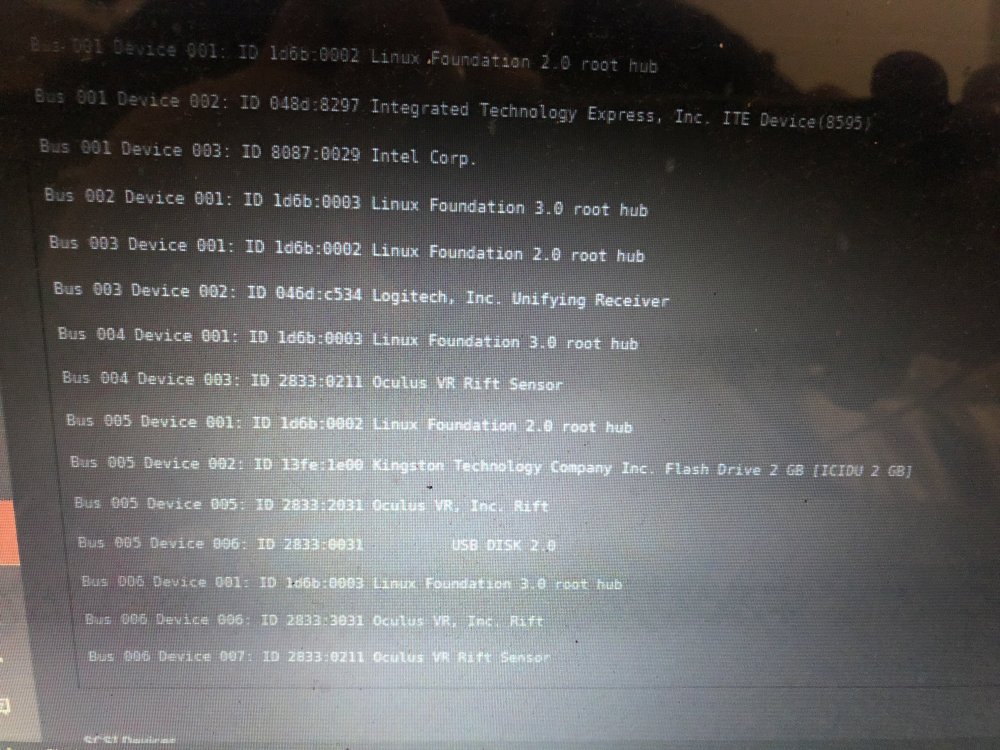
Getting to that point now where I’d be willing to pay someone to sort this 🤔
-
K well xml didn’t work either what’s my next step and what screen shot info do you need to help get this sorted I just want it done with 😳
-
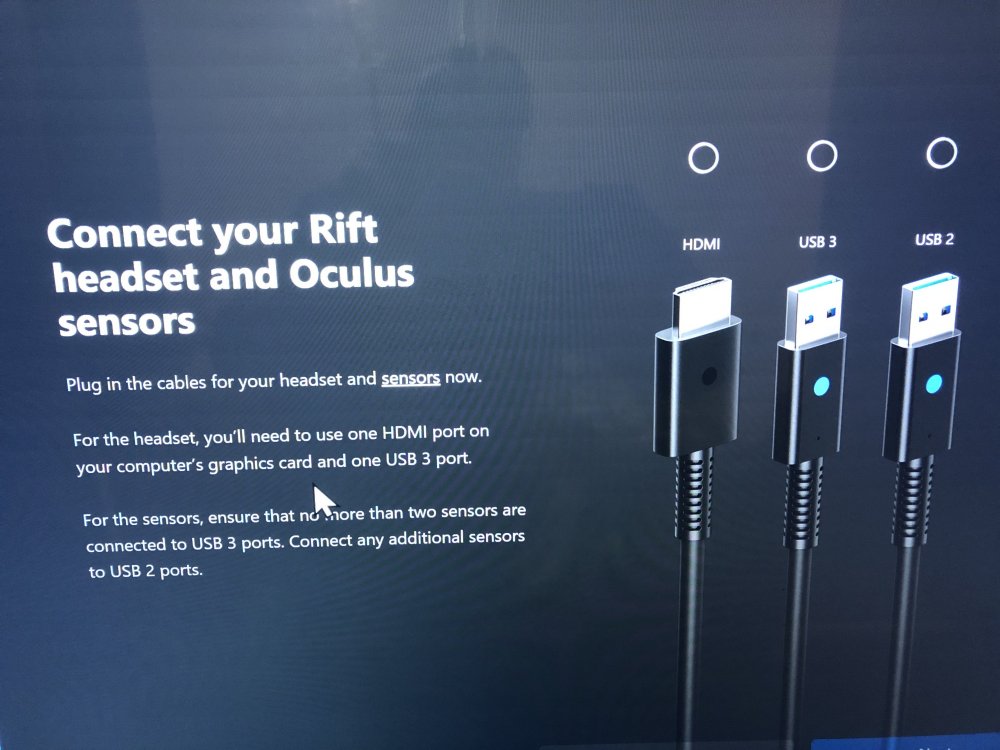
I can see the headset if I remove unraid usb and move to usb 3.1 port and two sensors also show up but like I say non will show bloody nightmare lol 😤
-
Nothing happens doesn’t detect them
-
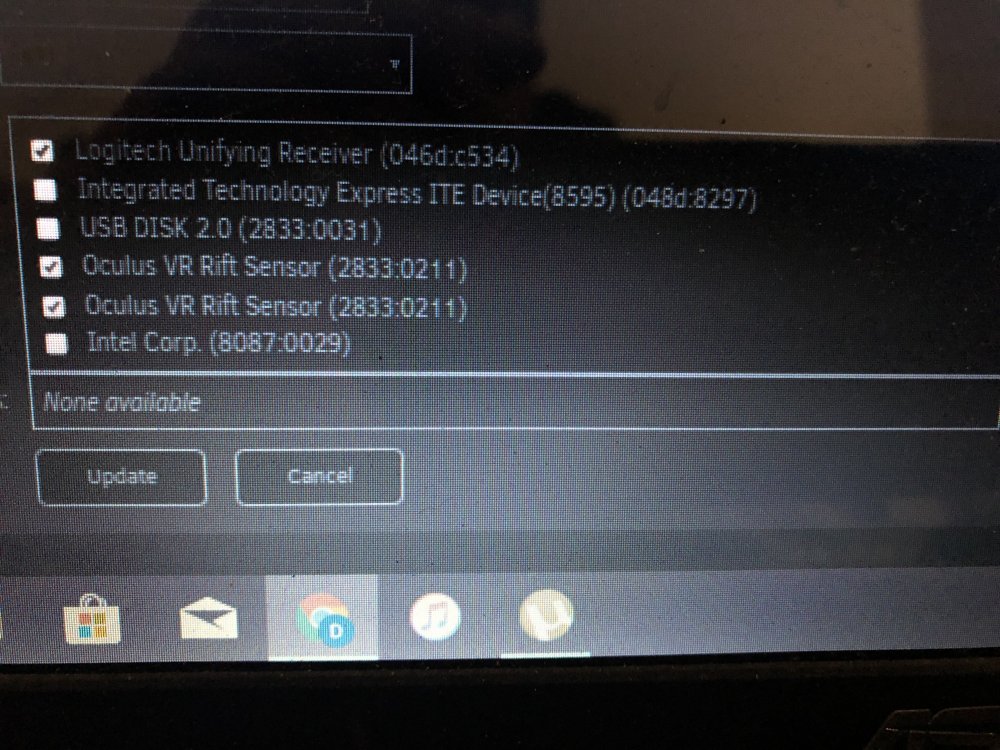
K il try now I’m missing the oculus headset off the list does that matter
-
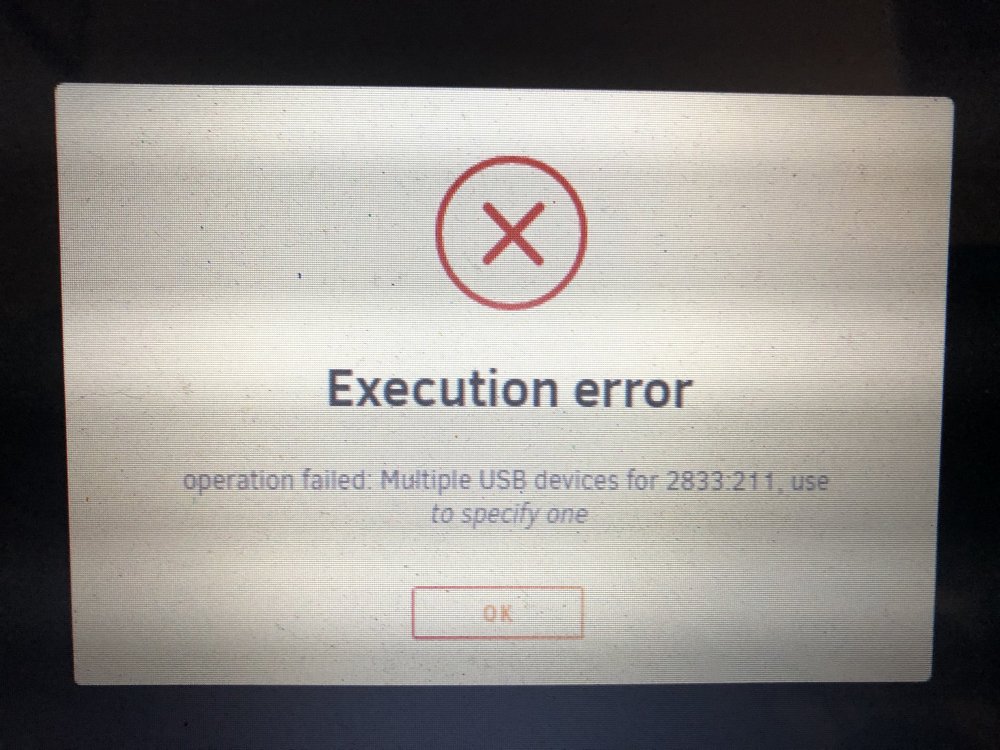
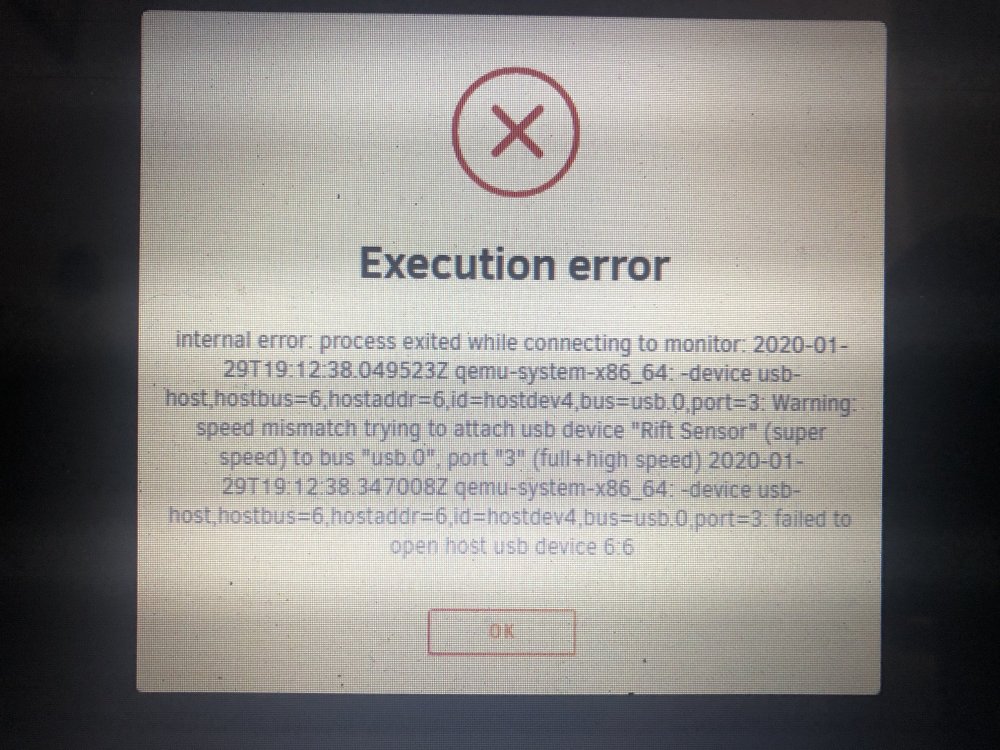
I just get this error
-
Yeah I done IOMMU and enabled Svm whilst following space invaders vm tutorial I have turned off acs overide I have a perfect running vm with sound video passthrough and my usb keyboard mouse ect it’s working very well and love it but I need to get the oculus vr working I’ve tried following guide lines for finding the bus numbers and other bits I need for vfio and stuff and tried to follow everything I’ve seen on the unraid forum but to no success I need to try the xml suggested by phat cow Skitals kinda helped me out but I don’t know what stubing is...but I just wanna check a few things with phat cow to make sure the xml matches my usb configuration don’t want my server getting stuck at boot anymore il have a heart attack if I get much more of it lol hopefully the great minds on here can take a few minutes of the day to help me out and finally stop me posting lol
-
Thank you il give it a try is there anything I need to change or look up before inputting the code I’ve got my unraid usb in bios slot which is white my oculus 3x usbs in usb 3.0 ports il save the xml before I change it so I can change it back thank you for your help 👍🏻
-
Sorry I don’t know what stub is il carry on reading I am reading a lot on here only been using a week and got vr yesterday so I’m trying to get my head round It all thank you for helping me sorry to be a nuisance
-
If i take out one sensor so it’s not conflicting I get this
-
Plugin ain’t working for me
-
Thank you now having ago will this sort the error out for oculus sensor and headset detection on win vm
-
it’s not working for me still getting operation failed multiple usb devices for 2833:211 use to specify one driving me insane
-
Can you tell me how you did this pls via xml


