





jimmy898
Members
-
Joined
-
Last visited
-
Working perfect here with docker (unraid-managed) and zero customs!
-
Hello! Great development so far, I've switched both my backend and frontend to ABS. Just a note: when downloading an audiobook from my oneplus 8 (android 12), it triggers a fail notification related to the cover objects but it's misleading, if you launch a manual scan of the local folder it finds the covers and correctly apply. I'm sorry if it's a known issue, maybe I've missed the post with resolution.
-
Same here with traefik, no issues at all
-
My library follow the very same structure, is ready to go! Being able to apply the Metadata into the ID3 tags would be awsome, right now Calibre is a powefull tool in find the correct info among the web but when we talk about audiobooks there is no way to "export his knowledge". Bring his Embed Metadata tool in audiobookshelf would be a killing feature imho!
-
Hi @advplyr. Thanks once again for the great app and his develpment. Right now I have my audiobook's library in Calibre, it works pretty well even with my italian editions. I'm struggling to find a way to embed metadata files into the files, unfortunately Calibre can't write the metadata from the .opf files into the ID3 MP3 tags. This means no info in my audiobook player (besides Title and Artist) ....so sad!! Do you think this could be a feature? Thanks in advance.
-
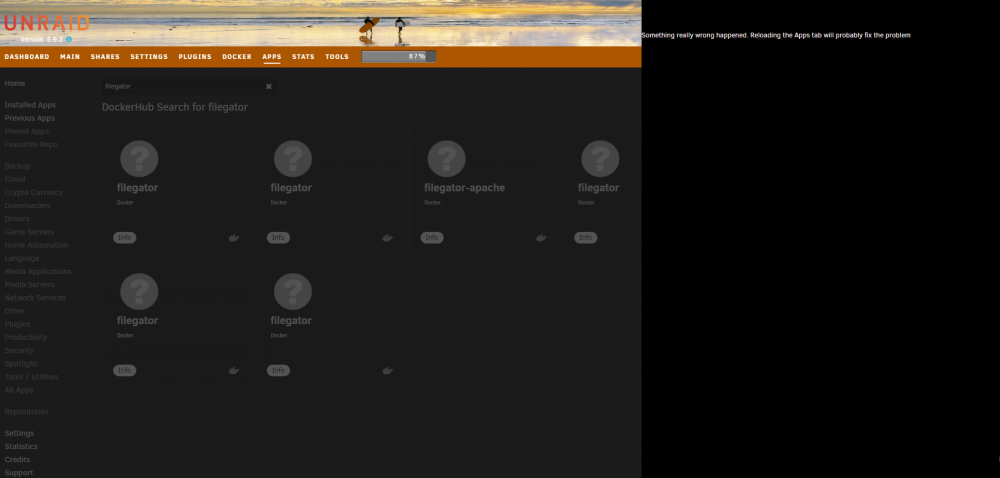
Thanks @Squid! Just started looking around ... when I switch browsing to docker hub I can't install the container or even open the info:
-
It works also removing servers.json. They already updated the :latest but even with the last commit I'm still facing the issue
-
Bug open! https://github.com/qdm12/gluetun/issues/654 It seems we are not the only ones @monarc
-
Hi everyone! last update broke my instance of Gluetun, the container seems in shutdown loop: 2021/09/30 09:59:05 INFO Shutdown successful 2021/09/30 09:59:06 ERROR cannot read servers from file: json: cannot unmarshal string into Go struct field ProtonvpnServer.protonvpn.servers.exit_ip of type []net.IP 2021/09/30 09:59:06 INFO Shutdown successful 2021/09/30 09:59:06 ERROR cannot read servers from file: json: cannot unmarshal string into Go struct field ProtonvpnServer.protonvpn.servers.exit_ip of type []net.IP 2021/09/30 09:59:06 INFO Shutdown successful 2021/09/30 09:59:07 ERROR cannot read servers from file: json: cannot unmarshal string into Go struct field ProtonvpnServer.protonvpn.servers.exit_ip of type []net.IP 2021/09/30 09:59:07 INFO Shutdown successful 2021/09/30 09:59:09 ERROR cannot read servers from file: json: cannot unmarshal string into Go struct field ProtonvpnServer.protonvpn.servers.exit_ip of type []net.IP 2021/09/30 09:59:09 INFO Shutdown successful 2021/09/30 09:59:11 ERROR cannot read servers from file: json: cannot unmarshal string into Go struct field ProtonvpnServer.protonvpn.servers.exit_ip of type []net.IP 2021/09/30 09:59:11 INFO Shutdown successful 2021/09/30 09:59:15 ERROR cannot read servers from file: json: cannot unmarshal string into Go struct field ProtonvpnServer.protonvpn.servers.exit_ip of type []net.IP 2021/09/30 09:59:15 INFO Shutdown successful 2021/09/30 09:59:22 ERROR cannot read servers from file: json: cannot unmarshal string into Go struct field ProtonvpnServer.protonvpn.servers.exit_ip of type []net.IP 2021/09/30 09:59:22 INFO Shutdown successful 2021/09/30 09:59:35 ERROR cannot read servers from file: json: cannot unmarshal string into Go struct field ProtonvpnServer.protonvpn.servers.exit_ip of type []net.IP 2021/09/30 09:59:35 INFO Shutdown successful 2021/09/30 10:00:01 ERROR cannot read servers from file: json: cannot unmarshal string into Go struct field ProtonvpnServer.protonvpn.servers.exit_ip of type []net.IP 2021/09/30 10:00:01 INFO Shutdown successful 2021/09/30 10:00:53 ERROR cannot read servers from file: json: cannot unmarshal string into Go struct field ProtonvpnServer.protonvpn.servers.exit_ip of type []net.IP 2021/09/30 10:00:53 INFO Shutdown successful 2021/09/30 10:01:54 ERROR cannot read servers from file: json: cannot unmarshal string into Go struct field ProtonvpnServer.protonvpn.servers.exit_ip of type []net.IP 2021/09/30 10:01:54 INFO Shutdown successful 2021/09/30 10:02:54 ERROR cannot read servers from file: json: cannot unmarshal string into Go struct field ProtonvpnServer.protonvpn.servers.exit_ip of type []net.IP Anyone else with the same issue?
-
Thanks for the hint! Just to be sure: the script should have the very same name of the container right? So if my container name is "zabbix-agent2", the starting script should be "/boot/config/plugins/ca.update.applications/scripts/starting/zabbix-agent2.sh". Right?
-
This worked for me too. After the "fix" I have the same logs: [cont-init.d] 10-adduser: exited 0. [cont-init.d] 30-config: executing... [cont-init.d] 30-config: exited 0. [cont-init.d] 40-initialise-db: executing... [cont-init.d] 40-initialise-db: exited 0. [cont-init.d] 90-custom-folders: executing... [cont-init.d] 90-custom-folders: exited 0. [cont-init.d] 99-custom-files: executing... [custom-init] no custom files found exiting... [cont-init.d] 99-custom-files: exited 0. [cont-init.d] done. [services.d] starting services [services.d] done. 210826 10:27:08 mysqld_safe Logging to '/config/databases/1e9a6a6ee3d8.err'. 210826 10:27:08 mysqld_safe Starting mariadbd daemon with databases from /config/databases
-
Hi guys, it's a nab question but I'm stuck so... how can I change the script permissions (+x) in "/boot/config/plugins/ca.update.applications/scripts/starting/"? chmod it's not working: root@xxxxxx:/boot/config/plugins/ca.update.applications/scripts/starting# ls -l total 8 -rw------- 1 root root 748 Aug 19 21:55 zabbix-agent2.sh root@xxxxxx:/boot/config/plugins/ca.update.applications/scripts/starting# chmod +x zabbix-agent2.sh root@xxxxxx:/boot/config/plugins/ca.update.applications/scripts/starting# ls -l total 8 -rw------- 1 root root 748 Aug 19 21:55 zabbix-agent2.sh thanks!
-
Great idea! Right now I'm using Calibre also for audiobooks but a dedicated service it's missing, I'll follow this project
-
I get the job done! thanks a lot. With [PLUGIN] CA APPLICATION AUTO UPDATE I've added a script that runs after the update at container start. It should automate the permissions fix. Core commands are: docker exec --user root zabbix-agent2 sh -c "addgroup -g 281 docker" docker exec --user root zabbix-agent2 sh -c "sed -i "s/docker:x:281:/docker:x:281:zabbix/g" /etc/group" About User Scripts I've already set up a script that populates files: sensors > /mnt/user/appdata/zabbix_agent/misc/scripts/temperatures_data apcaccess > /mnt/user/appdata/zabbix_agent/misc/scripts/ups_data Adding avolume binding "/var/local/:/var/local/" I'm able to use the template of @fabianonline (thans a lot!): https://git.schle.nz/fabian/unraid-zabbix_agent/raw/branch/main/zabbix_template.xml
-
First of all great job! Thanks for the template and guidelines. I'm facing the same problem with the very same solution but I can't find a way to easily add the user "zabbix" into the group "docker" due to usermod command not installed. Am I missing something? I correctly create the group with: docker exec --user root zabbix-agent2 sh -c "addgroup -g 281 docker" Do you have any hint? Thank you!


