





Ocean HP
Members
-
Joined
-
Last visited
Everything posted by Ocean HP
-
To everyone trying to access the container through Swag, here is a working nginx config file: ## Version 2024/07/16 # make sure that your dns has a cname set for n8n and that your n8n container is not using a base url # add `server.use-forward-headers=true` to `/config/application.properties` to ensure logs contain real source IP server { listen 443 ssl; listen [::]:443 ssl; server_name n8n.*; include /config/nginx/ssl.conf; client_max_body_size 0; location / { include /config/nginx/proxy.conf; include /config/nginx/resolver.conf; set $upstream_app n8n; set $upstream_port 5678; set $upstream_proto http; proxy_pass $upstream_proto://$upstream_app:$upstream_port; proxy_set_header Connection ''; chunked_transfer_encoding off; proxy_buffering off; proxy_cache off; } } Along with this, you need to setup a couple of environmental variables: Name: VUE_APP_URL_BASE_API Key: VUE_APP_URL_BASE_API Value: https://n8n.yourdomain.com Name: N8N_HOST Key: N8N_HOST Value: n8n.yourdomain.com It should work without N8N_SECURE_COOKIE variable.
-
I'm leaving this information here in hopes it helps someone. I did get V14.2.1 working with Swag, Https enabled, and email smtp working. Unfortunately, V14.3 onward no longer works with the nginx file, but it is close: server { listen 80; server_name OpenProject.*; return 301 https://$host$request_uri; } server { listen 443 ssl; listen [::]:443 ssl; server_name OpenProjects.*; include /config/nginx/ssl.conf; client_max_body_size 0; proxy_redirect off; location / { include /config/nginx/proxy.conf; include /config/nginx/resolver.conf; proxy_set_header Host $host; proxy_set_header X-Real-IP $remote_addr; proxy_set_header X-Forwarded-For $proxy_add_x_forwarded_for; proxy_set_header X-Forwarded-Proto https; set $upstream_app OpenProject; set $upstream_port 8080; set $upstream_proto http; proxy_pass $upstream_proto://$upstream_app:$upstream_port; } }
-
This issue looks similar to yours: https://github.com/jitsi/docker-jitsi-meet/issues/977
-
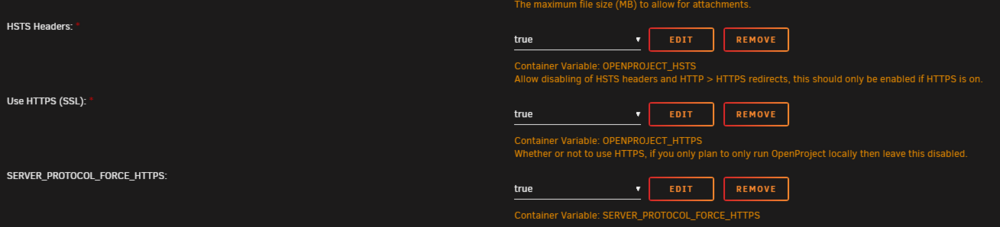
After hours of searching and testing, my solution to the Error 422 was to add the variable: OPENPROJECT_HTTPS and set it to false; both for the value and default value. I couldn't access the login page through my browser (Brave) even after clearing the cache. I was able to access the login page in a private/incognito window. Hope this helps you @Gelantious. Anyone solved the Nginx problem? I've set both the OPENPROJECT_HTTPS, SERVER_PROTOCOL_FORCE_HTTPS, and OPENPROJECT_HSTS to true. Changed the host name to op.mydomain.com. Changed the network to match Swag and got the proxy config file. None of the settings seem to do anything. OP still listens on the localhost:port. Maybe there is another variable we have to use?
-
You're currently using websocket. Have you tried SCTP yet? I had similar issues with websocket including the 'Video Bridge Disconnected' message. You may need to remove/compose down existing jitsi docker containers before. Add the following to your .env file: ENABLE_SCTP=1 ENABLE_COLIBRI_WEBSOCKET=0 ENABLE_XMPP_WEBSOCKET=0 Compose up. It should start working without issue.
-
Hello Eric, I had the same set of issues until last night. I finally fixed all the issues and was able to open and edit documents in nextcloud. Have you tried anything else since?

