





jsmontague
Members
-
Joined
-
Last visited
Everything posted by jsmontague
-
I have that checked already.
-
Thanks @endystrike. I went back to 2.10 and was able to run benchmark on drives individually. When I try and benchmark all drives at once, I check the box to ignore speed gaps yet during the benchmarking it gets hung up.

-
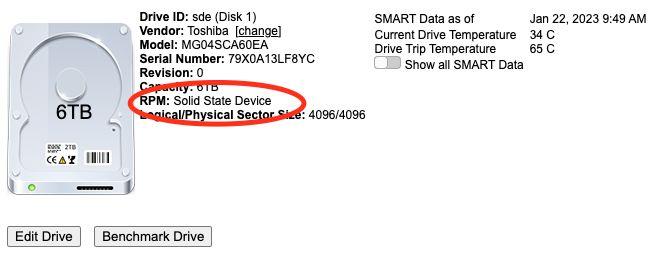
@jbartlett I still am unable to benchmark these drives as the tool thinks they are SSDs and tries to trim them.
-
@jbartlett anything else you need from me?
-
10:23:16 Spinning up sdu (6TB) 10:23:16 Performing random seek tests 10:23:26 Performing sequential seek tests 10:23:38 Performing drive latency tests Random Seek: 101 SequentialSeek: 155 DriveLatency: 8229412 Lucee 5.3.10.97 Error (application) Message Error invoking external process Detail fstrim: /mnt/UNRAID/disk14: the discard operation is not supported Stacktrace The Error Occurred in /var/www/BenchmarkDriveController.cfm: line 131 129: 130: <CFFILE action="write" file="#OutDir#/trim.sh" mode="766" output="fstrim #MountPoint#" addnewline="NO"> 131: <CFEXECUTE name="#OutDir#/trim.sh" timeout="3060" /> 132: <CFSET WriteSpeedList=""> 133: <CFLOOP index="i" from="1" to="#SSDBenchmarkTestFiles#"> Was able to get one to benchmark and this is the output as it gets stuck at trimming.
-
I was able to get one of my TOSHIBA drives to finally benchmark in the tool, not sure whats different, changed etc, only 1 of them would load into the benchmarking screen, all the rest are still unable to. However it hangs at "trimming drive". Should it be trying to trim a spinning disk drive?

-
No change, pulling a debug will get it emailed out tonight.
-
That makes sense. Let me know if you need anything more from me, appreciate the help! I've bought a few HBA cards over the years, not 100% certain which one is in my rig so i'll check that next time I open it up. Doing some research on 4Kn drives I wonder if my HBA doesn't fully support them (I've almost fully migrated to all 4Kn drives and have 0 issues though). SysDevs shows: Serial Attached SCSI controller: Broadcom / LSI SAS2008 PCI-Express Fusion-MPT SAS-2 [Falcon] (rev 03) HBA cards I've bought: LSI 6Gbps SAS HBA LSI 9211-8i (=9201-8i) P20 LSI 6Gbps SAS HBA P20 9223-8i = (9211-8I) HP H220 6Gbps SAS PCI-E 3.0 HBA LSI 9205-8i P15
-
I am still unable to spin up drives on any version below 2.10.1. Version: 2.9.7.1 Scanning Hardware 08:09:48 Spinning up hard drives Lucee 5.3.9.166 Error (application) MessageError invoking external process
-
I sent the debug file in email. I moved the docker back to 2.10.1 and DiskSpeed was able to start and found all my drives. However I can't benchmark any drives; Unable to benchmark for the following reason * No mounted partitions were found. You will need to restart the DiskSpeed docker after making changes to mounted drives for changes to take effect.
-
Getting an error starting DiskSpeed GUI. Its been a little bit since I've run it, so not sure if this is an issue since upgrading to 6.11.5 or with a new drive model I have installed, Toshiba MG04SCA60EA. DiskSpeed ERROR.txt
-
Looks like after docker install its pulled down install and opencore into ISOS folder and I have a bigSur folder in domains with a 100GB disk however vmready_notify is still running and no VM is present in list. Been a few hours so i'm assuming its not still downloading. Any logs to check to help figure out where its stuck? I regret every day when I setup UnRaid for the first time I changed "appdata" to "docker" updated both scripts to look in proper directory and poof there is a VM in my list!!
-
Anyone else no longer see metadata from files after Beta 1.207? My process relies on a metadata comment to not convert items already processed but since update tdarr no longer is seeing any file metadata during health check scans so everything is processing over and over edit: was previously on Beta 1.1093



