





ssinseeme
Members
-
Joined
-
Last visited
Everything posted by ssinseeme
-
Hi all. I have an issue getting Zoneminder docker to work with Nginx. I have all my other docker works flawlessly thank you for that. the only difference I see with Zoneminder is that it requires /zm after the port in order to work. For example 10.01.1.32:8443/zm works but 10.0.1.32:8443 won’t. When I set up the reverse proxy where can I tell it to add /zm to my subdomain.domain ?
-
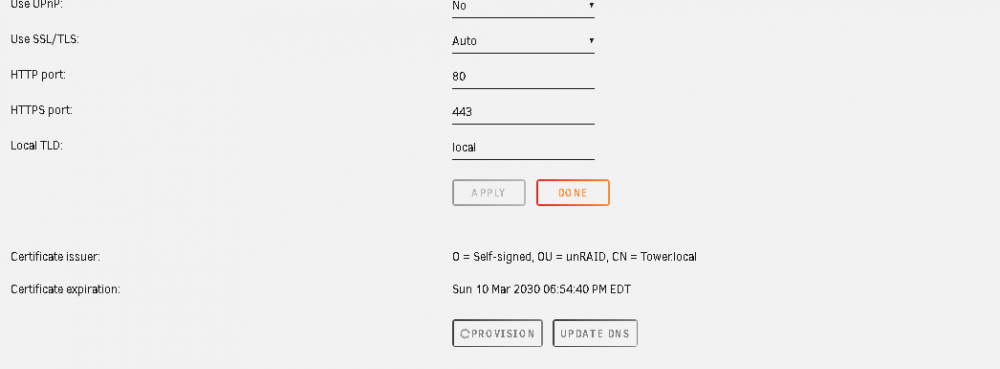
Hi I am trying to encrypt my disks, but first according to space invaders i need to get HTTPS. when I Provision it keeps spinning and nothing happens! i have been waiting for more then half an hour. no error so far what should i do? ssl is set to auto
-
Are you sure you don’t see the difference. “https://okavangonextcloud” should be https://okavangonextcloud.dickdns.org.
-
Your config php doesn’t look right. Did you follow this.
-
Did you edit Letencrypt Ngix Nextcloud.config.sample to match your domain? did you edit Nextcloud config file as instructed from space invader. Post your config files.
-
Saarge. Your answers have been always hints. Do you want to help here or give a hard time. Of course I search google and read forums before I post. The answers I found did not work for me me. That’s why I am seeking this forum help. If you want to help I appreciate it but it you don’t. Don’t give me hints that don’t lead anywhere.
-
Just change the IPv4 address to static in network, go to setting --network
-
I didn't change the path is the same: /mnt/user/media/ i double check that media contained all the document i have in nextcoud. I made also sure also that the share file i am using is disk 3 which has all the file in next cloud. all my dockers worked fine but next cloud. any suggestion what to do thanks
-
Hi all I recently upgraded my MB and CPU. My next cloud now is giving me this error: Your data directory is invalid Ensure there is a file called ".ocdata" in the root of the data directory. someone had this error and managed to add .ocdata in data directory i believe, but i can't find where to add .ocdata. i tried different folders like. \\TOWER\appdata\nextcloud\www\nextcloud\core\Data but i still have this error. my next cloud docker is set up as before with the same path and use the same share folder. any help appreciate it
-
I don't see it in 2 places. I have it only in Letencrypt Nextcloud.config. I don't see that in the nextcloud config.php. could you point me to the senconf place you believe i have it
-
Can anybody tell me why after adding the line: add_header Strict-Transport-Security "max-age=15768000; includeSubDomains; preload;"; i still have "The "Strict-Transport-Security" HTTP header is not set to at least "15552000" seconds. For enhanced security, it is recommended to enable HSTS as described in the security tips ↗." I fixed all other error following spaceinvador but this one
-
Just FYI. This problem occurred because I was trying to connect to my Nextcloud from work. I could not access Nextcloud because acccording to them they block Dynamic DNS. somehow when I get home it’s didn’t let me connect as well, I had to restart Leyenrypt and Nextcloud dockers.
-
Did you change anything else. Because I change d the port from 444 to 443 in Nextcloud docker and it giving me Error 502 and nginx 1.16.1. Did you change the config file to your localIP:444 to 443? for bitwarden port 80 default will not work. It fail the compile. ! Could you share screen shots. Thanks.
-
what happened to my Nextcloud? I have been running nextcloud for 3 weeks with no problems. Today suddenly on my phone i kept getting "Error the certificate for this server is invalid" . at home I tried to open the web UI from the docker and it was trying to acess my local IP nextclpoud instead of Https. any idea. I have not change anything to the settings.
-
444
-
I don’t see the tap supervisor either. Do I have to make any changes in the config folder or YAML? could you share how you did the reverse proxy. Thanks.
-
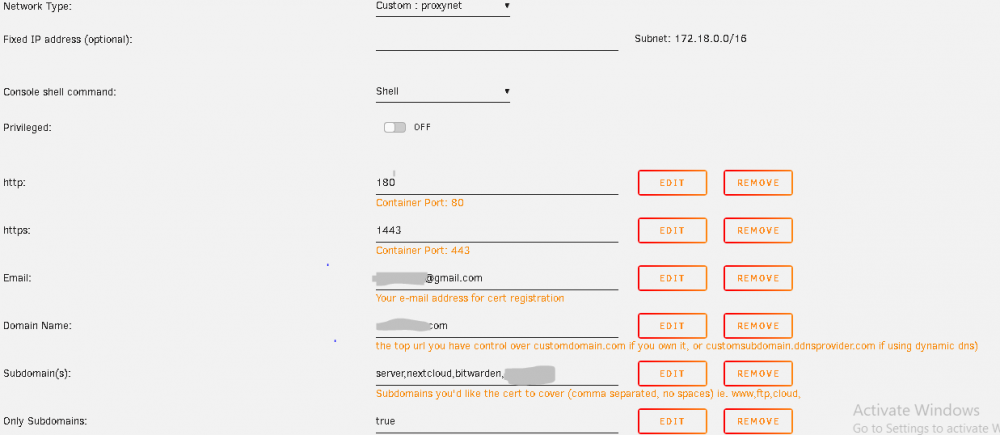
Thanks for sharing mine was a little different as you see above, i tried your config file and i have the same thing. i know this is not Letencrypt help thread but i believe it is the probleme. what did you set your port 443 and 80 in letengrypt. please see this my Letenrypt docker and let me know if it is the same i have follloed Spaceinvador set up
-
Yes, I did follow Spaceinvador YT Video to set up Letencrypt and Nextcloud. He redirected port 443 to 1443 and port 80 to 180. i did the same but I see that you mentioned above that we should leave everything set us as default. I tried that but because port 80 and 443 is been used then the installation failed. However I have my Nextcloud working but none of the other dockers work, all subdomain.mydomain redirect me to Nextcloud.
-
I just installed Hassio supervisor and ran with no other editing. I don'tt see the new HASSIO tab in home assistant core? an other question home do i set up HA with reverse proxy to access from outside.
-
Hi I posted this already but in a wrong thread. I have issues connecting to bitwarden using my domain. I used to use duckdns for domain and it didn't work so I decided to have my own domain to try and see if bitwarden would work. first, I know that Letenrypt is set up right with my domain name and subdomains, the log connected to all my 2 subdomain Nextcloud, bitwarden. I . made sure the Cnam is set right spelled right... Second, my duckdns is set up right since my Nextcloud is working following Spaceenvador's Video for Bitwarden, i set up the network to custom, just like Nextcloud. I tried 2 different config files in letencryp for bitwarden, one with spaceinvador file and i left the container name as original with bitwardenrs of course i alway restart my dockers. #BITWARDEN # make sure that your domain has dns has a cname or a record set for the subdomain bitwarden # This config file will work as is when using a custom docker network the same as letesencrypt (proxynet). # However the container name is expected to be "bitwardenrs" as it is by default the template as this name is used to resolve. # If you are not using the custom docker network for this container then change the line "server bitwardenrs:80;" to "server [YOUR_SERVER_IP]:8086;" Also remove line 7 resolver 127.0.0.11 valid=30s; upstream bitwarden { server bitwardenrs:80; } server { listen 443 ssl; server_name bitwarden.*; include /config/nginx/ssl.conf; client_max_body_size 128M; location / { proxy_pass http://bitwarden; proxy_set_header Host $host; proxy_set_header X-Real-IP $remote_addr; proxy_set_header X-Forwarded-For $proxy_add_x_forwarded_for; proxy_set_header X-Forwarded-Proto $scheme; } location /notifications/hub { proxy_pass http://bitwarden; proxy_set_header Upgrade $http_upgrade; proxy_set_header Connection "upgrade"; } location /notifications/hub/negotiate { proxy_pass http://bitwarden; } } second i tried the default config which what was in letenrypt and change .sample to .conf and i change the container name to bitwarden. make sure that your dns has a cname set for bitwarden and that your bitwarden container is not using a base url # make sure your bitwarden container is named "bitwarden" server { listen 443 ssl; listen [::]:443 ssl; server_name bitwarden.*; include /config/nginx/ssl.conf; client_max_body_size 128M; # enable for ldap auth, fill in ldap details in ldap.conf #include /config/nginx/ldap.conf; location / { # enable the next two lines for http auth #auth_basic "Restricted"; #auth_basic_user_file /config/nginx/.htpasswd; # enable the next two lines for ldap auth #auth_request /auth; #error_page 401 =200 /login; include /config/nginx/proxy.conf; resolver 127.0.0.11 valid=30s; set $upstream_app bitwarden; set $upstream_port 80; set $upstream_proto http; proxy_pass $upstream_proto://$upstream_app:$upstream_port; } location /notifications/hub { include /config/nginx/proxy.conf; resolver 127.0.0.11 valid=30s; set $upstream_app bitwarden; set $upstream_port 80; set $upstream_proto http; proxy_pass $upstream_proto://$upstream_app:$upstream_port; proxy_set_header Upgrade $http_upgrade; proxy_set_header Connection "Upgrade"; } location /notifications/hub/negotiate { include /config/nginx/proxy.conf; resolver 127.0.0.11 valid=30s; set $upstream_app bitwarden; set $upstream_port 80; set $upstream_proto http; proxy_pass $upstream_proto://$upstream_app:$upstream_port; } } now the weird part. when i use http://bitwarden.mydomain.com it will direct me to nextcloud i don't understand why?, when i stop nextcloud and try again i have error 502 Bad Gateway nginx/1.16.1 i am able only to connect locally with bitwarden i dont know what am i missing. this was the same using duckdns as domain
-
something wrong in Nextoud docker or the other docker "bitwaerden"
-
Also i forget to mention that when i use "bitwarden.mydomain.com" it redirect me to my Nextcould why is that??
-
i have the same problem with other dockers to access like "bitwarden" it works locally but not with letenrypt. i am trying to find out what to comment out in "appdata\letsencrypt\nginx\site-confs" i don't see what you see could you share the config default.
-
I am not an expert since I have some issue. But. Did you have port forwarding set up right and the config file in letencrypt ok. Do you have anything else running on reverse proxy running ok. It seem to be Letencrypt issues
-
Finally! thank you very much man, was very helpful. it was actually sudo -u abc php7 /config/www/nextcloud/occ files:scan --all i hope this will be useful for newbies like me. the mysterious first post! had too many links.

