





danimal86
Members
-
Joined
-
Last visited
Everything posted by danimal86
-
Server has been doing well. I figured out that the docker image was somehow on an array drive and was slowing some stuff down and keeping parity and a disk spining, got it over to the cache and much better. Any drive errors on the diag? tower-diagnostics-20241027-1303.zip
-
🤞 Hopefully that took care of it. Next check should be on Nov 1st, i'll try posting up another diag in a few days.
-
Swapped the sas expander card and one of the breakout cables. I attached an updated diagnostic, hopefully disk errors on 1/3/6 are gone. system seemed to be a little bit more responsive. tower-diagnostics-20241022-0802.zip
-
I'm going to double check in the morning, but how I had it setup was Parity 1 & 2 - directly to mobo. Disks 1-4 - on one minisas cable Disks 5-8 - on one minisas cable Disks 9-12...... I'm not using any power splitters. I'm using a Corsair rm1000x with cables that power 4 drives per leg. The only thing I havent replaces is the SAS expander card. I replaced the hba, both minisas to minisas cables (in-between the hba and expander) and the minisas to sata cables. I have a backup expander card, I can try swapping it out....or I could use my other hba that was running at x4 speeds for some reason and ditching the expander.
-
I may have misspoke. I think I plugged the parity 1 and disk 2 to the mobo. I have brand new sas breakout cable, I'll try swapping the ones that do those disks.
-
I'm not sure what else to do. I put in a new PSU, disk1 is now plugged directly into the mobo with a brand new sata cable...... The only thing I can think of is that I believe it's a white label drive that I have kapton tape over the 3.3v pin...I figure that if that wasn't working the drive wouldn't be visible. Maybe I should clip the 3.3v wire on the PSU sata cable instead. I could rebuild it with a red pro I have also,
-
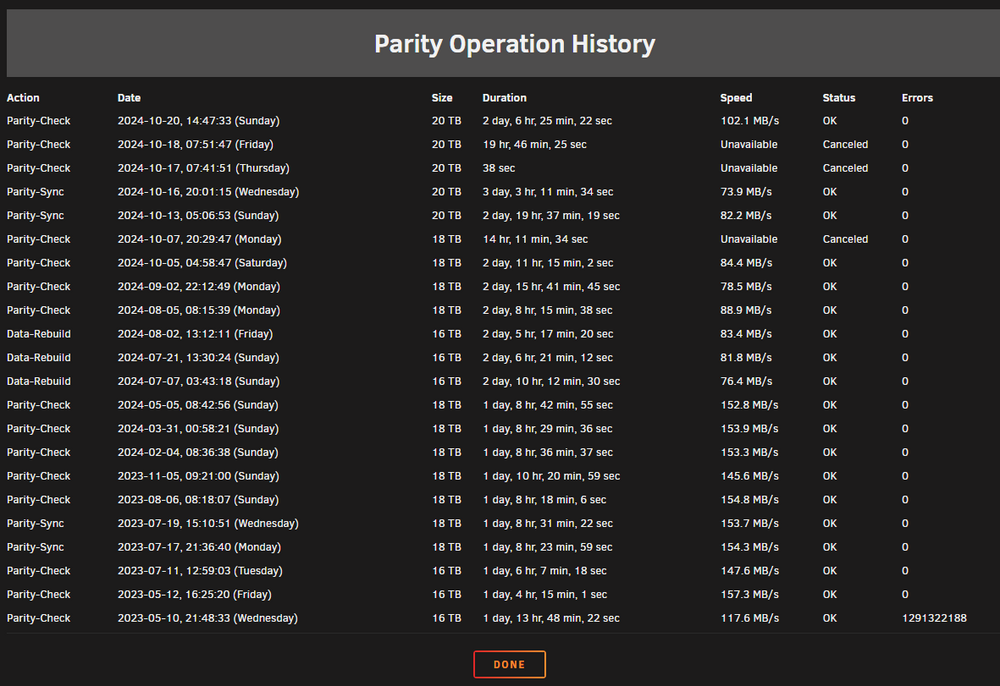
Parity check completed, average speed of 100MB/s, not quite the 150 i was getting earlier, but it was also a faster drive i believe ( 18tb red pro) vs white 20tb Server still feels a little slow, it took about 60second to process that diagnostic. Hopefully no more disk errors. tower-diagnostics-20241020-1745.zip
-
I used brand new Sabrent sata cables for parity 1 and disk 2 and plugged them directly into the motherboard sata ports. Parity check didn't start automagically so i started a new one. I'll let it run for a while an post up a new diagnostic.
-
ok, i'm fine with that. I'll just cancel it and try to fix the cables and restart it.
-
Is it a bad idea to pause parity check, shutdown, fix cables, restart and resume check does it even work like that or do i just need to cancel the check, fix it and then restart the check
-
So i let the parity check go overnight, hoping it would be faster than it was before but it seems like my issue is not fixed. Over the 14.5hrs its been running, its checked 4.21tb.....so around a speed of 60 MB/s I've gotten 3 crc errors on Parity 1 drive (sdc), i hadn't had that happen before. I believe that i have the two parity drives plugged into the mobo not through the hba. I'm sure the diag shows disk errors, are there errors on disks other than sdc? I'm thinking i'll go ahead and stop the parity check and try reseating the cables to sdc and switching the port on the mobo. think thats a good idea? tower-diagnostics-20241018-0731.zip
-
So i just stopped all the dockers one by one and it might be tautulli...it definitely helped with the read/write of both parity and disk 11 but didn't fix it completly. I'm still seeing the read/write but its like a few minutes apart instead of every 3 seconds. still not enough to let the drives spin down after 15min One thing i'm noticing is that when i start/stop all dockers, its pretty dang slow. I dont remember it taking this long to start/stop 9-10 dockers. Edit: i just started up all my normal dockers, except tautulli and its back to reads/writes every second or so. Frustrating! Edit2: I figured it out, i had the docker image on the array for some reason. I moved it to the cache and it seems like its no longer spinning up disks.
-
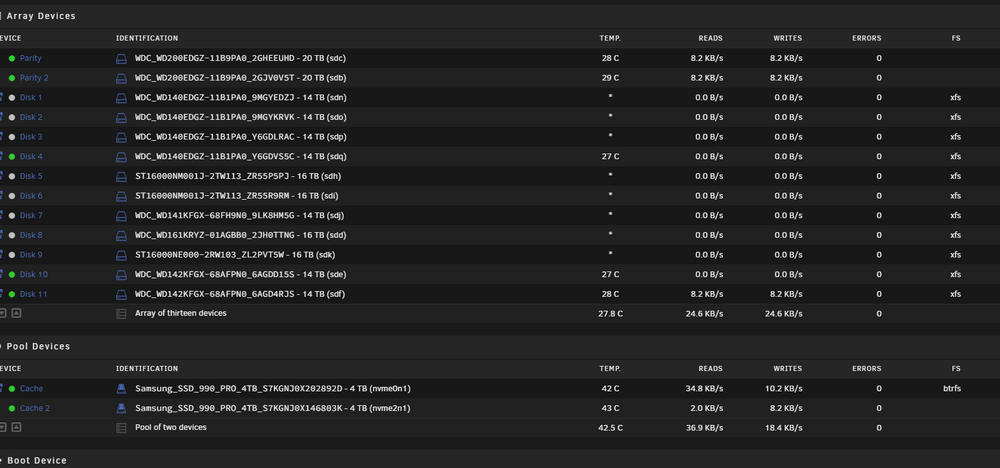
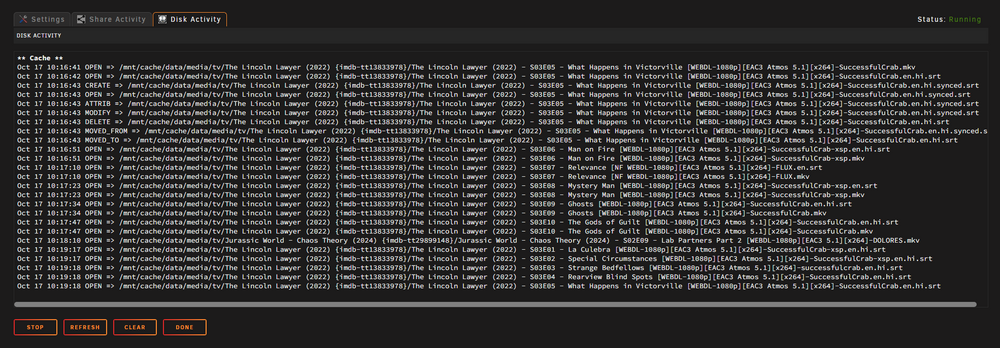
Ok, i'll run one now. I'm trying to figure out why something is reading/writing to my last drive or 2 and the parity about every 3 seconds. I thought it bazarr looking for subtitles since there are so many .srt files in the disk activity but i stopped the bazaar docker and its still doing the same thing of read/write to both parity and disk 11 and File Activity (shares activity and disk activity) is just blank after i cleared it. Got any tricks to figure out what the hell keeps writing to disk 10/11 and parity drives? i'm sure a constant read/write isn't helping my speeds any. I attached an updated diag in case it would help tower-diagnostics-20241017-1031.zip
-
Woohoo! I'm happy to hopefully have my speeds back. Anything else i can do to further check it, maybe a parity check or possibly running the Disk Speeds docker test?
-
I just swapped to a different hba card. I've attached new diagnostics to see if there are still disk errors. For some reason upon startup, it started a parity check, so for some reason it didn't do a clean shutdown. I'll probably bump up the Shutdown Time-Out to 120sec I re-ran the command and here's the output with the new hba. Looks like linksta is Speed 8GT/s, Width x8 before it was x4 root@Tower:~# lspci -d 1000: -vv 01:00.0 Serial Attached SCSI controller: Broadcom / LSI SAS2308 PCI-Express Fusion-MPT SAS-2 (rev 05) Subsystem: Broadcom / LSI SAS2308 PCI-Express Fusion-MPT SAS-2 Control: I/O- Mem+ BusMaster+ SpecCycle- MemWINV- VGASnoop- ParErr- Stepping- SERR- FastB2B- DisINTx+ Status: Cap+ 66MHz- UDF- FastB2B- ParErr- DEVSEL=fast >TAbort- <TAbort- <MAbort- >SERR- <PERR- INTx- Latency: 0, Cache Line Size: 64 bytes Interrupt: pin A routed to IRQ 16 IOMMU group: 16 Region 0: I/O ports at 4000 [disabled] Region 1: Memory at 80b40000 (64-bit, non-prefetchable) Region 3: Memory at 80b00000 (64-bit, non-prefetchable) Expansion ROM at 80a00000 [disabled] Capabilities: [50] Power Management version 3 Flags: PMEClk- DSI- D1+ D2+ AuxCurrent=0mA PME(D0-,D1-,D2-,D3hot-,D3cold-) Status: D0 NoSoftRst+ PME-Enable- DSel=0 DScale=0 PME- Capabilities: [68] Express (v2) Endpoint, MSI 00 DevCap: MaxPayload 4096 bytes, PhantFunc 0, Latency L0s <64ns, L1 <1us ExtTag+ AttnBtn- AttnInd- PwrInd- RBE+ FLReset+ SlotPowerLimit 0W DevCtl: CorrErr+ NonFatalErr+ FatalErr+ UnsupReq+ RlxdOrd+ ExtTag+ PhantFunc- AuxPwr- NoSnoop+ FLReset- MaxPayload 256 bytes, MaxReadReq 512 bytes DevSta: CorrErr- NonFatalErr- FatalErr- UnsupReq- AuxPwr- TransPend- LnkCap: Port #0, Speed 8GT/s, Width x8, ASPM L0s, Exit Latency L0s <64ns ClockPM- Surprise- LLActRep- BwNot- ASPMOptComp+ LnkCtl: ASPM Disabled; RCB 64 bytes, Disabled- CommClk+ ExtSynch+ ClockPM- AutWidDis- BWInt- AutBWInt- LnkSta: Speed 8GT/s, Width x8 TrErr- Train- SlotClk+ DLActive- BWMgmt- ABWMgmt- DevCap2: Completion Timeout: Range BC, TimeoutDis+ NROPrPrP- LTR- 10BitTagComp- 10BitTagReq- OBFF Not Supported, ExtFmt- EETLPPrefix- EmergencyPowerReduction Not Supported, EmergencyPowerReductionInit- FRS- TPHComp- ExtTPHComp- AtomicOpsCap: 32bit- 64bit- 128bitCAS- DevCtl2: Completion Timeout: 50us to 50ms, TimeoutDis- LTR- 10BitTagReq- OBFF Disabled, AtomicOpsCtl: ReqEn- LnkCap2: Supported Link Speeds: 2.5-8GT/s, Crosslink- Retimer- 2Retimers- DRS- LnkCtl2: Target Link Speed: 8GT/s, EnterCompliance- SpeedDis- Transmit Margin: Normal Operating Range, EnterModifiedCompliance- ComplianceSOS- Compliance Preset/De-emphasis: -6dB de-emphasis, 0dB preshoot LnkSta2: Current De-emphasis Level: -6dB, EqualizationComplete+ EqualizationPhase1+ EqualizationPhase2+ EqualizationPhase3+ LinkEqualizationRequest- Retimer- 2Retimers- CrosslinkRes: unsupported Capabilities: [d0] Vital Product Data pcilib: sysfs_read_vpd: read failed: No such device Not readable Capabilities: [a8] MSI: Enable- Count=1/1 Maskable- 64bit+ Address: 0000000000000000 Data: 0000 Capabilities: [c0] MSI-X: Enable+ Count=16 Masked- Vector table: BAR=1 offset=0000e000 PBA: BAR=1 offset=0000f000 Capabilities: [100 v2] Advanced Error Reporting UESta: DLP- SDES- TLP- FCP- CmpltTO- CmpltAbrt- UnxCmplt- RxOF- MalfTLP- ECRC- UnsupReq- ACSViol- UEMsk: DLP- SDES- TLP- FCP- CmpltTO- CmpltAbrt- UnxCmplt- RxOF- MalfTLP- ECRC- UnsupReq- ACSViol- UESvrt: DLP+ SDES+ TLP- FCP+ CmpltTO- CmpltAbrt- UnxCmplt- RxOF+ MalfTLP+ ECRC- UnsupReq- ACSViol- CESta: RxErr- BadTLP- BadDLLP- Rollover- Timeout- AdvNonFatalErr- CEMsk: RxErr- BadTLP- BadDLLP- Rollover- Timeout- AdvNonFatalErr+ AERCap: First Error Pointer: 00, ECRCGenCap- ECRCGenEn- ECRCChkCap- ECRCChkEn- MultHdrRecCap- MultHdrRecEn- TLPPfxPres- HdrLogCap- HeaderLog: 00000000 00000000 00000000 00000000 Capabilities: [1e0 v1] Secondary PCI Express LnkCtl3: LnkEquIntrruptEn- PerformEqu- LaneErrStat: 0 Capabilities: [1c0 v1] Power Budgeting <?> Capabilities: [190 v1] Dynamic Power Allocation <?> Capabilities: [148 v1] Alternative Routing-ID Interpretation (ARI) ARICap: MFVC- ACS-, Next Function: 0 ARICtl: MFVC- ACS-, Function Group: 0 Kernel driver in use: mpt3sas Kernel modules: mpt3sas tower-diagnostics-20241017-0742.zip
-
Dang. I just swapped to a new PSU, and hba cables. I have backup hba card SAS expander card. I'll swap it once the rebuild is done.
-
Parity rebuild fine (attached)? or wait till during a check tower-diagnostics-20241014-0558.zip
-
01:00.0 Serial Attached SCSI controller: Broadcom / LSI SAS2308 PCI-Express Fusion-MPT SAS-2 (rev 05) Subsystem: Super Micro Computer Inc Onboard SAS2308 PCI-Express Fusion-MPT SAS-2 Control: I/O+ Mem+ BusMaster+ SpecCycle- MemWINV- VGASnoop- ParErr- Stepping- SERR- FastB2B- DisINTx+ Status: Cap+ 66MHz- UDF- FastB2B- ParErr- DEVSEL=fast >TAbort- <TAbort- <MAbort- >SERR- <PERR- INTx- Latency: 0, Cache Line Size: 64 bytes Interrupt: pin A routed to IRQ 16 IOMMU group: 16 Region 0: I/O ports at 4000 Region 1: Memory at 80b40000 (64-bit, non-prefetchable) Region 3: Memory at 80b00000 (64-bit, non-prefetchable) Expansion ROM at 80a00000 [disabled] Capabilities: [50] Power Management version 3 Flags: PMEClk- DSI- D1+ D2+ AuxCurrent=0mA PME(D0-,D1-,D2-,D3hot-,D3cold-) Status: D0 NoSoftRst+ PME-Enable- DSel=0 DScale=0 PME- Capabilities: [68] Express (v2) Endpoint, MSI 00 DevCap: MaxPayload 4096 bytes, PhantFunc 0, Latency L0s <64ns, L1 <1us ExtTag+ AttnBtn- AttnInd- PwrInd- RBE+ FLReset+ SlotPowerLimit 0W DevCtl: CorrErr+ NonFatalErr+ FatalErr+ UnsupReq+ RlxdOrd+ ExtTag+ PhantFunc- AuxPwr- NoSnoop+ FLReset- MaxPayload 256 bytes, MaxReadReq 512 bytes DevSta: CorrErr+ NonFatalErr- FatalErr- UnsupReq- AuxPwr- TransPend- LnkCap: Port #0, Speed 8GT/s, Width x8, ASPM L0s, Exit Latency L0s <64ns ClockPM- Surprise- LLActRep- BwNot- ASPMOptComp+ LnkCtl: ASPM Disabled; RCB 64 bytes, Disabled- CommClk+ ExtSynch+ ClockPM- AutWidDis- BWInt- AutBWInt- LnkSta: Speed 8GT/s, Width x4 (downgraded) TrErr- Train- SlotClk+ DLActive- BWMgmt- ABWMgmt- DevCap2: Completion Timeout: Range BC, TimeoutDis+ NROPrPrP- LTR- 10BitTagComp- 10BitTagReq- OBFF Not Supported, ExtFmt- EETLPPrefix- EmergencyPowerReduction Not Supported, EmergencyPowerReductionInit- FRS- TPHComp- ExtTPHComp- AtomicOpsCap: 32bit- 64bit- 128bitCAS- DevCtl2: Completion Timeout: 50us to 50ms, TimeoutDis- LTR- 10BitTagReq- OBFF Disabled, AtomicOpsCtl: ReqEn- LnkCap2: Supported Link Speeds: 2.5-8GT/s, Crosslink- Retimer- 2Retimers- DRS- LnkCtl2: Target Link Speed: 8GT/s, EnterCompliance- SpeedDis- Transmit Margin: Normal Operating Range, EnterModifiedCompliance- ComplianceSOS- Compliance Preset/De-emphasis: -6dB de-emphasis, 0dB preshoot LnkSta2: Current De-emphasis Level: -6dB, EqualizationComplete+ EqualizationPhase1+ EqualizationPhase2+ EqualizationPhase3+ LinkEqualizationRequest- Retimer- 2Retimers- CrosslinkRes: unsupported Capabilities: [d0] Vital Product Data pcilib: sysfs_read_vpd: read failed: No such device Not readable Capabilities: [a8] MSI: Enable- Count=1/1 Maskable- 64bit+ Address: 0000000000000000 Data: 0000 Capabilities: [c0] MSI-X: Enable+ Count=16 Masked- Vector table: BAR=1 offset=0000e000 PBA: BAR=1 offset=0000f000 Capabilities: [100 v2] Advanced Error Reporting UESta: DLP- SDES- TLP- FCP- CmpltTO- CmpltAbrt- UnxCmplt- RxOF- MalfTLP- ECRC- UnsupReq- ACSViol- UEMsk: DLP- SDES- TLP- FCP- CmpltTO- CmpltAbrt- UnxCmplt- RxOF- MalfTLP- ECRC- UnsupReq- ACSViol- UESvrt: DLP+ SDES+ TLP- FCP+ CmpltTO- CmpltAbrt- UnxCmplt- RxOF+ MalfTLP+ ECRC- UnsupReq- ACSViol- CESta: RxErr- BadTLP- BadDLLP- Rollover- Timeout- AdvNonFatalErr- CEMsk: RxErr- BadTLP- BadDLLP- Rollover- Timeout- AdvNonFatalErr+ AERCap: First Error Pointer: 00, ECRCGenCap- ECRCGenEn- ECRCChkCap- ECRCChkEn- MultHdrRecCap- MultHdrRecEn- TLPPfxPres- HdrLogCap- HeaderLog: 00000000 00000000 00000000 00000000 Capabilities: [1e0 v1] Secondary PCI Express LnkCtl3: LnkEquIntrruptEn- PerformEqu- LaneErrStat: 0 Capabilities: [1c0 v1] Power Budgeting <?> Capabilities: [190 v1] Dynamic Power Allocation <?> Capabilities: [148 v1] Alternative Routing-ID Interpretation (ARI) ARICap: MFVC- ACS-, Next Function: 0 ARICtl: MFVC- ACS-, Function Group: 0 Kernel driver in use: mpt3sas Kernel modules: mpt3sas
-
I've got the second parity rebuild going....still do this or wait?
-
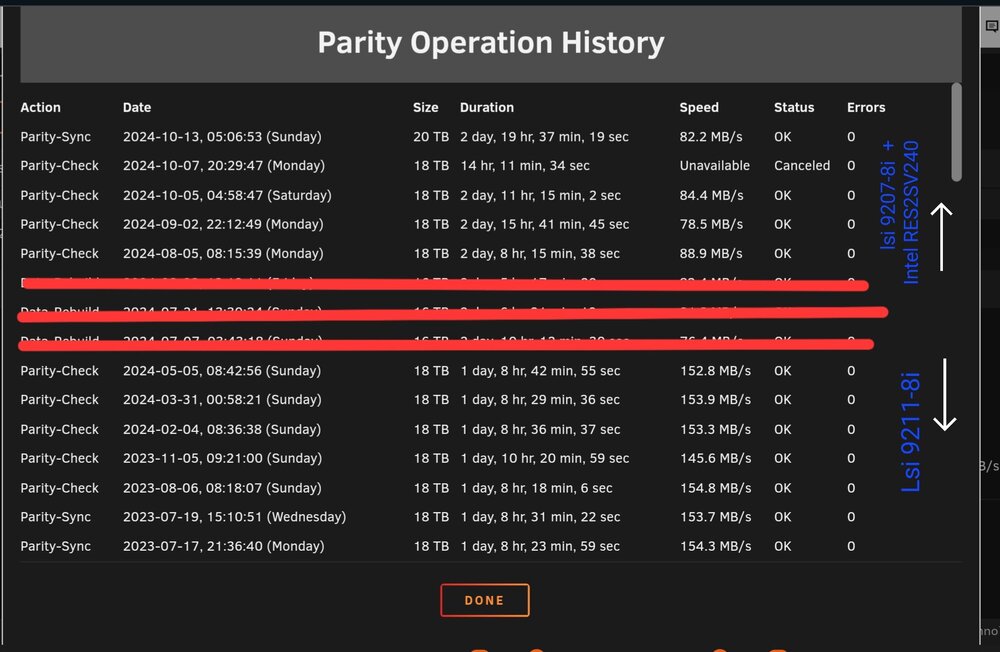
I just swapped one of my 18tb parity drives for a 20tb and damn, it took a long time...almost 3 days. When i was looking at the history, it looks like around the time that i swapped from a 9211-8i to a 9207-8i with a RES2V240 sas expander my speeds dropped quite a bit. Those red strike outs were 16tb disk rebuilds due to a bad connection, those rebuild speeds were 76-83MB/s. figured i'd look into it before i swap the second parity for a 20tb and start the rebuild. I'm using dual link cables between the hba and the expander card and sas to sata breakout cables on the other 4 ports of the expander. Is this expected speeds or is something that i can look into. The server isn't doing a crazy amount of work during this last rebuild of th 20tb drive, normal arr's and plex. I did have the syslog server running since i was having an issue, but its now fixed (fingers crossed). One last thing, when i did the parity rebuild with the new 20tb drive it said "Data Rebuild Complete (0 errors) and next to it under Description it said "canceled", is that normal? I didn't cancel anything so it should have finished just fine. On the Main tab both parity drives are green. tower-diagnostics-20241013-0852.zip
-
Just swapped to a brand new corsair rm1000x psu that has enough sata ports without using adapters or splitters. Swapped a bunch of HBA cables and installed a cooling fan on the sas expander (already have one on the HBA). I'll see how it behaves overnight
-
Damn. I guess I didn't solve my previous issue. I'll need to shutdown my server during the parity check and install a new PSU and breakout cables. Anything different I should do?
-
I've been having some issues lately that i'm not sure whats going on. I was previously having some problems (server crash over night) with what i think is a bad cable on my hba card (server crashed overnight, see attached link) but i thought it was fixed when i moved some cables around. Now i'm having an issue where the server will get hung up....seems like i can kindof access the gui but just barely but its extremely slow. Yesterday morning i was able to get onto the gui to try to do a clean reboot when it was hung up, but i think the disk timeout was too short and it did an unlcean shutdown so it started a parity check first thing. Now this morning i see the same thing...unresponsive/extremely slow gui and plex looks to be offline. I had syslog server running so hopefully it will have some signs of whats going on, and i've attached diagnostics. I did upgrade my cache drives a few days ago, but i believe i got everything back to how it was previously. Another thing i noticed is that on startup, dockers take around 60 secs to get everything started up. It was much quicker before. tower-diagnostics-20241007-0620.zip syslog-192.168.1.99.log
-
Thanks for the reply! Dang I didn't know that 7 had that. That's super cool. Ill probably wait till it's stable and probably a revision or two in before I update so I'll keep your script running in the mean time. Thanks for all you did on this
-
Hey @Terebi I had your script running for a while and it works great. I just recently doubled my cache drives size, is there anything other than changing the MAX_SIZE= in the moverignore.sh file? Obviously there isn't any media in the cache drive since i had to move it over to the array to replace the drives. I'm ok with just filling it up as i go.


