





danimal86
Members
-
Joined
-
Last visited
Everything posted by danimal86
-
better off using windows defender?
-
I've been trying to decide if i should uninstall norton (free with my isp) or keep it. I cant run defender and norton at the same time.
-
Thanks for the info. I figured any added layer of protection would be worth having. I didn't even think that it wouldn't work on newer versions of unraid. Maybe @Squid can let us know if it'll still work.
-
Is this plugin still applicable? I read about some people loosing their data due to ransomware.....made me a little paranoid....
-
So i had some issues last week with some of my dockers not being able to get into the gui, i ended up recovering my appdata from a backup and sonarr and radarr came back to life, but not lidarr. Since i already did a recovery of the appdata, i'm thinking that i should remove the docker and try to reinstall it. Will i loose my settings if i do this? Here's my run command: Command:root@localhost:# /usr/local/emhttp/plugins/dynamix.docker.manager/scripts/docker run -d --name='binhex-lidarr' --net='bridge' -e TZ="America/Los_Angeles" -e HOST_OS="Unraid" -e 'UMASK'='000' -e 'PUID'='99' -e 'PGID'='100' -p '8686:8686/tcp' -v '/mnt/user/Downloads/':'/data':'rw' -v '/mnt/user/Downloads/Complete/Music/':'/media':'rw' -v '/mnt/user/appdata/binhex-lidarr':'/config':'rw' 'binhex/arch-lidarr' 6cef6cb435b54c8676ea49f63c904f1bd7518edf6fb002f9daf3dce4bb5c3482 The command finished successfully! Here's an error in the logs: at NzbDrone.Core.Datastore.DbFactory.CreateMain (System.String connectionString, NzbDrone.Core.Datastore.Migration.Framework.MigrationContext migrationContext) [0x0000b] in <f339569e234a4fc1add8b9dab7a33d21>:0 is corrupt, restore from backup if available. See: https://github.com/Lidarr/Lidarr/wiki/FAQ#i-am-getting-an-error-database-disk-image-is-malformed Anyone got any ideas before i remove and reinstall lidarr?
-
Thanks for the assistance! I could only do 3 of the 4 disks since i only have the 12 drive license (so far).
-
Thanks! As soon as my parity rebuild is done i'll throw those in and start the preclear
-
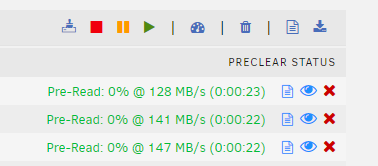
I'm about to add 4 2tb drives to the array later today. With the precelar app can i do multiple drives at once? Do you just select multiple drives from the settings menu (i haven't installed them yet, so i dont know what the plugin will show)? I'm on a 7700k with 16gb ram.
-
I do have ca.backup2 plugin installed, but i cant remember how i configured it, and i've never recovered anything from it Edit: yes i have an appdata backup from 5/3/20. I went backthrough the spaceinverone's video and found where the backup share i created was. do i just need to recover from that? When i go to the ca.backup2 plugin page it just stays blank. Update: I uninstalled and reinstalled ca.backup. was able to restore my appdata. sonarr is back up and running. Thanks @trurl
-
Yesterday i had to move my hba card that a pairty drive i was adding and my cache drive attached to it to a different pci port (maybe this is coincidence). Now i cant get sonarr (or radarr, but my official plex docker and binhex sabnzbd seems to work fine) to get to the webgui. here is the run command: Command: root@localhost:# /usr/local/emhttp/plugins/dynamix.docker.manager/scripts/docker run -d --name='binhex-sonarr' --net='bridge' -e TZ="America/Los_Angeles" -e HOST_OS="Unraid" -e 'UMASK'='000' -e 'PUID'='99' -e 'PGID'='100' -p '8989:8989/tcp' -p '9897:9897/tcp' -v '/mnt/user/Downloads/':'/data':'rw' -v '/mnt/user':'/media':'rw' -v '/mnt/user/appdata/binhex-sonarr':'/config':'rw' 'binhex/arch-sonarr' 044c8d3e4c88e74bd3ee79f53dc5961734b6e2eea8973951279380a9f2bfcd33 The command finished successfully! in the logs i see this error in red: [v2.0.0.5344] NzbDrone.Core.Datastore.CorruptDatabaseException: Database file: /config/nzbdrone.db is corrupt, restore from backup if available. See: https://github.com/Sonarr/Sonarr/wiki/FAQ#i-am-getting-an-error-database-disk-image-is-malformed ---> System.Data.SQLite.SQLiteException: database disk image is malformed I tried going to that github link but its in a technology language that i do not speak. I was thinking about uninstalling and re-installing the docker, but i dont want to loose all my settings/shows.
-
Holy crap. This actually worked. I was stuck on "syncing file system", i right clicked on the drive in windows, hit "rename" (while it was still stuck on syncing) and changed it to "UNRIAD" i saw the drive started to populate and it said DONE! Thanks! I was pulling my hair out!

