





danimal86
Members
-
Joined
-
Last visited
Everything posted by danimal86
-
So i setup firefox yesterday and shut down my gaming pc, woke up this morning and the browser had been reset back to the homepage. Does it have anything to do with a separate pc accessing it? I looked at the logs, and most of the way down, i can see a time stamp of 3am and then another stamp of 6:44 when i turned on my gaming pc and looked at the firefox browser: [xvnc ] Tue May 23 03:06:27 2023 [xvnc ] vncext: VNC extension running! [xvnc ] vncext: Listening for VNC connections on /tmp/vnc.sock (mode 0660) [xvnc ] vncext: Listening for VNC connections on all interface(s), port 5900 [xvnc ] vncext: created VNC server for screen 0 [supervisor ] starting service 'nginx'... [nginx ] Listening for HTTP connections on port 5800. [supervisor ] starting service 'openbox'... [supervisor ] starting service 'app'... [app ] Mozilla Firefox 109.0.1 [supervisor ] all services started. [xvnc ] Tue May 23 06:44:15 2023 [xvnc ] Connections: accepted: /tmp/vnc.sock [xvnc ] Tue May 23 06:44:16 2023 [xvnc ] SConnection: Client needs protocol version 3.8 [xvnc ] SConnection: Client requests security type None(1) [xvnc ] VNCSConnST: Server default pixel format depth 24 (32bpp) little-endian rgb888 [xvnc ] VNCSConnST: Client pixel format depth 24 (32bpp) little-endian bgr888 [xvnc ] ComparingUpdateTracker: 0 pixels in / 0 pixels out [xvnc ] ComparingUpdateTracker: (1:-nan ratio)
-
I'll check tomorrow (seems the issue happened overnight) and see if anything shows up. Right now, i dont see any errors in the logs: [cont-init ] 10-certs.sh: executing... [cont-init ] 10-certs.sh: terminated successfully. [cont-init ] 10-check-app-niceness.sh: executing... [cont-init ] 10-check-app-niceness.sh: terminated successfully. [cont-init ] 10-cjk-font.sh: executing... [cont-init ] 10-cjk-font.sh: terminated successfully. [cont-init ] 10-clean-logmonitor-states.sh: executing... [cont-init ] 10-clean-logmonitor-states.sh: terminated successfully. [cont-init ] 10-clean-tmp-dir.sh: executing... [cont-init ] 10-clean-tmp-dir.sh: terminated successfully. [cont-init ] 10-fontconfig-cache-dir.sh: executing... [cont-init ] 10-fontconfig-cache-dir.sh: terminated successfully. [cont-init ] 10-init-users.sh: executing... [cont-init ] 10-init-users.sh: terminated successfully. [cont-init ] 10-nginx.sh: executing... [cont-init ] 10-nginx.sh: terminated successfully. [cont-init ] 10-openbox.sh: executing... [cont-init ] 10-openbox.sh: terminated successfully. [cont-init ] 10-set-tmp-dir-perms.sh: executing... [cont-init ] 10-set-tmp-dir-perms.sh: terminated successfully. [cont-init ] 10-vnc-password.sh: executing... [cont-init ] 10-vnc-password.sh: terminated successfully. [cont-init ] 10-web-data.sh: executing... [cont-init ] 10-web-data.sh: terminated successfully. [cont-init ] 10-x11-unix.sh: executing... [cont-init ] 10-x11-unix.sh: terminated successfully. [cont-init ] 10-xdg-runtime-dir.sh: executing... [cont-init ] 10-xdg-runtime-dir.sh: terminated successfully. [cont-init ] 15-install-pkgs.sh: executing... [cont-init ] 15-install-pkgs.sh: terminated successfully. [cont-init ] 55-check-snd.sh: executing... [cont-init ] 55-check-snd.sh: sound not supported: device /dev/snd not exposed to the container. [cont-init ] 55-check-snd.sh: terminated successfully. [cont-init ] 55-firefox.sh: executing... [cont-init ] 55-firefox.sh: terminated successfully. [cont-init ] 56-firefox-set-prefs-from-env.sh: executing... [cont-init ] 56-firefox-set-prefs-from-env.sh: terminated successfully. [cont-init ] 85-take-config-ownership.sh: executing... [cont-init ] 85-take-config-ownership.sh: terminated successfully. [cont-init ] 89-info.sh: executing... ╭――――――――――――――――――――――――――――――――――――――――――――――――――――――――――――――――――――――╮ │ │ │ Application: Firefox │ │ Application Version: 109.0.1-r0 │ │ Docker Image Version: 23.04.1 │ │ Docker Image Platform: linux/amd64 │ │ │ ╰――――――――――――――――――――――――――――――――――――――――――――――――――――――――――――――――――――――╯ [cont-init ] 89-info.sh: terminated successfully. [cont-init ] all container initialization scripts executed. [init ] giving control to process supervisor. [supervisor ] loading services... [supervisor ] loading service 'default'... [supervisor ] loading service 'app'... [supervisor ] loading service 'gui'... [supervisor ] loading service 'certsmonitor'... [supervisor ] service 'certsmonitor' is disabled. [supervisor ] loading service 'nginx'... [supervisor ] loading service 'xvnc'... [supervisor ] loading service 'openbox'... [supervisor ] loading service 'logmonitor'... [supervisor ] service 'logmonitor' is disabled. [supervisor ] loading service 'logrotate'... [supervisor ] all services loaded. [supervisor ] starting services... [supervisor ] starting service 'xvnc'... [xvnc ] Xvnc TigerVNC 1.13.1 - built Apr 16 2023 16:56:42 [xvnc ] Copyright (C) 1999-2022 TigerVNC Team and many others (see README.rst) [xvnc ] See https://www.tigervnc.org for information on TigerVNC. [xvnc ] Underlying X server release 12013000 [xvnc ] Mon May 22 03:06:16 2023 [xvnc ] vncext: VNC extension running! [xvnc ] vncext: Listening for VNC connections on /tmp/vnc.sock (mode 0660) [xvnc ] vncext: Listening for VNC connections on all interface(s), port 5900 [xvnc ] vncext: created VNC server for screen 0 [supervisor ] starting service 'nginx'... [nginx ] Listening for HTTP connections on port 5800. [supervisor ] starting service 'openbox'... [supervisor ] starting service 'app'... [app ] Mozilla Firefox 109.0.1 [supervisor ] all services started. [xvnc ] Mon May 22 06:40:21 2023 [xvnc ] Connections: accepted: /tmp/vnc.sock [xvnc ] Mon May 22 06:40:22 2023 [xvnc ] SConnection: Client needs protocol version 3.8 [xvnc ] SConnection: Client requests security type None(1) [xvnc ] VNCSConnST: Server default pixel format depth 24 (32bpp) little-endian rgb888 [xvnc ] VNCSConnST: Client pixel format depth 24 (32bpp) little-endian bgr888 [xvnc ] ComparingUpdateTracker: 0 pixels in / 0 pixels out [xvnc ] ComparingUpdateTracker: (1:-nan ratio)
-
Thats a good idea. I just looked at the logs in the "error" file i see: ATTENTION: default value of option mesa_glthread overridden by environment. And a bunch of these in the "output" : Crash Annotation GraphicsCriticalError: |[0][GFX1-]: glxtest: libEGL initialize failed (t=0.357819) |[1][GFX1-]: glxtest: GLX extension missing (t=0.357922) [GFX1-]: glxtest: GLX extension missing Crash Annotation GraphicsCriticalError: |[0][GFX1-]: glxtest: libEGL initialize failed (t=0.357819) |[1][GFX1-]: glxtest: GLX extension missing (t=0.357922) |[2][GFX1-]: Unrecognized feature ACCELERATED_CANVAS2D (t=0.792826) [GFX1-]: Unrecognized feature ACCELERATED_CANVAS2D Crash Annotation GraphicsCriticalError: |[0][GFX1-]: glxtest: libEGL initialize failed (t=0.357631) [GFX1-]: glxtest: libEGL initialize failed Crash Annotation GraphicsCriticalError: |[0][GFX1-]: glxtest: libEGL initialize failed (t=0.357631) |[1][GFX1-]: glxtest: GLX extension missing (t=0.357853) [GFX1-]: glxtest: GLX extension missing Crash Annotation GraphicsCriticalError: |[0][GFX1-]: glxtest: libEGL initialize failed (t=0.357631) |[1][GFX1-]: glxtest: GLX extension missing (t=0.357853) |[2][GFX1-]: Unrecognized feature ACCELERATED_CANVAS2D (t=0.786093) [GFX1-]: Unrecognized feature ACCELERATED_CANVAS2D Crash Annotation GraphicsCriticalError: |[0][GFX1-]: Unrecognized feature ACCELERATED_CANVAS2D (t=0.835898) [GFX1-]: Unrecognized feature ACCELERATED_CANVAS2D Crash Annotation GraphicsCriticalError: |[0][GFX1-]: Unrecognized feature ACCELERATED_CANVAS2D (t=0.790332) [GFX1-]: Unrecognized feature ACCELERATED_CANVAS2D
-
I didn't change any settings within firefox, and from what i recall i didn't really change anything on the docker settings. The only thing i added was an extra parameter --restart=always as recommended by someone else, but i think that just starts the docker I did load the TamperMonkey extension within firefox. I setup a few firefox tabs and came back the next day or two later and just one tab was open and it was back at the homepage. I'll set it up again and see.
-
Its not closing or exiting itself, it just reverts back to its homepage.
-
Is there any way to keep Firefox from resetting (keeping the page open till the end of time)? I need to use a flight checkin script and have got it all setup, but i noticed that when i check on it the next day its back to the homepage on the firefox browser....the firefox tab is still there, but its back at the homepage. Any ideas how to keep the page im on to stay forever (in reality a week or two). Another person mentioned i add the Extra Parameter "--restart=always" (minus quotes), so i have that setup. Everything else is pretty much stock docker template.
-
Everything seems to be working just fine....no missing drives or any warning notifications. My only thing is that every once in a while, i'll see a movie or half a show missing and think "i could have sworn i had this". Now, take that with a grain of salt...could totally have been something that i didn't have or stopped monitoring mid way through a show. I've been on the quarterly parity check maybe i should go back to monthly?
-
@JorgeB Finished the 3rd parity check and all the errors appear to have been corrected. I attached an updated diagnostic. What could have caused 1.3B correctable errors? tower-diagnostics-20230513.zip

-
Got the 3rd one running
-
@JorgeB 2nd Parity check finished, had 1.3Billion errors. I've attached an updated diagnostics. Any idea what would cause this? Everything on the system seems to be working like normal. tower-diagnostics-20230511-0637.zip

-
The only thing i can think of that i can think of was a hardware change. I was messing around with a Google Coral M.2 and had to remove and reinstall my LSI HBA card to get to the m.2 slot, but i ended up removing it. No software changes that i can think of. Messed around with a couple different dockers (frigate/xteve/firefox/recyclarr), but nothing that i can think of that would need a New Config.
-
running now. Lots of sync errors corrected and climbing. Something to be concerned with?

-
How many errors? I normally have it so that it doesn't write corrections (at least on scheduled parity checks). Just use this one?

-
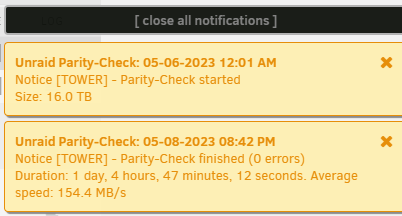
I run a quarterly parity check. I had it set to only do the parity check for a chunk of about 6 hours at a time, but decided i'd rather just get it over with in a little over a day (i resumed the parity check manually and changed the setting mid way through the check, but at idle) I noticed that errors were stacking up like crazy as the check was going: But then i look at my notifications and it says 0 errrors Even my email confirmation said 0 errors. Are all the errors because of the incremental parity check? Should i start another (non-incrimental) pairty check? Attached diagnostics. tower-diagnostics-20230509-0641.zip

-
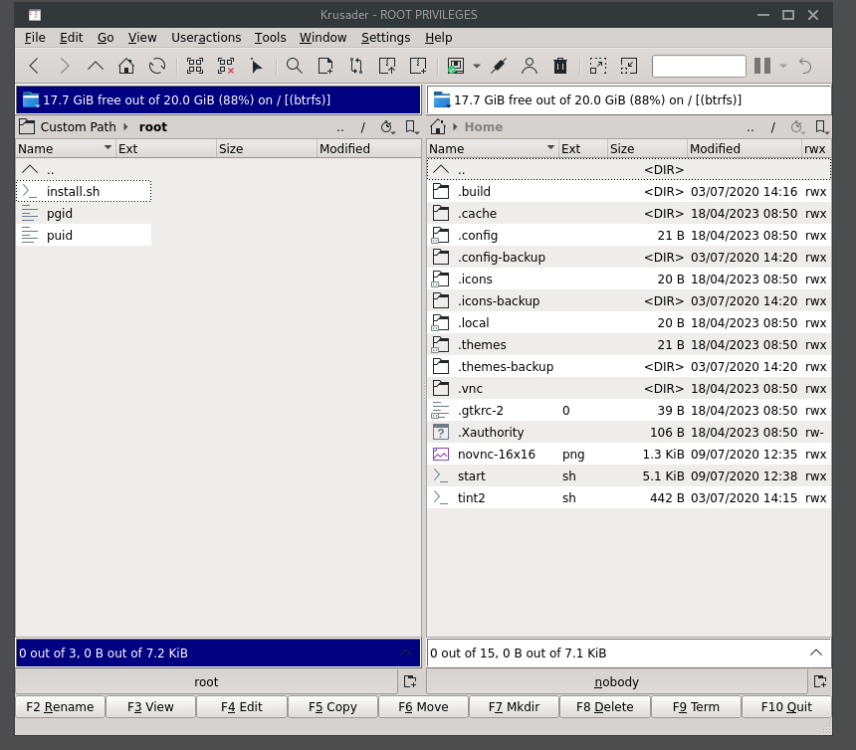
i was able to get into the root folder on the backup server, but i dont see the id_rsa.pub file, would it be somewhere other than root? is it possible it was deleted from both (luckybackup isn't installed on the Backup server, so i doubt it)
-
I let krusader run a search for the id_rsa and it couldn't find anything. Would you happen to have any idea of where the file may have been moved to? I cant get into the Root file with krusader (looks like a permission thing).
-
i wish there was a config creator tool....something where you plug in all the necessary values (camera address/storage/settings) and it would spit out the cofig file. I've got the m.2 coral installed but i have no idea where to start as far as setting up that config file. I tried reading up on the frigate page, but since you created the docker for Community Apps, i'm not sure where to start with the docs. is there any guides with pictures and colors for the notepad++ illiterate like me?
-
Whats the best/easiest way to get the file to /luckybackup/.ssh (im terrible with command line outside of copy/pasta)
-
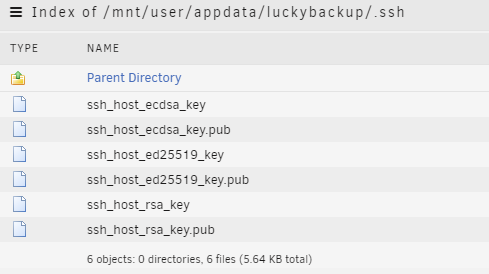
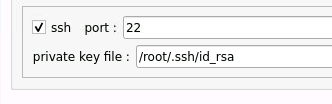
Previously i used this command in the docker console to put my key in the right spot: cp -R /root/.ssh ${DATA_DIR}/.ssh But i'm not seeing the id_rsa in luckybackup/.ssh within my backup tasks it shows Do i need to re-run that command?
-
Its on a separate unraid server but on the same network. I haven't changed anything as far as host or destination shares. Luckybackup had been working fine until this week. Any ideas?
-
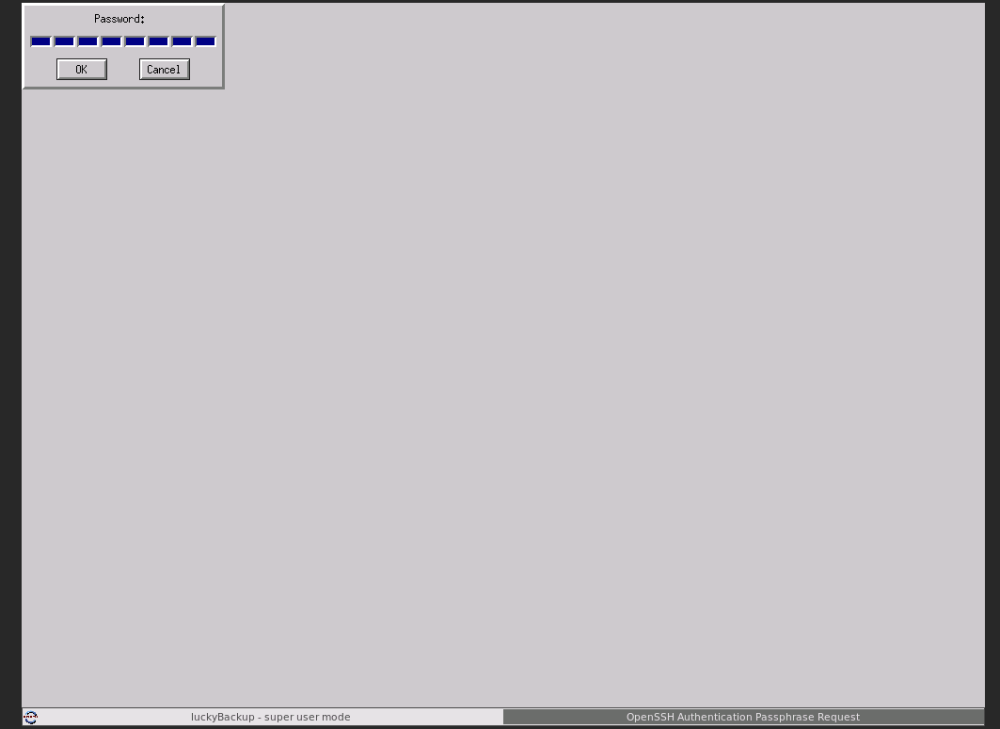
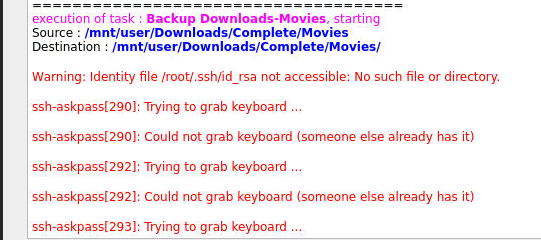
I'm having some really strange behavior this morning with LuckyBackup (still on 6.11.5). A backup should have run this morning but didn't. I tried to run it manually, but the ui is really slow and froze a couple time. I had to restart the docker, and was able to get back to the main page, but when i try to run a manual backup, it goes to a password page At one point i was able to click Super User Mode at the bottom and saw a bunch of red text, i tried to get a screenshot, but couldn't in time before switching back to the password page. I believe it said something about ssh key in red, but not 100% sure. edit: got it
-
to piggy back on this, would be nice to be able to have multiple unraid servers work together. I'm still patiently waiting for the part2 of spaceinvaderone's video on how to setup plex failover from a backup server.
-
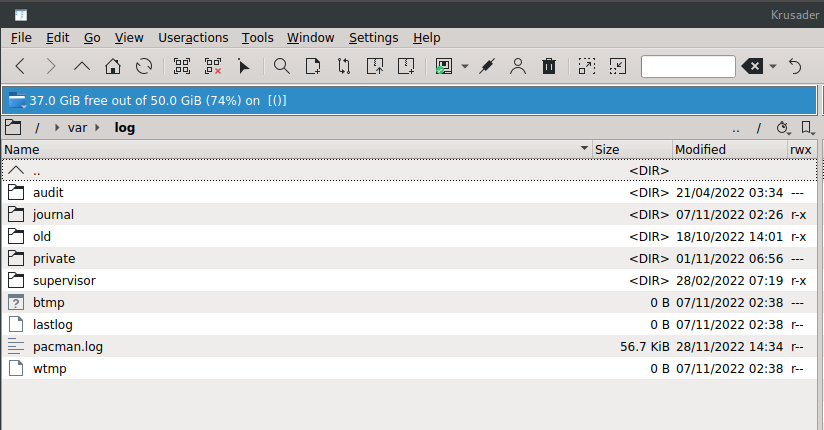
I did just do a mobo/cpu swap, would it have been cleared out with the reboots? Its no biggie for now, i'll try doing some tests when my cache gets closer to filling up in a couple months. Maybe your update will be out by then. It sounds like its going to be some cool additions.
-
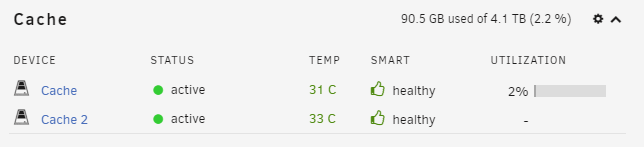
Well, its down at 2%, so it ignored the tuning profile and just did a standard move. I used Krusader and went into /usr/sbin and couldn't find anything labled mover. I must have not had logging enabled for the move.
-
It's down to 40% so it's pulling everything off the cache. I'll try to look at the logs tomorrow






