





dariusz65
Members
-
Joined
-
Last visited
-
I don't know if this was reported but clicking on Toggle Read/Write Display is not consistent with other panels. When unassigned devices displays read write speed, the other panels display read/write count. Clicking on toggle again reverses the display.
-
After years of working correctly, my sonarr and radarr (routed thru privoxyvpn) started to have an issue with indexers (not connecting). If I restart all involved dockers: privoxyvpn, radarr and sonarr - in that order, everything seems to work for a minute. After that indexers cannot connect. If I open a console for either radarr or sonarr and ping any domain (including indexers) it works fine. I've not made any changes in my system in months other than updating dockers. When i configured sonarr to connect directly (bridge), everything worked. I'm running Unraid 6.12.13
-
My plex was updated overnight and it stopped working. I can still go to the web page but the server is gone and I'm welcomed with Your home screen is empty message,
-
I've been using this docker successfully for months but it stopped working yesterday. I'm unable to start it. I've not made any changes to my system. 2023-03-26 16:29:31.078671 [INFO] VPN_ENABLED defined as 'yes' 2023-03-26 16:29:31.099255 [INFO] VPN_TYPE defined as 'wireguard' 2023-03-26 16:29:31.120809 [INFO] WireGuard config file is found at /config/wireguard/wg0.conf 2023-03-26 16:29:31.144734 [INFO] VPN remote line defined as 'atl-331-wg.whiskergalaxy.com:1194' 2023-03-26 16:29:31.162835 [INFO] VPN_REMOTE defined as 'atl-331-wg.whiskergalaxy.com' 2023-03-26 16:29:31.180867 [INFO] VPN_PORT defined as '1194' 2023-03-26 16:29:31.197038 [INFO] VPN_PROTOCOL set as 'udp', since WireGuard is always udp. 2023-03-26 16:29:31.214796 [INFO] VPN_DEVICE_TYPE set as 'wg0', since WireGuard will always be wg0. 2023-03-26 16:29:31.233300 [INFO] LAN_NETWORK defined as '192.168.1.0/24' 2023-03-26 16:29:31.254009 [INFO] NAME_SERVERS defined as '1.1.1.1,1.0.0.1' 2023-03-26 16:29:31.274231 [INFO] Adding 1.1.1.1 to resolv.conf 2023-03-26 16:29:31.294288 [INFO] Adding 1.0.0.1 to resolv.conf 2023-03-26 16:29:31.309907 [INFO] Starting WireGuard... I do have this error: [#] '/root/wireguardup.sh' /usr/bin/wg-quick: line 295: /root/wireguardup.sh: No such file or directory I re-did my wg0.conf file to make sure that the server is valid. I tested the conf file with a different docker and it worked fine.
-
That did the trick. Thank you.
-
My domoticz was updated to 2020.2 today and it broke my zwave. I'm getting 'Failed to open serial port /dev/ttyACM0'. This was working fine until this morning update.
-
I have my nzbget setup to go thru privoxyvpn using Extra Parameter (--net=container:binhex-privoxyvpn).
-
Thanks for this fix. I finally was able to update my Synology.
-
I'm running 3615 in VM. I'm not sure about hyberbackup but other Synology apps are working fine including Surveillance.
-
The field is empty in Plex. I'm thinking about starting over with correct parameters set from the very beginning.
-
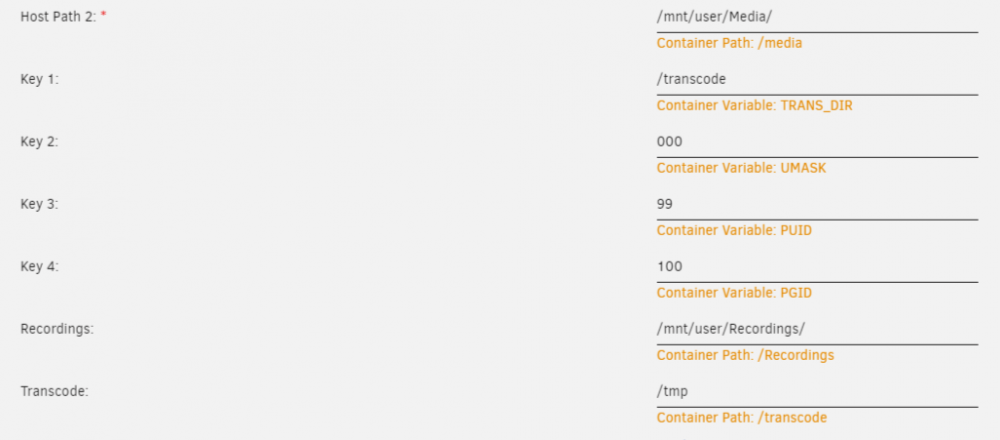
I know that this was covered not long time ago but I still cannot get the transcoding to RAM to work. I tried everything and Plex is always transcoding to /mnt/cache/appdata/binhex-plex/Plex Media Server/Cache/Transcode/Sessions This is my configuration:
-
Thank you. It worked perfectly. One change I had to make was to replace e1000e with e1000. I was getting wrong transmission stats in Xpenology. Thanks again for help.
-
Can you post your settings for 3615 6.2.3? I'm getting hard disk not found. I'm using 1.3b bootloader.
-
Thank you for looking into this. I removed that disk couple days ago as parity drive to copy substantial amount of data to the unraid. I put it back as parity and all is well.
-
Attached diagnostics-20200423-1417.zip
