IbeAbitGoofy
Members
-
Joined
-
Last visited
-
I'm having the same issue. Not sure if it is a Prowlarr or Readarr issue as all other arr apps work just fine. Also tried a non-binhex (gasp!) readarr and had the same issue.
-
This is complete user error on my part. For those who may have similar issues, do the following: As instructions clearly state, select the folder with the "ab_" folders in them. Not the actual "ab_" folder as I was doing (that is what caused the initial error. I selected those folders because when I selected the backup folder and clicked "Next", I did not pay close enough attention to the fact that "Step 2" appeared below. Then, I just followed the instructions. Again, completely my fault. But, aopreciate the responsiveness and willingness to assist.
-
The one I am attemping to restore does not have "-failed" at the end.
-
Yes I am. Just re-ran a manual backup and get the same issues.
-
When attempting to restore appdata, I get an error: Invalide Sourec - The selected source seems invalid. I'm likely missing something obvious, but I cannot figure out what. Below is my log file number. Thank you for your help 2605837a-0e1d-4638-a6d5-7101d2336d12
-
Came back to update. Not related to Unraid at all. Just got a Mac and connected via a docking station (which is hardwired to network) and it's related to that. For whatever reason, it's causing issues when I disconnect it - it causes all hardwired connections to lose connectivity to the network. Plug it back in and everything is fine again. So, I need to work on that if I wish to operate via wired.
-
Thanks! Agree, I don’t think it’s the server either. I believe I’ve got another NIC a I can use to at least test. Appreciate the help.
-
Tried another cable already and that didn’t help. Another devices are getting IPs from the router without issue.
-
With explaination, my server stopped connecting to the network. All other devices o the network are connected fine, it's just unRaid. It does not appear to be getting an address from my router, which I already reset. Connecting via a monitor and keyboard with the GUI, I tried deleting the network-rules and network cfg files. For whatever reason, it will not get an address and setting a static IP address does not work either. I've attached my diagnotics file. Any support or pointers would be greatly appreciated. tower-diagnostics-20230523-2100.zip
-
Got this up and running and works great! Appreciate all the work that went into the development. My RTL-SDR Device seems to keep moving Port/Device. For example, it will be on Port 001 Device 025 and the move to Port 001 Device 023. When it does that, the docker will crash and stop. Is there anyway to fix this?
-
You helped me narrow it down to CF as the issue. Thanks.
-
It's got to be something related to CF as it works if I use port forwarding and a duckdns domain.
-
Yes, both 443 and 80 are open. I'm using Cloudflare to point to my public IP. I can access all other sites using NPM using the custom cert. I just cannot create a Let's Encrypt cert. I'm confident it's one setting I've got off...just don't know which one that "one" is.
-
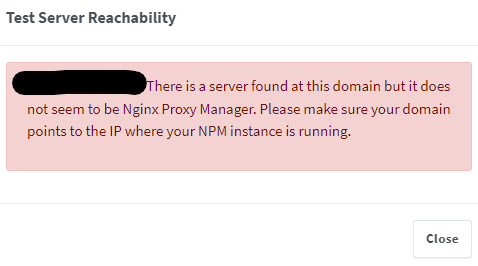
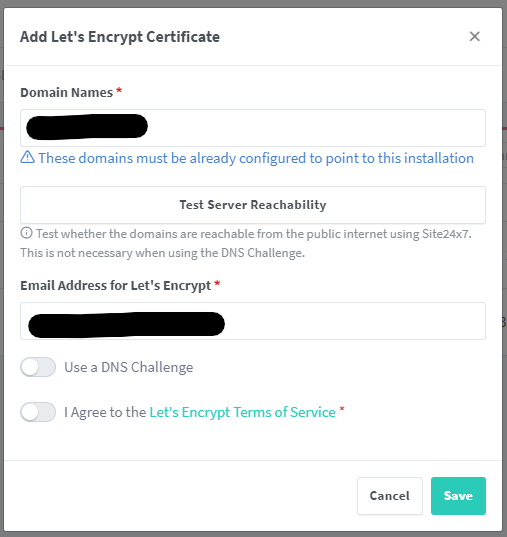
At the risk of sounding completely ignorant, I'm having trouble establishing a Let's Encrypt certificate. I can create custom ones easily enough, but would like to have auto-renewing certs to simplify the process. When entering my domain into the "Add Let's Encrypt Certificate" box, select "I agree to the...", and click Save, the following error shows up. Any pointers on what I may be doing wrong. I'm using Cloudflare to manage all DNS.
-
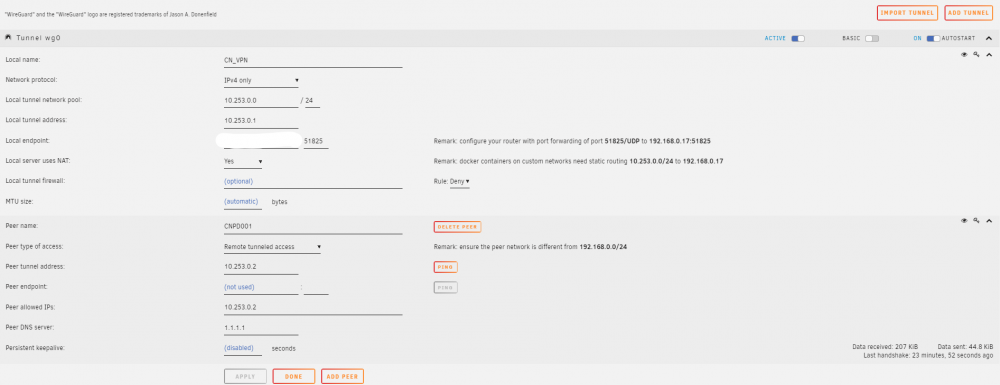
Hoping someone can help. I am able to access my server remotely via Wireguard. However, I cannot access any other asset on the network (i.e., Home Assistant on a VM/another IP). Additionally, I cannot access the internet. Below is my configuration on VM Manager. Any insight would be greatly appreciated.