





skinsvpn
Members
-
Joined
-
Last visited
Everything posted by skinsvpn
-
I have started getting this error when I go to log in: The web server seems to be incorrectly configured for cookies required for PHP sessions! This is on all machine I've tried and with different browsers. I also tried deleting the image and reinstalling, Do I have something misconfiguration? The only thing I changed was the port.
-
Everything worked before the October 22 according to my logs though. Not an issue you're seeing with others I guess then?
-
Since around October 22 (so around the time mediainfo was updated to v23.10) I get this error for writing xattr: Failed to write xattr key: net.filebot.mediainfo: 'filename': Error writing extended attribute 'net.filebot.mediainfo': Not supported Any thoughts on how to get around this?
-
Is it possible to send attachments with this template? Seems to require https.
-
I have a USB PCI card that I pass through to a windows VM that does not seem to work after a reboot of the VM. After rebooting nothing connected to the card works and I have to restart unraid to get it back. Is there something wrong with my configuration? kinderserver-diagnostics-20230214-1244.zip
-
Thanks. Is this indicative of a low quality or dying device?
-
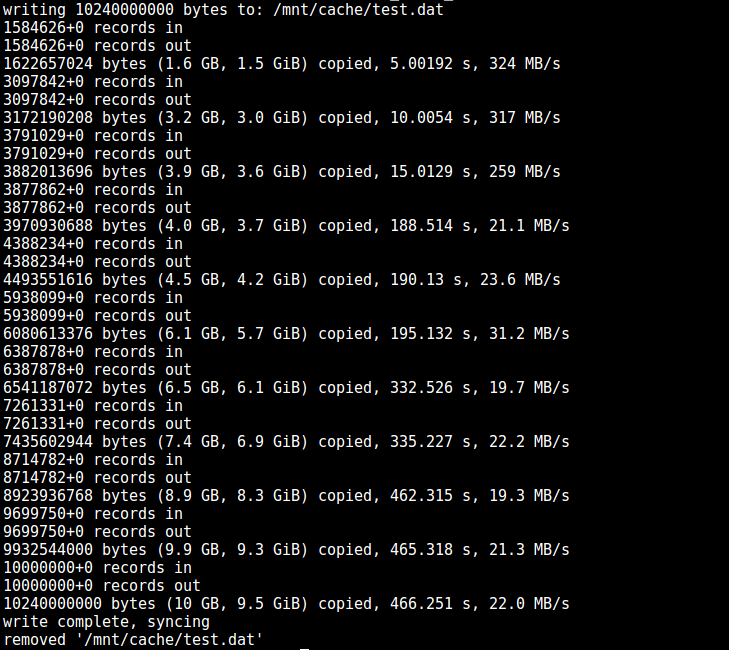
I've notices that during large writes to the cache pool my write speed quickly tapers from 300 MBps to 30 MBps. I ran across a write speed test from JorgeB on another post that captured what I was seeing in the webui perfectly. Why could I be seeing this? It is a Silicon Power 1TB connected directly to the motherboard SATA controller and TRIM is scheduled to run daily. It is 4KiB-aligned and I've been thinking about reformatting with 1MiB alignment but want to see if there are other options first. kinderserver-diagnostics-20221122-2031.zip
-
Unfortunately in this case when I add the nVME card the USB card goes unrecognized. Does not show up at all in System Devices. I pulled the nVME card and the USB card shows again.
-
Thanks for pointing this out. So I just installed that card and never passed it to the VM. I guess it took the spot of my USB controller but now the usb controller isn't visible and obviously not passed through. Is that a mobo problem? I'm running dual Intel Xeon E5-2689 which should have the lanes for the additional card.
-
I just installed an nVME PCIe expansion card and the attached drive is not seen by Unraid. In system devices, whether the box is checked or not, I get this message: This controller is bound to vfio, connected drives are not visible. Do I need to find a way to remove the binding? kinderserver-diagnostics-20221111-0945.zip
-
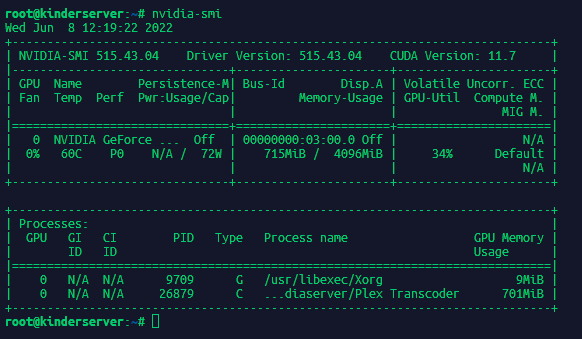
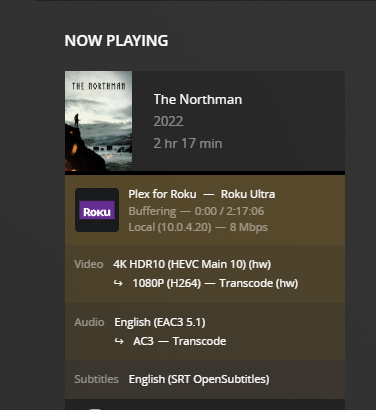
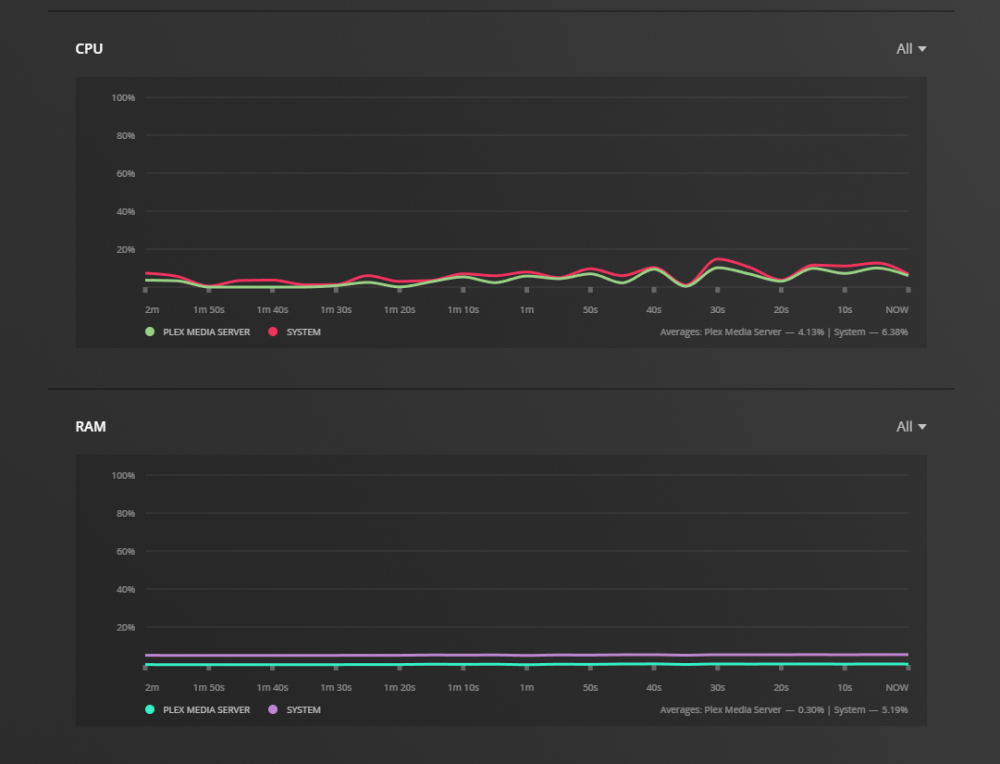
I am having trouble transcoding 4k content with my GeForce 1050 Ti. Plex just hangs at 13% and gives up. I feel like the GPU should be more than capable for multiple transcodes even. The issue does not occur in the Web Stream with quality set to automatic (in which it does transcode to 1080) but when 1080 is selected at any bitrate and with a Roku where there is not automatic option it dies. Is this a bottleneck or some other issue? I have tried Automatic and Make My CPU Hurt Transcoder quality setting. I've tried HDR tone mapping on and off. My transcode directory is set to RAM and 'df -h' in the Plex shell shows 62G available. My dashboard screenshot shows hw transcode too. One thing I noticed during a transcode to 1080 is this error: [Transcode] Codecs: hardware transcoding: opening hw device failed - probably not supported by this system, error: Generic error in an external library This error does not appear in the logs if I initialize a 720 transcode but the transcode still fails. Direct play works fine so it should not be a network problem. Server Info: CPU: Dual E5-2689 GPU: NVIDIA GeForce GTX 1050 Ti (4GB) OS: Unriad Version: 6.9.2 Nvidia Driver: 515.43.04 Latest linuxserver.io Plex image settings: Extra Parameters: --runtime=nvidia Nvidia Visible Devices: GPU-99a7eafc-de53-f78f-b16c-746370cbe0ed Nvidia Driver Capabilities: all transcode: /tmp
-
Yeah I had to reboot. Got too many "Is Plex down?" texts. But i will keep this in my hip pocket for the next time. Thanks! Would it be worth preemptively replacing the boot usb?
-
For the second time I am unable to access any Docker containers or any of the tabs listed in the title. I've tried rebooting in the GUI which seems to just do nothing and sudo reboot 0 from CLI just sits and does nothing. When I try to download diagnostics it hangs at "lsof -Pni 2>/dev/null|todos" Is there anything else I can try to determine the issue before a hard reboot?
-
The link appears to be broken
-
You were correct, the docker image wouldn't start with the 18.20 drivers. Guess that card is older than I realized. Thanks for the response though!
-
lxnd, I am getting the following message in the logs: amdgpu_device_initialize: DRM version is 2.50.0 but this driver is only compatible with 3.x.x. Safe to take that message to mean my card in unsupported? (Radeon HD 7870)
-
I'm having issues with my AMC script when processing tv shows. It appears as though AMC is forcing the title to be a movie but also recognizes to place it in the tv_shows folder. Has anyone experienced this situation? Unraid version: 6.8.3 Latest version of docker image (I don't know exactly how to verify this other than run a check for updates and ensure it states "latest") filebot -v output: FileBot 4.9.1 (r7372) JDK8 / OpenJDK Runtime Environment 1.8.0_242 / Linux 4.19.107-Unraid (amd64) Log: Run script [fn:amc] at [Thu May 21 09:53:11 EDT 2020] Parameter: subtitles = en Parameter: pushbullet = ***** Parameter: pushover = ***** Parameter: exec = /bin/ash /config/filebot_verify_suball.sh '{f}/' Parameter: music = y Parameter: artwork = y Parameter: ignore = idx|\.sub Parameter: movieFormat = {fn =~ /2160p/ ? "4k_movies" : "movies"}/{n.replaceFirst(/^(?i)(The|A|An)\s(.+)/, /$2, $1/).ascii()} ({y})/{n.replaceFirst(/^(?i)(The|A| An)\s(.+)/, /$2, $1/).ascii()} {"("+fn.matchAll(/despecialized|extended|uncensored|remastered|remaster|4k.remaster|unrated|uncut|directors.cut|director.s.cut|spe cial.edition|criterion.collection|theatrical|remux/)*.upperInitial()*.lowerTrail().sort().join(", ").replaceAll(/[._]/, " ")+")"} {"[$vf $vc $ac $af]"} Parameter: seriesFormat = tv_shows/{n.replaceFirst(/^(?i)(The|A|An)\s(.+)/, /$2, $1/).ascii()} ({y})/Season {s.pad(2)}/{n.ascii()} - {s00e00} - {t.ascii()} {"("+ fn.matchAll(/despecialized|extended|uncensored|remastered|remaster|4k.remaster|unrated|uncut|directors.cut|director.s.cut|special.edition|criterion.collection|re mux/)*.upperInitial()*.lowerTrail().sort().join(", ").replaceAll(/[._]/, " ")+")"} {"[$vf $vc $ac $af]"}{"."+lang} Parameter: musicFormat = music/{n.replaceFirst(/^(?i)(The|A|An)\s(.+)/, /$2, $1/).ascii()}/{album.ascii()} ({y})/{album.ascii()} - {media.PartPosition}{pi.pad(2) } - {t.ascii()} ({kbps}) Argument[0]: /mnt/disks/whatbox/Rick.and.Morty.S04E07.1080p.WEBRip.x264-BTX Ignore video extra: /mnt/disks/whatbox/Rick.and.Morty.S04E07.1080p.WEBRip.x264-BTX/Sample/rick.and.morty.s04e07.1080p.webrip.x264-btx.sample.mkv Read archive [rick.and.morty.s04e07.1080p.webrip.x264-btx.rar] and extract to [/mnt/disks/whatbox/Rick.and.Morty.S04E07.1080p.WEBRip.x264-BTX/rick.and.morty.s04e 07.1080p.webrip.x264-btx/Rick.and.Morty.S04E07.1080p.WEBRip.x264-BTX] Extracting files [/mnt/disks/whatbox/Rick.and.Morty.S04E07.1080p.WEBRip.x264-BTX/rick.and.morty.s04e07.1080p.webrip.x264-btx/Rick.and.Morty.S04E07.1080p.WEBRip.x 264-BTX/rick.and.morty.s04e07.1080p.webrip.x264-btx.mkv] Input: /mnt/disks/whatbox/Rick.and.Morty.S04E07.1080p.WEBRip.x264-BTX/rick.and.morty.s04e07.1080p.webrip.x264-btx/Rick.and.Morty.S04E07.1080p.WEBRip.x264-BTX/ric k.and.morty.s04e07.1080p.webrip.x264-btx.mkv Group: {Series=rick and morty} => [rick.and.morty.s04e07.1080p.webrip.x264-btx.mkv] Get [English] subtitles for 1 files Looking up subtitles by hash via OpenSubtitles No matching subtitles found: /mnt/disks/whatbox/Rick.and.Morty.S04E07.1080p.WEBRip.x264-BTX/rick.and.morty.s04e07.1080p.webrip.x264-btx/Rick.and.Morty.S04E07.108 0p.WEBRip.x264-BTX/rick.and.morty.s04e07.1080p.webrip.x264-btx.mkv Rename movies using [TheMovieDB] Auto-detect movie from context [/mnt/disks/whatbox/Rick.and.Morty.S04E07.1080p.WEBRip.x264-BTX/rick.and.morty.s04e07.1080p.webrip.x264-btx/Rick.and.Morty.S04E07. 1080p.WEBRip.x264-BTX/rick.and.morty.s04e07.1080p.webrip.x264-btx.mkv] [MOVE] from [/mnt/disks/whatbox/Rick.and.Morty.S04E07.1080p.WEBRip.x264-BTX/rick.and.morty.s04e07.1080p.webrip.x264-btx/Rick.and.Morty.S04E07.1080p.WEBRip.x264-B TX/rick.and.morty.s04e07.1080p.webrip.x264-btx.mkv] to [/mnt/user/media/tv_shows/Rick (2003)/Season/Rick - - [1080p x264 AAC 2ch].mkv] Processed 1 files groovy.lang.MissingPropertyException: No such property: seriesInfo for class: net.filebot.web.Movie groovy.lang.MissingPropertyException: No such property: seriesInfo for class: net.filebot.web.Movie at Script1$_run_closure69$_closure112$_closure117.doCall(Script1.groovy:355) at Script1$_run_closure69$_closure112.doCall(Script1.groovy:355) at Script1$_run_closure69.doCall(Script1.groovy:352) at Script1.run(Script1.groovy:332) at net.filebot.cli.ScriptShell.evaluate(Unknown Source) at net.filebot.cli.ScriptShell.runScript(Unknown Source) at net.filebot.cli.ArgumentProcessor.runScript(Unknown Source) at net.filebot.cli.ArgumentProcessor.run(Unknown Source) at net.filebot.Main.main(Unknown Source) Error (o_O) AMC call from custom script in user scripts: docker exec FileBot /opt/filebot/filebot -script fn:amc --output '/mnt/user/media/' \ --log-file amc.log \ --action move \ --conflict index -non-strict \ --db TheMovieDB \ --def subtitles=en \ --def pushbullet=$pushbullet_token \ --def pushover=$pushover_userkey:$pushover_apitoken \ "exec=/bin/ash /config/filebot_verify_suball.sh '{f}/'" \ music=y artwork=y \ ignore='idx|\.sub' \ 'movieFormat='"$movie_format" \ 'seriesFormat='"$series_format" \ 'musicFormat='"$music_format" \ "$file_name"
