





DarkMan83
Members
-
Joined
-
Last visited
Everything posted by DarkMan83
-
See my signature
-
Yeah, i see. I investigated further, but couldn't find where the disks.ini is generated. Maybe a user script updatiung the temps in that ini file would temp fix this problem, until it gets picked up and worked on... Or modify the rc.diskinfo php script for writing that info into the ini file.
-
Was there ever an solotion? Im still facing this problem...
-
I have the same problem with an WD40EFAX, which is clearly identified as a SMR drive by me, which cloud/should have in it's SMART data the TRIM command listed as available. I dunno whats the method for checking if it's actually an SSD used by this plugin, but this could be the problem? Greetings Dark
-
Hi, i have QNAP TS-1677x with AMD inside. I was trying to get all those temps and other things working, i did some google digging and found, that it must be using the IT8528 chip/board, because sensors-detect ist complaining. But it seems unRaid did not activate the kernel modules on compile, hopefully. If the iManager driver would be baked into the kernel, it could get me the: Temps, GPIO (LCD), FANS and LED's control - Maybe not until 6.9 unRaid release. sensors-detect showed this: Some Super I/O chips contain embedded sensors. We have to write to standard I/O ports to probe them. This is usually safe. Do you want to scan for Super I/O sensors? (YES/no): Probing for Super-I/O at 0x2e/0x2f Trying family National Semiconductor/ITE'... Yes Found unknown chip with ID 0x8528 So after soe Gooling i found: https://lore.kernel.org/patchwork/patch/634176/ https://lwn.net/Articles/705319/ https://github.com/rvido/iManager Would be so nice, if these QNAP Hardware would work on unRaid, so i could beat them on e.g. Facebook, as they refused to give me support for their product and only said: Use compatible NVME -> which is in QNAP case never updated since 2018 and the fastest NVME's are 530 MB/s, this made the NVME's obsolete, as my normal SATA SSD already got 560 MB/s 😞 I would be so thankfully, if someone has any idea on getting this working, or bring it to the next unRaid version or the dynamix temperature plugin, i would buy you a beer 🙂 Greetings Dark
-
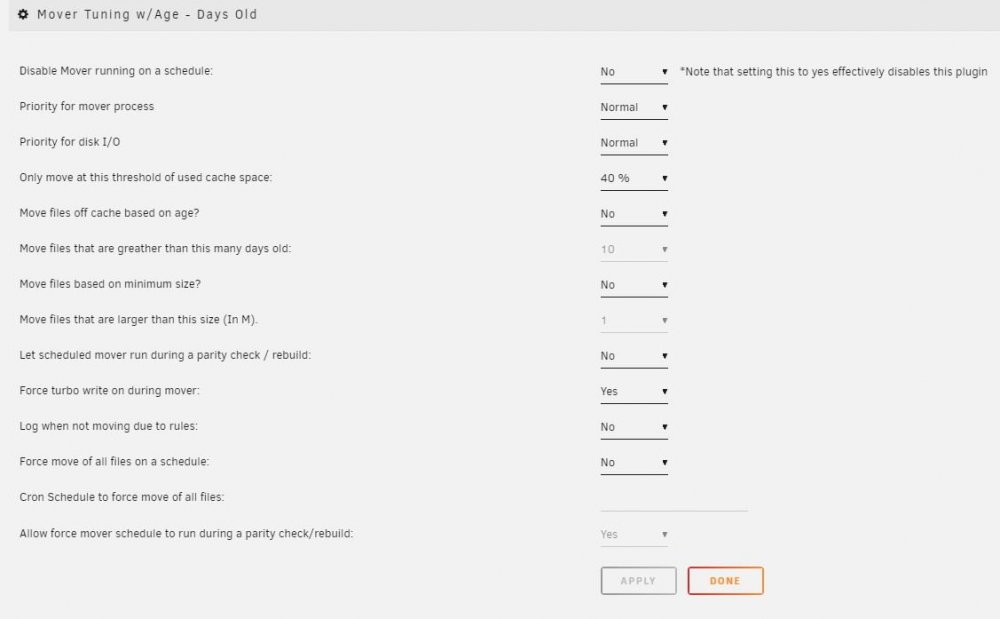
Doesn't the CA Plugin "Mover Tuning" do what you want?
-
Thanks, deleting the file + restart worked 🙂
-
Heyho folks, today after restarting the server i get the following, which tells me nothing from user perspective...



