





Masterwishx
Members
-
Joined
-
Last visited
Everything posted by Masterwishx
-
Any news for posting to CA?
-
2026.10.18.0001 Change pluginURL to new maintainer/repoChanged in old version, so we have auto update plugin to your new version
-
The author of same template fixed his xml, so it unblacklisted, so my template also unblocked
-
I found another template was created some day ago witch was blacklisted in CA statistic and seems it affected to my template, that was fine for the one year.
-
Do you mean only visible to me?
-
https://product.unraid.net/p/filebrowser-quantum-xml-blacklisted-by-mistake?b=community-apps-submission-support Yes it was moved, still have no answer, you can install by github link at now, also maybe confirm issue if it needed in the link above
-
Opened issue for this: https://product.unraid.net/p/filebrowser-quantum-xml-blacklisted-by-mistake
-
@Squid can you please help, why FileBrowserQuantum was Blacklisted due to attempt to execute extra code via docker run command This application template has been blacklisted. ?
-
Not sure what the problem, you can use for now https://raw.githubusercontent.com/masterwishx/unraid-templates/main/FileBrowserQuantum.xml
-
I will check it
-
@Squid not sure who responsible for this, but it looks like @chodeus is still missing CA dev role in forum.
-
Will be cool to have new version, still not on CA...
-
Users who want to test new beta version, that have a lot of fixes, new futures like progress bar in 7.4beta, and many more, these was possible with help by @chodeus So any feedback are welcome
-
In the new version will be added support for Translation, thanks to @chodeus So added Russian, German and French language. Users with native German or French can update/fix it in github. Any other language also can be added by users on github to plugin.
-
Yep, you right sorry for this I will fix it
-
For users that have seen issues, please check new version that will be available tomorrow I hope. Also, I want to thank @chodeus the developer of the amazing plugin: Folder View 3, which was kindly and has spent a lot of time improving this plugin in recent days, so everything should work better than before... :)
-
I need not only log file , but all mover tuning files logs + file lists that included in debug zip (with logs and debug logs enabled )
-
We need debug.zip of latest version that you say you have issue in it .... after some mover tuning runs... to see why not moving
-
Please send debug.zip
-
Yep, please check @chodeus pr on github
-
New version is out, fixed calculations for threshold pool used, users who used : 75% to 25% or any others, now should work correctly! Will be cool to have feedback that is fine now :)
-
For users that have plugin not moving data with thresholds! Seems I found the bug, should be fixed in next version...
-
I can't reproduce it, but will try to fix it, you can help with testing?
-
OK ,i checked the diagnostic , you have all data from media share (keep on primary) : 03:40:01.335 Using global (cache:yes) moving threshold: 40 % 03:40:01.336 Using global (cache:yes) freeing threshold: 25 % 03:40:01.337 Using global (cache:prefer) fillup threshold: 80 %cache|media|yes|1784793600|6857058039|31774043642|124965909504|1|4192366|keep on primary|/mnt/cache|none|media/TV Shows/Ransom Canyon (2025) {tvdb-443051}/Ransom Canyon (2025) - S02E01 - Hey There Cowboy [NF WEBDL-2160p][DV HDR10][EAC3 Atmos 5.1][HEVC]-Kitsune.mkv|f I think you need to make more gap between moving - freeing thresholds (more than 15%) .... Like wrote in `Note:`
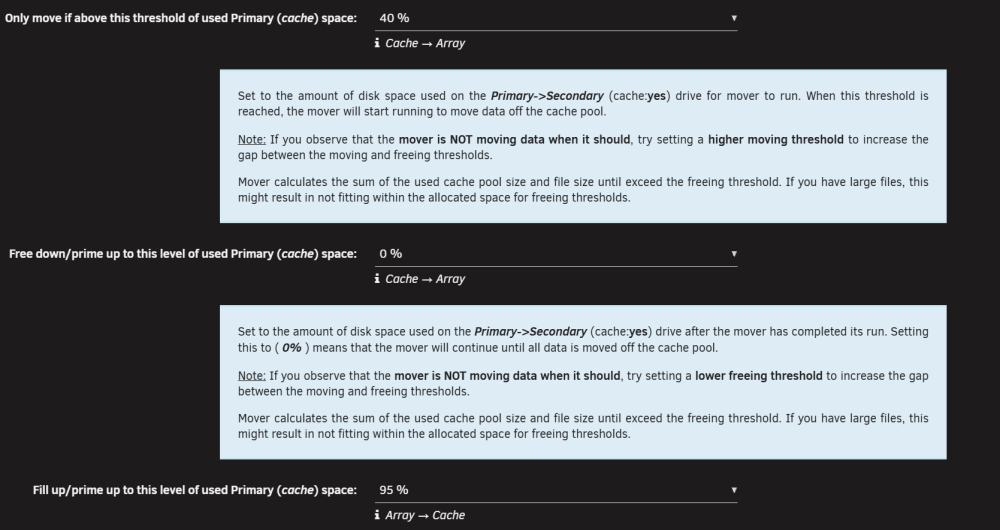
-
Found in mover logs : ``` 11:40:01.728 ----------------------------------------------------------------- Global settings --------------------------------------------------------------- 11:40:01.733 Using global (cache:yes) moving threshold: 90 % 11:40:01.736 Using global (cache:yes) freeing threshold: 50 % 11:40:01.738 Using global (cache:prefer) fillup threshold: 90 % 11:40:01.745 Age: Automatic (smart caching) 11:40:01.759 ATIME: yes 11:40:01.767 mover: already running ... ``` You have latest version but in syslog old version: `Installing new package /boot/config/plugins/ca.mover.tuning/ca.mover.tuning-2026.06.24-x86_64-1.txz`




