Everything posted by Masterwishx
-
[Plugin] Mover Tuning
How do you run plugin by cron only? In latest version I changed some stuff about posting to syslog when running by cli and button it was not working befor, but not sure how it related to your issue...
-
ZFS BuddyBackup plugin guide
Interesting, this is maybe becouse default sanoid setting: daily_hour = 23, daily_min =59? I have still strange issue with plugin by --cron, for me it make in different time and not every day (system_cache_ssd/appdata + childs, flash/boot) with copy backups. I tryed to make separate user script with - - prune, it remove old datasets but seems it couse to post errors in log, also maybe made new sub dataset in appdata. Then used make snapshot and send backup this made hourly snapshots, and fixed errors but they still exit and not removed however I have hourly=0.
-
[Plugin] Mover Tuning
You need to enable logging and debug logging, then let plugin run some times and then post debug.zip Also not sure why in syslog : ```move: 2910766 ? R 0:00 /bin/bash /usr/local/emhttp/plugins/ca.mover.tuning/age_mover start```
-
[Plugin] Mover Tuning
Or you can set notifications only when files moving
-
[Plugin] Mover Tuning
You need to post debug.zip
-
[Plugin] Mover Tuning
We have option in plugin (force move of all files.. ) that run unraid mover with separate cron, in case enabled...
-
[Plugin] Mover Tuning
If Unraid mover is disabled, you can check if forced mover option cron is not Intersect with plugin cron in case enabled...
-
[Plugin] Mover Tuning
If you set run mover every 30min, can be that first mover not finished and new mover trying to start? Also be shure that Unraid mover is disabled
-
[Plugin] Mover Tuning
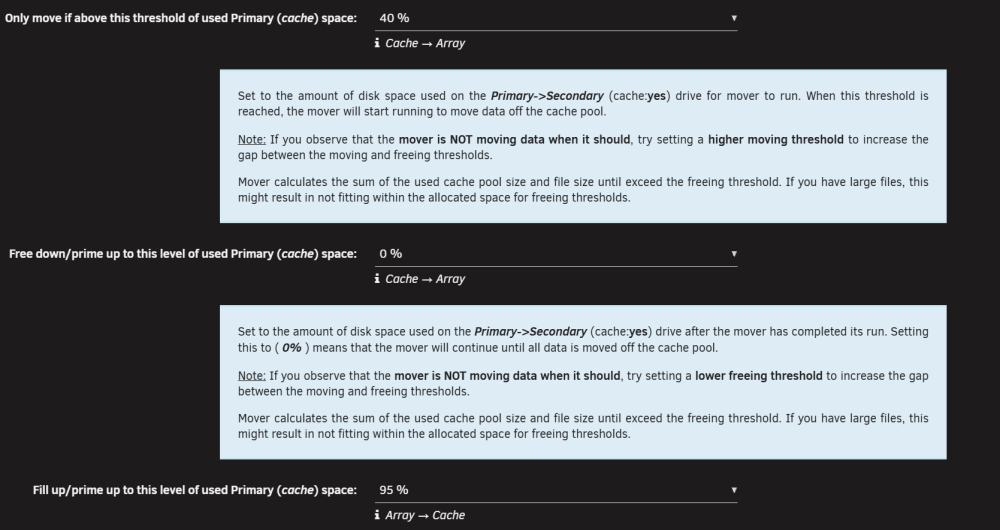
Plugin will move files after cache pool size 75% until 0%
-
[Plugin] Mover Tuning
You can also check log files for what files filtered, moved etc...
-
[Plugin] Mover Tuning
No, nothing was changed. Sometimes you need a gap more than 10%-15% between moving thresholds. It should move all files above 30mb until free up %. So if you have like only 3 files above 30mb it will move only them + what other setting... Iirc You can send me age_mover debug, for I can check it.
-
[Plugin] Mover Tuning
Can be, you can open github issue, I will check when/if have time for it...
-
ZFS BuddyBackup plugin guide
From debug: Filesystem system_cache_ssd/appdata/vaultwarden has: 15 total snapshots (newest: 34.4 hours old) 3 monthly desired: 3 newest: 445.4 hours old, named autosnap_2026-05-01_20:00:04_monthly 8 daily desired: 7 newest: 34.4 hours old, named autosnap_2026-05-18_23:00:02_daily 4 weekly desired: 4 newest: 181.4 hours old, named autosnap_2026-05-12_20:00:18_weekly Filesystem disk7/zfs_backups/system_cache_ssd_appdata/binhex-airsonic-advanced has: 19 total snapshots (newest: 12.2 hours old) 5 weekly desired: 4 newest: 12.2 hours old, named autosnap_2026-05-19_21:15:01_weekly 11 daily desired: 7 newest: 12.2 hours old, named autosnap_2026-05-19_21:15:01_daily 3 monthly desired: 3 newest: 445.4 hours old, named autosnap_2026-05-01_20:00:03_monthly Filesystem system_cache_ssd/appdata/semaphore has: 19 total snapshots (newest: 0.2 hours old) 5 weekly desired: 4 newest: 0.2 hours old, named autosnap_2026-05-20_09:15:01_weekly 11 daily desired: 7 newest: 0.2 hours old, named autosnap_2026-05-20_09:15:01_daily 3 monthly desired: 3 newest: 445.4 hours old, named autosnap_2026-05-01_20:00:05_monthly Filesystem system_cache_ssd/appdata/PuTTY has: 17 total snapshots (newest: 20.7 hours old) 3 monthly desired: 3 newest: 445.4 hours old, named autosnap_2026-05-01_20:00:05_monthly 9 daily desired: 7 newest: 20.7 hours old, named autosnap_2026-05-19_12:45:01_daily 5 weekly desired: 4 newest: 20.7 hours old, named autosnap_2026-05-19_12:45:01_weekly Filesystem system_cache_ssd/appdata/YouTrack has: 21 total snapshots (newest: 15.7 hours old) 12 daily desired: 7 newest: 15.7 hours old, named autosnap_2026-05-19_17:45:01_daily 6 weekly desired: 4 newest: 15.7 hours old, named autosnap_2026-05-19_17:45:01_weekly 3 monthly desired: 3 newest: 445.4 hours old, named autosnap_2026-05-01_20:00:03_monthly
-
ZFS BuddyBackup plugin guide
Do your snapshots for appdata all sub datasets have daily snapshots at every day? And if you have flash snapshots maybe? I have strange count of snapshots for appdata sub datasets from 15 to 20... (with old script snapshots). So this mean after installed plugin it make snapshots not at every day for all subdatasets. Also for flash it made only one time snapshot ...
-
ZFS BuddyBackup plugin guide
@Pirat After talking to Ai, sanoid debug and more investigation for system_ssd_cache/appdata found that some of child datasets was made snapshots/backup in random times but not all and not parent dataset. In the script that used befor, it used : sanoid --take-snapshots --take-snapshots is a forced snapshot mode. It means: - Sanoid always creates a snapshot - for every dataset with autosnap=yes - exactly at the time you run it (20:00) - even if the dataset did NOT change - even if the interval did NOT expire - even if daily/weekly/monthly is not due This is why: ✔ All snapshots were created at exactly 20:00 ✔ All datasets had the same timestamp ✔ Backups ran immediately after ✔ Behavior was predictable and synchronized This mode behaves like a cron job, not like an interval manager. But in plugin use : sanoid --cron This mode is interval‑based, not time‑based. Sanoid decides: - whether hourly is expired - whether daily is expired - whether weekly is expired - whether monthly is expired - whether the dataset changed - whether it should skip the snapshot Snapshots are created: - not at a fixed time - but at the first cron run after the interval expires - and only if the dataset changed (unless forced) That seems much better Behavior of sanoid snapshots/Backups. In any case maybe a good idea to add option for parametr : noinconsistentsnapshot = yes This forces Sanoid to create snapshots even if the dataset did not changed? Also can't see syncoid snapshot/backup for any of datasets...
-
ZFS BuddyBackup plugin guide
OK ,got it So not better to add also option with schedule for snapshots/retention or better to let sanoid choose time ? Well, for now only flash/boot made snapshot/backup but i cant see syncoid like this: flash/boot@syncoid_MyTower_2026-05-15:20:00:17-GMT03:00 0 B 232 KiB 0 B off 0 2026-05-15 20:00:17 Only have: flash/boot@autosnap_2026-05-16_14:15:02_monthly 0 B 2.45 GiB 2.45 GiB off 0 2026-05-16 14:15:02 flash/boot@autosnap_2026-05-16_14:15:02_daily 0 B 2.45 GiB 0 B off 0 2026-05-16 14:15:02 flash/boot@autosnap_2026-05-16_14:15:02_weekly 0 B 2.45 GiB 0 B off 0 2026-05-16 14:15:02 For system_cache_ssd/appdata still have NOT made any snapshots/backups , maybe sanoid waiting for make it in same time that old snapshots/backups was made by script (20:00) ? system_cache_ssd/appdata@autosnap_2026-05-14_20:00:03_daily 56 KiB 232 KiB 56 KiB off 0 2026-05-14 20:00:03 system_cache_ssd/appdata@autosnap_2026-05-15_20:00:04_daily 0 B 232 KiB 56 KiB off 0 2026-05-15 20:00:04 system_cache_ssd/appdata@syncoid_My_Tower_2026-05-15:20:00:17-GMT03:00 0 B 232 KiB 0 B off 0 2026-05-15 20:00:17
-
ZFS BuddyBackup plugin guide
Finally the first snapshot for /flash/boot was made in 14:15, interesting how sanoid choose when to make snapshot with (0 7 4 3 0)...
-
ZFS BuddyBackup plugin guide
system_cache_ssd/appdata@autosnap_2026-05-13_20:00:03_daily 56 KiB 232 KiB 56 KiB off 0 2026-05-13 20:00:03 system_cache_ssd/appdata@autosnap_2026-05-14_20:00:03_daily 56 KiB 232 KiB 56 KiB off 0 2026-05-14 20:00:03 system_cache_ssd/appdata@autosnap_2026-05-15_20:00:04_daily 0 B 232 KiB 56 KiB off 0 2026-05-15 20:00:04 system_cache_ssd/appdata@syncoid_MyTower_2026-05-15:20:00:17-GMT03:00 0 B 232 KiB 0 B off 0 2026-05-15 20:00:17 sanoid.conf [system_cache_ssd/appdata] recursive = yes autosnap = yes autoprune = yes hourly = 0 monthly = 3 daily = 7 yearly = 0 weekly = 4 post_snapshot_script = /usr/local/emhttp/plugins/buddybackup/scripts/rc.buddybackup.php send_backup "aa4ed6a1" 2>&1 | /usr/local/emhttp/plugins/buddybackup/scripts/log.sh [flash/boot] recursive = no autosnap = yes autoprune = yes hourly = 0 monthly = 3 daily = 7 yearly = 0 weekly = 4 post_snapshot_script = /usr/local/emhttp/plugins/buddybackup/scripts/rc.buddybackup.php send_backup "81370285" 2>&1 | /usr/local/emhttp/plugins/buddybackup/scripts/log.sh [disk7/zfs_backups/system_cache_ssd_appdata] recursive = yes autosnap = no autoprune = yes hourly = 0 monthly = 3 daily = 7 yearly = 0 weekly = 4 [disk7/zfs_backups/flash_boot] recursive = no autosnap = no autoprune = yes hourly = 0 monthly = 3 daily = 7 yearly = 0 weekly = 4 snapshots.cfg [7e4d1070] dataset="system_cache_ssd/appdata" recursive="yes" autosnap="yes" autoprune="yes" hourly="0" monthly="3" daily="7" yearly="0" weekly="4" trigger="aa4ed6a1" [755c4461] dataset="flash/boot" recursive="no" autosnap="yes" autoprune="yes" hourly="0" monthly="3" daily="7" yearly="0" weekly="4" trigger="81370285" [ecbc2001] dataset="disk7/zfs_backups/system_cache_ssd_appdata" recursive="yes" autosnap="no" autoprune="yes" hourly="0" monthly="3" daily="7" yearly="0" weekly="4" trigger="no" [4a91a312] dataset="disk7/zfs_backups/flash_boot" recursive="no" autosnap="no" autoprune="yes" hourly="0" monthly="3" daily="7" yearly="0" weekly="4" trigger="no" backups.cfg [aa4ed6a1] enable="no" source_dataset="system_cache_ssd/appdata" recursive="yes" backup_cron="0 20 * * *" type="local" destination_host="" destination_dataset="disk7/zfs_backups/system_cache_ssd_appdata" [81370285] enable="no" source_dataset="flash/boot" recursive="yes" backup_cron="10 20 * * *" type="local" destination_host="" destination_dataset="disk7/zfs_backups/flash_boot" Log 2026-05-16 09:45:15: Successfully synced local backup! 2026-05-16 09:45:15: [[rc.buddybackup finished]] 2026-05-16 10:00:14: Successfully synced local backup! 2026-05-16 10:00:14: [[rc.buddybackup finished]] 2026-05-16 10:15:15: Successfully synced local backup! 2026-05-16 10:15:15: [[rc.buddybackup finished]] 2026-05-16 10:30:28: Successfully synced local backup! 2026-05-16 10:30:28: [[rc.buddybackup finished]] 2026-05-16 10:45:14: Successfully synced local backup! 2026-05-16 10:45:14: [[rc.buddybackup finished]] 2026-05-16 11:00:15: Successfully synced local backup! 2026-05-16 11:00:15: [[rc.buddybackup finished]] 2026-05-16 11:15:15: Successfully synced local backup! 2026-05-16 11:15:15: [[rc.buddybackup finished]] 2026-05-16 11:30:18: Successfully synced local backup! 2026-05-16 11:30:18: [[rc.buddybackup finished]] 2026-05-16 11:45:15: Successfully synced local backup! 2026-05-16 11:45:15: [[rc.buddybackup finished]] 2026-05-16 12:00:14: Successfully synced local backup! 2026-05-16 12:00:14: [[rc.buddybackup finished]] 2026-05-16 12:15:14: Successfully synced local backup! 2026-05-16 12:15:14: [[rc.buddybackup finished]] 2026-05-16 12:30:15: Successfully synced local backup! 2026-05-16 12:30:15: [[rc.buddybackup finished]] 2026-05-16 12:45:15: Successfully synced local backup! 2026-05-16 12:45:15: [[rc.buddybackup finished]] 2026-05-16 13:00:38: Successfully synced local backup! 2026-05-16 13:00:38: [[rc.buddybackup finished]] 2026-05-16 13:15:16: Successfully synced local backup! 2026-05-16 13:15:16: [[rc.buddybackup finished]]
-
ZFS BuddyBackup plugin guide
Thanks, sure I will add as future request in github In my main sever I have already snapshots + Backups from script (system_ssd/appdata) made yesterday at 20:00 and I don't see that plugin made any snapshot or backup Hovewer in dashboard it wrote that made somethink.. Also added snapshot for flash/boot and also can't see any snapshots. I can see in log only that synchronise ok Also seems we need to add retensions for local backups in snapshots menu, do you think will be useful to add strict mode option maybe to syncoid? If it not over complicate the plugin?
-
ZFS BuddyBackup plugin guide
I'm confused a little: We don't have cron for snapshots (or should be made in check of 15m?), so not sure when snapshot should be made (in test server it was done but in my main sever still no snapshot was made) Also as i understand for local backup we don't need set cron if we set backup to run after snapshot? So it need cron only when remote or not set after snapshot? @Pirat maybe you need to add help description for options to get more info for options...
-
ZFS BuddyBackup plugin guide
Also will awesome to add option for we can add sound (speaker) notify like in Spaceinvaderone script...
-
ZFS BuddyBackup plugin guide
@Pirat Checked the plugin ,its really cool , sorry that took me so much time to get on it from spaceinvaider script .... Just for info : As i understand, its check every 15 min of sanoid config for snapshots retention / creation , will be cool maybe to have also manually create snapshot by button ? Maybe also will be cool to have default-auto-generated addon path in case if not exist for Destination dataset like, when i choose pool/dataset it will add source pool_dataset after it (with button create dataset) : cache_appdata in disk3/zfs_backups/cache_appdata when ZFS dataset to backup: cache/appdata Example from script: destination_pool="disk3" #this is the zpool in which your destination dataset will be created parent_destination_dataset="zfs_backups" #this is the parent dataset in which a child dataset will be created containing the replicated data (zfs replication) ... ... source_path="$source_pool"/"$source_dataset" source_dataset_flat=$(echo $source_dataset | sed 's|/|_|g') zfs_destination_path="$destination_pool"/"$parent_destination_dataset"/"$source_pool"_"$source_dataset_flat"We can create it manually before it off course ....
-
[PLUGIN] ZFS Master
Please upvoite for plugin will integrate in Unraid here: full-proper-support-for-zfs-pools-equivalent-to-array-support?b=unraid-os-feature-requests
-
ZFS BuddyBackup plugin guide
If i want to migrate to plugin from Spaceinvader script + sanoid plugin , should be removed sanoid plugin first?
-
[PLUGIN] ZFS Master
is the plugin not maintaining anymore ?