





TexasUnraid
Members
-
Joined
-
Last visited
Everything posted by TexasUnraid
-
Curious, I have a bunch of drives plugged into the server at the moment, I keep manually spinning them down but for some reason they will spin up again within a few minutes? With them being unmounted I would not think there is anything that would cause them to spin up. Any ideas what is causing the spin up?
-
Yeah, I think that is why SSD's are considered vital, people are trying to use the wrong tool for the job IMHO. They spend thousands on drives are other hardware but won't spend a few hundred (well at least before this craze started) to buy proper server mobo/cpu's to plot with. We are kinda spoiled with 32+ threads at our disposal admittedly. Heck I technically have like 80+ threads I could throw at plotting if it was worth it and that doesn't even tap into the gaming rigs lol.
-
Cool, I will let it run then, my backplane or something crashed last night and all my drives dropped out so I get to work that out first lol.
-
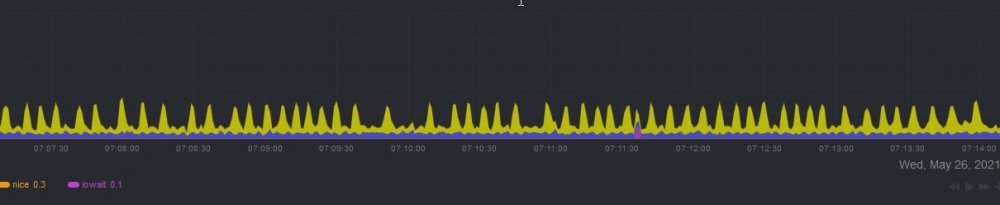
I just had time to install this docker, looks really nice. I just started it up and left it running last night and noticed that it is using a lot of CPU just sitting there doing nothing but "syncing"? It was on all night, it hasn't finished syncing yet? No plots running, and not farming. It does say: No online backup file found, Press S to skip restore from backup Press F to use your own backup file: Exception from 'wallet' EOF when reading a line How can I use a backup from the official chia program (on another system)? Would that stop the excessive usage?
-
Interesting ideal, although seeing the actual IO load to the drives as being fairly mundane compared to a lot of database workloads that these controllers were designed for, I kinda doubt the controller is an issue. On linux I am able to log the IO of the drives, technically I can see the micro-scale IO but I don't really understand those numbers. On the macro scale, it seems to be large chunks as it will read a few hundred mb and then write a few hundred etc. BUT it is possible that the dirty write settings combined with my extra memory are what is allowing it to combine a bunch of small writes into those larger writes.
-
Very nice for times like this when I have to move drives around between systems. Along this same line, why are the btrfs formatted disks I made on ubuntu not mountable in UD? It does not even detect a file system? Not a big deal in this case as they were not encrypted and I planned to reformat them anyways but found it odd. I tried mounting it manually and they did mount up and work fine, UD just simply didn't detect the partition it seems.
-
I noticed some inconsistency between plots but not nearly that bad. Total time was generally within a few minutes of each other, honestly would not expect any better. The biggest conclusion I have come to is that plotting is CPU limited more then anything and parallel plotting to max out the CPU will generally give you the best results as long as you are not pushing past the IO limits of the drive significantly (which as you can see, takes much more then a single plot to do). I also just pulled apart my test rig and shuffled some drives around, also waiting on a cable, gonna try setting up a JBOD with the un-used drive bays on another chassis to add some more disks. Should allow me to max out the CPU with some more drives.
-
Yeah, I have preached for years to minimize hard drive usage on drives you care about to extend their life. I have a lot of drives that are 10+ years old and still running good mostly because I don't abuse them. At this point those those drives are old enough that I have accepted I will NEVER use them again, so might as well get some use out of them this way, if they die it is finally an excuse to throw them out lol Any old drives I care about (basically 4tb+) will be for farming not plotting.
-
Agreed, I also wish it could just leave the files in the temp folder or MOVE them to another folder. Right now it wasting time coping them on the same drive for me to come along and clean up later. Yeah, I think the sweet spot for threads is around 4-6 based on my limited testing.
-
ah, I got you. Why not use the final destination dir from chia as your final location?
-
I am guessing the robocopy makes moving them faster due to using more threads? I remember using it for some oddball file moving many years ago but besides multi-thread support forgot what all it offered.
-
Lol, funny you should mention that, I found some cheap ECC DDR3 the other day on ebay and ordered 256gb of it. Combined with the 128gb I already had here, I could put 384gb into one of my servers. It was hard not to but I didn't want to mess with my main server as it is nice an reliable. From reading though, ram drives only see a ~10% improvement over ssd/nvme, the real limit is single thread CPU speed. Which is why I am surprised how everyone makes it sound like you must use SSD's to plot or it won't work. I suppose on a "normal" computer with 4 cores, you need to maximize each plots speed vs overall plotting speed in parallel. In that case it would make a difference but still not worth it from what I have seen. I mean a single plot doesn't even stress spinning rust. I am in the process of moving all the finished plots around (figure why waste them). Then going to shuffle some drives around and try loading the system down with even more parallel plots.
-
Yeah, kinda confirms my suspensions that SSD's are far from required to plot. I have some Samsung 845DC Pro SSD's from 2014 with 8TB of endurance each that came in a server I picked up off craigslist awhile back. I just don't know if it is worth using them for plotting though as I am not sure the performance will be much better then doing a whole bunch in parallel with regular drives. Properly setup, I will be limited by drive bays if I decided to really go at this. I have a lot of old small drives laying around that I will never actually use for anything. If they die, who cares. These SSD's though I want to use as my cache on unraid, just got to 3D print a holder for them to fit in the server.
-
How much idle time are the drives seeing?
-
Interesting, so this is just with 4 threads per plot vs 2? Interesting that the later phases moved quicker even though the CPU usage says it was basically the same. Or you also set the 2nd temp folder right? Does that effect all the phases and not just the last one?
-
Same, I have not messed with them either yet, figure I will sort out the optimal settings first then worry about the managers.
-
Yeah, I noticed that using more threads seems to help as well. It was reported that too many threads can reduce performance but that was like 12 threads for a plot. I have been using 6 threads so far although CPU usage doesn't seem much higher then 4 threads. There are several plot managers out now that wil handle the automation side of things for you. Plotman and swar are the 2 most popular I have seen. Might look into those.
-
Yeah, the BTRFS still applies once luks is unlocked. Same command/label as an unencrypted drive, just "under" the luks. The luks label is not really used for much that I can tell, anytime I mount a drive on another system it only uses the btrfs label/details. The luks is just unlocked and nothing else is really done with it that I can tell.
-
interested in what the 2nd temp dir does, I saw that option but never looked into what it did yet. What does your CPU usage look like during plotting? You should be able to overprovision the CPU unless it was already hitting 100%. Won't help a ton but might let you squeeze out a little more performance. I also have 16c/32t and I generally only see %50 usage on phase one with 6 cores per plot. There is still a single thread limiting factor for sure.
-
Ok, just did some more testing. Sure enough if making a normal BTRFS partition the label works fine. The issue seems to be when encryption is used. Guessing that it has to update the label after the encryption is unlocked? Possibly do a quick check after mounting to see if the label is correct and update if not?
-
lol, yeah I would also like to see some cheap used hardware flood the market in a few months. I picked up so many cheap GPU's after the last crash I outfitted all my family and friends. FYI, plotting on linux vs windows is virtually identical, it uses the same GUI program for both (unless you are using an external plot manager, although those are also cross platform for the most part). Just install ubuntu onto a spare drive, install Chia by using the .deb file on the chia website and you are off to the races pretty much. I would recommend install the btrfs package so you can use btrfs formatted drives, it is a simple terminal command to install it and then you can use the GUI to format drives. Only other change I made was increasing my dirty_ratio to 90% since I have spare memory. There are write ups for doing that but I could show you what I did if you needed.
-
Howdy, I noticed the last few days that UD does not seem to be assigning labels to BTRFS formatted disks properly when I was moving some drives to another system. The BTRFS label is just blank on them? It would be really nice if the BTRFS label could be set to the same as the mount point in UD. To set the BTRFS label is really simple: btrfs filesystem label /mount/point new_label To view the existing label is the same command minus the new label btrfs filesystem label /mount/point Having the label is really nice for recovery operation and the like where you have a bunch of disks and no way to easily identify them in the system. Ubuntu also uses the label as the default mount point so really eases things.
-
Agreed, the people spending stupid amounts of money on plotting and farming parts are crazy at this point. I just don't understand spending $1500 on what was $250 last year. I am doing some upgrades (mostly backups and redundancy related) that I have had on my to do list for along time simply because I want to beat inflation. None of the prices I have paid are what I would consider bad given the circumstances, just not as good as if I had purchased 6 months ago when I looked them up lol. Good point on the 300gb limit, forgot about that. You could try raiding 2 or 3 drives together to run more plots but might not be worth it. You are CPU limited for sure with your setup, the only way to get more out of it is to use Linux and run more in parallel. You can try allocating more cores to the plot but only the first stage (everything before 39%) is multi-threaded. So it won't help with the rest. Sounds like what you need is more drives / larger drives to run in parallel. Maybe a disk shelf / JBOD with those spare drives you said you had?
-
Interesting, what is the usage on each drive? With a single plot I had a lot of idle time (in windows pretty sure it will just show less then 100% usage) on individual drives. I had to go to 3 plots per drive to saturate a single ~170mb/s hard drive (and saw improvements in plot time to back it up). I finished the experiment from last night. Results are quite interesting. same 4x4tb array (technically this latest one is a little slower since the drives are more filled up), only change was going from 64gb of ram to 224gb of total system ram. I also raised the per-plot memory usage to 6gb. In retrospect I should of left that alone. Looking at the memory usage though, I don't think it really used that much more memory for the plots, most of the memory usage was for the cache. Total time with 64gb ram = 20 hours for a 2.5 hour per plot time Total time with 224gb ram = 16.6 hours for a 2.1 hour per plot time. Very interesting results for linux anyways, don't know that windows would see the same gains as the cache works a lot differently. This could be why people see faster plots on linux. In theory with 4x 4tb drives run individually with 3x plots in parallel, I could do 12 plots in 20 hours for a net 1.7 hours per plot. Makes me wounder what my individual drive performance would be like now, it might be faster but since I would be running more total plots in parallel, possible there is not enough ram to go around and the performance is not improved as much.
-
Just got the DDR3 I ordered off ebay, decided to toss it in the backup server to test it and try plotting with it before putting it into my main server. Doing the 4x4tb raid0 with 8x plots again, only change is 224gb vs 64gb of ram. I set it to 6 cores per plot everytime. I just started it but already noticing much higher CPU usage this time around. I still have the dirty writes set to 90%, I can see it using the full 200gb of cache space in memory as well, I am guessing that is where the gains are coming from (anything overwritten in cache doesn't have to be written to disk twice). Curious what the final results will be if it continues to help or just hitting the ground running type of deal.

