





mushtafa
Members
-
Joined
-
Last visited
Everything posted by mushtafa
-
server-diagnostics-20230116-2142.zip
-
I'm having issue where a few containers won't restart after the backup has finished. Can anyone assist please? Jan 15 04:14:46 SERVER CA Backup/Restore: done Jan 15 04:14:46 SERVER CA Backup/Restore: Starting binhex-plexpass... (try #1) Jan 15 04:14:46 SERVER CA Backup/Restore: done! Jan 15 04:14:48 SERVER CA Backup/Restore: Starting overseerr... (try #1) Jan 15 04:14:48 SERVER CA Backup/Restore: Error while starting container! - Code: Image can not be deleted, in use by other container(s) Jan 15 04:14:53 SERVER CA Backup/Restore: Starting overseerr... (try #2) Jan 15 04:14:53 SERVER CA Backup/Restore: Error while starting container! - Code: Image can not be deleted, in use by other container(s) Jan 15 04:14:58 SERVER CA Backup/Restore: Starting overseerr... (try #3) Jan 15 04:14:58 SERVER CA Backup/Restore: Error while starting container! - Code: Image can not be deleted, in use by other container(s) Jan 15 04:14:58 SERVER CA Backup/Restore: Container did not started after multiple tries, skipping. Jan 15 04:14:58 SERVER CA Backup/Restore: Waiting 10 seconds before carrying on Jan 15 04:15:08 SERVER CA Backup/Restore: Starting tautulli... (try #1) Jan 15 04:15:08 SERVER kernel: docker0: port 1(veth6fe6c7c) entered blocking state Jan 15 04:15:08 SERVER kernel: docker0: port 1(veth6fe6c7c) entered disabled state Jan 15 04:15:08 SERVER kernel: device veth6fe6c7c entered promiscuous mode Jan 15 04:15:08 SERVER kernel: docker0: port 1(veth6fe6c7c) entered blocking state Jan 15 04:15:08 SERVER kernel: docker0: port 1(veth6fe6c7c) entered forwarding state Jan 15 04:15:08 SERVER kernel: docker0: port 1(veth6fe6c7c) entered disabled state Jan 15 04:15:09 SERVER kernel: eth0: renamed from veth75be4c7 Jan 15 04:15:09 SERVER kernel: IPv6: ADDRCONF(NETDEV_CHANGE): veth6fe6c7c: link becomes ready Jan 15 04:15:09 SERVER kernel: docker0: port 1(veth6fe6c7c) entered blocking state Jan 15 04:15:09 SERVER kernel: docker0: port 1(veth6fe6c7c) entered forwarding state Jan 15 04:15:09 SERVER CA Backup/Restore: done! Jan 15 04:15:09 SERVER CA Backup/Restore: Waiting 10 seconds before carrying on Jan 15 04:15:10 SERVER avahi-daemon[16027]: Joining mDNS multicast group on interface veth6fe6c7c.IPv6 with address fe80::101c:40ff:fec4:fe82. Jan 15 04:15:10 SERVER avahi-daemon[16027]: New relevant interface veth6fe6c7c.IPv6 for mDNS. Jan 15 04:15:10 SERVER avahi-daemon[16027]: Registering new address record for fe80::101c:40ff:fec4:fe82 on veth6fe6c7c.*. Jan 15 04:15:19 SERVER CA Backup/Restore: Starting prowlarr... (try #1) Jan 15 04:15:19 SERVER CA Backup/Restore: Error while starting container! - Code: Image can not be deleted, in use by other container(s) Jan 15 04:15:24 SERVER CA Backup/Restore: Starting prowlarr... (try #2) Jan 15 04:15:24 SERVER CA Backup/Restore: Error while starting container! - Code: Image can not be deleted, in use by other container(s) Jan 15 04:15:29 SERVER CA Backup/Restore: Starting prowlarr... (try #3) Jan 15 04:15:29 SERVER CA Backup/Restore: Error while starting container! - Code: Image can not be deleted, in use by other container(s) Jan 15 04:15:29 SERVER CA Backup/Restore: Container did not started after multiple tries, skipping. Jan 15 04:15:29 SERVER CA Backup/Restore: Waiting 10 seconds before carrying on Jan 15 04:15:39 SERVER CA Backup/Restore: Starting radarr... (try #1) Jan 15 04:15:39 SERVER CA Backup/Restore: Error while starting container! - Code: Image can not be deleted, in use by other container(s) Jan 15 04:15:44 SERVER CA Backup/Restore: Starting radarr... (try #2) Jan 15 04:15:44 SERVER CA Backup/Restore: Error while starting container! - Code: Image can not be deleted, in use by other container(s) Jan 15 04:15:49 SERVER CA Backup/Restore: Starting radarr... (try #3) Jan 15 04:15:50 SERVER CA Backup/Restore: Error while starting container! - Code: Image can not be deleted, in use by other container(s) Jan 15 04:15:50 SERVER CA Backup/Restore: Container did not started after multiple tries, skipping. Jan 15 04:15:52 SERVER CA Backup/Restore: Starting sonarr... (try #1) Jan 15 04:15:52 SERVER CA Backup/Restore: Error while starting container! - Code: Image can not be deleted, in use by other container(s) Jan 15 04:15:57 SERVER CA Backup/Restore: Starting sonarr... (try #2) Jan 15 04:15:57 SERVER CA Backup/Restore: Error while starting container! - Code: Image can not be deleted, in use by other container(s) Jan 15 04:16:02 SERVER CA Backup/Restore: Starting sonarr... (try #3) Jan 15 04:16:02 SERVER CA Backup/Restore: Error while starting container! - Code: Image can not be deleted, in use by other container(s) Jan 15 04:16:02 SERVER CA Backup/Restore: Container did not started after multiple tries, skipping. Jan 15 04:16:04 SERVER CA Backup/Restore: Starting homeassistant... (try #1) Jan 15 04:16:04 SERVER CA Backup/Restore: done! Jan 15 04:16:04 SERVER CA Backup/Restore: Waiting 10 seconds before carrying on
-
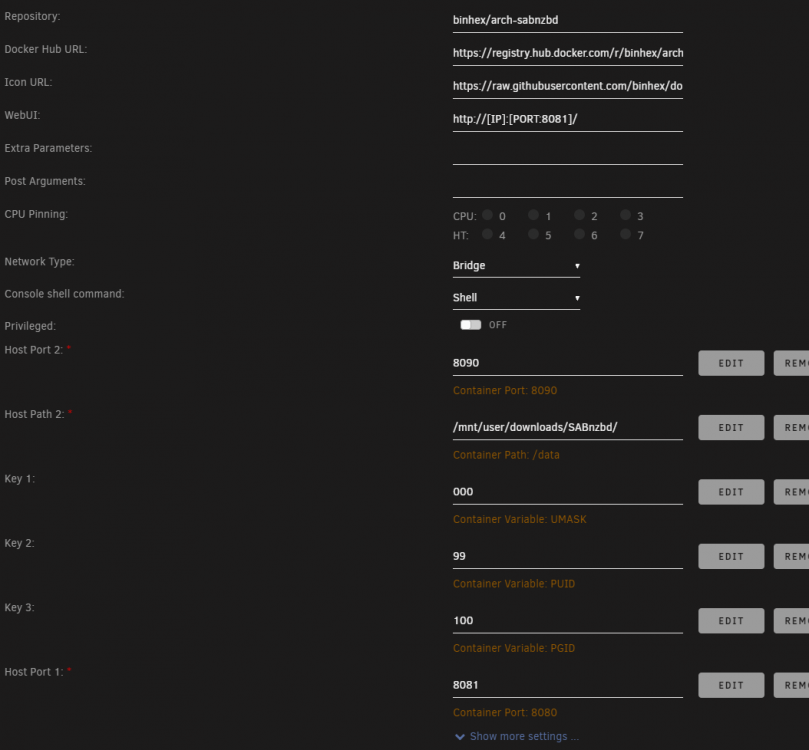
EDIT: I removed and re-added the Host Port 1 field and it's working now. Not sure what happened. My issues return. I managed to get sab working, but sonarr and radarr couldn't see it as they are routed through privoxyvpn container. I routed sab through the same container and got it working, but even though I had changed the port to 8081 (and using it) it had also taken over 8080 which stopped qbittorrent from working and being accessable. I enabled "Host access to custom networks:" and changed the network type to bridge. When navigating to 192.168.1.50:8081 I get the "this page can't be reached" error in Chrome. Can anyone assist please?
-
Need some help please. I'm unable to change the port numbers. I've installed this docker container this afternoon but it's trying to use port 8080 which is already in use with QBittorrent. I've attempted to change 8080 to 8081 & 8090 to 8091. I've changed it in the config screen, I've removed the values in the config screen and re-added them, I've changed them in the config file and the port mapping doesn't change. The log shows a fatal error as it can't bind port 8080 and I can't access the webui. If you want logs and/or screenshots, tell me what you need. Cheers EDIT: Think I've sussed it, possibly. I had changed the container port with the host port
-
I've followed your advice and done as suggested. The problem remains. I've even removed the second instance of Radarr. Both Radarr & Sonarr still stop themselves with 'Exited (128)'. Both Sonarr & Radarr have these 3 entries at the end of their logs.
-
I think the SQLite errors where from me attempting to fix another issue. I removed a root folder, but was unable to remove the error of the location missing. I followed a 'fix' online which was to edit a table. I didn't edit it, only viewed it. If I reinstall the docker image, and keep the appdata, everything will remain the same yes?
-
I've got an issue of both radarr & sonarr stopping. I haven't seen a pattern of behaviour yet. The 'uptime' column says 'Exited 128'. I've had a search but haven't found an answer yet. Radarr log https://pastebin.com/K7mW5Q58 (I think the SQLite errors was me attempting to fix another issue) Sonarr log https://pastebin.com/nzk8aiFx Any help will be appreciated. Thanks
