






scolcipitato
Community Developer
-
Joined
-
Last visited
Everything posted by scolcipitato
-
New version is out with the request from @Mattaton, now Docker container both in the dashboard and in the Docker tab have autostart status classes, refer to the template on the GH repo for more info. @Mattaton and @hernandito can you include in the README or the CSS file itself on your GH repo the latest version of the plugin you know the CSS is working on? I think this will make things easier knowing what works on what version.
-
Good, nice to have it, I'll make an update to add it for everyone. The translations are in the plugin repo, here.
-
I noticed it too, but it's from unraid not mine.
-
I pushed a new version with this.
-
I feel this is outside the scope of this plugin, but is a great idea, maybe an idea for another plugin.
-
Sorry about that, I am working on another project and don't have much time, I'll implement it, you just have to wait a little bit.
-
I don't know if I can, technically the CSS for this plugin is not a plugin, additionally I don't think it should be in the plugin support. Maybe a moderator can help with this.
-
In the edit page, change the "Preview Context" to advanced.
-
It doesn't really have a look, I implemented the ability to add custom styles, so if you don't like the way it looks you can always use a custom style or create one of your own. This is the default style. And these are the settings that I used on those folders.
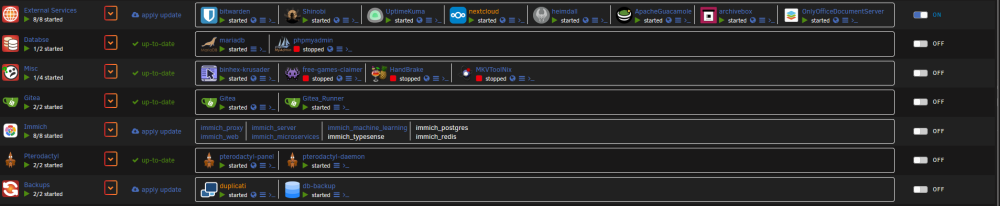
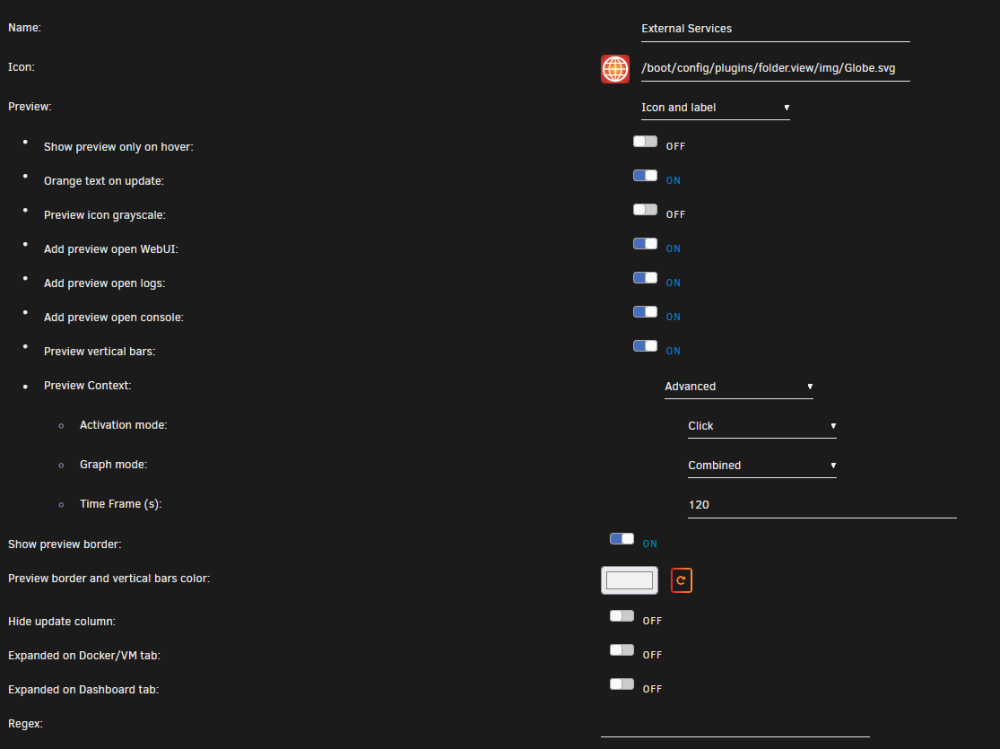
-
This is the final fix, if this won't work I need to rework a big chunk of the code, try to update and let me know.
-
How much time is shown in the graph.
-
I left the webui open for a couple of days now, and I don't have this problem. What I think is happening is that the web socket is stopping sending data, this means my code won't get triggered and consequently won't update the values in the webui. You can check on that by opening the dev tools and going to the network section and searching for dockerload clicking on the only row you see and going to the Messages section, here you can see the messages that the socket receives. Either way I don't know how to proceed, if the socket stops receiving data the problem is on the server, if the socket continues receiving data, but you don't see it updating the webui then the problem is on the client, but again, I used standard JS event listener so if it doesn't work, I don't even know where to begin.
-
I have made an update, hopefully this fixes it.
-
Pushed the new update with the fix. 🥳
-
I think I fixed it, now I'll wait for the other bug that have been reported and push the update.
-
Any error in the browser console?
-
First post
-
For this I need the debug file.
-
This is the reason I don't want to mess with unraid code, I'll try to fix it.
-
I pushed an update, now should be fixed.
-
There is an option when you edit the folder.
-
I tried with both Chrome and Firefox, for me, it works, maybe just try to play around with the rules, maybe a display: block and width: 100% see if it helps.
-
In the new update, you can do what you want. .folder-showcase-outer[expanded="true"], .folder-showcase-outer[expanded="true"] .folder-showcase { float: left; display: block; width: 100%; }
-
This is the day. The newest version of the plugin is here, 2023.09.15. As said in the posts above, I have added: The advanced docker context menu. Support for more languages. Button to open the console in the preview. Thanks to @Kloudz Now you can add docker containers to a folder with labels, the label to do this is folder.view The value should be the name of the folder. Thanks to @jbb Added a small button to verify that the order of the autostart match the order you see. This icon will turn red if the autostart order is different from what you see. Fixed the error when rebooting the server without internet connectivity. EXPECT A LOT OF BUGS!

-
This was a good idea, so good that i actually I made it, now I just need people to translate the plugin. I'll leave the translation file if anyone wants to translate something. The "locale" field and the name of the file should be an ISO 639-1 language code. If you translate, don't edit any HTML tags you see, only edit text. For anyone else, I'm getting a little burned out on the advanced context, so I made this, I promise I will continue, I just need to comment out the code, iron out some bugs, and copy the new code to the dashboard, the update is not far in the future. With this update I also introduced the feature requested from @jbb, you can add containers to a folder with labels. en.json Edit: For anyone translating, the field "updating" have a $1 in the string, that $1 is the name of the folder, so it should stay there, you can change its position. The same concept is for HTML tags mentioned above, you can change their positions, but they shouldn't be removed. Edit 2: Forgot to mention I translated the plugin in Italian, if you want to redo my work you are more than welcome.






