





thingie2
Members
-
Joined
-
Last visited
Everything posted by thingie2
-
Cheers, I've just checked the sticker on the card, and apparently it's a 9200-8i, so I'll try finding updated firmware for it & giving it a go 1 drive at a time & hope it behaves from there.
-
Thanks, I'll try to find the axact model number of the card & see if I can find updated firmware for it. Is there any way to check it's been fixed, other than just hooking my array up to it & hope it doesn't cause any problems when errors do occur?
-
I recently bought a 2nd hand SAS card (been using a PCI-E SATA card for a while, but decided to change due to the claims of a SAS card being better), but since installing, I've been getting drive errors. I had 3 of my drives connected to it. Initially, it was a single drive, started with a couple of read errors, then write errors, so I wondered if it was a cable issue. I swapped the drive to a different connector on the SAS cable, and rebuilt the drive with errors. All was ok again for a day or so, then a different drive got read errors, and then another one (all from the SAS card). Thankfully no more write errors, so I didn't have to rebuild anything. I've now connected everything up avoiding the SAS card again until I can resolve this issue, but I've attached a diagnostics log from the first drive that got errors, does anyone have any pointers to what I need to do to resolve this? tower-diagnostics-20231023-1729.zip
-
Add the ability to add hysterisis for warnings such as temperature, disk space etc. Lets say you have your disk temp threshold for a warning at 45C, when the drive gets close, it might vary slightly -> 44>45>44>45>44>45 etc. Each time it moves from 44 to 45, a warning message (for any notification methods chosen, e.g. email), which seems excessive. If some hysterisis was added, for example to be able to say "don't re-alert unless it drops under 43C", then you'd only get the notification on the first instance, then you wouldn't get further notifications. This could be user configurable, so you can make it 1C (current behaviour) if desired, but allows the reduction in notifications if desired. Same idea for disk space (e.g. require a 5% drop before re-notification, so the removal/addition of a small file doesn't re-trigger (e.g. a cache drive that might be continually changing). There may be other scenarios too, but they're the only ones that come to mind.
-
anyone with any solution to this? I've currently reverted back to 6.9.2, where everything works, but I'd like to update to the latest at some point, but will be holding off if there's no fix for this.
-
Update for anyone else who finds this & has a similar problem. I forced an update on the container & that seemed to remove all the bloat & the container is back down to a more reasonable ~600MB
-
EpicGanmes-Freegames - Large docker image. I've recently been getting warnings that my docker image is filling up, and upon checking the size of each docker image, this image is by far the largest (6.6GB). Is this normal? It sounds excessively large for a container
-
Yesterday, I finally remembered to update Unraid to 6.11.5 (I was on 6.9.?) prior to this, however ever since the update, my Libreelec VM has not been working. Intially it gave a "failed to start xorg server" error, which I've had before & seems to be GFX card driver related, so I tried the whole "remove & re-add the GFX card", however since then, I don't get any feed at all on the output of the GPU (The VM does say it's running, however). I'm passing through a GT710 to the VM, which worked fine previously. I noticed an error in the libvirt logs saying "15093: error : virNetSocketReadWire:1791 : End of file while reading data: Input/output error" which from what I can find could well be related & I have removed all other pass-through devices to the VM to check & this error still appears. XML for the VM in question: <?xml version='1.0' encoding='UTF-8'?> <domain type='kvm' id='3'> <name>LibreElec2</name> <uuid>22e56e89-63cd-936b-2c02-c246fc055fd8</uuid> <metadata> <vmtemplate xmlns="unraid" name="Linux" icon="linux.png" os="linux"/> </metadata> <memory unit='KiB'>8388608</memory> <currentMemory unit='KiB'>8388608</currentMemory> <memoryBacking> <nosharepages/> </memoryBacking> <vcpu placement='static'>2</vcpu> <cputune> <vcpupin vcpu='0' cpuset='15'/> <vcpupin vcpu='1' cpuset='31'/> </cputune> <resource> <partition>/machine</partition> </resource> <os> <type arch='x86_64' machine='pc-q35-5.1'>hvm</type> <loader readonly='yes' type='pflash'>/usr/share/qemu/ovmf-x64/OVMF_CODE-pure-efi.fd</loader> <nvram>/etc/libvirt/qemu/nvram/22e56e89-63cd-936b-2c02-c246fc055fd8_VARS-pure-efi.fd</nvram> </os> <features> <acpi/> <apic/> </features> <cpu mode='host-passthrough' check='none' migratable='on'> <topology sockets='1' dies='1' cores='1' threads='2'/> <cache mode='passthrough'/> </cpu> <clock offset='utc'> <timer name='rtc' tickpolicy='catchup'/> <timer name='pit' tickpolicy='delay'/> <timer name='hpet' present='no'/> </clock> <on_poweroff>destroy</on_poweroff> <on_reboot>restart</on_reboot> <on_crash>restart</on_crash> <devices> <emulator>/usr/local/sbin/qemu</emulator> <disk type='file' device='disk'> <driver name='qemu' type='raw' cache='writeback'/> <source file='/mnt/user/domains/LibreElec2/vdisk2.img' index='1'/> <backingStore/> <target dev='hdc' bus='sata'/> <boot order='1'/> <alias name='sata0-0-2'/> <address type='drive' controller='0' bus='0' target='0' unit='2'/> </disk> <controller type='usb' index='0' model='ich9-ehci1'> <alias name='usb'/> <address type='pci' domain='0x0000' bus='0x00' slot='0x07' function='0x7'/> </controller> <controller type='usb' index='0' model='ich9-uhci1'> <alias name='usb'/> <master startport='0'/> <address type='pci' domain='0x0000' bus='0x00' slot='0x07' function='0x0' multifunction='on'/> </controller> <controller type='usb' index='0' model='ich9-uhci2'> <alias name='usb'/> <master startport='2'/> <address type='pci' domain='0x0000' bus='0x00' slot='0x07' function='0x1'/> </controller> <controller type='usb' index='0' model='ich9-uhci3'> <alias name='usb'/> <master startport='4'/> <address type='pci' domain='0x0000' bus='0x00' slot='0x07' function='0x2'/> </controller> <controller type='pci' index='0' model='pcie-root'> <alias name='pcie.0'/> </controller> <controller type='pci' index='1' model='pcie-root-port'> <model name='pcie-root-port'/> <target chassis='1' port='0x8'/> <alias name='pci.1'/> <address type='pci' domain='0x0000' bus='0x00' slot='0x01' function='0x0' multifunction='on'/> </controller> <controller type='pci' index='2' model='pcie-root-port'> <model name='pcie-root-port'/> <target chassis='2' port='0x9'/> <alias name='pci.2'/> <address type='pci' domain='0x0000' bus='0x00' slot='0x01' function='0x1'/> </controller> <controller type='pci' index='3' model='pcie-root-port'> <model name='pcie-root-port'/> <target chassis='3' port='0xa'/> <alias name='pci.3'/> <address type='pci' domain='0x0000' bus='0x00' slot='0x01' function='0x2'/> </controller> <controller type='pci' index='4' model='pcie-root-port'> <model name='pcie-root-port'/> <target chassis='4' port='0x13'/> <alias name='pci.4'/> <address type='pci' domain='0x0000' bus='0x00' slot='0x02' function='0x3'/> </controller> <controller type='pci' index='5' model='pcie-root-port'> <model name='pcie-root-port'/> <target chassis='5' port='0xb'/> <alias name='pci.5'/> <address type='pci' domain='0x0000' bus='0x00' slot='0x01' function='0x3'/> </controller> <controller type='pci' index='6' model='pcie-to-pci-bridge'> <model name='pcie-pci-bridge'/> <alias name='pci.6'/> <address type='pci' domain='0x0000' bus='0x01' slot='0x00' function='0x0'/> </controller> <controller type='virtio-serial' index='0'> <alias name='virtio-serial0'/> <address type='pci' domain='0x0000' bus='0x02' slot='0x00' function='0x0'/> </controller> <controller type='sata' index='0'> <alias name='ide'/> <address type='pci' domain='0x0000' bus='0x00' slot='0x1f' function='0x2'/> </controller> <interface type='bridge'> <mac address='52:54:00:ab:e0:e6'/> <source bridge='br0'/> <target dev='vnet2'/> <model type='virtio-net'/> <alias name='net0'/> <address type='pci' domain='0x0000' bus='0x03' slot='0x00' function='0x0'/> </interface> <serial type='pty'> <source path='/dev/pts/2'/> <target type='isa-serial' port='0'> <model name='isa-serial'/> </target> <alias name='serial0'/> </serial> <console type='pty' tty='/dev/pts/2'> <source path='/dev/pts/2'/> <target type='serial' port='0'/> <alias name='serial0'/> </console> <channel type='unix'> <source mode='bind' path='/var/lib/libvirt/qemu/channel/target/domain-3-LibreElec2/org.qemu.guest_agent.0'/> <target type='virtio' name='org.qemu.guest_agent.0' state='disconnected'/> <alias name='channel0'/> <address type='virtio-serial' controller='0' bus='0' port='1'/> </channel> <input type='tablet' bus='usb'> <alias name='input0'/> <address type='usb' bus='0' port='3'/> </input> <input type='mouse' bus='ps2'> <alias name='input1'/> </input> <input type='keyboard' bus='ps2'> <alias name='input2'/> </input> <audio id='1' type='none'/> <hostdev mode='subsystem' type='pci' managed='yes'> <driver name='vfio'/> <source> <address domain='0x0000' bus='0x21' slot='0x00' function='0x0'/> </source> <alias name='hostdev0'/> <rom file='/mnt/user/isos/MSI.GT710.2048.160112_mod.rom'/> <address type='pci' domain='0x0000' bus='0x04' slot='0x00' function='0x0' multifunction='on'/> </hostdev> <hostdev mode='subsystem' type='pci' managed='yes'> <driver name='vfio'/> <source> <address domain='0x0000' bus='0x21' slot='0x00' function='0x1'/> </source> <alias name='hostdev1'/> <address type='pci' domain='0x0000' bus='0x04' slot='0x00' function='0x1'/> </hostdev> <memballoon model='none'/> </devices> <seclabel type='dynamic' model='dac' relabel='yes'> <label>+0:+100</label> <imagelabel>+0:+100</imagelabel> </seclabel> </domain> I've attached a diagnostics file from my server, but anything else, let me know. Any suggestions on how to fix this? tower-diagnostics-20230119-1207.zip
-
I shouldn't have had either on the array, as they were both set to prefer cache & they always used to be on the cache only, but I've just checked & docker.img was on disk 5 for some reason. I didn't even think to check the location, as I was still getting it with docker turned off, but maybe Unraid does stuff with docker.img for upto a min or so after docker has actually been turned off (I didn't leave it off long, as when I still saw the RW happening, I decided it must not be that & turned it back on!) I've moved it back to the cache drive where it should have been & will leave it be for a few hours/over night & confirm it's fixed it.
-
Hi All, I've been having this issue for a couple of weeks now. My drives (usually all of them, but occasionally it's just 1+parity) won't spin down (or spin back up again if I force a spin down). I have tried disabling Docker & VMs, still happens. I have tried using the File Activity & Active streams plugins, but these show nothing is happening. tower-diagnostics-20220922-1809.zip I'm at a loss as to how to try and find the source of these reads & writes, so my drives can spin down when (as far as I'm aware), nothing should be happening! I've attached a diagnostics, hopefully that'll say something. If anyone can point me at anything else to check/any further information to give to help solve this, please let me know. thanks in advance.
-
Replaced libvert with my old backup, and all now working again. Thanks for your help
-
Awesome, that was my hope, so I'll be able to replace the libvert file, and my VMs should return, but I might need to change any VM config changes I've made since (CPU cores available, memory available etc?)
-
Yesterday I updated the main HW that my Unraid server was running on. Most of the change went fine & it now running as it should, however I have had an issue with VMs... I used to have 3 VMs (2x Ubuntu Server, 1x Ubuntu desktop, if it makes a difference). When I first booted after swapping the HW over, the VMs wouldn't start & I got an error basically saying virtualisation wasn't enabled (my bad, I forgot to check before first booting). I enabled virtualisation & rebooted into Unraid, but then 1 of the VMs seemed to not exist anymore under my VM tab. I can still find the Vdisk for the "missing" VM, but I don't know how to go about getting this back to a usable VM. Can I just add a new VM, and point it to that Vdisk, or would that wipe it? I have a backup of my libvert file, but it's quite old (I only just realised that the auto backup for it won't backup on schedule, as the VMs are left running, and it can't backup a file in use). If I replace the old libvert file, but with the new vdisks, would this revert all VMs back to the state at the point of the libvert file, or would it restore the data as per the latest vdisk? Or is there a completely different route I need to take to restore?
-
Thanks for the quick reply. It might not be the most elegant way to do it, but probably more that it's appeared out of multiple small changes & additions, and I'd rather not rip everything up & start again. I have Sonarr & Radarr on on br1, as that's my "VPN network". all decides on this subnet go through the OVPN running in my VM (this was created before there was/I found there was an OpvenVPN Client docker (probably been that way for a couple of years min), as a means to get all the traffic through a VPN whilst only utilising a single VPN "Device". I've enabled the "Host access to custom networks", and kept the rest of my settings the same & it seems to have fixed it. Thank you! I didn't realise the default bridge can't communicate with other networks, and that explains why it can't communicate & why I couldn't find what was wrong. - Is this what the above setting changes, or is that something else?
-
Hi, I'm having issues with the OpenVPN-Client container, and the routing of local traffic between docker containers, through the OVPN container I'm trying to use this container as the VPN gateway for some dockers, one of which is Transmission. My setup is as following: I have Sonarr/Radarr etc on a subnet 192.168.20.0/24, which is gatewayed through another OpenVPN connection (hosted in a VM if it matters). I also have a transmission container on this subnet. I have a 2nd transmission container (I'll call transmission2) on the "container:OpenVPN-Client" network. This can connect to the internet through the OVPN connection absolutely fine. My unraid server sits on the 192.168.10.0/24 subnet (exc a selection of dockers, as mentioned above) I'm trying to have Sonarr & Radarr connect to transmission2, so that I can utilise 2 different VPN connections from my 2 different transmission instances. If I remove the OpenVPN-Client container/put transmission2 onto my server subnet via a dedicated IP, or via a host connection, Sonarr & Radarr can connect to it fine (this makes me think it's not an issue with my router firewall, as traffic is getting between subnets fine). When I put it through the OpenVPN-Client network, they cannot communicate, therefore I believe I have missed something in regards to port mappings etc within the OpenVPN-Client. the mappings etc for the containers in question are below: My Sonarr download client config: Any help to resolve would be greatly appreciated. Let me know if there's anything more needed to troubleshoot.



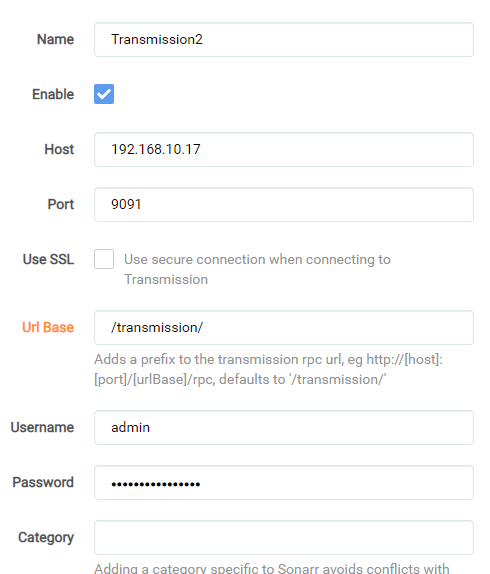
-
I'm having a strange issue with the DelugeVPN docker & I'm hoping someone can help point me to the right solution. First, a quick overview of my network: "Home network" is on 192.168.10.0/24 subnet (any unraid items connect to this network via br0) "VPN network" is on 192.168.20.0/24 subnet (any unraid items connect to this network via br1) Unraid is running an Ubuntu Server VM, running OpenVPN & acts as a gateway, passing any traffic on the "VPN network" through a VPN On the "VPN network" I have Sonarr, Radarr etc & (non VPN) Deluge. This setup works fine, however isn't as quick as I'd like, due to the speed of the VPN. In order to increase the speed of my downloads, I decided I would create a seperate DelugeVPN docker & use another VPN connection. This is on the "Home network" The issue I am having: If I set DelugeVPN to a bridge connection with Unraid, I can access the WebUI (and the IP shown is the VPN connection), however Sonarr/Radarr fail to connect to DeluveVPN (I believe I have configured my Router etc correctly, and the traceroute from a device on the "VPN network" can reach my Unraid IP sucessfully) If I set DelugeVPN to use br0 & assign it's own IP address, Sonarr/Radarr can connect correctly, but I cannot access the WebUI (same router config etc) Is there something I'm missing here that would prevent one of these routes to work? Ideally I'd use the 2nd option (custom IP for the docker) however at this point, I'd be willing to use either solution to make it work. I've attached the startup log for each version of the docker, If any other logs/information is needed, please let me know & I'll provide it. Custom IP log.txt Bridge log.txt
-
For anyone else who find this with similar issues, I found a solution. The issue is the tasks that the rclone filesystem supports. Once I realised this, and could look into rclone's capability a bit more, I found the vfs-cache-mode parameter. I've since set this to write, and it has resolved my issues.
-
For anyone else who find this with similar issues, I found a solution. The issue is the tasks that the rclone filesystem supports. Once I realised this, and could look into rclone's capability a bit more, I found the vfs-cache-mode parameter. I've since set this to write, and it has resolved my issues.
-
Did you ever get this resolved? I'm having a similar issue, but with Onedrive. It's finding the folder fine, and loading some .tmp files in there (upto a few 100kb), but then throwing up sync errors (both illegal seek & operation not permitted). and example of the errors: 2020-07-19 21:36:57 Puller (folder "5870" (5870), item "DSC_3452.JPG"): truncate /onedrive/pictures/.syncthing.DSC_3452.JPG.tmp: operation not permitted 2020-07-19 21:37:00 Puller (folder "5870" (5870), item "DSC_3453.JPG"): save: write /onedrive/pictures/.syncthing.DSC_3453.JPG.tmp: illegal seek I've tried a load of different rclone configs e.g. changing the uid to match the syncthing docker uid etc but I continue to get the same errors. I've tried with & without "ignore permissions" set, with no difference. I can access & write to the rclone mount in other dockers fine. Anyone got any ideas?
-
I think I spoke too soon! The folder is being seen with the correct size, and I can access it fine from everywhere, other than syncthing... It seems to be a permissions issue, but I think it's on the syncthing side, rather than rclone. Time to head over to the syncthing docker support topic & hope someone can help there.
-
I was having a bit more of a look into it, and for some reason, the rclone mount is now showing as 1TB (which it should be), rather than 1MB (I'm not aware of doing anything different, so I'm not sure why it's now changed), so I'm able to use syncthing instead. Still being fairly new to Linux in general, I'm still not fully confident in what's needed using command line, but I'm getting there. Until then, the GUI for syncthings will suit me well!
-
I've been having another look, and I hadn't realised I needed the nerd pack plugin in order to install python modules, which is why the installation instructions weren't working. I've at least got further now, unraid just doesn't recognise the "cloudplow" command, so got that to work out now.
-
Thanks, I've been having a bit of a look into this & Cloudplow, however I'm a little unclear on the setup instructions & can't find a guide/walkthrough. Are you aware of one anywhere?
-
I hadn't come across cloudplow whilst looking around, but from a quick initial look, it seems like it should do what I want, thanks. I'll take a better look/give it a try as an alternative.
-
I'm having an issue using rclone with Onedrive. Due to rclone not supporting bidirectional syncing, I have been investigating options to provide this. The best route I found so far, was to use rclone to mount Onedrive, then use 2 seperate dockers of syncthings to sync between the Onedrive mount & the local folder. Unfortunatly, doing this throws up errors in syncthings, saying there is insufficient space in the folder. From a bit of investigation, it looks like the reason for this, is that the Onedrive mount is seen as being 1MB in size, rather than the 1TB it actually is. Is there a way that either the size can be correctly shown, or at the very least be increased in size (e.g. to 100MB) to allow syncthings to know there is sufficient space?

