





johnny2678
Members
-
Joined
-
Last visited
Everything posted by johnny2678
-
attaching mine. On this run, it looks like it does manage to get an ip from pia, but ping response times are awful and most requests just time out. That's why I was waiting to post. Getting inconsistent results. Something not right but not sure it's the container. Might be PIA.supervisord.log here's another one a different pia server. This time it fails to generate token for wireguard 4-5 times before succeeding. Also, fails to check external ip 3-5 times. supervisord.log2
-
Assuming you are all using PIA? Might have been a hiccup on their side. I noticed none of my indexers were working. Played with the settings for a bit but was getting inconsistent readings in the logs. Sometimes it would connect, get an ip, etc. Sometimes it would time out. This AM, everything seems to be restored. Hope it stays that way. edit: nevermind - still wonky. attaching logs below in a new reply
-
Not sure if you ever found a solution. In addition to adding the ports back to the docker run commands, Rebuild-DNDC is also selectively dropping my volumes on some containers when rebuilding, forcing me to manually intervene and recreate. I opened a ticket here: https://github.com/elmerfdz/rebuild-dndc/issues/59
-
Did you get this working? Github issue you referenced is now closed and says `Solution is to enable hard links in Unraid.`, but hardlinks are already enabled on my server and I'm still getting the same error?
-
Port Setting keeps re-appearing after docker auto-update? To be clear, I don't think this is a delugevpn issue but posting here in case others have seen this. I have a "Few" ***rr containers running through delugevpn (network for each is set to `custom:container:delugevpn`). Auto-update is set to run weekly. Most update and restart just fine, but I have 3 that don't come back up after upgrading. When I look closer, it's because each of the 3 containers somehow have the port settings added back in their container config. This is causing a conflict with delugevpn, which already has those ports set via ADDITIONAL_PORTS. So after each update, I have to 'Add Container', pick the container config of the offending container, remove the port setting, and it fires right back up. Have tried doing XML editing via the Unraid GUI and via cmd line and the port setting doesn't exist in the XML, so not sure how it keeps re-appearing after updating the container? It's been this way since I started with unraid in 2020 and it's not a big deal, but after doing this for 2+ years I thought I'd ask to see if anyone else has this issue? TIA
-
Just wanted to say thanks again @JorgeB. I reseated all of my power cables and I've been CRC free for a few days now. Disk4 is rebuilt and back in the array. Cheers!
-
Just checking in from the future (2022) to let you know these steps still work. Thanks!
-
Ahh, thank you. hopefully this means the drive is ok. I've got a few things to try. Using Rosewill cages that uses 2x 4-pin power from the PSU to power each 4-drive backplane (I think I'm saying that right). Wonder if that's the issue? For now, will try and reseat the power cables in both the PSU and backplanes. Thanks again for your suggestions.
-
Thanks so much for the suggestion @JorgeB. I will try one at a time - first to swap slots. If you don't mind me asking - how do you read the line you quoted? Is it saying that a device (card) is having power issues? or the entire rig has a power problem? Running a corsair 850w with 1 cpu and no gfx (other than intel onboard). SD 1:0:6:0: refers to what?
-
Hi, hoping some kind soul can provide a sanity check. Been running Unraid 6.9 for >18 months, mostly just hands off. For my dockers/VMs it just works... I have one 12TB parity with 8 assorted drives (all native WD Reds or shucked WDs) hooked to a SAS HBA card via 2 SAS Breakout cables from Cable Creations. About a year ago, a couple drives in one bank started reporting the occasional CRC error. At first, it was happening infrequently, then the pace started to pick up. After reading about it, most suggested to reseat the cables or try new ones. I pulled the drives, checked the snugness of each one, and then turned it back on. NO change, still getting CRC errors. So I replaced the cable. All drives reporting errors were on one breakout cable so I just replaced that one. This time I went the a Cable Matters breakout cable. That stopped the CRC errors. I had a few nice quiet months until about Nov 2021 and then CRC errors started on 2 drives in the other bank. I quickly ordered a replacement breakout cable, pulled the drives and reseated them all with the new cable. That was a week ago. Haven't had any CRC errors since on those drives. Great right?! But now just a few days later, one 10TB drive in the first bank is reporting CRC errors in the thousands and the drive is going into a disabled state. Tried reseating the cables, stopping array, unassigning the disk, starting the array, stopping, reassigning, and then starting - but the drive errored out with CRC errors and went back to a disabled state during the rebuild? Drive is about one year old. questions: Is this drive really dead? Drive is a shucked WD 10TB in use for about 1 year in 10 years running Synology/Unraid, I've never had to replace a drive because it went bad so I'm skeptical. hoping it's just a config/hardware issue. Is it my cables again? Am I using the right ones? Is it my SAS HBA card? Ordered from Art of the Server on eBay based on recommendations in this forum Any suggestions on what to try to harden my setup would be welcome. Thanks in advance edit: grammar 15620-beast-diagnostics-20220105-0811.zip
-
Up and running using min.io. Cool project. First thing I did was add a photo to a note on mobile and it works great. nice self-hosted, multiplatform note taking app.
-
Thanks @konaboy. I got it working. Early on in my build I checked the box to make the iGPU available to VMs on the IOMMU Groups page. I never created any VMs so I forgot about it. 🤪 Cleared this and GPU is passing through to the docker containers now.
-
@lukeoslavia Not sure if you're still around but would love to know what you did to get 10th gen GPU passthrough. I've got a i9-10900 (not K, not F, just plain 10900). It has the UDH630 iGPU my go and sysconfig: root@15620-BEAST:~# more /boot/config/go #!/bin/bash # Start the Management Utility /usr/local/sbin/emhttp & #sensor chip drivers modprobe coretemp modprobe nct6775 modprobe i915 chmod -R 777 /dev/dri root@15620-BEAST:~# more /boot/syslinux/syslinux.cfg default menu.c32 menu title Lime Technology, Inc. prompt 0 timeout 50 label Unraid OS menu default kernel /bzimage append pcie_acs_override=downstream,multifunction initrd=/bzroot i915.alpha_support=1 label Unraid OS GUI Mode kernel /bzimage append pcie_acs_override=downstream,multifunction initrd=/bzroot,/bzroot-gui i915.alpha_support=1 label Unraid OS Safe Mode (no plugins, no GUI) kernel /bzimage append initrd=/bzroot unraidsafemode label Unraid OS GUI Safe Mode (no plugins) kernel /bzimage append initrd=/bzroot,/bzroot-gui unraidsafemode label Memtest86+ kernel /memtest Anything I'm missing? No /dev/dri directory after reboot and multi monitor is set to enabled and GPU is set to Auto in the BIOS. Also tried to set GPU to CPU Graphics with no luck root@15620-BEAST:~# ls /dev/dri /bin/ls: cannot access '/dev/dri': No such file or directory
-
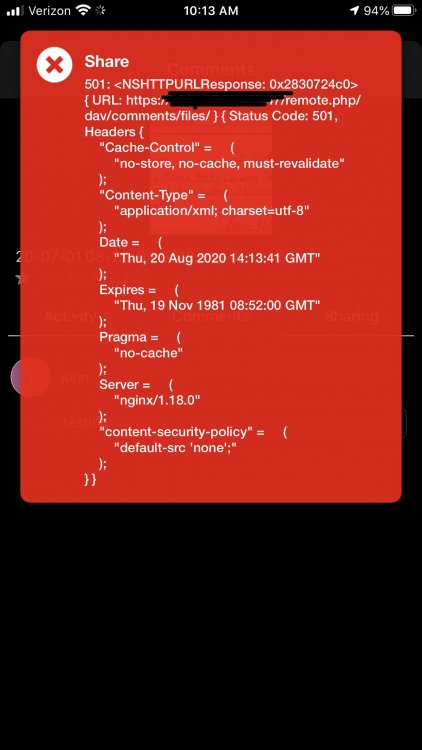
Hi, just installed LSIO Nextcloud on Unraid 6.9.25. Just nextraid and mariaDB at the moment. No letsencrypt/reverse proxy yet. Did a photo sync from the mobile app and it worked great. But tried to comment on a photo from mobile gives me a strange 405 error. Any ideas?
-
I actually do have a rack, but every search for a rack-able case with external bays comes back with rosewill (OOS) or supermicro (too big for my 23” depth rack. Looking at the Chenbro 42300 with 3x4 cages like this guy but it looks awful tight in there, especially for 2 cages. Wondering if my mobo already has a uhd 630p if I even need a graphics card. I don’t do any gaming. Sent from my iPhone using Tapatalk
-
Wow, this thread is a wealth of knowledge and INSANELY frustrating at the same time. Me every other post: "Oh look, someone just posted a nice build!" "I like that case" "it could work for me" "What case is that?" DISCONTINUED. not on ebay repeat from the top 😂 Looking to move off my Synology 1812 which has worked great for 9 years but I'm not waiting around for it to fail. Can't shake the need for 8-12 external swappable drives so I've been looking for a case/cages before mobo, cpu, etc and I can't even get started. Fractal Design 6 looks nice/modern and is available but has anyone modded for external drives? Will keep researching.


