





BRiT
Members
-
Joined
Everything posted by BRiT
-
Also, I'm thinking that the archival programs such as most up to date versions of rar, unrar, 7zip, unzip, tar, par2 should be contained in their own Archival Plugin Pack. Then the developer tools like git, subversion, cvs, rcs would be in their own Developer Repository Plugin Pack as well.
-
If git doesn't have large dependencies you could try pulling this then using "installpkg" on it: wget http://mirrors.slackware.com/slackware/slackware64-14.1/slackware64/d/git-1.8.4-x86_64-1.txz -O /tmp/git-1.8.4-x86_64-1.txz installpkg /tmp/git-1.8.4-x86_64-1.txz
-
Its been known to take 2 to 3 minutes depending on what sensors your motherboard has. Im going off my personal experience as documented in this thread. Its possible other systems could take 3 seconds or could take 10 minutes or more. But during this time the page showed as busy with the browser status spinning until it completes.
-
After you hit [Detect] did you hit [save]? The detect button switches to save after it's finished.
-
It takes anywhere from 2 to 3 minutes to complete all because of the 1 sensor it's trying to probe. I'll have that output in a couple minutes. The part that takes the 2-3 minutes is this driver: Do you want to probe the I2C/SMBus adapters now? (YES/no): Using driver `i2c-i801' for device 0000:00:1f.3: Intel Cougar Point (PCH) The real driver that I used when I ran my own kernel on full slackware64bit was ipmi (something), which I have asked to be compiled and included in the next unRAID release. And now the full output... # sensors-detect revision 6170 (2013-05-20 21:25:22 +0200) # System: TYAN S5512 [empty] This program will help you determine which kernel modules you need to load to use lm_sensors most effectively. It is generally safe and recommended to accept the default answers to all questions, unless you know what you're doing. Some south bridges, CPUs or memory controllers contain embedded sensors. Do you want to scan for them? This is totally safe. (YES/no): Silicon Integrated Systems SIS5595... No VIA VT82C686 Integrated Sensors... No VIA VT8231 Integrated Sensors... No AMD K8 thermal sensors... No AMD Family 10h thermal sensors... No AMD Family 11h thermal sensors... No AMD Family 12h and 14h thermal sensors... No AMD Family 15h thermal sensors... No AMD Family 15h power sensors... No AMD Family 16h power sensors... No Intel digital thermal sensor... Success! (driver `coretemp') Intel AMB FB-DIMM thermal sensor... No VIA C7 thermal sensor... No VIA Nano thermal sensor... No Some Super I/O chips contain embedded sensors. We have to write to standard I/O ports to probe them. This is usually safe. Do you want to scan for Super I/O sensors? (YES/no): Probing for Super-I/O at 0x2e/0x2f Trying family `National Semiconductor/ITE'... No Trying family `SMSC'... No Trying family `VIA/Winbond/Nuvoton/Fintek'... Yes Found `Nuvoton NCT5577D/NCT6776F Super IO Sensors' (but not activated) Probing for Super-I/O at 0x4e/0x4f Trying family `National Semiconductor/ITE'... No Trying family `SMSC'... No Trying family `VIA/Winbond/Nuvoton/Fintek'... No Trying family `ITE'... No Some systems (mainly servers) implement IPMI, a set of common interfaces through which system health data may be retrieved, amongst other things. We first try to get the information from SMBIOS. If we don't find it there, we have to read from arbitrary I/O ports to probe for such interfaces. This is normally safe. Do you want to scan for IPMI interfaces? (YES/no): Found `IPMI BMC KCS' at 0xca8... Success! (confidence 8, driver `to-be-written') Some hardware monitoring chips are accessible through the ISA I/O ports. We have to write to arbitrary I/O ports to probe them. This is usually safe though. Yes, you do have ISA I/O ports even if you do not have any ISA slots! Do you want to scan the ISA I/O ports? (YES/no): Probing for `National Semiconductor LM78' at 0x290... No Probing for `National Semiconductor LM79' at 0x290... No Probing for `Winbond W83781D' at 0x290... No Probing for `Winbond W83782D' at 0x290... No Lastly, we can probe the I2C/SMBus adapters for connected hardware monitoring devices. This is the most risky part, and while it works reasonably well on most systems, it has been reported to cause trouble on some systems. Do you want to probe the I2C/SMBus adapters now? (YES/no): Using driver `i2c-i801' for device 0000:00:1f.3: Intel Cougar Point (PCH) Now follows a summary of the probes I have just done. Just press ENTER to continue: Driver `to-be-written': * ISA bus, address 0xca8 Chip `IPMI BMC KCS' (confidence: Driver `coretemp': * Chip `Intel digital thermal sensor' (confidence: 9) Note: there is no driver for IPMI BMC KCS yet. Check http://www.lm-sensors.org/wiki/Devices for updates. Do you want to overwrite /etc/sysconfig/lm_sensors? (YES/no): Copy prog/init/lm_sensors.init to /etc/init.d/lm_sensors for initialization at boot time. You should now start the lm_sensors service to load the required kernel modules.
-
It takes anywhere from 2 to 3 minutes to complete all because of the 1 sensor it's trying to probe. I'll have that output in a couple minutes.
-
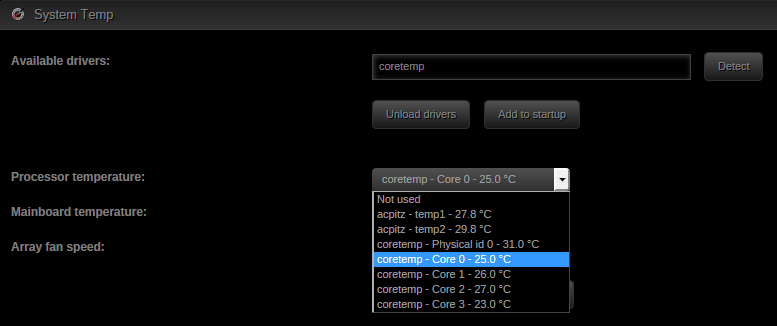
That results in finding the 2 drivers, where one is yet to-be-written. ~# yes ''|perl /usr/sbin/sensors-detect 2>&1|grep -Po "^Driver.{2}\K[^\']*" coretemp to-be-written Try again with the svn version: wget http://www.lm-sensors.org/svn/lm-sensors/trunk/prog/detect/sensors-detect -O /tmp/sensors-detect yes ''|perl /tmp/sensors-detect 2>&1|grep -Po "^Driver.{2}\K[^\']*" Similar results, but when I put the change into the dynamix page setting I get 1 more to select in the dropdown (acpitz) wget http://www.lm-sensors.org/svn/lm-sensors/trunk/prog/detect/sensors-detect -O /tmp/sensors-detect --2015-02-03 19:02:16-- http://www.lm-sensors.org/svn/lm-sensors/trunk/prog/detect/sensors-detect Resolving www.lm-sensors.org (www.lm-sensors.org)... 160.45.254.26 Connecting to www.lm-sensors.org (www.lm-sensors.org)|160.45.254.26|:80... connected. HTTP request sent, awaiting response... 200 OK Length: 209836 (205K) [text/plain] Saving to: ‘/tmp/sensors-detect’ 100%[=====================================================>] 209,836 172KB/s in 1.2s 2015-02-03 19:02:18 (172 KB/s) - ‘/tmp/sensors-detect’ saved [209836/209836] # yes ''|perl /tmp/sensors-detect 2>&1|grep -Po "^Driver.{2}\K[^\']*" to-be-written coretemp For completeness, here's the patched changes into TempSettings.page function detect_modules(){ $mods = array(); exec("yes ''|perl /usr/sbin/sensors-detect 2>&1|grep -Po \"^Driver.{2}\K[^\']*\"", $matches); foreach ($matches as $mod) if (exec("modprobe -D $mod 2>/dev/null")) $mods[]=$mod ; return $mods; }
-
That results in finding the 2 drivers, where one is yet to-be-written. ~# yes ''|perl /usr/sbin/sensors-detect 2>&1|grep -Po "^Driver.{2}\K[^\']*" coretemp to-be-written
-
FYI: here is the result of the following command that seems to be invoked from the page. As you can see nothing matched on the awk statement. # yes ''|/usr/sbin/sensors-detect 2>&1|awk '/^modprobe/{print $2}' # Now output of "sensors" # sensors acpitz-virtual-0 Adapter: Virtual device temp1: +27.8 C (crit = +95.0 C) temp2: +29.8 C (crit = +95.0 C) coretemp-isa-0000 Adapter: ISA adapter Physical id 0: +28.0 C (high = +74.0 C, crit = +94.0 C) Core 0: +24.0 C (high = +74.0 C, crit = +94.0 C) Core 1: +25.0 C (high = +74.0 C, crit = +94.0 C) Core 2: +26.0 C (high = +74.0 C, crit = +94.0 C) Core 3: +24.0 C (high = +74.0 C, crit = +94.0 C) Contents of lm_sensors: # cat /etc/sysconfig/lm_sensors # Generated by sensors-detect on Tue Feb 3 17:52:45 2015 # This file is sourced by /etc/init.d/lm_sensors and defines the modules to # be loaded/unloaded. # # The format of this file is a shell script that simply defines variables: # HWMON_MODULES for hardware monitoring driver modules, and optionally # BUS_MODULES for any required bus driver module (for example for I2C or SPI). HWMON_MODULES="coretemp"
-
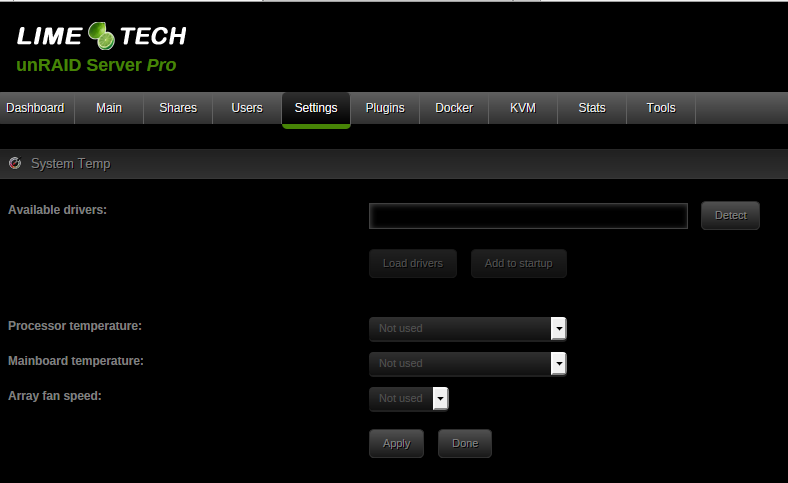
I updated to the latest from the plugin settings and now everything is busted. I clicked on 'detect' and waited until that came back. After two minutes the following is shown with absolutely nothing available in any of the drop-down boxes to select from. The Load drivers and Add to Startup buttons do nothing. The only buttons that do anything are Apply and Done.
-
Try this and see if it helps: wget http://www.lm-sensors.org/svn/lm-sensors/trunk/prog/detect/sensors-detect -O /tmp/sensors-detect yes ''|perl /tmp/sensors-detect 2>&1|awk '/^modprobe/{print $2}' Tried that and it seemed to be roughly the same time-hole which seems to be the following: Do you want to probe the I2C/SMBus adapters now? (YES/no): Using driver `i2c-i801' for device 0000:00:1f.3: Intel Cougar Point (PCH) This bit should only be done once and only once with results cached until told to re-execute again. It should not be executed on each and every page load.
-
I timed it a few times and it ranged anywhere from 2 to 3 minutes.
-
New version of Dynamix system temp is available. This version allows the selection of probes to be displayed in the footer. Also inactive/unused probes are removed from the dropdown menu, making the selection easier. Use the plugin manager to update to the new version. I updated to the latest version of Dynamix SystemTemp and now the Web UI went completely rogue and non-responsive for 10 minutes when I tried navigating to "System Temp" Settings via http://tower/Settings/TempSettings . Eventually it came up and allowed me to make selections. Now when I clicked on "Apply" its sitting non-responsive again for at least 5 minutes. The tailing of syslog only showed these relevant entries: Feb 2 21:05:18 REAVER emhttp: sendFile: sendfile /usr/local/emhttp/webGui/scripts/dynamix.js: Broken pipe Feb 2 21:07:19 REAVER emhttp: sendFile: sendfile /usr/local/emhttp/webGui/scripts/dynamix.js: Broken pipe Feb 2 21:09:21 REAVER emhttp: sendFile: sendfile /usr/local/emhttp/webGui/scripts/dynamix.js: Broken pipe I don'r see anything in the code that may trigger this behavior. This is the only command that can be potentially problematic: yes ''|/usr/sbin/sensors-detect 2>&1|awk '/^modprobe/{print $2}' If you can run it successfully, then I don't have any clue about where the bug is.... Yup, that series of commands is taking a mft amount of time on my system. It might be related to unraid kernel not having the IPMI sensors modules available that i requested be added last year.
-
New version of Dynamix system temp is available. This version allows the selection of probes to be displayed in the footer. Also inactive/unused probes are removed from the dropdown menu, making the selection easier. Use the plugin manager to update to the new version. I updated to the latest version of Dynamix SystemTemp and now the Web UI went completely rogue and non-responsive for 10 minutes when I tried navigating to "System Temp" Settings via http://tower/Settings/TempSettings . Eventually it came up and allowed me to make selections. Now when I clicked on "Apply" its sitting non-responsive again for at least 5 minutes. The tailing of syslog only showed these relevant entries: Feb 2 21:05:18 REAVER emhttp: sendFile: sendfile /usr/local/emhttp/webGui/scripts/dynamix.js: Broken pipe Feb 2 21:07:19 REAVER emhttp: sendFile: sendfile /usr/local/emhttp/webGui/scripts/dynamix.js: Broken pipe Feb 2 21:09:21 REAVER emhttp: sendFile: sendfile /usr/local/emhttp/webGui/scripts/dynamix.js: Broken pipe
-
Careful with calling it CLI Tools...... It wouldn't be suitable without including finger.
-
Your GPU virtualization stuff is more geek / nerd than these basic tools. Why don't you change the name of that stuff then? Your proposed name chosen gives no insight into what it contains and it will be referred to for the immediate and indefinite future as people ask how to do basic operation of adding a drive to their array without upsetting the wife or family or to troubleshoot why their array isn't shutting down. Why not name it properly now to avoid seeing it used for the next year or two?
-
Perhaps a better name would be CommandPack or PowerTools Pack instead of the attempt to be cheeky that can come off as offensive.
-
Hrm, who to trust, a longstanding contributing member of the forums and an actual moderator or a one time poster who as far as we know could be working at Seagate and trying to do damage control.
-
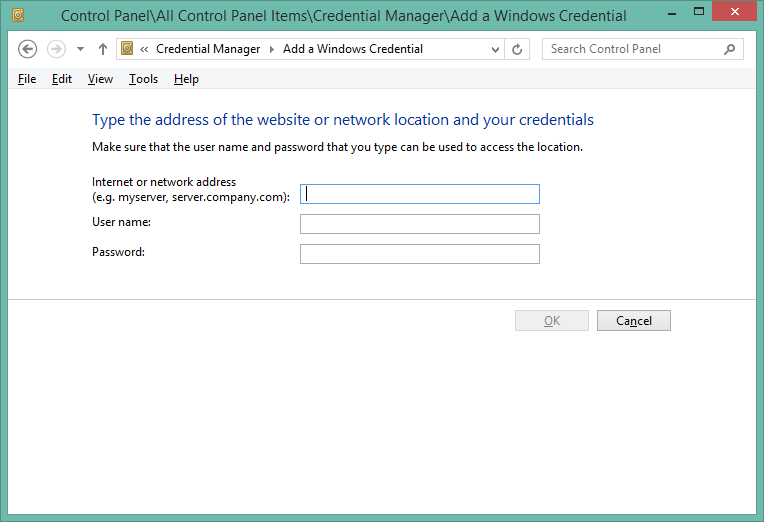
What you want is called "Credential Manager" and it's located in the "Control Panel". You want the selection [Windows Credentials]. You then want to select [Add a Windows credential]. You should see the following screen where you can enter in a simple username/password that you setup on unRAID. Here's a lot more details on this -- http://www.techrepublic.com/blog/windows-and-office/manage-network-logon-credentials-in-microsoft-windows/
-
You're running the 32bit unraid, so you might be running out of low memory causing the dentry being flushed/evicted from ram.
-
The key is how much low memory you have free. Also, how is cache_dirs crashing?
-
Spin down/Spin up causes nearly all the drives to RED-ball, drop out of the array, and generate thousands of false read-errors. This throws your entire array into one big cluster-fuck. It's not a good thing to happen for the sake of your data.
-
Explorer accesses the file because it's trying to extract media info from the files in the directory or trying to generate or display thumbnails. It likely wont access the file(s) a second time because Explorer has that info cached on the client side. As for what settings to tweak so it doesn't try to extract media info, I don't know of any directly. Perhaps use an alternative file explorer or file manager?
-
Your browser is opening up the movie files and likely retrieving info from them. /mnt/user/server/Filme/D-E/Drag me to Hell - BluRay/ OPEN Drag me to Hell - BluRay-trailer.mov /mnt/user/server/Filme/D-E/Drag me to Hell - BluRay/ OPEN Drag me to Hell - BluRay-trailer.mov /mnt/user/server/Filme/D-E/Drag me to Hell - BluRay/ OPEN Drag me to Hell - BluRay-trailer.mov /mnt/user/server/Filme/D-E/Drive Angry - BluRay/ OPEN Drive Angry - BluRay-trailer.mov /mnt/user/server/Filme/D-E/Drive Angry - BluRay/ OPEN Drive Angry - BluRay-trailer.mov
-
That's concerning the built in spindown control of emHttp. As mentioned previously, there are workarounds to still get drive spindown functionality. They mostly involve disabling it in emHttp and using 'hdparm' to set it manually. As for Windows support, that's an entirely different beast. It might support drive spin-down natively without having to do any workarounds. Also, there are some hdparm programs for windows, so give those a shot if Windows can't manage it directly.


