





ainuke
Members
-
Joined
-
Last visited
Everything posted by ainuke
-
Is there any indication as to why it all went south in the first place? And should I not be getting redundancy from having two cache drives?
-
well, crap. I rebooted, and now it's pooling the "bad" drive with the reformatted drive. I expect the appdata on the bad one is gone, gone, gone. If it was recoverable to begin with... orthanc-diagnostics-20220604-1611.zip
-
well, crap. I rebooted, and now it's pooling the "bad" drive with the reformatted drive. I expect the appdata on the bad one is gone, gone, gone. If it was recoverable to begin with...
-
I didn't reboot; let me know if you want to. The drive in question is dev2. orthanc-diagnostics-20220603-2030.zip
-
Sorry for the delay; life happened. EDIT: This is the current state diagnostics, with the reformatted cache drive (one only) and just a couple dockers. I can re-install the remaining drive that provoked the "no file system" error and re-submit the diagnostics if needed. orthanc-diagnostics-20220603-1306.zip
-
Thanks for the response; and sorry for the OP sounding like such a rant. Understood about reformatting; it was my only path to a functional server, on which my home network depends. I had hoped that I could restore appdata from backup; but rightfully should've checked beforehand. will post diagnostics this evening.
-
I am so frustrated right now I can't even see straight. Inability to connect to Plex Server (docker) got me to check on unraid, and all Dockers were offline. I don't know how I got to it but found procedure to recreate docker image. However, that's when I saw that both cache drives (two SSDs mirrored) were showing No File System. Attempts to "mount -o degraded,usebackuproot,ro /dev/sdb1 /x" on either drive produced "mount: /x: can't read superblock on /dev/sdb1." I've had one bad SSD in the cache pool (mirrored) make both drives unreadable before, so I reformatted the newer one, expecting to restore the appdata to it and go on about my merry way. Except the appdata folder in my backup location was empty. There was a dated folder, but it contained 0bytes and no other folders, files, or anything. I have been using Backup/Restore Appdata for as long as I've used unRaid, and get Prowl notifications every morning that appdata backup has happened. I don't know what happened to start this all, but my expectation was that using two cache drives meant that if one failed, the other would continue and I could replace the failed one and continue on as if nothing had happened. I also expected that the daily affirmations that my appdata was being backed up meant that it would be there in case of total cache pool failure. Neither of these assumptions appear to have been correct. Am I missing something? So, do I have any other means to repair the remaining cache drive that is showing no file system? I can restore all the dockers to functional status, but the couple Maria databases contained in the appdata will be lost, as will the entirety of the Minecraft worlds that my kids use. The rest is just a PITA to reconfigure (Plex, Flarum, Homebridge, AMP, etc.). But the even larger issue is just how reliable is this OS, anyway. I've now had two critical cache failures, and a backup reporting system that's useless. What happens when I lose a data drive? Is my expectation that the two parity drives I've invested in are going to be able to recover my array *also* a fantasy? I'm seriously considering switching back to WHS2011; it wasn't as sexy as unRaid, but it also never gave me these kinds of problems.
-
Thank you so much! All sorted now. Erik
-
New Topic: Is there an easy way to run speedtest through the GluetunVPN? Using LibreSpeed(linuxserver), if I use the "--network=container:GluetunVPN" parameter, the container fails to install with an error Error response from daemon: conflicting options: port publishing and the container type network mode I just picked this speed test docker on a whim; if there's a better way to speed test the vpn, I'd be happy to hear it. I'm currently getting <1Mb/s on NBZGet, which is waaaay down from where it was a month ago. Speed to the server minus VPN is 900Mb/s. Trying to track down what's changed...
-
Sorry, that was my bad. I was looking too far up in the log; the http server error was from when it was shutting down. Everything is working now, although to get access to the containers' UI (NZBGet and Sonarr) on the LAN, their ports need to be manually specified/added. From the description, I thought that was the purpose of ADDIDIONAL_FIREWALL_INPUT_PORTS? Not really worried about it at this point, given that it's functional; just curious. Thanks for your help!
-
I'm getting a "ERROR http server: http: Server closed" error when restarting Gluetun, with both the other containers stopped.
-
Ok, did that, but now when I start sonarr or nzbget containers, I get "Execution Error No such container"
-
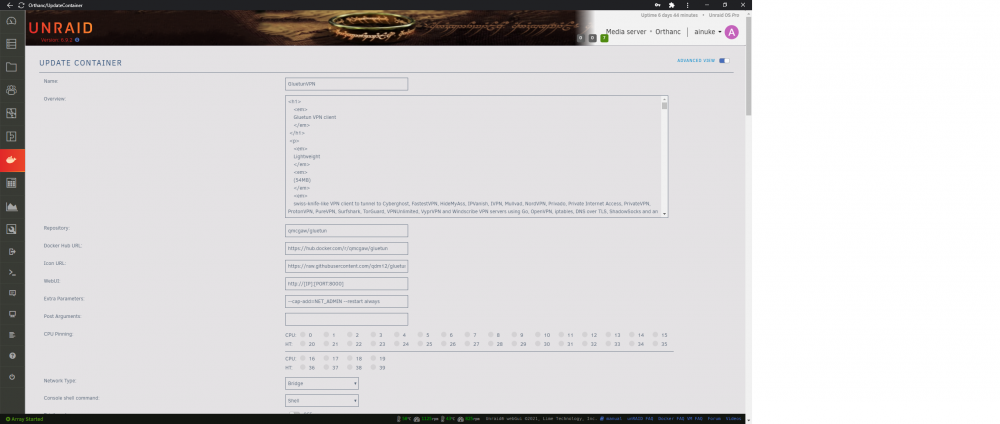
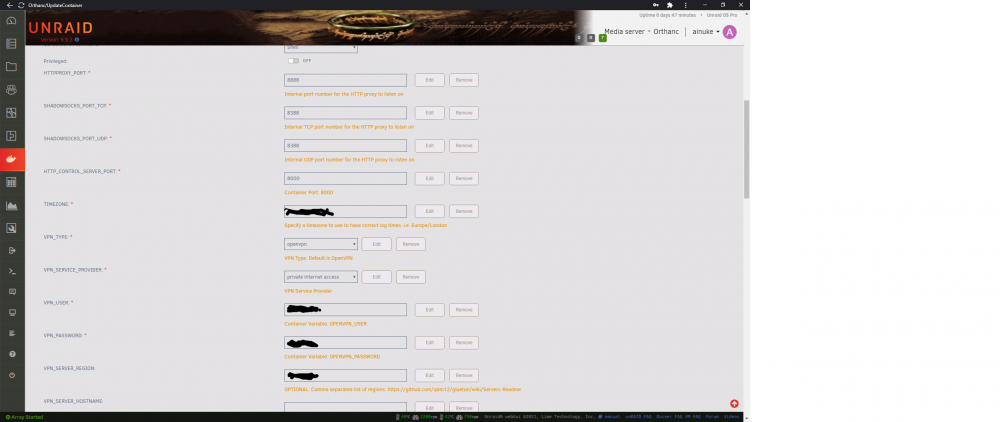
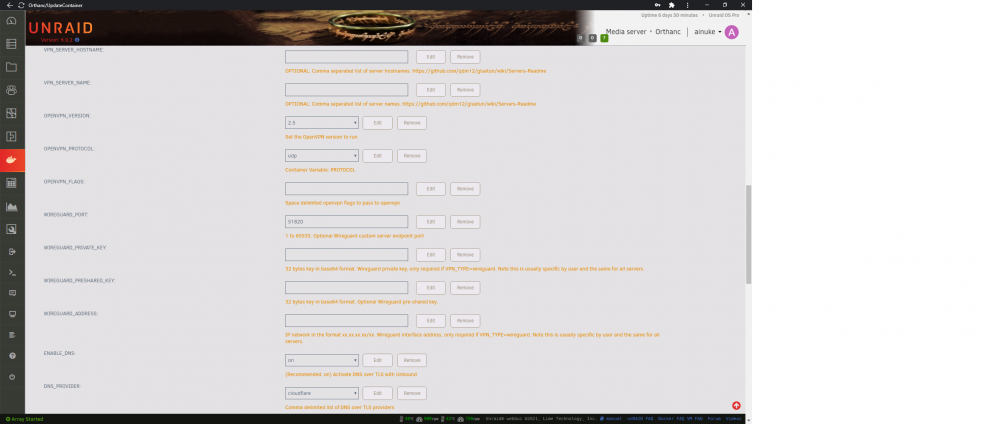
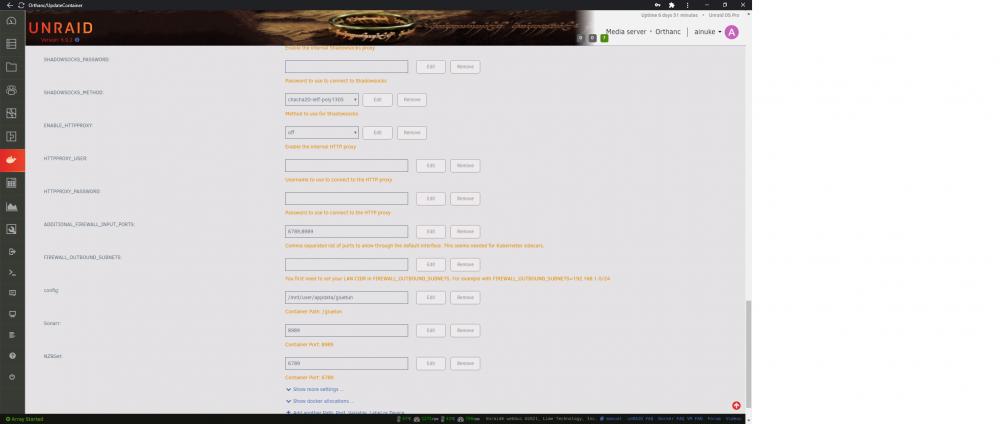
Not sure if there's a better way to do this, but here goes: Everything is at default with the exception of ports added for nzbget and sonarr, plus login creds and server region. Thanks for the help!
-
Hi, Having issues with GluetunVPN setup, specifically having Sonarr and NZBGet communicate with each other. I can access both UI fine from browser on the LAN, but Sonarr is throwing an "Error: ConnectFailure (No route to host): 'http://**.*.*.***:6789/jsonrpc'". I'm coming from a previous version of Gluetun Docker (not DPC), which was working fine, but with different parameter names. I've added ports 6789,8989 to "ADDITIONAL_FIREWALL_INPUT_PORTS" and added "--network=container:GluetunVPN" to Extra Parameters. I've also tried adding the ports via "add another path, port, variable, etc" as was needed with my previous iteration of Gluetun/PIA, to no avail. Is there something I need to do with "FIREWALL_OUTBOUND_SUBNETS"? TIA, Erik
-
I have the same issue, except with PIA as a stand-alone VPN Docker. Haven’t tracked it down as it isn’t a big issue for me, but I’ve wondered if it’s an artifact of the tunneling. Although I didn’t have this issue when I was running VPN and NZBGet + ‘arrs on a standalone pi.
-
Hmmmm, OK. In the "Wireguard" folder in AppData, the conf file shows "ca-toronto.privacy.network:1337" for the endpoint, which is the server I'd have picked anyway... Is that static, or does it change when restarted? I don't recall ever setting that, but maybe I did. 😕
-
OK, thanks. I'm running the Wireguard version. Is there a like setting for that?
-
Is there a way to specify which PIA server to use? My firewall blocks many countries, and I've had connections issues with port forwarding inside this docker as a result. Would like to choose a server in the whitelist...
-
Ok, I don’t know what I did differently, but it seems to be excluding the designated folders as expected now. 🤷🏼♂️ consider my issue solved
-
Anyone have any thoughts on this?
-
OK, I've got it sorted. I had to reclaim the server through the webui, but it didn't work before because I had the container in bridge mode, I think. I changed it back to host to claim the server, then restarted the container as bridge. Everything is fine, now.
-
UPDATE: tried reverting to my old password. That didn't work and I'm now locked out of my PMS instance from both Plex.tv and webui.
-
I've not seen this question answered, and a search hasn't brought it up; please forgive me if this is reviving the dead... I changed my PlexPass password through my account online, and through the webgui for the PlexPass container, but now my PMS is unreachable from my Plex account. It's been a while since I originally set this container up, so I've forgotten how I attached it to my Plex account. What is the procedure for updating my password in the Docker instance? I don't see any credentials files in my /appdata? EDIT: When I log into the webui, it shows the name of my server, but the screen shows a message that I'm not authorized to use it... Thanks in advance, Erik
-
Unsure if this has been asked before, as it's not coming up on any search I'm using: I see that I can exclude folders from the scheduled scans, but can I exclude from the extended test? I have a "backup" share that my Windows machines point to, and there are many errors within those backups that Windows doesn't care about, but unRAID does: leading/trailing spaces, etc. Those items are beyond my control to correct, as they are the result of other apps' organization, or even Windows'. I have image backups and file history backups here, and they make "run extended tests" take FOREVER and generate numerous lines in the results that are completely irrelevant. I'd really like to exclude this Backup share from the extended tests. Is there a way to do this? TIA Erik
-
Thank you, that works awesome. I think I just peed myself a little with how easy it was. It even saw my daemon without having to configure anything!


