





brent3000
Members
-
Joined
-
Last visited
-
Without re posting everything in its raw format, would anyone be able to shed some light on the following issue I'm having adding a 2nd GPU to my system and if the family of GPU would be the likely cause of my 2nd GPU not showing up? Adding 2nd GPU not showing to Unraid - General Support - Unraid TLDR - Have a P4, got a T4 but both dont seem to work together only 1 appears in the plugin while the other wont show but is detected by Unraid
-
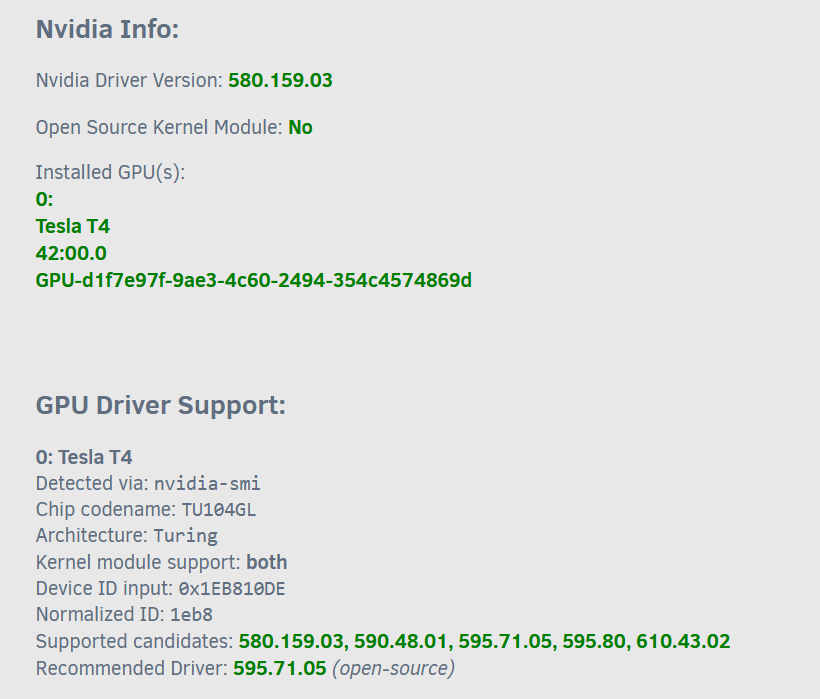
I have been running an Nvidia P4 for some time but have been looking to get an upgrade and I recently came across an Nvidia T4 unit and as my system supports multiple PCI I wanted to run them both side by side, When I login I'm able to see both GPU's in the System Devices but the newer T4 dosnt show up in any of the Nvidia tools or under nvidia-smi Should there be more I need to do about enabling it or if one is working should the other just work? Or is the generation gap between them not going to allow me to actually run both side by side? Yes I have rebooted the system as per the prompt but it still doesn't show in the Nvidia app etc. Is anyone able to shed some guidance on getting two GPU's enabled? If its any help attached is the diag filedellbox-diagnostics-20260904-1528.zip EDIT When I remove the P4 it seems to allow the T4 to load and it seems to still be using the same supported driver it appears Is it having different generations the problem maybe?


-
Just adding my experience here, seamless upgrade, took about 5min on initial boot up for migration and validation, keep an eye on the logs to see its status as it wont boot straight up after due to the migration+validation
-
Can someone help me how this would be configured in Unraid? Configuration File - RomMFull schema reference for config.ymlThis is to enable the streaming platform however I'm unsure how to configure the 'Containers' section of this with Unraid if its able to be done at all. The UI dosnt enable until there is at least one provisioned streaming: enabled: true containers: - platform: ps2 host: https://192.168.1.51:3001 # browser-facing, must be HTTPS broker_host: http://192.168.1.51:8000 # server-to-container, HTTP ok label: PCSX2 - platform: ngc # ngc/wii/wiiu can share one Dolphin container host: https://192.168.1.51:3002 broker_host: http://192.168.1.51:8001 label: Dolphin
-
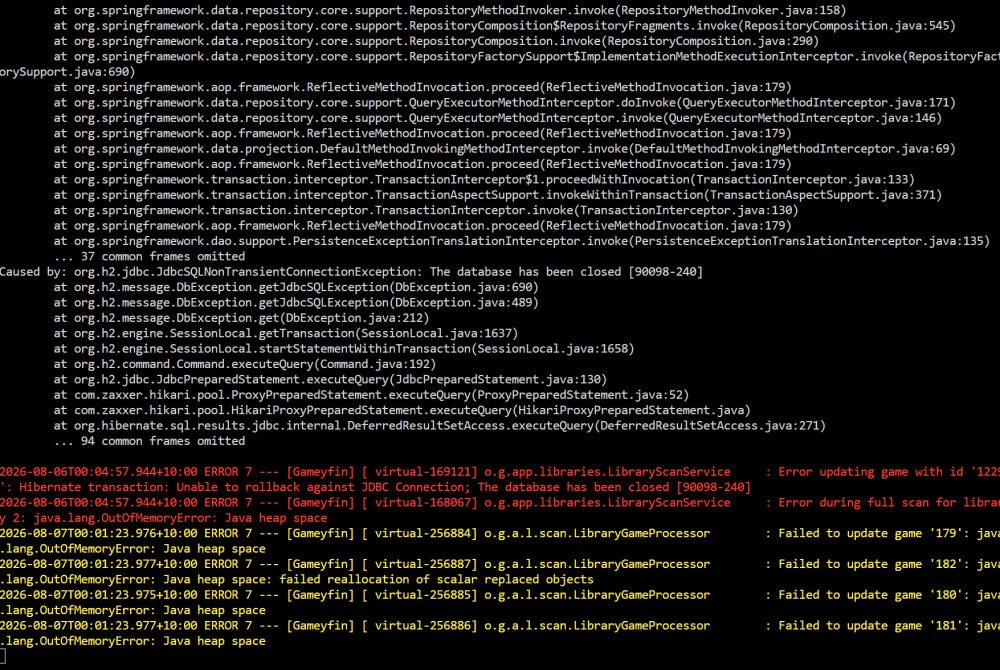
Not sure if something with mine or something else but for some reason my instance was sucking my CPU dry Had the Java app running at crazy % Not sure if just the stage of development or an issue with the container but wanted to share, not sure if there is a way to kill when it hands

-
Behind Deluge I have Prowlarr and Flaresolvarr which is also unable to connect (which is what the ports are used for) but also if the VPN is enabled would I not need to have the ports for input set for the external containers to access Deluge? or is Deluge not considered behind the VPN? Yes this is enabled No I have not as I didnt know this was considered a proxy and didnt know the settings how to apply that as a proxy? I normally would think of something like nginx as a proxy but this I considered as just like I would connect to the WebUI using the IP it would be the same concept. Can you advise how the proxy settings should be setup when communicating with an app behind the VPN? I assumed if all the ports and containers were mapped they would flow the IP across (LIke when I access the WebUI for Prowlerr it works fine no issues, but asking to verify a site then fails.
-
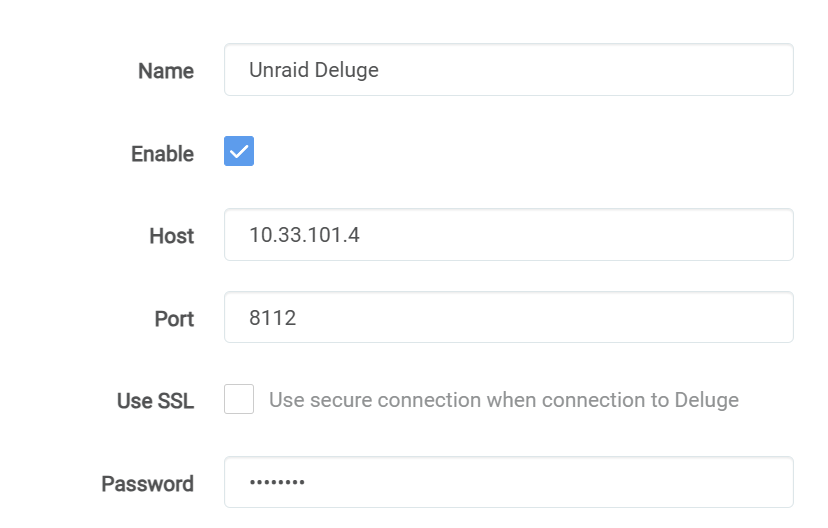
I did set the LAN in it but tthe same errors and as mentioned, its working fine via the WebUI. Yes this is using a fixed IP on the same VLAN as the other containers trying to connect. As mentioned they can ping the container, they just cant kick off the Deluge sync (which works when the VPN is off) Sometimes work and timetimes it does not does that mean its going to be abit of a lucky dip >_< As mentioned the fact it works when the VPN is offline and it cant ping makes me think something about the VPN ports arnt sticking. As I mentioned, I did make the container some time ago and had to manually add the extra functions, is it possible they arnt applying correctly? Is there a way to validate in and out ports are being set correctly which I can test? As it can ping but it cant access it via port 8112 makes me think its the ports not opening? Both are using the same setting (Reminder both Sonarr and Radarr are NOT behind the container and are on dedicated IP's on the same VLAN
-
As mentioned it's been working for mo ths before hand and it must have been a recent update or something it's all stopped (it's not a new deployment) The VPN input and VPN Output ports are setup as mentioned the webui works for all the containers behind it and all the containers are on the same Vlan, which was all working fine up untill a week or so ago untill I noticed only my RSS feeds were connecting and nothing else behind the VPN was. And the strange thing is, when the VPN is turned off everything works as expected, something about the VPN being enabled stops all containers being able to communicate with the VPN app container and everything behind it (as per the logs as well the VPN out and in ports are setup and we're working before a recent update. Unless the VPN ports are setup back to front but as mentioned, it was working, other containers can't even communicate with deluge let alone anything else behind it so it's something within the whole container stopping even that working. I don't think it shows in the logs but I did also try adding the deluge ports to the VPN input and outputs to see if that is needed (even tho it's declared further up) but same results
-
I'm not having any issues accessing it via the web UI, my only issue is none of my containers can verify the deluge settings (My local lan is not being impacted when trying to connect to the WebUI and using the container stand alone works fine) As mentioned Everything is working Webui for all Containers behind the VPN + the Container itself, The issue I'm having is that my other containers cant connect to it (They can ping them from the other containers to the VPN container but none of the setups work to verify Deluge to the container when the VPN is enabled) As mentioned when the VPN is on, Deluge Works fine The VPN connects and shows the new external IP fine Containers behind the container work fine (WebUI etc) BUT no other containers on the same vlan can verify the Deluge settings or access any of the conatiners behind the VPN (Ping of the .4 works so the container can 'see' it but thats the only response I get, everything else times out) When the VPN is OFF As above, all WebUI's work All other containers can NOW communicate with the Deluge and verify + all other containers using its network
-
So I have x.x.11.0/27 called out in LAN_NETWORK When I go to Sonarr (Orr any of them) and I try and validate the torrent client it will spin and timeout. Or do I need to even add my LAN from the PC which I'm using the webui from? THat woudnt make any sense as the container will self validate and its still failing For example, DelugeVPN is .5 Sonarr is .6 Both are x.x.11.0/27 My lan (where my Computer is) is x.x.12.0/27, are you saying even this IP needs to be whitelisted? If I'm using a RevProxy? As that is also in the same /27 as the other containers Strict IP is enabled then the container's own regular sync should self validate but they have been in the same error for over 24 hours (When it self checks every 6) EDIT: Added my local IP range and same error, but I think thats not the issue or maybe its not applying the values correctly as mentioned, the containers can ping from outside to the VPN container but the container dosnt seem to receive it when sending the validation from Sonarr
-
All of the containers are on the same vlan, when the VPN portion is turned off it works fine the system can Ping the container but none of the request (From Sonarr etc) are processed. Turn the VPN off and everything works. Where would I define it if the containers are all running on x.x.11.0/27 where or what else do I need to define? As mentioned the strange thing is, VPN is on, none of the containers can talk (either the VPN container or the containers behind it) but from the other containers I can ping it. When the VPN is disabled, no other changes everything works (Which to me rules out the network itself being an issue right?)
-
Done see attached supervisord.log Command execution.txt
-
Not sure if there has been some changes recently but suddenly all of my systems cant connect to the VPN container when its enabled with the VPN. When the VPN is enabled and working my containers on the same vlan fail to verify the settings (Unable to connect). Yes the conatiners can ping but it wont verify the settings or connect to any other container running on that VPN. When I set VPN_ENABLED to No, everything starts working again. Did something change in a recent update or is there a new setting I haven't setup as my instance has been running for some time,
-
Ok so something in the system is forcing this IP to be blocked or un-accessible, the container works a treat on legit any other IP, what or how or where do I see this IP being consumed and kill that specific value without needing to re-map all my networks? None of my other apps seem to have this issue so I'm not sure if its just the way Pihole is setup to run or if there is a way to force it to run as there is no docker containers even running yet it thinks the IP is taken, I have even had the container offline for over 2 hours while working on some other tasks and still the same error. What validation or checks does this even do to verify the address is already in use? EDIT : Some more searching and the issue seems to be related to a 'stale' IP in the local-kv.db causing the issue, is there a fix of a KI about this? My current fix after almost killing my server is just to make the ip from .2 to .20 but this isnt a fix as nothing can use the .2 address now it seems (none of the other docker containers can now start on it)
-
So this issue came back again, is there a way to force a docker to run or flush any stale IP's? I'm not keen on always rebuilding my lan details every reboot, not sure if its something with Pihole or something greater,


