





yogy
Members
-
Joined
-
Last visited
Everything posted by yogy
-
I'm using Cloudflare, but never experienced this.
-
I hope you didn't just use the LOG IN tab or something similar offered when you opened the newly installed bitwarden app on your mobile device. You have to click on the settings cog (upper left corner) and enter your self hosted server url first, save it and then try to log in. Did you try that?
-
I'm a bit late with replies due to vacations. Did you manage to resolve the issue. If not please provide wider explanation what is working and what not.
-
Try to delete the Vaultwarden container and template and start from scratch, if possible.
-
You should enter the admin panel (https://yourdomainname/admin) enter your admin token and correct things with the warning. As I can see you didn't configure your admin token which you should. Recreate the container, use false for signups and invitations allowed and create admin token with the following command in terminal without quotes "openssl rand -base64 48" which will generate very complex random key to be used as admin token. After you do all of this prevent the access to admin panel via internet (local network only), see recommended post from @Roxedusat the top of this thread.
-
The easiest way: open Nginx Proxy Manager webUI edit Bitwarden/Vaultwarden Proxy Host go to Advanced tab paste it in Custom Nginx Configuration and click Save You can also do it directly to your Bitwarden/Vaultwarden *.conf file (/mnt/user/appdata/NginxProxyManager/nginx/proxy_host)
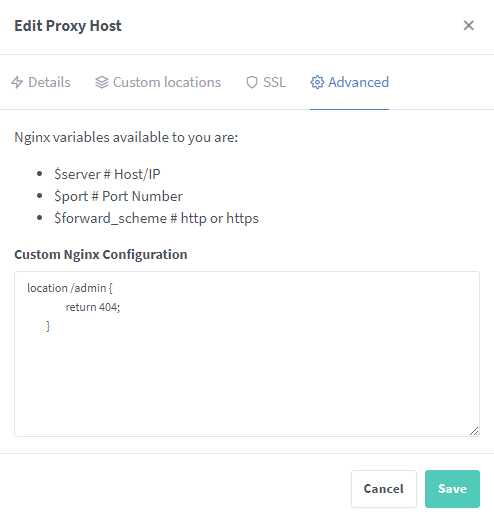
-
Exactly, just follow the procedure and your admin page is no longer accessible over the internet, only via local network.
-
I wont be able to answer your question completely because I use Nginx Proxy Manager as a reverse proxy, so I have no clue how to do it with Swag. To answer your second question (2.), no, you don't open any ports on your router, that's what reverse proxy is all about. The only port forwarding on the router is for reverse proxy (in your case Swag or any other if you choose so). The purchase of your own domain is a great choise, I would recomend it for everyone, since it doesn't really cost much. So the idea of a Reverse Proxy is that you will be able to access (on the Internet) your apps via subdomains. If your domain is xywz.com, you will be able to access bitwarden / vaultwarden via vaultwarden.xywz.com without entering port number at the end. Let's encrypt will provide you with necesary certificate for this subdomain and if you go with Cloudflare DNS you are protecting the access to your apps even more. You can also use their DDNS. If you decide to switch Swag with Nginx Proxy Manager (NPM) as a reverse proxy with Cloudflare take a look of this great video Check out also a long discusion of NPM on this forum.
-
Update to 1.22.0 went smooth, no issues 👍
-
+1 Please do this already
-
If you use Nginx Proxy Manager (or any reverse proxy app) the only port to be open is 443 which already is. I have various apps in docker containers and all working with reverse proxy, no additional ports opened. I didn't experiment with Bitwarden access through LAN and probably will not. Hopefully someone managed to made it working via LAN and could provide further assistance.
-
I will try to answer by the best of my knowledge. I think you would be able to access Bitwarden via LAN, the problem is a valid certificate in your browser (recognized by the browsers root approval authority). This isn't so hard to do but I'm not sure if this would actually work. Didn't try. The Admin page, you can access via LAN and that is the right thing to do, to block access via internet and allow only via LAN. Regarding accessing Bitwarden via Reverse Proxy. It is a very safe procedure, especially if you are using Clouflare's DNS service. I can write a tutorial for that using Nginx Proxy Manager in a docker container. I suppose you own a domain registered in one of the worlds registrars (GoDaddy, Bluehost, Namecheap, Hostgator and similar)?
-
2.19.0 is currently the latest version by Vaultwarden. Seems like Bitwarden (original) is 2.20.4. Let's wait for a bit 👍👣🍻
-
You should access the admin page only via LAN so you type the IP/admin and there you go. If you have local DNS then you can access it over a local domain e.g. home.local/admin
-
You've done it the correct way. Not all password managers are listed, so you have to export your data to *.csv file and import that file to Bitwarden.
-
I get the same thing. Any update on this?
-
You have Admin access for that with a loooong token key. Go through this thread and you will learn how to disable it over internet and only get access via LAN.
-
LOL. That's what Vaultwarden/Bitwarden is for 🤣
-
Can you post a screenshot of your bitwarden/admin SMTP settings Edit: Sorry, didn't look at the screenshoot you already posted above. OK try this: firstly try with port 587 (save and try if it works) if it still doesn't work try to disable (untick) Enable SSL
-
Sorry, I'm afraid I'm out of ideas what could be wrong here. It's strange thought, maybe someone with similar issues might provide further assistance. I'm using simple 2FA by Google Authenticator on my mobile phone.
-
That's a very good question. I'm not sure and haven't try multiple users setup, but I guess it should be unlimited since it's self hosted. Maybe someone else could answer who actually setup multiple users.
-
Hmm, the only option I can think of that's left is to restart the container and go through the config file again.
-
Try to delete browsers cache or use different browser. What did you do so far? Do you own a domain?
-
This is because you are trying to access bitwarden through local network. This will only work with self signed certificate. Self hosted bitwarden_rs/vaultwarden is not meant to work in local network, I mean it's duable but .... The easiest and safest way is if you own a domain, use Cloudflare to manage it and Nginx Proxy Manager with Let's encrypt certificate and you are safe enough to access Bitwarden self hosted password vault through the internet. Domain is very cheap (€ or $ 2-10) and the rest is free of charge, so I really try to encourage every user to do it that way. All mentioned can be used for other docker containers too. I'm running 10 docker containers/apps via internet with 2FA this way and I feel very safe and happy.
-
That's strange. Check the network type in docker settings. Did you follow the procedure with all the steps. Did you change anything? WebUI should take you to the internal (LAN) Bitwarden login page. Since your picture above shows access to Bitwarden through the internet I still think there is an issue in Nginx Proxy Manager (check *.conf file and ip range)
