





flyize
Members
-
Joined
-
Last visited
Everything posted by flyize
-
Hmmm, I just saw this email from 5 hours ago. According to Unraid Connect, all my containers are stopped (which isn't true because Plex is working). * **disk3 (ST8000DM004-2CX188_WCT0EE4D) has read errors**
-
So I'm having a weird problem. I can't access the UI for any of my Docker containers or Unraid itself. I also can't ping the server. However, Plex is fully working and Unraid Connect shows the server as online. What in the heck am I missing here?
-
Yeah, I knew I had forgotten something.
-
Actually, not sure what I've done, but the mover now moves everything off.
-
I finally got around to adding this. I used this version. I have 1.3TB on my 'cache_media' drive and set the script MAX_SIZE at 1000000000000 (1TB). Right now its at 600GB used. It made a list of files to ignore, and has then started moving files anyway. What am I missing here? edit: Oops, I think it was self inflicted. I see that by default using the Move Now button does not use the Mover Tuning settings.
-
I wish I knew the answer to that question as well. I have a similar issue with Chrome, but Firefox works fine.
-
Someday, I'd love to not have to bother you guys, and maybe be able to help. Where do I go to see that those CRC errors in the diagnostics?
-
You're an angel! That's wonderful news, as I'm about to be travelling for a week and didn't want this thing to die while I was gone! I'll get the cable swapped out. Yeah, the OOM errors are annoying. It just started happening with the latest version of Frigate. I've notified the devs, but its pretty much just me with the problem. For some reason, ffmpeg likes to occasionally try to grab 80GB+ of RAM. It was bringing down the whole server before I limited the RAM available to the container.
-
Any suggestions on if/how I can fix this? truffle-diagnostics-20240403-0902.zip
-
Just so that I can keep track of all my scripts in one place, can I use User Scripts? It puts scripts in /boot/config/plugins/user.scripts/scripts/. I'd still call if from the Mover Tuner, but at least all my scripts are in one place then.
-
Okay, got it!
-
So in your example, if it gets over 750GB, the script will make a list of files from newest to oldest. Then remove the oldest file from the list and recalculate total space used, and do this over and over until it gets under 750GB. Then pass all this off to the Mover, with a list of files it can't touch. Am I understanding correctly?
-
So wait, is MAX_SIZE how much free space to keep on the disk? And then it adds older files until it hits that number? Sorry, I'm terrible with bash scripts.
-
Thanks @JorgeB. All fixed up.
-
Well hopefully that's correct, cause I'm in the middle of the rebuild!
-
Okay. So unassign the disks, mount the array. Then navigate through the emulated disks (via the Unraid GUI I guess?) and make sure I see data. Then reassign the disks and rebuild (in-place)?
-
mount /dev/sdk /tempdrive
-
I went in an mounted /dev/sdk. It's actually emulating the whole device? If so, how will I know when I get it fixed? edit: Added diagnostics truffle-diagnostics-20240228-1458.zip
-
Any reason I can't just bring them back online and pretend nothing happened (or maybe do a parity check)? edit: FWIW, if I look at the drives, all the data seems to be there.
-
Thanks! Looks like those two drives are on the same molex to sata power splitter. If I order another one and things spin up, do I have to rebuild?
-
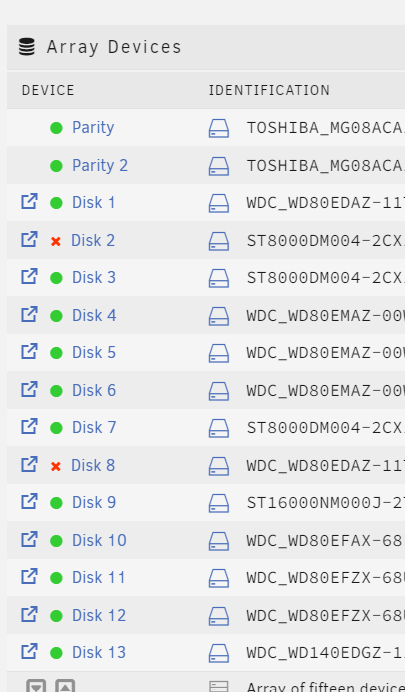
Oh crap, I powered off the server without recording the actual disabled drives. Where do I see that in the diags?
-
Well that was a bonehead move on my part. Ugh truffle-diagnostics-20240228-1318.zip
-
I tried to reboot, but that didn't seem to help. Attached diagnostics from before the reboot. Any ideas? truffle-syslog-20240228-1751.zip
-
Holy crap this is amazing
-
Intel of course.


