





sillywalks
Members
-
Joined
-
Last visited
Everything posted by sillywalks
-
I finally found the culprit. I was using a home assistant integration to connect to the unraid api and that was for whatever reason keeping the disks constantly spun up.
-
I think I will once again start with a fresh install and keep it as minimal as possible adding services one by one. Bit of a pain but I really want the drives to stay spun down what with electricity prices being high. It's still pretty strange that at one point it just started happening without me doing anything to the system. I can even see th exact moment in the power readout of the smart plug, and I was in bed at that time :)
-
That was indeed the first one to go but still the issue persists.
-
Spin up groups are disabled. So unfortunately not the issue. File activity plugin shows nothing whatsoever writing to the disk. Open files also draws a blank Installed plugins are: Community Apps Dynamix system temp File activity 2 GPU stats Intel GPU top Nvidia driver Tailscale Un-get Powertop (via un-get) Unraid connect User scripts That's it. I'll try disabling them one by one and see if one of them is the cause.
-
Unfortunately not. It's just one data drive an one parity drive. That's all. And both spin up immediately after being spun down. Docker and VM completely disabled and it still happens.
-
ok so after a few days without issues it has returned. I am still running a minimal setup and I have no idea why this issue is back. Here is the part of the log where it suddenly starts: Aug 30 12:11:17 Tower kernel: usb 1-7: reset low-speed USB device number 5 using xhci_hcd Aug 30 12:11:18 Tower kernel: usb 1-1.1: reset full-speed USB device number 4 using xhci_hcd Aug 30 12:11:18 Tower kernel: usb 1-1.3.1: reset full-speed USB device number 8 using xhci_hcd Aug 30 12:11:18 Tower kernel: usb 1-6: reset high-speed USB device number 3 using xhci_hcd Aug 30 12:11:58 Tower kernel : x86/split lock detection: #AC: CPU 8/KVM/73515 took a split_lock trap at address: 0x6199f100 Aug 30 12:11:58 Tower kernel: x86/split lock detection: #AC: CPU 2/KVM/73509 took a split_lock trap at address: 0x6199f100 Aug 30 12:11:58 Tower kernel: x86/split lock detection: #AC: CPU 9/KVM/73516 took a split_lock trap at address: 0x6199f100 Aug 30 12:11:58 Tower kernel: x86/split lock detection: #AC: CPU 0/KVM/73507 took a split_lock trap at address: 0x6199f100 Aug 30 12:11:58 Tower kernel: x86/split lock detection: #AC: CPU 7/KVM/73514 took a split_lock trap at address: 0x6199f100 Aug 30 12:11:58 Tower kernel: x86/split lock detection: #AC: CPU 10/KVM/73517 took a split_lock trap at address: 0x6199f100 Aug 30 12:11:59 Tower kernel: x86/split lock detection: #AC: CPU 1/KVM/73508 took a split_lock trap at address: 0x6199f100 Aug 30 12:12:02 Tower kernel: x86/split lock detection: #AC: CPU 13/KVM/73520 took a split_lock trap at address: 0x6199f100 Aug 30 12:12:02 Tower kernel: x86/split lock detection: #AC: CPU 4/KVM/73511 took a split_lock trap at address: 0x6199f100 Aug 30 12:12:03 Tower kernel: x86/split lock detection: #AC: CPU 12/KVM/73519 took a split_lock trap at address: 0x6199f100 Aug 30 12:12:04 Tower kernel: x86/split lock detection: #AC: CPU 11/KVM/73518 took a split_lock trap at address: 0x6199f100 Aug 30 12:22:30 Tower kernel: usb 1-7: reset low-speed USB device number 5 using xhci_hcd Aug 30 12:22:33 Tower kernel: usb 1-1.1: reset full-speed USB device number 4 using xhci_hcd Aug 30 12:22:33 Tower kernel: usb 1-1.3.1: reset full-speed USB device number 8 using xhci_hcd Aug 30 12:22:41 Tower kernel: ata8.00: Enabling discard_zeroes_data Aug 30 12:22:41 Tower kernel: sde: sde1 Aug 30 12:22:41 Tower kernel: br0: port 2(vnet0) entered disabled state Aug 30 12:22:41 Tower kernel: vnet0 (unregistering): left allmulticast mode Aug 30 12:22:41 Tower kernel: vnet0 (unregistering): left promiscuous mode Aug 30 12:22:41 Tower kernel: br0: port 2(vnet0) entered disabled state Aug 30 12:22:41 Tower kernel: usb 1-7: reset low-speed USB device number 5 using xhci_hcd Aug 30 12:22:42 Tower kernel: input: SZH usb keyboard as /devices/pci0000:00/0000:00:14.0/usb1/1-7/1-7:1.0/0003:C0F4:04C0.0007/input/input16 Aug 30 12:22:42 Tower kernel: hid-generic 0003:C0F4:04C0.0007: input,hidraw0: USB HID v1.10 Keyboard [SZH usb keyboard] on usb-0000:00:14.0-7/input0 Aug 30 12:22:42 Tower kernel: input: SZH usb keyboard Consumer Control as /devices/pci0000:00/0000:00:14.0/usb1/1-7/1-7:1.1/0003:C0F4:04C0.0008/input/input17 Aug 30 12:22:42 Tower kernel: input: SZH usb keyboard System Control as /devices/pci0000:00/0000:00:14.0/usb1/1-7/1-7:1.1/0003:C0F4:04C0.0008/input/input18 Aug 30 12:22:42 Tower kernel: hid-generic 0003:C0F4:04C0.0008: input,hidraw1: USB HID v1.10 Device [SZH usb keyboard] on usb-0000:00:14.0-7/input1 Aug 30 12:22:42 Tower elogind-daemon[1904]: Watching system buttons on /dev/input/event2 (SZH usb keyboard Consumer Control) Aug 30 12:22:42 Tower elogind-daemon[1904]: Watching system buttons on /dev/input/event1 (SZH usb keyboard) Aug 30 12:22:42 Tower elogind-daemon[1904]: Watching system buttons on /dev/input/event3 (SZH usb keyboard System Control) Aug 30 12:22:42 Tower kernel: usb 1-6: reset high-speed USB device number 3 using xhci_hcd Aug 30 12:22:42 Tower kernel: usb 1-1.3.1: reset full-speed USB device number 8 using xhci_hcd Aug 30 12:22:42 Tower kernel: input: Thermaltake Tt eSPORTS Challenger Ultimate gaming keyboard as /devices/pci0000:00/0000:00:14.0/usb1/1-1/1-1.3/1-1.3.1/1-1.3.1:1.0/0003:04F2:0978.0009/input/input19 Aug 30 12:22:42 Tower kernel: hid-generic 0003:04F2:0978.0009: input,hidraw2: USB HID v1.11 Keyboard [Thermaltake Tt eSPORTS Challenger Ultimate gaming keyboard] on usb-0000:00:14.0-1.3.1/input0 Aug 30 12:22:42 Tower kernel: input: Thermaltake Tt eSPORTS Challenger Ultimate gaming keyboard Consumer Control as /devices/pci0000:00/0000:00:14.0/usb1/1-1/1-1.3/1-1.3.1/1-1.3.1:1.4/0003:04F2:0978.000A/input/input20 Aug 30 12:22:42 Tower kernel: input: Thermaltake Tt eSPORTS Challenger Ultimate gaming keyboard as /devices/pci0000:00/0000:00:14.0/usb1/1-1/1-1.3/1-1.3.1/1-1.3.1:1.4/0003:04F2:0978.000A/input/input21 Aug 30 12:22:42 Tower kernel: hid-generic 0003:04F2:0978.000A: input,hiddev96,hidraw3: USB HID v1.11 Device [Thermaltake Tt eSPORTS Challenger Ultimate gaming keyboard] on usb-0000:00:14.0-1.3.1/input4 Aug 30 12:22:42 Tower elogind-daemon[1904]: Watching system buttons on /dev/input/event4 (Thermaltake Tt eSPORTS Challenger Ultimate gaming keyboard) Aug 30 12:22:43 Tower kernel: usb 1-1.1: reset full-speed USB device number 4 using xhci_hcd Aug 30 12:22:43 Tower kernel: input: Logitech Gaming Mouse G502 as /devices/pci0000:00/0000:00:14.0/usb1/1-1/1-1.1/1-1.1:1.0/0003:046D:C332.000B/input/input23 Aug 30 12:22:43 Tower kernel: hid-generic 0003:046D:C332.000B: input,hidraw4: USB HID v1.11 Mouse [Logitech Gaming Mouse G502] on usb-0000:00:14.0-1.1/input0 Aug 30 12:22:43 Tower kernel: input: Logitech Gaming Mouse G502 Keyboard as /devices/pci0000:00/0000:00:14.0/usb1/1-1/1-1.1/1-1.1:1.1/0003:046D:C332.000C/input/input24 Aug 30 12:22:43 Tower kernel: hid-generic 0003:046D:C332.000C: input,hiddev97,hidraw5: USB HID v1.11 Keyboard [Logitech Gaming Mouse G502] on usb-0000:00:14.0-1.1/input1 Aug 30 12:22:43 Tower elogind-daemon[1904]: Watching system buttons on /dev/input/event8 (Logitech Gaming Mouse G502 Keyboard) Aug 30 12:22:44 Tower kernel: ata8.00: Enabling discard_zeroes_data Aug 30 12:22:44 Tower kernel: sde: sde1 Aug 30 12:22:44 Tower kernel: vfio-pci 0000:01:00.0: vgaarb: VGA decodes changed: olddecodes=io+mem,decodes=io+mem:owns=none Aug 30 12:22:44 Tower kernel: nvidia 0000:01:00.0: vgaarb: VGA decodes changed: olddecodes=io+mem,decodes=none:owns=none Aug 30 12:22:44 Tower kernel: ata8.00: Enabling discard_zeroes_data Aug 30 12:22:44 Tower kernel: sde: sde1 Aug 30 12:23:59 Tower emhttpd: cmd: /usr/local/emhttp/plugins/user.scripts/startScript.sh /tmp/user.scripts/tmpScripts/nvidia powersave hourly/script Aug 30 22:25:41 Tower webgui: Successful login user root from 10.10.10.116 Aug 30 22:27:11 Tower monitor_nchan: Stop running nchan processes Aug 30 23:12:28 Tower kernel: usb 1-1: USB disconnect, device number 2 Aug 30 23:12:28 Tower kernel: usb 1-1.1: USB disconnect, device number 4 Aug 30 23:12:28 Tower acpid: input device has been disconnected, fd 13 Aug 30 23:12:28 Tower kernel: usb 1-1.3: USB disconnect, device number 6 Aug 30 23:12:28 Tower kernel: usb 1-1.3.1: USB disconnect, device number 8 Aug 30 23:12:29 Tower acpid: input device has been disconnected, fd 11 Aug 30 23:12:29 Tower kernel: usb 2-1: USB disconnect, device number 2 Aug 30 23:12:29 Tower acpid: input device has been disconnected, fd 12 Aug 30 23:36:50 Tower monitor_nchan: Stop running nchan processes Aug 30 23:40:02 Tower emhttpd: read SMART /dev/sdb Aug 30 23:40:09 Tower emhttpd: read SMART /dev/sdc Aug 30 23:54:57 Tower emhttpd: spinning down /dev/sdb Aug 30 23:54:59 Tower emhttpd: read SMART /dev/sdb Aug 30 23:55:04 Tower emhttpd: spinning down /dev/sdc Aug 30 23:55:37 Tower emhttpd: read SMART /dev/sdc Aug 31 00:10:00 Tower emhttpd: spinning down /dev/sdb Aug 31 00:10:28 Tower emhttpd: read SMART /dev/sdb Aug 31 00:10:32 Tower emhttpd: spinning down /dev/sdc Aug 31 00:11:09 Tower emhttpd: read SMART /dev/sdc Aug 31 00:25:23 Tower emhttpd: spinning down /dev/sdb Aug 31 00:25:24 Tower emhttpd: read SMART /dev/sdb Aug 31 00:26:04 Tower emhttpd: spinning down /dev/sdc Aug 31 00:26:36 Tower emhttpd: read SMART /dev/sdc Aug 31 00:40:25 Tower emhttpd: spinning down /dev/sdb Aug 31 00:40:52 Tower emhttpd: read SMART /dev/sdb Aug 31 00:41:31 Tower emhttpd: spinning down /dev/sdc Aug 31 00:42:06 Tower emhttpd: read SMART /dev/sdc Aug 31 00:55:47 Tower emhttpd: spinning down /dev/sdb Aug 31 00:55:48 Tower emhttpd: read SMART /dev/sdb Aug 31 00:57:01 Tower emhttpd: spinning down /dev/sdc Aug 31 01:10:49 Tower emhttpd: spinning down /dev/sdb Aug 31 01:11:16 Tower emhttpd: read SMART /dev/sdb The complete log is in the attachment. Any idea whats going on? error log unraid
-
Sweet that worked. Drives stay spun down on the fresh system. Where do I go from here. Should I manually rebuild my setup? Because restoring the flash backup might reintroduce the problem?
-
Thanks. I'll try that and report back.
-
Yes I did that. Quite a few files open but none on the drives. All on the cache. :(
-
I rolled back to 6.12 and the issue persists. Can this somehow be related to hardware? So maybe the mainboard is not allowing spindown? I updated the bios to the latest version alread so that was no help. Any ideas how I can further debug this issue?
-
Thanks for the heads up. Here is the diagnostics. Edit: just checked, even in safe mode the drive spins up right after spindown. ministry-diagnostics-20250826-1558.zip
-
I just moved my small setup to a new machine (MSI H610m-e with i5 14600) and I'm having the issue that my drives immediately spin up after spinning down. Docker, VMs, appdata etc are all writing to the cache. Looking at file activity nothing is writing or reading to the disks. The log shows clearly that they immediately spin up. Even if I manually spin them down they spin right back up with no delay. I tried turning off docker and VMs but no change. I rarely write to the array (more archival nature) and would really love to keep it spun down to save energy. Any idea what could be going on here? Logs: Aug 26 07:53:05 ministry emhttpd: spinning down /dev/sdd Aug 26 07:53:06 ministry emhttpd: read SMART /dev/sdd Aug 26 07:53:44 ministry emhttpd: spinning down /dev/sde Aug 26 07:53:49 ministry emhttpd: read SMART /dev/sde Aug 26 08:06:47 ministry emhttpd: spinning down /dev/sdb Aug 26 08:06:48 ministry emhttpd: read SMART /dev/sdb Aug 26 08:08:07 ministry emhttpd: spinning down /dev/sdd Aug 26 08:08:09 ministry emhttpd: read SMART /dev/sdd Aug 26 08:08:48 ministry emhttpd: spinning down /dev/sde Aug 26 08:09:31 ministry emhttpd: read SMART /dev/sde
-
Just to go exploring I set the unassigned drive back to the incorrect read/write state (not slave read write) Currently its still running.
-
did you check the logs of your container? Is something strange going on (like with mine)
-
2022-06-26 21:37:04 Coral Temp: 39.80C 2022-06-26 21:37:19 Coral Temp: 39.80C 2022-06-26 21:37:34 Coral Temp: 39.80C 2022-06-26 21:37:49 Coral Temp: 39.80C 2022-06-26 21:38:04 Coral Temp: 39.80C 2022-06-26 21:38:19 Coral Temp: 39.80C 2022-06-26 21:38:34 Coral Temp: 39.80C 2022-06-26 21:38:49 Coral Temp: 40.05C 2022-06-26 21:39:04 Coral Temp: 39.80C 2022-06-26 21:39:19 Coral Temp: 40.05C 2022-06-26 21:39:34 Coral Temp: 39.80C 2022-06-26 21:39:49 Coral Temp: 40.05C 2022-06-26 21:40:04 Coral Temp: 40.05C Mostly around 40*C Even when detection is active. I thought that maybe it was trying to read a file and couldn't access it correctly due to my wrong mounting of the unassigned drive and this crashed the process?
-
@snoopy86 Just updated to the latest version and LMS stopped working for me as well. Before the update it was running without issues for ages. I can start the container and it keeps running but I can't access the UI Here are the logs: 2022-06-26 21:37:13,653 CRIT Set uid to user 0 2022-06-26 21:37:13,656 INFO supervisord started with pid 15 2022-06-26 21:37:14,658 INFO spawned: 'dbus' with pid 18 2022-06-26 21:37:14,659 INFO spawned: 'avahi-daemon' with pid 19 2022-06-26 21:37:14,661 INFO spawned: 'squeezeboxserver' with pid 20 2022-06-26 21:37:14,669 INFO exited: avahi-daemon (exit status 255; not expected) 2022-06-26 21:37:15,670 INFO success: dbus entered RUNNING state, process has stayed up for > than 1 seconds (startsecs) 2022-06-26 21:37:15,671 INFO spawned: 'avahi-daemon' with pid 23 2022-06-26 21:37:15,671 INFO success: squeezeboxserver entered RUNNING state, process has stayed up for > than 1 seconds (startsecs) 2022-06-26 21:37:15,675 INFO exited: avahi-daemon (exit status 255; not expected) 2022-06-26 21:37:17,711 INFO spawned: 'avahi-daemon' with pid 55 2022-06-26 21:37:17,716 INFO exited: avahi-daemon (exit status 255; not expected) 2022-06-26 21:37:21,526 INFO spawned: 'avahi-daemon' with pid 56 2022-06-26 21:37:21,531 INFO exited: avahi-daemon (exit status 255; not expected) 2022-06-26 21:37:21,625 INFO gave up: avahi-daemon entered FATAL state, too many start retries too quickly 2022-06-26 21:37:36,679 INFO exited: squeezeboxserver (exit status 0; expected) 2022-06-26 21:37:37,681 INFO spawned: 'squeezeboxserver' with pid 57 2022-06-26 21:37:38,682 INFO success: squeezeboxserver entered RUNNING state, process has stayed up for > than 1 seconds (startsecs) 2022-06-26 21:38:00,124 INFO exited: squeezeboxserver (exit status 0; expected) 2022-06-26 21:38:01,126 INFO spawned: 'squeezeboxserver' with pid 91 2022-06-26 21:38:02,127 INFO success: squeezeboxserver entered RUNNING state, process has stayed up for > than 1 seconds (startsecs) 2022-06-26 21:38:23,165 INFO exited: squeezeboxserver (exit status 0; expected) 2022-06-26 21:38:24,167 INFO spawned: 'squeezeboxserver' with pid 125 2022-06-26 21:38:25,168 INFO success: squeezeboxserver entered RUNNING state, process has stayed up for > than 1 seconds (startsecs) 2022-06-26 21:38:41,932 INFO exited: squeezeboxserver (exit status 0; expected) 2022-06-26 21:38:42,934 INFO spawned: 'squeezeboxserver' with pid 159 2022-06-26 21:38:43,935 INFO success: squeezeboxserver entered RUNNING state, process has stayed up for > than 1 seconds (startsecs) 2022-06-26 21:38:55,681 INFO exited: squeezeboxserver (exit status 0; expected) 2022-06-26 21:38:56,683 INFO spawned: 'squeezeboxserver' with pid 188 2022-06-26 21:38:57,684 INFO success: squeezeboxserver entered RUNNING state, process has stayed up for > than 1 seconds (startsecs) that just keeps going for ever.
-
Plugin page didn't say anything except "shutdown" Currently its been running over an hour without any issues and multiple working detections.
-
@ich777 I might have been an idiot and setup an unasigned drive in the wrong mode (not SLAVE r/w) since changing this all is running smoothly. Will let it run and see if it keeps going.
-
Thanks for taking the time to answer! I'm using the mini pcie module inside a pci converter (everything else is unavailable atm) I restarted the container and for the first time it actually ran for a while and didn't crash immediately. As soon as I walked out and around the cameras (actually giving the coral something to do) it again crashed. [2022-06-26 20:27:11] detector.coral_pci INFO : Starting detection process: 216 [2022-06-26 20:27:11] frigate.edgetpu INFO : Attempting to load TPU as pci [2022-06-26 20:27:11] frigate.edgetpu INFO : TPU found [2022-06-26 20:27:11] ws4py INFO : Using epoll [2022-06-26 20:27:16] frigate.record WARNING : Discarding a corrupt recording segment: front-20220626202713.mp4 [2022-06-26 20:27:16] frigate.record WARNING : Discarding a corrupt recording segment: front-20220626202713.mp4 [2022-06-26 20:27:25] ws4py INFO : Managing websocket [Local => 127.0.0.1:5002 | Remote => 127.0.0.1:39598] [2022-06-26 20:28:21] frigate.watchdog INFO : Detection appears to be stuck. Restarting detection process... [2022-06-26 20:28:21] root INFO : Waiting for detection process to exit gracefully... [2022-06-26 20:28:51] root INFO : Detection process didnt exit. Force killing... [2022-06-26 20:29:04] detector.coral_pci INFO : Starting detection process: 354 [2022-06-26 20:29:04] frigate.edgetpu INFO : Attempting to load TPU as pci [2022-06-26 20:29:17] frigate.edgetpu ERROR : No EdgeTPU was detected. If you do not have a Coral device yet, you must configure CPU detectors. Process detector:coral_pci: Traceback (most recent call last): File "/usr/lib/python3/dist-packages/tflite_runtime/interpreter.py", line 160, in load_delegate delegate = Delegate(library, options) File "/usr/lib/python3/dist-packages/tflite_runtime/interpreter.py", line 119, in __init__ raise ValueError(capture.message) ValueError During handling of the above exception, another exception occurred: Traceback (most recent call last): File "/usr/lib/python3.9/multiprocessing/process.py", line 315, in _bootstrap self.run() File "/usr/lib/python3.9/multiprocessing/process.py", line 108, in run self._target(*self._args, **self._kwargs) File "/opt/frigate/frigate/edgetpu.py", line 135, in run_detector object_detector = LocalObjectDetector( File "/opt/frigate/frigate/edgetpu.py", line 43, in __init__ edge_tpu_delegate = load_delegate("libedgetpu.so.1.0", device_config) File "/usr/lib/python3/dist-packages/tflite_runtime/interpreter.py", line 162, in load_delegate raise ValueError('Failed to load delegate from {}\n{}'.format( ValueError: Failed to load delegate from libedgetpu.so.1.0 [2022-06-26 20:29:19] ws4py INFO : Terminating websocket [Local => 127.0.0.1:5002 | Remote => 127.0.0.1:39598] [2022-06-26 20:29:19] ws4py INFO : Managing websocket [Local => 127.0.0.1:5002 | Remote => 127.0.0.1:58352] [2022-06-26 20:29:24] frigate.watchdog INFO : Detection appears to have stopped. Exiting frigate... [2022-06-26 20:29:24] ws4py INFO : Terminating websocket [Local => 127.0.0.1:5002 | Remote => 127.0.0.1:58352] [2022-06-26 20:29:24] frigate.video ERROR : drive: Unable to read frames from ffmpeg process. [2022-06-26 20:29:24] frigate.video ERROR : drive: ffmpeg process is not running. exiting capture thread... [2022-06-26 20:29:24] frigate.video ERROR : front: Unable to read frames from ffmpeg process. [2022-06-26 20:29:24] frigate.video ERROR : front: ffmpeg process is not running. exiting capture thread... [cont-finish.d] executing container finish scripts... [cont-finish.d] done. [s6-finish] waiting for services. [s6-finish] sending all processes the TERM signal. [s6-finish] sending all processes the KILL signal and exiting. [s6-init] making user provided files available at /var/run/s6/etc...exited 0. [s6-init] ensuring user provided files have correct perms...exited 0. [fix-attrs.d] applying ownership & permissions fixes... [fix-attrs.d] done. [cont-init.d] executing container initialization scripts... [cont-init.d] done. [services.d] starting services [services.d] done. [cont-finish.d] executing container finish scripts... [cont-finish.d] done. [s6-finish] waiting for services. [s6-finish] sending all processes the TERM signal. [s6-finish] sending all processes the KILL signal and exiting. The temp readings from your script don't make a lot of sense. -89.7*C sound wrong. But I highly doubt it jumped from 40*C to 100*c in 15 seconds to cause a temperature crash. See here: 2022-06-26 20:26:03 Coral Temp: 39.55C 2022-06-26 20:26:18 Coral Temp: 39.55C 2022-06-26 20:26:33 Coral Temp: 39.55C 2022-06-26 20:26:48 Coral Temp: 39.80C 2022-06-26 20:27:03 Coral Temp: 39.80C 2022-06-26 20:27:18 Coral Temp: 39.80C 2022-06-26 20:27:33 Coral Temp: 39.80C 2022-06-26 20:27:48 Coral Temp: 39.80C 2022-06-26 20:28:03 Coral Temp: 39.80C 2022-06-26 20:28:18 Coral Temp: -89.70C 2022-06-26 20:28:33 Coral Temp: -89.70C 2022-06-26 20:28:48 Coral Temp: -89.70C 2022-06-26 20:29:03 Coral Temp: -89.70C 2022-06-26 20:29:18 Coral Temp: -89.70C 2022-06-26 20:29:33 Coral Temp: -89.70C Please let me know what I can do to debug this further.
-
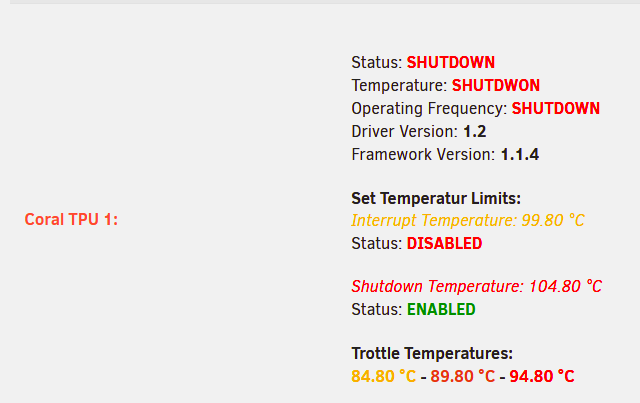
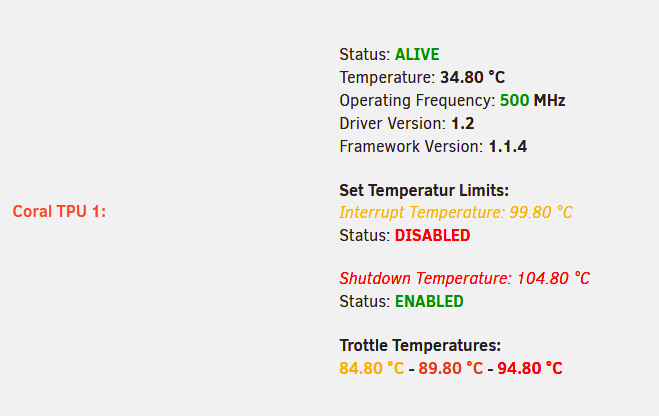
@ich777 any idea whats going on? when I reboot my unraid machine the driver shows the coral as working: as soon as I start frigate the coral seems to crash and stays in shutdown mode until next reboot. might be related to this github issue which never got resolved properly https://github.com/blakeblackshear/frigate/issues/3283
-
I just got a mini cpie coral and installed it in unraid. Downloaded the driver and the unraid system page shows the device: [1ac1:089a] 01:00.0 System peripheral: Global Unichip Corp. Coral Edge TPU I have the frigate config setup with the mapping for /dev/apex_0 The frigate config.yml looks like this: detectors: coral_pci: type: edgetpu device: pci But when starting the container it crashes with the following errors: [2022-06-21 23:35:18] detector.coral_pci INFO : Starting detection process: 218 [2022-06-21 23:35:18] frigate.edgetpu INFO : Attempting to load TPU as pci Process detector:coral_pci: [2022-06-21 23:35:30] frigate.edgetpu ERROR : No EdgeTPU was detected. If you do not have a Coral device yet, you must configure CPU detectors. Traceback (most recent call last): File "/usr/lib/python3/dist-packages/tflite_runtime/interpreter.py", line 160, in load_delegate delegate = Delegate(library, options) File "/usr/lib/python3/dist-packages/tflite_runtime/interpreter.py", line 119, in __init__ raise ValueError(capture.message) ValueError During handling of the above exception, another exception occurred: Traceback (most recent call last): File "/usr/lib/python3.8/multiprocessing/process.py", line 315, in _bootstrap self.run() File "/usr/lib/python3.8/multiprocessing/process.py", line 108, in run self._target(*self._args, **self._kwargs) File "/opt/frigate/frigate/edgetpu.py", line 136, in run_detector object_detector = LocalObjectDetector( File "/opt/frigate/frigate/edgetpu.py", line 44, in __init__ edge_tpu_delegate = load_delegate("libedgetpu.so.1.0", device_config) File "/usr/lib/python3/dist-packages/tflite_runtime/interpreter.py", line 162, in load_delegate raise ValueError('Failed to load delegate from {}\n{}'.format( ValueError: Failed to load delegate from libedgetpu.so.1.0 [2022-06-21 23:35:38] frigate.watchdog INFO : Detection appears to have stopped. Exiting frigate... [cont-finish.d] executing container finish scripts... [cont-finish.d] done. [s6-finish] waiting for services. [2022-06-21 23:35:38] frigate.video ERROR : front: Unable to read frames from ffmpeg process. [2022-06-21 23:35:38] frigate.video ERROR : front: ffmpeg process is not running. exiting capture thread... [2022-06-21 23:35:38] frigate.video ERROR : drive: Unable to read frames from ffmpeg process. [2022-06-21 23:35:38] frigate.video ERROR : drive: ffmpeg process is not running. exiting capture thread... [s6-finish] sending all processes the TERM signal. [s6-finish] sending all processes the KILL signal and exiting. [s6-finish] sending all processes the KILL signal and exiting. Any idea whats going on here? Must I restart the server after installing the driver?
-
Same for me. Radarr and Sonarr using privoxy from the sabvpn container can't connect to anything local anymore. Accessing the web works just fine (searching for new series/movies)
-
So I just updated from the broken release to the latest version and still have the database corrupted issues. The container can't even start. Do I have to start from scratch? That would be quite annoying as I had most of my settings nicely tweaked What can I do to get this running again without having to start at zero? Starting services... * Starting Apache httpd web server apache2 * * Starting MariaDB database server mysqld Jan 5 08:23:43 e490f9ecde0f web_php[19211]: FAT [Failed db connection to ] Jan 5 08:23:43 e490f9ecde0f web_php[19211]: ERR [Unable to authenticate user. error decoding JWT token:Signature verification failed] Jan 5 08:23:43 e490f9ecde0f web_php[19211]: ERR [Unable to authenticate user. error decoding JWT token:Signature verification failed] Jan 5 08:23:43 e490f9ecde0f web_php[19212]: FAT [Failed db connection to ] Jan 5 08:23:43 e490f9ecde0f web_php[19213]: FAT [Failed db connection to ] Jan 5 08:23:43 e490f9ecde0f web_php[19214]: FAT [Failed db connection to ] Jan 5 08:23:43 e490f9ecde0f web_php[19215]: FAT [Failed db connection to ] Jan 5 08:23:43 e490f9ecde0f web_php[19215]: ERR [Unable to authenticate user. error decoding JWT token:Signature verification failed] Jan 5 08:23:43 e490f9ecde0f web_php[19215]: ERR [Unable to authenticate user. error decoding JWT token:Signature verification failed] ... # Some hundred more failed attempts in a few seconds ... Jan 5 08:23:55 e490f9ecde0f web_php[19214]: FAT [Failed db connection to ] Jan 5 08:23:55 e490f9ecde0f web_php[19215]: FAT [Failed db connection to ] Jan 5 08:23:55 e490f9ecde0f web_php[19211]: FAT [Failed db connection to ] ...fail! DBI connect('database=zm;host=localhost','zmuser',...) failed: Can't connect to local MySQL server through socket '/var/run/mysqld/mysqld.sock' (2) at /usr/share/perl5/ZoneMinder/Database.pm line 110. DBI connect('database=zm;host=localhost','zmuser',...) failed: Can't connect to local MySQL server through socket '/var/run/mysqld/mysqld.sock' (2) at /usr/share/perl5/ZoneMinder/Database.pm line 110. Jan 5 08:24:03 e490f9ecde0f zmupdate[19652]: ERR [Error reconnecting to db: errstr:Can't connect to local MySQL server through socket '/var/run/mysqld/mysqld.sock' (2) error val:] DBI connect('database=zm;host=localhost','zmuser',...) failed: Can't connect to local MySQL server through socket '/var/run/mysqld/mysqld.sock' (2) at /usr/share/perl5/ZoneMinder/Database.pm line 110. Can't call method "prepare_cached" on an undefined value at /usr/share/perl5/ZoneMinder/Config.pm line 96. BEGIN failed--compilation aborted at /usr/share/perl5/ZoneMinder/Config.pm line 147. Compilation failed in require at /usr/bin/zmupdate.pl line 73. BEGIN failed--compilation aborted at /usr/bin/zmupdate.pl line 73. Jan 5 08:24:03 e490f9ecde0f zmupdate[19652]: ERR [Error reconnecting to db: errstr:Can't connect to local MySQL server through socket '/var/run/mysqld/mysqld.sock' (2) error val:] DBI connect('database=zm;host=localhost','zmuser',...) failed: Can't connect to local MySQL server through socket '/var/run/mysqld/mysqld.sock' (2) at /usr/share/perl5/ZoneMinder/Database.pm line 110. DBI connect('database=zm;host=localhost','zmuser',...) failed: Can't connect to local MySQL server through socket '/var/run/mysqld/mysqld.sock' (2) at /usr/share/perl5/ZoneMinder/Database.pm line 110. Jan 5 08:24:03 e490f9ecde0f zmupdate[19653]: ERR [Error reconnecting to db: errstr:Can't connect to local MySQL server through socket '/var/run/mysqld/mysqld.sock' (2) error val:] DBI connect('database=zm;host=localhost','zmuser',...) failed: Can't connect to local MySQL server through socket '/var/run/mysqld/mysqld.sock' (2) at /usr/share/perl5/ZoneMinder/Database.pm line 110. Can't call method "prepare_cached" on an undefined value at /usr/share/perl5/ZoneMinder/Config.pm line 96. BEGIN failed--compilation aborted at /usr/share/perl5/ZoneMinder/Config.pm line 147. Compilation failed in require at /usr/bin/zmupdate.pl line 73. BEGIN failed--compilation aborted at /usr/bin/zmupdate.pl line 73. Jan 5 08:24:03 e490f9ecde0f zmupdate[19653]: ERR [Error reconnecting to db: errstr:Can't connect to local MySQL server through socket '/var/run/mysqld/mysqld.sock' (2) error val:] Starting ZoneMinder: DBI connect('database=zm;host=localhost','zmuser',...) failed: Can't connect to local MySQL server through socket '/var/run/mysqld/mysqld.sock' (2) at /usr/share/perl5/ZoneMinder/Database.pm line 110. DBI connect('database=zm;host=localhost','zmuser',...) failed: Can't connect to local MySQL server through socket '/var/run/mysqld/mysqld.sock' (2) at /usr/share/perl5/ZoneMinder/Database.pm line 110. Jan 5 08:24:03 e490f9ecde0f zmpkg[19663]: ERR [Error reconnecting to db: errstr:Can't connect to local MySQL server through socket '/var/run/mysqld/mysqld.sock' (2) error val:] DBI connect('database=zm;host=localhost','zmuser',...) failed: Can't connect to local MySQL server through socket '/var/run/mysqld/mysqld.sock' (2) at /usr/share/perl5/ZoneMinder/Database.pm line 110. Can't call method "prepare_cached" on an undefined value at /usr/share/perl5/ZoneMinder/Config.pm line 96. BEGIN failed--compilation aborted at /usr/share/perl5/ZoneMinder/Config.pm line 147. Compilation failed in require at /usr/share/perl5/ZoneMinder.pm line 33. BEGIN failed--compilation aborted at /usr/share/perl5/ZoneMinder.pm line 33. Compilation failed in require at /usr/bin/zmpkg.pl line 34. BEGIN failed--compilation aborted at /usr/bin/zmpkg.pl line 34. Jan 5 08:24:03 e490f9ecde0f zmpkg[19663]: ERR [Error reconnecting to db: errstr:Can't connect to local MySQL server through socket '/var/run/mysqld/mysqld.sock' (2) error val:] ZoneMinder failed to start *** /etc/my_init.d/40_firstrun.sh failed with status 255 *** Killing all processes...
-
Also pressed on "update" last night thinking...what could happen. This morning nothing was running Once again a lesson for me to check changes before updating... I also have issues with the included mysql database not working. See attached logs at the bottom for further datapoints. Also does opencv need to be compiled every restart of the container? I have a pretty poor cpu and no gpu and the compile takes ages. I fear having to tweak the new mem settings when each restart with a config change takes 40+ minutes... Compiling opencv - this will take a while... Jan 4 07:57:14 17b93c0e5743 EventServer: Compiling opencv without GPU Support Jan 4 07:57:35 17b93c0e5743 EventServer: Compiling opencv... Jan 4 08:42:17 17b93c0e5743 EventServer: Installing opencv... Jan 4 08:42:17 17b93c0e5743 EventServer: Installing opencv... Jan 4 08:42:21 17b93c0e5743 EventServer: Cleaning up... Error Logs: Jan 4 08:42:21 17b93c0e5743 EventServer: Cleaning up... Starting services... * Starting Apache httpd web server apache2 Jan 4 08:42:23 17b93c0e5743 web_php[19213]: FAT [Failed db connection to ] Jan 4 08:42:23 17b93c0e5743 web_php[19213]: ERR [Unable to authenticate user. error decoding JWT token:Signature verification failed] Jan 4 08:42:23 17b93c0e5743 web_php[19213]: ERR [Unable to authenticate user. error decoding JWT token:Signature verification failed] Jan 4 08:42:23 17b93c0e5743 web_php[19214]: FAT [Failed db connection to ] Jan 4 08:42:23 17b93c0e5743 web_php[19215]: FAT [Failed db connection to ] Jan 4 08:42:23 17b93c0e5743 web_php[19216]: FAT [Failed db connection to ] Jan 4 08:42:23 17b93c0e5743 web_php[19217]: FAT [Failed db connection to ] Jan 4 08:42:23 17b93c0e5743 web_php[19217]: ERR [Unable to authenticate user. error decoding JWT token:Signature verification failed] Jan 4 08:42:23 17b93c0e5743 web_php[19217]: ERR [Unable to authenticate user. error decoding JWT token:Signature verification failed] Jan 4 08:42:23 17b93c0e5743 web_php[19213]: FAT [Failed db connection to ] Jan 4 08:42:23 17b93c0e5743 web_php[19214]: FAT [Failed db connection to ] Jan 4 08:42:23 17b93c0e5743 web_php[19215]: FAT [Failed db connection to ] * * Starting MariaDB database server mysqld Jan 4 08:42:40 17b93c0e5743 web_php[19216]: FAT [Failed db connection to ] Jan 4 08:42:40 17b93c0e5743 web_php[19216]: ERR [Unable to authenticate user. error decoding JWT token:Signature verification failed] Jan 4 08:42:40 17b93c0e5743 web_php[19216]: ERR [Unable to authenticate user. error decoding JWT token:Signature verification failed] Jan 4 08:42:40 17b93c0e5743 web_php[19217]: FAT [Failed db connection to ] Jan 4 08:42:40 17b93c0e5743 web_php[19213]: FAT [Failed db connection to ] Jan 4 08:42:40 17b93c0e5743 web_php[19214]: FAT [Failed db connection to ] # # This happens quite a few times # Redacted for better readability Jan 4 08:42:53 17b93c0e5743 web_php[19215]: FAT [Failed db connection to ] Jan 4 08:42:53 17b93c0e5743 web_php[19216]: FAT [Failed db connection to ] ...fail! DBI connect('database=zm;host=localhost','zmuser',...) failed: Can't connect to local MySQL server through socket '/var/run/mysqld/mysqld.sock' (2) at /usr/share/perl5/ZoneMinder/Database.pm line 110. DBI connect('database=zm;host=localhost','zmuser',...) failed: Can't connect to local MySQL server through socket '/var/run/mysqld/mysqld.sock' (2) at /usr/share/perl5/ZoneMinder/Database.pm line 110. Jan 4 08:42:54 17b93c0e5743 zmupdate[19654]: ERR [Error reconnecting to db: errstr:Can't connect to local MySQL server through socket '/var/run/mysqld/mysqld.sock' (2) error val:] DBI connect('database=zm;host=localhost','zmuser',...) failed: Can't connect to local MySQL server through socket '/var/run/mysqld/mysqld.sock' (2) at /usr/share/perl5/ZoneMinder/Database.pm line 110. Can't call method "prepare_cached" on an undefined value at /usr/share/perl5/ZoneMinder/Config.pm line 96. BEGIN failed--compilation aborted at /usr/share/perl5/ZoneMinder/Config.pm line 147. Compilation failed in require at /usr/bin/zmupdate.pl line 73. BEGIN failed--compilation aborted at /usr/bin/zmupdate.pl line 73. Jan 4 08:42:54 17b93c0e5743 zmupdate[19654]: ERR [Error reconnecting to db: errstr:Can't connect to local MySQL server through socket '/var/run/mysqld/mysqld.sock' (2) error val:] DBI connect('database=zm;host=localhost','zmuser',...) failed: Can't connect to local MySQL server through socket '/var/run/mysqld/mysqld.sock' (2) at /usr/share/perl5/ZoneMinder/Database.pm line 110. DBI connect('database=zm;host=localhost','zmuser',...) failed: Can't connect to local MySQL server through socket '/var/run/mysqld/mysqld.sock' (2) at /usr/share/perl5/ZoneMinder/Database.pm line 110. Jan 4 08:42:54 17b93c0e5743 zmupdate[19655]: ERR [Error reconnecting to db: errstr:Can't connect to local MySQL server through socket '/var/run/mysqld/mysqld.sock' (2) error val:] DBI connect('database=zm;host=localhost','zmuser',...) failed: Can't connect to local MySQL server through socket '/var/run/mysqld/mysqld.sock' (2) at /usr/share/perl5/ZoneMinder/Database.pm line 110. Can't call method "prepare_cached" on an undefined value at /usr/share/perl5/ZoneMinder/Config.pm line 96. BEGIN failed--compilation aborted at /usr/share/perl5/ZoneMinder/Config.pm line 147. Compilation failed in require at /usr/bin/zmupdate.pl line 73. BEGIN failed--compilation aborted at /usr/bin/zmupdate.pl line 73. Jan 4 08:42:54 17b93c0e5743 zmupdate[19655]: ERR [Error reconnecting to db: errstr:Can't connect to local MySQL server through socket '/var/run/mysqld/mysqld.sock' (2) error val:] Starting ZoneMinder: DBI connect('database=zm;host=localhost','zmuser',...) failed: Can't connect to local MySQL server through socket '/var/run/mysqld/mysqld.sock' (2) at /usr/share/perl5/ZoneMinder/Database.pm line 110. DBI connect('database=zm;host=localhost','zmuser',...) failed: Can't connect to local MySQL server through socket '/var/run/mysqld/mysqld.sock' (2) at /usr/share/perl5/ZoneMinder/Database.pm line 110. Jan 4 08:42:54 17b93c0e5743 zmpkg[19665]: ERR [Error reconnecting to db: errstr:Can't connect to local MySQL server through socket '/var/run/mysqld/mysqld.sock' (2) error val:] DBI connect('database=zm;host=localhost','zmuser',...) failed: Can't connect to local MySQL server through socket '/var/run/mysqld/mysqld.sock' (2) at /usr/share/perl5/ZoneMinder/Database.pm line 110. Can't call method "prepare_cached" on an undefined value at /usr/share/perl5/ZoneMinder/Config.pm line 96. BEGIN failed--compilation aborted at /usr/share/perl5/ZoneMinder/Config.pm line 147. Compilation failed in require at /usr/share/perl5/ZoneMinder.pm line 33. BEGIN failed--compilation aborted at /usr/share/perl5/ZoneMinder.pm line 33. Compilation failed in require at /usr/bin/zmpkg.pl line 34. BEGIN failed--compilation aborted at /usr/bin/zmpkg.pl line 34. Jan 4 08:42:54 17b93c0e5743 zmpkg[19665]: ERR [Error reconnecting to db: errstr:Can't connect to local MySQL server through socket '/var/run/mysqld/mysqld.sock' (2) error val:] ZoneMinder failed to start *** /etc/my_init.d/40_firstrun.sh failed with status 255
-
OK thats pretty easy. Thanks. It's working as expected now!

