





maxse
Members
-
Joined
-
Last visited
Everything posted by maxse
-
Damn it, it stuttered again 10 minutes ago while watching a 720p file, no parity check going on, just sab, sonarr, radarr running in the background, nothing crazy. And also this time it was the only stream going. I am attaching diagnostics with this post. I did have a power outage this morning, which the UPS worked perfectly. I did notice around midnight there are some pro key errors, not sure if that's related or what that even means. And it looks like some memory issues around midnight also? Maybe I do have IO issues? Never had any problems before but really desperate now as I just upgraded to unraid, upgraded processor, motherboard and RAM and internet speed and got rid of my mac mini to consolidate into this one unraid system. Anyway, please help me out guys. sabertooth-diagnostics-20190102-1723.zip
-
thanks Trurl. Yes, I do realize that with parity sync, it's the secnod parity drive being built, I realize it will slow it down... I actually cancelled the 2nd parity sync at some point and it still had to buffer! Again it seems to buffer only the local streams not remote ones. Shouldn't the remote stream also then be affected? I should probably mention that I have Sab running in the background during all of this as well, but the processor should still be able to handle all of this, especially during direct play no? Again the remote stream is transcoding using hardware and that's also smooth. Should I attach the plex.log file? Will that be helpful? Not sure if it's a good idea to post it in a public space? Oh I see what you're saying, that perhaps the remote stream is using a file on a disk that gets priority at that specific time. But I'm pretty sure that during the most recent buffering time I had cancelled the parity sync and it still buffered
-
So it just happened again on during a Direct Stream to an apple TV. I had time to quickly log into plex and when I moused over the stream it was Direct play but said that it was BUFFERING. Throughout all this time I had another stream that was a remote stream that was transcoding, and that remote stream never needed to buffer and was smooth as butter never skipping a beat! Again appleTV is via ethernet. I am having a parity rebuild during this time not sure if that would cause plex to buffer, however, again the remote stream was flawless and never skipped a beat, doesn't make sense that this internal stream is buffering. I'm not sure what this means Help! Don't know what's going on!
-
bond0 fault-tolerance (active-backup), mtu 1500 eth0 1000 Mb/s, full duplex, mtu 1500 lo loopback Looks like full Gigabit speed, never had any issues when using a Mac Mini Just checked played movie on Plex app and the web app at the same time on a macbook. The web player direct plays the video, while the plex app is transcoding! This is over wifi, maybe the wifi isn't as strong and the apps handle transcoding differently? I know the web app paused sometimes, maybe because it tried to play the full stream. This doesn't explain the issues I've been having with the apple TVs though that are hard wired, not wifi connected.
-
Oh my goodness, thanks, I erased the pic, thank you Hoping someone could PLEASE help me out. For some reason, even on my local LAN network, wired with ethernet appleTVs and wifi mac computers that have a strong connection... I get a message on the apple TVs something that says network speed is not enough and it stops playing." When I'm on my macbook using plex, it starts to hardware trancode, when in the past (I used to run plex server on a mac mini) it would just direct play on the macbook. I'm thinking that somehow plex isn't recognizing the clients are on the local network and makes it go outside of the network and then back in? I'm not really sure why or what's evening happening and this never happened before when I had plex server running on a mac mini. Playback just stops if I use the web app sometimes (on my local network) and if I used the plex app on my local network, the quality is pixelated, and I can see the plex is trancoding for some reason
-
Guys can someone help me out with please? Like I mentioned, the same PIA app on a mac connected to all the same servers is maxing out my speed. But not when I'm using this docker on unraid
-
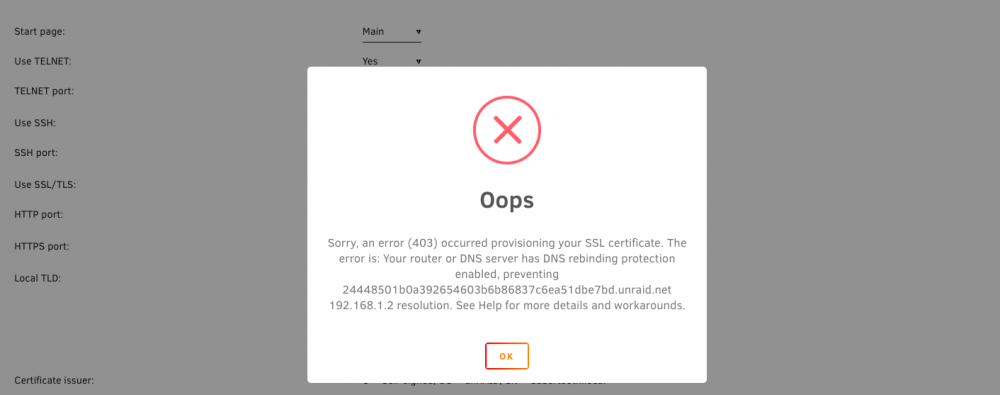
btw, I've already encrypted 2 drives, new drives (cache and array drive) but I never provisioned the SSLl Not even sure what that means really, or if that's what causing my issue. Anyway I tried to do it and got his error. Attaching screen shot. I am using a pi-hole on a raspberry pi, with the router dns set to the local ip for for the raspberry pi. not sure if this is why I get this error or if this is something should fix, but hopefully you guys could help? Did i screw up by encrypting drives without this ssl thing? I just saw that space invader one talked about it This is slowly starting to get VERY overwhelming. Can you guys help me? I do I need to do this SSL thing? Are my drives not really encrypted without this? I don't know what to do, is this the issue with why my speed is so slow? Again I was able to encrypt 2 drives already without this SSL DNS, resolver thing which I don't even know what it is, or how to fix it on my ISP router with Pi-Hole running
-
also, port 6238 seems to load but not port 6237 which is the actual port specified by unbalance server plugin. Nt even sure where 6238 comes from. Also it isn't a secure connection (no 's' in http) not sure if that matters help! 20MB/s and over 38 hours to transfer 3.22TB with no parity assigned!
-
Can someone please help. I am having so many issues learning v6. I came from unrid v5 for 5 years without any issues... I am encrypting drives so I am first using the unbalance plugin to move files from one drive to another, then exncrypt the empty one, etc... For some reason everything has come to a crawl lately. I have disabled any parity and don't even have any parity drive assigned. I am getting max speeds of about 20MB/s! I just goan i5 8400 processor, LSI IBM m1015 controller. Never had issues with such slow speed before! Can someone help me out and let me know what's happening? I feel like this is slowing down my other dockers that I installed. I have 16 gigs of ram too. What's happening and why is everything so slow, even without parity!

-
guys please help! I finally got everything working, or so I thought... But very often it seems that even though the docker is showing as running, I cannot access the WebUI for plex! It either takes very long to load, or just errors out as if the web page does not exist. Can someone tell me why this is happening? I am running the unbalance server at the same time moving files between hard drives. Not sure if this is something that intereferes?
-
binhex, could you help me please?
-
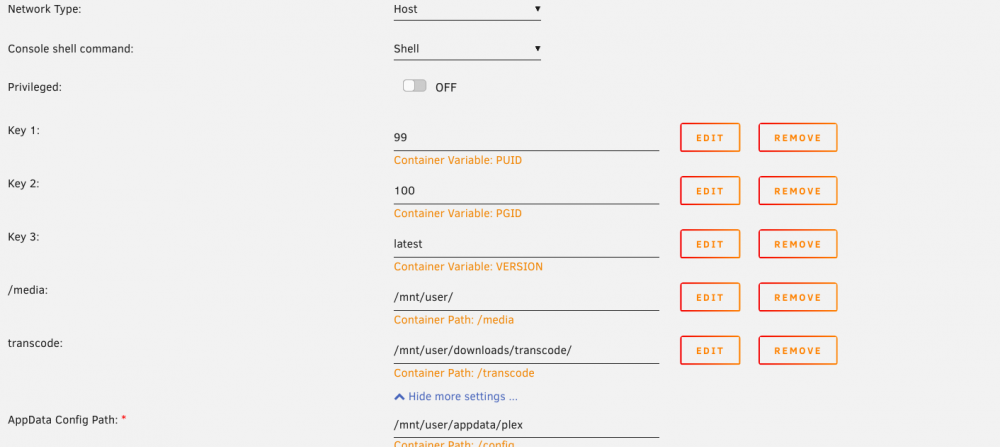
Hey guys, need some help please. I've been trying to get install plex on my newly-built unraid all day today and finally got it working with linuxserver.io docker, (binhex vresion did not work for me) so thank you! My issue is that plex is showing as unavailable outside of my network. I had it working perfectly with plex runinng on a mac mini and just consolidated today after upgrading my unraid. I have port-forwarding enabled on my router and updated the ip on the router to the unraid machine 192.168.1.2. Perhaps it needs to be a different ip because of the docker instead of forwarding everything to the unraid server itself? I am attaching a screen shot here. Also, did I set up transcoding path correctly? I want to transcode to my cache SSD. I have a share called "downloads" that I sent to use cache-only and created a folder called "transcode" on that share for plex. Help! *EDIT* Weird but all of a sudden that plex remote server icon turned green and now it's showing as accessible outside of my network. I guess it takes a bit to refresh? I also never had a default container path /media, I had to add that by myself (good thing I read a ton on how dockers work and paths before this). But is this normal? I thought it would be be part of the docker template by default like /config was. What do you guys think of everything else though including how I forwarded the port on my router to unraid server? There's no way to make it go to a virtual ip directly to the plex docker only correct?
-
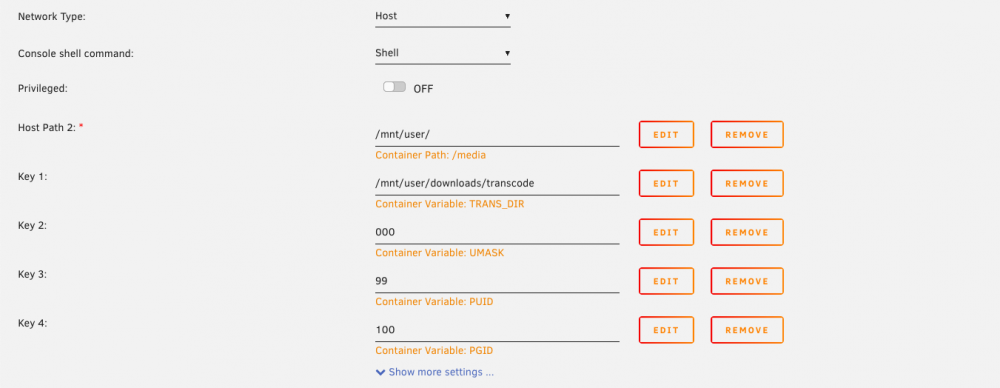
Anyone? I installed my new CPU, mobo and RAM, unraid booted well. I just installed the plex app docker, but when I click WebUI it keeps saying "site can't be reached" and won't load. Also within docker when I click "show docker allocations" There is a "???" next to the port number. I don't see any place to assign a port number either to 32400... Guys help I think something is going on. I am attaching the log file here. Seems to be some kind of error I don't know why. Downloads is a share I created that is on "cache only" that is an SSD and I created a folder on that share called "transcode" for plex transcoding What did I do wrong? Help please supervisord.log
-
Something is definitely wrong. I connected to the same PIA endpoint using a Mac and get full speed. Using the docker speed get cut in half and fluctuates like crazy to less then half... could pi-hole be interfering? I placed the openvpn files from PIA like Spaceinvader one mentioned to the one endpoint I use... when I used just the binhex sab docker I also have no issues and get full speed.
-
Oh man, okay thank you. I thought I was doing something wrong and I'm a newbie at this. It even goes down to 0 speed I also have Pi-hole running and the DNS on my router has the Pi-Hole IP as its DNS, not sure if that's an issue also?
-
Ahh, So I just installed this docker, I followed the video guide from spaceinvader for deluge, but obviously did it the vpn part for sab since that seems to be the same. Now my issue is that my download speed is literally cut in less then half. I have PIA and when I use the PIA app on my desktop connected to the same vpn server, my speed maxes out and is more than double then I get from unraid running this docker. Does this have anything to do with the specific PIA server not supporting port forwarding? Spaceinvader mentioned something about it on deluge, but I didn't think it would be an issue for newsgroups?
-
Hey guys, so I will be installing this for the first time on my unraid (used to run plex on mac mini). I have an i3-8400 coming this weekend that supports hardware transcoding. Is there anything that I need to add to the docker template to enable hardware transcoding? I read a post about something having to be added but that was for the linuxserver.io build, not sure if anything needs to be done for binhex?
-
Guys. I’ll be installing openvpn that will allow me to remote connect to the server. Are there any issues with the vpn included on this package or can they just run separately? I do have PIA
-
Squid!!! You're the man! Thank sooo much for helping on the other thread also. I understand now and your explanation makes sense! The highest level in docker shows those two, and those two ARE the mappings which are then pointing the shares on the array, which are set to use the cache drive! Awesome! I was getting so confused because in his other video it talks about how it's good to be consistent with all your volume docker mapping, and in his screen shot he uses "data" mapped.... Do you think the way I set everything up is a good way? Yeah he must have made a mistake in his video on sabznbd set up. Because in sabznbd he selected "data/incomplete" and "data/complete" respectively and even says that he mapped the data folder to "downloads" which he did not.. at least not in the video. Unless this is where the difference is between the binhex and the linuxserver.io docker
-
guys I need some help. I upgraded from v5 after 5 years of not touching this and am getting a bit overwhelmed. I am starting with Sabznbd (plan to have Sonarr, Radarr). I installed the docker successfully by watching Spaceinvader One's video tutorial although his is the one for binhex version but that's okay... I need help figuring out what to put in the "Temporary Download Folder" and "Completed Download Folder" from within the Folders tab in Sabnzbd. I have set up the container paths within the docker as follows Container Path: /downloads---> /mnt/user/downloads/complete/ Container Path: /incomplete-downloads --> /mnt/user/downloads/incomplete/ "downloads" is a share that was created with the settings set to "Use Cache Disk: YES" *EDIT* Ahh I see, I think it's because I need to have docker volume mapping. He has /data mapped to the "downloads" share outside the docker. I had re-watch the video and read up some more to understand what he's talking about since he skipped the docker volume mapping in the video. Now to figure out how to do that... Do you guys see anything wrong with this set up so far?
-
Great to hear! So is it basicall 4 drives per SATA port that you get the slow down, Weebo? So if I get another enclsure and hook it up to the second port on the card will it decreas the speed 1/4 when all drives are read the same way? Or is it 1/8 now since the other box is connected to the other port?
-
Okay great thank you again! I purchased this Addonics card. I'm assuming it the SIL chipset? http://www.newegg.com/Product/Product.aspx?Item=N82E16816318005 and this enclosure http://www.amazon.com/gp/product/B003X26VV4/ref=oh_details_o00_s00_i00?ie=UTF8&psc=1
-
Thanks again buddy. I am not too concerned with the internal drives running at SATA III speeds. They are all standard 3.5" hard drives in th ebox now and I am content with the speeds I am getting. I am more concerned with the port multiplier speeds. Which card would you recommend then? I think you mentioned it was the Syba, but do you mind linking me to it so I get the right one? You posted a link earlier in this thread I believe to an ebay auction but it has now ended. Thanks so much once again for your help! I recommended the StarTech if you wanted/needed the 2 'other' internal drives to run at top speed. I.E. SATA III. It's what I choose so my SSD would get 350MB/s. It does not work well with Port Multipliers. It works, just not as smoothly when accessing multiple drives simultaneously. I don't have an opinion on the mediasonic box. I selected items based on performance, reliability and functionality. I choose the sans digital box for it's internal power supply and hardware raid functionality should I choose to re-deploy elsewhere. It's really come in handy when I needed it. Have two of them.
-
Thank you Weebo, but it doesn't seem like that Startech is a silicone image chipset which is what you recommended? That enclosure seems pricey. What do you think about this one? http://www.amazon.com/Mediasonic-HF2-SU3S2-ProBox-Drive-Enclosure/dp/B003X26VV4/ref=wl_it_dp_o_pd_nS_nC?ie=UTF8&colid=37PZEZFSOCZ37&coliid=I1CTS9U3BFXBXW
-
Thanks so much guys! Can someone link me to the silicone image Syba card that you used that is low-profile? I just don't want to make a mistake and order the wrong card. Also, I am currently using the eSata port on the back of the box for he 6th drive inside the case. So that's taken up. So from what I understand I should not do more than one 4-drive enclosure otherwise it will be too slow correct? Lastly, that sans digital unit is discontinued (although) I can still find it on amazon. Do you guys still recommend it? I want to through 4tb drives in it. There's a Promedia enclosure that seems to be cheaper. Any suggestions?


