





maxse
Members
-
Joined
-
Last visited
Everything posted by maxse
-
Hey guys, I have been using this and it's been working perfectly. But I recently switched from PIA to Mullvad and I Cannot get this to work. I updated the username and password and moved the new mullvad config files to the new directory, but just can't get this to work. Can someone help me out please?
-
you guys are good. yes I meant /mnt/user, couldn't remember if it was abbreviated or not in unraid. Thanks again guys, love this place and I would not have been able set unraid up and troubleshoot without you guys here. Really appreciate it
-
Right on the money Squid! Sucks that I had to reconfigure, but the appdata folder was actually pointing to the cache drive, while the backup docker was pointed to the mnt/usr. Even though the appdata folder is set to use "cache only." I must have missed this in my original configs. Thanks so much!
-
Solved
-
I guess no concerns?
-
@flaggart quick question. I just got the drives and brackets in. So the drives just screw right into the floor right? It’s okay that the green board of Drive is touching the metal case? It’s not going to short? also, I was only able to line up 2 of the screw holes on one side of the drive at the bottom of the case .. I guess that’s how it should be?
-
Thank you!
-
@flaggart I got the OWC multimounts thanks for the tip! But how do you mount them in the drive chamber? I don't see any holes to mount the drives to in the drive chamber, only in the motherboard chamber. I want to set it up all at once even though I don't have that many drives yet, to make it easier in the future
-
Thanks! Which one do you like best? also, do both compartments of the case have the necessary hole in the bottom tk mount these? I remember seeing only one side allowing to mount 2 hard drives to the floor of the case. Thanks so much! Love this case
-
Sorry to resurrect such an old thread. But does anyone know which OWC multimount @flaggart used to get the two hard drives stacked? I just got the same case and I’m looking to do the exact same thing, please! OWC has so many multi mounts. I want to make sure I get the same one that word here.
-
This is perfect timing as I am looking for ways to backup my server using cloudberry. Except that I don't want to back it up to the cloud, I want to back it up to another unraid server in a remote location. Can someone make a tutorial on how to do that, or what's the best way to do that? I have another post about this in general and came to the conclusion to use cloudberry. I do not mind paying, but I don't quite yet know how to back up to the remote server. VPN? What are the logistics of that? Meaning is it something that will always be connected, or I can set it to connect just before cloudberry backs up and then disconnects? or is there another way? Would appreciate it
-
Thanks so much for explaining it! I guess I would use the openvpn docker server on the remote unraid. But is there a docker client-side app for the main unraid server that would automatically be triggered during backup time to connect to the vpn running on the backup unraid server? Or is it something that has to always be one? If always on, any downsides to that? And would it be possible then to always have it be on (if that needs to be the case) for the cloudberry docker connection only?
-
solved
-
solved
-
solved
-
solved
-
WOW, it worked guys! First time! Boom! I guess they are not blocking port 80 after all! Quick question, I am only using this for ombi right now. I selected an option in Ombi under Authorization to enable Plex OAuth. Is there any other password that I need to set for security reasons? Or is that fine? When I tested it, it goes to the ombi page and says log in with Ombi or Log in with plex... Is that enough? Thanks soo much!
-
Thank you! OKay here we go, following spaceinvader one's guide now The router actually supports no-ip.com, unfrotunately no duckdns. Hopefully that's still okay? I figured once less thing to set up if it's running on the router?
-
So it seems from googling that my ISP block port 80. I watched spaceinvader one's video but figured I would ask here before I invest a lot of time figuring how to set all this up... Is it as easy as just selecting a different port? I couldn't seem to find a straight answer on this. Is it more complicated to get around this? possible? I was planning on using DynDns as my ISP router has that function on it.
-
solved
-
Hey guys, I'm figuring out a backup solution for my server. I am pretty sure I will go with cloudberry, seems like it supports versioning which will protect against a crypto correct? My goal is to backup to another unraid server in a different geographical location. What would you say is best practice for doing this? How could I easily back up to a remote unraid server as a target? I was thinking of doing the initial backup on the local LAN then the move the 2nd unraid target server to the remote location for continued backups... Also, since cloudberry encrypts prior to sending the files, does that mean that I don't need to encrypt the hard drives of the target unraid backup server (I want this as secured as possible but if there's no need to encrypt the remote unraid backup server because cloudberry will encrypt the files anyway, than that's great). Lastly, this will definitely be over 5tb, am I correct in understanding that I would need to purchase a linux server license for $80? Thank you!
-
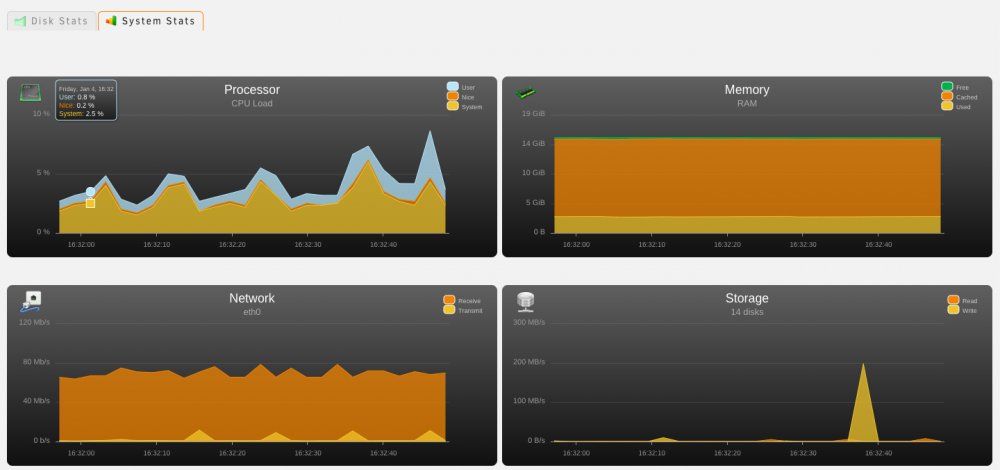
Guys thank you sooo much! Narrowed it down to SAB, it would spike the CPU usage to 100%! I switched to nzbget today and pinned all the dockers to 1 core, and it looks like it's using so much less CPU and everything has been fine so far. Thank you all for helping me narrow this down, it was so frustrating. Thank you! *EDIT* Ahh, seems even with nzbget, when it is unpacking, even though the docker is pinned to 1 core, I have 3 cores get go all the way to 100% usage of the CPU. I wasnt streaming plex, but I suspect that this would freeze up any streams that would be transcoding. What can I do here guys? I specifically got an i5-8400 with hardware transcoding, and wanted to make sure my system was powerful enough for a few transcoded streams while running these few dockers, that I've seen people with much less powerful hardware run. What should I do? This makes plex pretty much unusable. BTW, I didn't have any streaming at all this time, the cores spiked just during unpacking phase of nzbget I am also using CACHE drive ONLY for downloads, and did not enable cache for any of the other shares, I want files to go directly into the array when copied to the "array" Not sure if this info helps *EDIT 2* Damn it, 3-4 cores still getting pegged at 100% for some reason and my LOCAL plex stream froze when this happened. This makes plex unusable. Guys what do I do and why is this happening? All dockers except plex are pegged to 1 core. I don't know what's going on. Should I start a separate thread on this? Also the docker CPU utilization (on the docker page) doesn't add up anywhere close to 100% that the CPU is getting to. Is this correct that's it's showing most of my 16 gigs of ram is being used? Not sure if that's an issue, figured I would post this screen shot
-
Something is wrong guys, but I think I am getting close!. I pinned sab, radarr, sonarr to use CORE 5 only. Now I can see only Core 5 spiking to 100% BUT, for some reason I am having core 1, 2, 3 MAXED OUT at 100%! Under docker tab for utilization, all dockers (I only have 4 dockers, sab, radarr, sonarr, plex) were below 2% CPU usage, pretty much everything was again pegged at 100%. What's causing this? I don't know. All dockers are pegged to use core 5, except plex which is not pinned to a CPU.
-
Guys help! I don't know what's going on. It's not the swtch, family is watching TV and boom freezes for everyone and even a remote stream this time. I checked unraid and processor was pegged at like 92% All 6 cores! I just have sab, sonarr, radarr running that's all. I think that's what causing it! A file must have been moving from the flash drive to the array? But this shouldn't cause processor to spike over 90% and freeze the streams right? I mean I used to run unraid 5 with 8 gigs of ram, same services, on an AMD Athlon processor. No way this processor isn't enough. It's an i5-8400. What should do I do? So I just noticed when Sab unpacks processor spikes to 100%! ALL 6 CORES!
-
No errors in the main column at all. It's full because I was encrypting drives and moved things with krusader. I just freed up so it's 85 gigs free. Also I noticed this in docker log, anything significant? time="2019-01-02T00:43:40-05:00" level=warning msg="failed to load plugin io.containerd.snapshotter.v1.zfs" error="path /var/lib/docker/containerd/daemon/io.containerd.snapshotter.v1.zfs must be a zfs filesystem to be used with the zfs snapshotter" time="2019-01-02T00:43:40-05:00" level=info msg="loading plugin "io.containerd.metadata.v1.bolt"..." type=io.containerd.metadata.v1 time="2019-01-02T00:43:40-05:00" level=warning msg="could not use snapshotter aufs in metadata plugin" error="modprobe aufs failed: "modprobe: FATAL: Module aufs not found in directory /lib/modules/4.18.20-unRAID\n": exit status 1" time="2019-01-02T00:43:40-05:00" level=warning msg="could not use snapshotter zfs in metadata plugin" error="path /var/lib/docker/containerd/daemon/io.containerd.snapshotter.v1.zfs must be a zfs filesystem to be used with the zfs snapshotter" Sorry I thought that was memory error. I have not run memtest, I just got brand new RAM when I upgraded the server. Corsair 16Gigs. Also, I have been using 2 TP link switches one next to the appleTV to connect my SONOS and apple TV. I tried playing the same file now connected directly to a FIOS G1100 router and it seems to be playing smooth! No stuttering! Could it be a router issue? Would this just be a coincidence when I upgraded? If it turns out to play smooth now without issues, any suggestions for a router? Do I just get one router and run 2 more ethernet cables behind my TV, for SONOS, AppleTV, and one extra if I get another Device like an Xbox?

